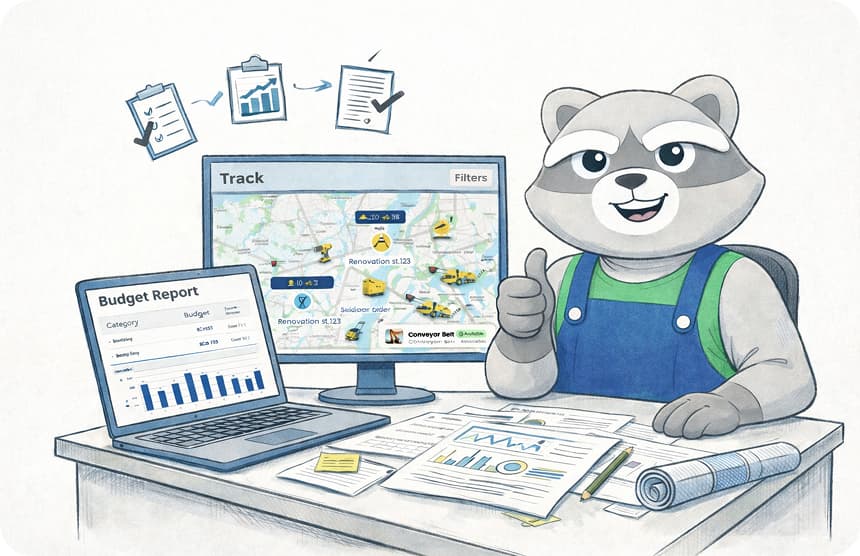
Field Service Management Software: Bridging the Gap Between Site and Office
by
|
Field Service Management Software: Bridging the Gap Between Site and Office

If your project managers spend 8 hours every week chasing paper trail updates and manual logs, you're losing one full day of production every five days. That's 20% of your labor cost vanishing into administrative friction before a single brick is laid. Implementing robust field service management software isn't just a tech upgrade; it's a structural necessity for any firm looking to scale. You've likely seen how missing site documentation and delayed reporting create bottlenecks that stall progress for weeks at a time.
We agree that the disconnect between the mud on the site and the spreadsheets in the office is where profits go to die. It's time to stop the bleed. This article provides a blueprint to master the transition from chaotic manual site documentation to a streamlined, digital operation that protects your margins. We'll examine how to achieve real-time visibility into site progress, automate your compliance documentation, and establish a single source of truth for both your field crews and office staff.
Key Takeaways
Eliminate the "Admin Tax" by replacing manual site documentation with real-time digital tracking to protect your project margins.
Bridge the gap between field operations and office management using field service management software designed specifically for the construction industry.
Identify the core features required for rugged site environments, from customizable safety forms to seamless progress reporting.
Master a 5-step implementation framework to audit your current workflows and deploy a mobile-first platform your team will actually use.
Leverage "One-Click" professional reporting to gain total project visibility and ensure accountability across every job site.
What is Field Service Management Software in Construction?
Construction projects are high-stakes environments where every minute costs money. Managing hundreds of workers and heavy machinery requires more than just spreadsheets and grit. At its core, What is Field Service Management in a construction context? It acts as the connective tissue between the rugged reality of the site and the precision of office management. It replaces the fragmented communication of WhatsApp groups and messy emails with a centralized digital hub. Modern field service management software ensures every stakeholder sees the same data at the same time, eliminating the guesswork that plagues traditional builds.
The industry has undergone a massive shift since 2018. Site diaries used to be physical books kept in dusty cabins. They were often lost, illegible, or filled out days after the fact. Today, the evolution toward real-time digital project tracking is non-negotiable. Digital systems capture data as it happens. This isn't just about convenience; it's about project survival. In a market like Singapore, where labor costs are high and regulatory oversight is strict, relying on paper is a liability. You need a digital foreman that tracks progress with surgical accuracy.
Don't confuse construction-specific tools with generic service software. HVAC repair or delivery apps focus on simple dispatch and one-off tickets. Construction is different. It involves complex submittals, multi-month schedules, and heavy plant equipment. A generic tool won't handle a $20 million infrastructure project. It lacks the depth to manage long-term manpower allocations or the specialized reporting required by local authorities. You need a system built for the dirt and the sweat, not just for delivery drivers.
The Core Components of a Modern Field System
Digital site diaries: These serve as the foundation of daily documentation. They record weather conditions, work completed, and unforeseen delays instantly.
Real-time manpower tracking: Manual attendance sheets lead to a 5% average error rate in payroll. Digital systems use GPS-based check-ins to ensure you only pay for hours actually worked.
Equipment and asset management: High-value machinery often sits idle for 20% of its scheduled time. Proper tracking ensures every excavator and crane is utilized to its full potential.
Why Construction Teams are Moving to the Cloud
Cloud-based systems provide instant visibility. Site managers upload progress photos directly from their phones, allowing stakeholders to see site updates without leaving the office. This transparency reduces administrative lag by 70%, as data doesn't need to be manually re-entered into office systems. Accountability increases because every entry is time-stamped and geo-tagged. You'll know exactly when a punch list item was cleared and who cleared it. There's no room for "he said, she said" when the data is indisputable. Moving to the cloud isn't a luxury; it's the only way to maintain a single source of truth in a chaotic industry.
GoBuid represents the next era of this technology. We don't just provide a tool; we provide a way to regain control over your workflow. By bridging the gap between the field and the office, we turn chaos into a streamlined operation. Every feature is designed to move your project forward, faster and with fewer errors. It's time to stop chasing updates and start driving results.
The High Cost of Manual Site Documentation
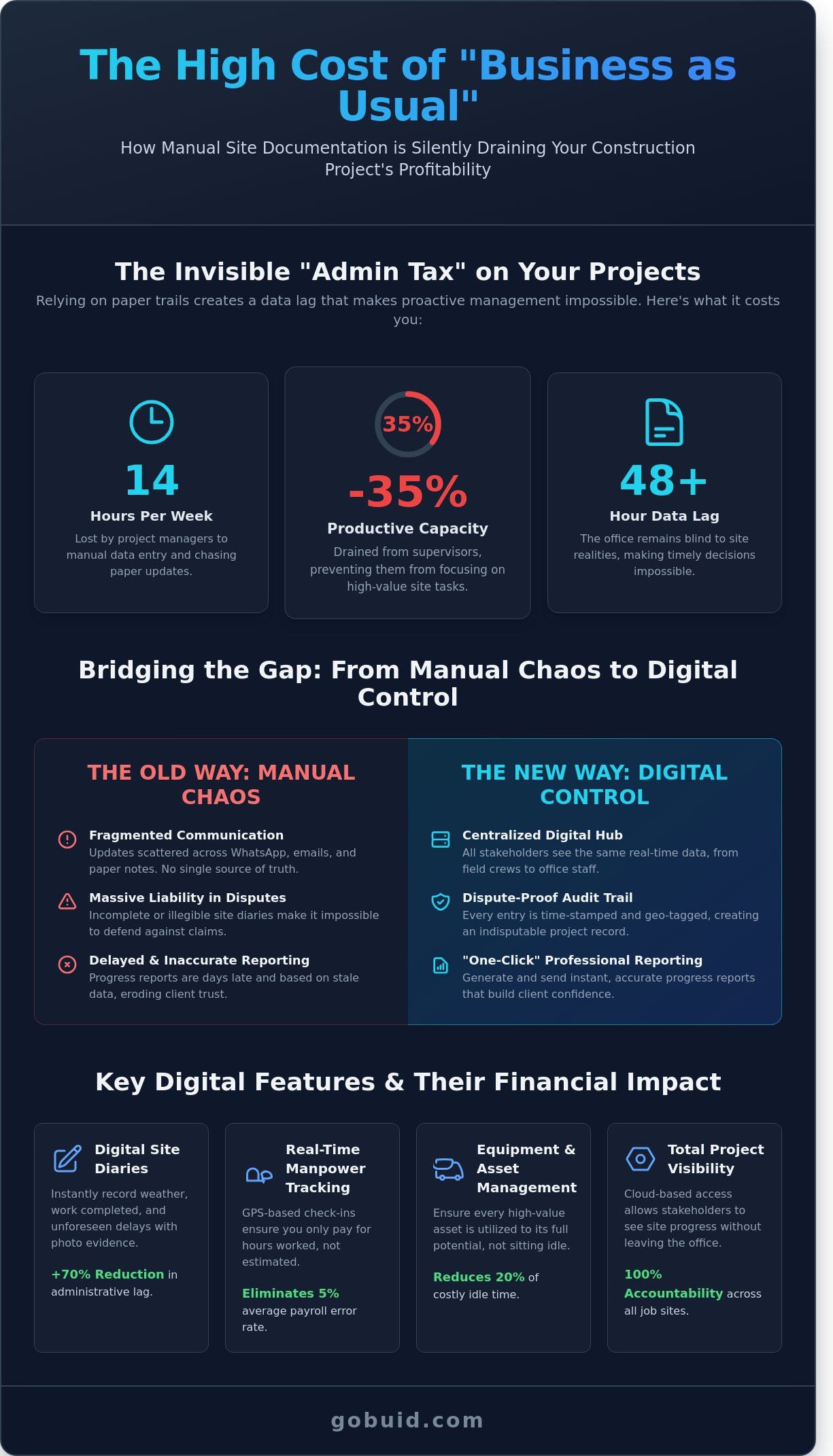
Manual documentation is a silent profit killer on Singaporean worksites. Project managers lose an average of 14 hours every week to manual data entry and report consolidation. This "Admin Tax" drains 35% of a supervisor's productive capacity. You aren't just losing hours; you're losing visibility. Relying on paper site diaries creates a data lag that makes proactive management impossible. When information stays trapped in a physical notebook, the office remains blind to site realities until it's too late to pivot.
The "Status Quo" is the most expensive software you're currently using. It costs you thousands in unrecovered variations and liquidated damages. Incomplete site diaries are a massive liability during project disputes. If you can't prove exact manpower levels or equipment usage for a specific Tuesday three months ago, you'll lose the claim. Delayed reporting also erodes client trust. Sending a progress report three days late signals a lack of control. Modern field service management software replaces this chaos with a digital audit trail that's impossible to dispute.
Understanding the Core Features of Effective Field Service Software reveals that automation is no longer a luxury. It's the baseline for survival in a competitive market. Digital systems capture data at the source. They eliminate the need for double-entry. They ensure that every dollar spent on labor and machinery is accounted for in real-time. Without this, your margins are constantly under threat from invisible leaks.
Communication Gaps Between Field and Office
Working with 24-hour-old data is a recipe for rework. When the office relies on paper forms delivered at the end of a shift, they're always reacting to yesterday's problems. Fragmented communication across WhatsApp, email, and paper leads to a 20% increase in project errors. You need to bridge the gap. The office must see what the foreman sees as it happens. A centralized field service management software ensures every stakeholder operates from a single source of truth. This transparency eliminates the "telephone game" that stalls site progress and confuses subcontractors.
Compliance and Safety Risks
Maintaining BCA-compliant records with paper systems is a logistical nightmare. One missing signature on a safety inspection form can trigger a stop-work order or heavy fines. Digital forms ensure every safety check is mandatory before work begins. This isn't just about filing; it's about risk mitigation. Digital records are timestamped and geo-tagged, providing 100% accountability. If you want to stop chasing paper and start driving results, it's time to centralize your site documentation. Moving to a digital system ensures that every safety inspection is completed, recorded, and instantly accessible during an audit.
Admin Tax: 14 hours lost per week per manager.
Productivity Drain: 35% of supervisor time wasted on paperwork.
Error Rate: 20% higher when using fragmented communication tools.
Compliance: Digital systems provide 100% verifiable audit trails for BCA standards.
Core Features of Effective Field Service Software
High-performance construction requires more than just grit. You need a digital foreman that never sleeps. Modern field service management software provides the structure necessary to scale operations without increasing administrative headcount. The interface must be rugged. It has to work for a site supervisor wearing gloves in the 32-degree Singapore heat. If the software is too complex, the team won't use it. Success starts with customizable digital forms that capture safety audits and progress updates in seconds. These tools replace soggy paper forms with precise, timestamped data points.
Project analytics dashboards turn this raw data into high-level decision power. Instead of guessing project health, you see it. Real-time visibility into site activities allows you to spot delays before they become expensive setbacks. Effective field service management software transforms chaotic site notes into structured intelligence. It bridges the gap between the dust of the field and the precision of the office.
Digital Site Diaries and Progress Photos
A site diary is the legal and operational record of your project. Stop losing evidence in messy WhatsApp groups or fragmented email chains. You can now capture the daily story of the site with visual evidence that stays organized. Buid allows you to categorize 200+ daily photos by project, date, and work zone for instant retrieval. Linking these entries directly to manpower and equipment logs creates an indisputable audit trail. It turns raw site data into a defensive asset during progress claim disputes.
Manpower and Equipment Tracking
Managing 50 subcontractors across three different sites often leads to payroll leakage. Manual timecards typically result in a 5% to 8% margin of error in labor costs. Digital tracking eliminates this headache by centralizing headcounts and hours in one dashboard. You can monitor equipment uptime with precision. If a 20-ton excavator sits idle for 5 hours, the system flags the inefficiency. Implementing FSM Software allows project managers to reallocate these resources dynamically. Data-driven decisions ensure your heavy machinery is always earning, not just costing. This level of control is what separates profitable firms from those just breaking even.
One-Click Professional Reporting
Administrative tasks shouldn't kill your productivity. Most site engineers spend 90 minutes every evening drafting daily reports. We've reduced that task to 60 seconds. One click generates a professional PDF containing all site activities, weather conditions, and safety incidents. You can customize these templates to meet specific BCA or client requirements. Automating the distribution of these reports ensures stakeholders receive updates by 6:00 PM daily. This consistency builds 100% transparency and reinforces your reputation as a reliable partner. You don't just finish the job; you document the excellence of the work with zero extra effort.
5 Steps to Implementing FSM Software on Your Site
Transitioning from manual logs to digital systems requires more than just a software license. It demands a tactical approach to change management. Success depends on how well the tool integrates with the daily grind of the job site. Follow these five steps to ensure your implementation sticks and delivers immediate ROI.
Audit your current workflow: Map every touchpoint from the daily site diary to the monthly progress claim. Implementing a field service management software starts with identifying where paper slows you down. In 2023, industry data showed that manual data entry consumes 15% of a project manager's weekly hours. Pinpoint these bottlenecks before you digitize.
Select a mobile-first platform: Choose a field service management software built for the field; not the office. If the site team can't update a punch list in three taps, they'll abandon the tool. Prioritize offline functionality for basement works or remote locations where signals often drop by 40%.
Standardize digital templates: Eliminate ambiguity. Create uniform site diary and inspection forms that every team member must use. This ensures data from Site A looks exactly like Site B; making cross-project analysis possible for the head office.
Run a 30-day pilot: Deploy the software on a single, controlled project first. Use this period to iron out workflow kinks and gather raw feedback from your most trusted foremen. It's better to fix a process error on one site than across ten.
Roll out with structured support: Scale the solution to the rest of the company once the pilot proves successful. Provide hands-on training sessions that last no more than 60 minutes. Keep the focus on utility; not just features.
Getting Site Buy-In
Field veterans often view new technology as "just more work" or "bloatware." Counter this objection by highlighting the 2.5 hours they'll save each week on administrative reporting. Focus on how the software eliminates the need for late-night data entry at home. Reward your early adopters with public recognition or small incentives. When the rest of the team sees a foreman leaving the site on time because his reports are already finished; adoption happens naturally. It's about giving them their time back.
Standardizing Site Documentation
Consistency is the foundation of project accountability. Establish a company-wide "language" for all site entries to prevent confusion. Use standardized dropdown menus for equipment status and manpower categories. This digital flow reduces reporting errors by 60% and ensures safety inspections follow a mandatory sequence. Use the resulting analytics to track performance trends across your portfolio. If three different sites report the same excavator downtime; you've identified a systemic maintenance issue before it kills your project margin.
GoBuid: The No-Nonsense Solution for Modern Builders
GoBuid eliminates the friction between the job site and the office. Most software tools feel like they were designed in a vacuum by people who never stepped foot on a project site. GoBuid is different. It functions as a specialized field service management software tailored for the high-stakes environment of heavy civil and building projects. It addresses the chaotic reality of managing 50 sub-contractors and 20 pieces of heavy machinery simultaneously. We built this platform for the dirt, the sweat, and the complexity of real-world construction.
Admin tasks shouldn't eat your profit margins. Site supervisors often spend 90 minutes every evening manually compiling reports and chasing signatures. GoBuid reduces this to 5 minutes through its one-click reporting system. You capture data as it happens. You generate professional PDFs instantly. This isn't about fancy features; it's about reclaiming 10 hours of productivity every week. When you use GoBuid, you're choosing a tool that values your time as much as you do.
Construction is unpredictable. We don't believe in trapping you with 24-month lock-in contracts that ignore the seasonal nature of your work. Our model is built on transparency and flexibility. You get a tool that works, a setup process that takes less than 48 hours, and the freedom to scale your usage as your project pipeline fluctuates. We bridge the gap between rugged sites and sleek project management by providing a single source of truth that everyone from the foreman to the CEO can trust.
Designed for the Singapore Construction Context
Compliance is a non-negotiable requirement for SG builders. GoBuid aligns with Building and Construction Authority (BCA) standards, ensuring your manpower tracking meets local regulatory demands. We understand the complexity of the CoreTrade scheme and the specific safety requirements of the Ministry of Manpower (MOM). Our local support team provides on-the-ground assistance, ensuring your digital transition respects the unique operational nuances of Singaporean work sites. We help you maintain 95% accuracy in attendance and safety records, reducing the risk of costly penalties during audits.
Starting Your Digital Transformation Today
Ditch the rain-soaked paper site diaries. Transitioning to the GoBuid digital site diary centralizes your data. This move provides immediate visibility into your daily operations. You can access an integrated analytics dashboard that identifies a 15% equipment idle time or highlights a 20% labor cost overrun before it becomes a crisis. This field service management software turns your raw site data into actionable intelligence. Stop guessing about your project health and start seeing the numbers clearly. The transition is simple, the interface is intuitive, and the results are immediate.
Experience the power of one-click reporting with GoBuid. Take control of your site operations and ensure your projects stay on track and under budget.
Take Control of Your Project Data
Manual site documentation isn't just a nuisance; it's a financial drain. Industry research indicates that poor communication and disconnected data account for 14% of all construction rework costs. You can't afford to leave your profit margins to chance. Implementing a robust field service management software solution bridges the gap between the field and the office, creating a single source of truth for every stakeholder. By automating your documentation, you eliminate the risk of missing files and ensure your project stays on schedule.
GoBuid provides the no-nonsense tools required for modern builders to thrive. You'll generate professional reports in one click and deploy customizable forms for safety and quality compliance instantly. We don't believe in trapping you with long-term commitments, so there are no lock-in contracts to sign. Companies using these digital workflows typically see a 30% increase in field reporting efficiency within the first 90 days. It's time to replace the chaos of paper with the precision of a digital foreman.
Start digitizing your site operations with GoBuid today. You've built the foundation; now it's time to build smarter.
Frequently Asked Questions
What is the difference between FSM and general project management software?
Field service management software focuses on real-time resource deployment and site-level activity while general project management tools handle high-level scheduling and financial budgeting. FSM captures granular data like hourly equipment utilization and individual worker attendance. General software lacks the specialized modules needed to track 50 different sub-contractor trades simultaneously on a rugged construction site.
Will my site workers find the software too difficult to use?
Most site workers master the GoBuid interface within 30 minutes of their first training session because it relies on intuitive icons and photo-based inputs. We designed the UI to minimize typing and maximize speed in the field. Adoption rates among frontline staff typically reach 95% within the first 7 days of deployment because it simplifies their daily reporting tasks.
How does digital field service management improve BCA compliance in Singapore?
Implementing field service management software automates the collection of manpower data required for BCA productivity submissions and reduces manual entry errors by 40%. It ensures every man-hour is logged against specific trade codes. This creates a clear audit trail for the Building and Construction Authority's monthly reports, ensuring your firm meets all regulatory standards without the last-minute paperwork scramble.
Can I customize the forms to match my existing paper site diary?
You can digitize your existing paper site diary templates 100% using our flexible drag-and-drop form builder. This allows your team to maintain familiar workflows while gaining the benefits of digital data storage. Since 2021, we've converted over 500 unique contractor templates into standardized digital formats that capture signatures, GPS tags, and time-stamped photos automatically.
How long does it take to generate a daily site report with GoBuid?
GoBuid generates a comprehensive daily site report in less than 60 seconds by pulling data directly from real-time field entries. Manual reporting usually consumes 2 hours of a site supervisor's evening every single day. Our automated system cuts this administrative overhead by 90%, allowing your staff to focus on site safety and work quality instead of spreadsheets.
Is my site data secure in a cloud-based FSM system?
Your site data is protected by 256-bit AES encryption and hosted on Tier 3 data centers that guarantee 99.9% uptime. We perform automated backups every 4 hours to ensure zero data loss for your projects. Only authorized personnel can access your single source of truth through secure multi-factor authentication protocols that keep sensitive project information private.
Does GoBuid offer a free trial or a no-lock-in contract?
GoBuid provides a 14-day full-access trial and flexible monthly subscription plans that don't require long-term lock-in contracts. We believe in earning your business every month through performance and reliability. You can scale your user count up or down based on your project volume without facing hidden penalty fees or complex cancellation procedures.
What happens if my site has poor internet connectivity?
The GoBuid mobile app includes a robust offline mode that saves all data locally and syncs automatically once a 4G or Wi-Fi connection is restored. Workers won't lose their progress even when working in basement levels or remote locations. The system caches up to 1GB of field data on the device until it finds a signal to bridge the gap between the field and the office.