How to Prevent Budget Overruns With Real-Time Cost Data
Learn how to prevent budget overruns with real-time data: align cost updates, commitments, and field progress to spot gaps early and act before costs grow.
by Sam Chen
|
A construction budget rarely slips all at once. Costs can outpace estimates when labor, materials, scope changes, and progress are not visible together. A cost overrun occurs when actual costs exceed the approved budget or original estimate. Knowing how to prevent budget overruns with real-time data starts with identifying the gap early, while there is still time to respond.
Field updates, procurement commitments, and budget reports each show part of the picture. When information arrives late or records do not align, teams may miss early signs of overspending. That makes it harder to adjust staffing, sequencing, or spending before the variance grows.
This guide covers common causes of construction cost overruns and practical ways to manage budget risk. Learn how to coordinate around shared project information, validate cost data, and use consistent reporting to spot discrepancies sooner. The aim is a reliable view for both field and office teams of what is happening and what needs attention.
Key Takeaways
- Track estimates, change orders, invoices, and expenses together to spot budget drift before it grows.
- Align finance, procurement, operations, and project teams around a shared view of costs and commitments.
- Validate incoming data and use automated reports to flag discrepancies while there’s still time to act.
- Turn cost updates into practical decisions about staffing, scope, and spending priorities.
1. What Is a Cost Overrun?
A cost overrun occurs when a project’s actual cost exceeds its approved budget or original estimate. A project budgeted at $100,000 that costs $115,000 ends 15% over budget. For construction teams, how to prevent budget overruns with real-time data starts with recording cost changes while work is underway, not after closeout.
Track estimates, approved change orders, purchase commitments, invoices, and expenses against the same project. Useful data sources include labor entries, supplier pricing, purchase orders, invoice updates, and field progress records. Connect project tracking, budgets, and invoicing so teams can see how each update affects expected completion costs. A project budget view can help organize this comparison.
Compare planned and actual hours and costs as tasks progress. If a task estimated at 20 hours takes 40, review its remaining scope and labor plan. Teams can prevent budget overruns with real-time data by using task-level differences to identify where the forecast needs attention.
Budget software may combine project tracking with accounting, purchasing, or invoicing. For Australian teams exploring unified operational management, Mooov provides an all-in-one business software platform to coordinate day-to-day operations and workflows. Compare tools based on the functions and user access they include, as well as their pricing models, which vary with features and team needs. Set approval rules for change orders, supplier contracts, equipment purchases, staffing increases, and scope changes. Require approval before new commitments enter the forecast.
For projects under $10,000, formal budget management may create more overhead than value. Keep tracking proportionate, focusing on the estimate, actual spending, and changes that could shift the final cost.
2. Coordination across finance, procurement, operations, and project teams
Give finance, procurement, operations, and project leads one shared cost view. Finance tracks actual cost; procurement reports committed purchases; field teams update progress and resource needs. At 40% completion, compare logged hours and commitments with the plan. If hours are running ahead, reforecast remaining work and adjust staffing or purchases before approving more spending.
Connect accounting, procurement, and project records through consistent project codes, cost categories, and update routines. Reconcile purchase commitments and invoices against approved work, and resolve mismatches before they distort forecasts. A shared project cost view helps teams work from aligned information rather than separate records.
Fixed-fee work makes early coordination especially important. Added costs can reduce that margin to about $10,000, or near 11%. Share labor, material, and scope changes promptly so teams can see the effect on profitability.
Use completed projects to improve future estimates. Compare planned and actual labor, materials, equipment, and supplier costs, then apply relevant lessons to similar work. Separate unusual conditions from recurring patterns, such as repeated rework or underestimated equipment time. This gives estimators practical evidence to refine assumptions on the next project.
Improve data quality by assigning clear owners to updates and reconciling records across systems. Procurement confirms commitments, finance aligns invoices with accounting entries, and project teams report field progress. Together, these practices give managers better visibility to adjust resources and spending as conditions change.
3. Automated reporting and data validation
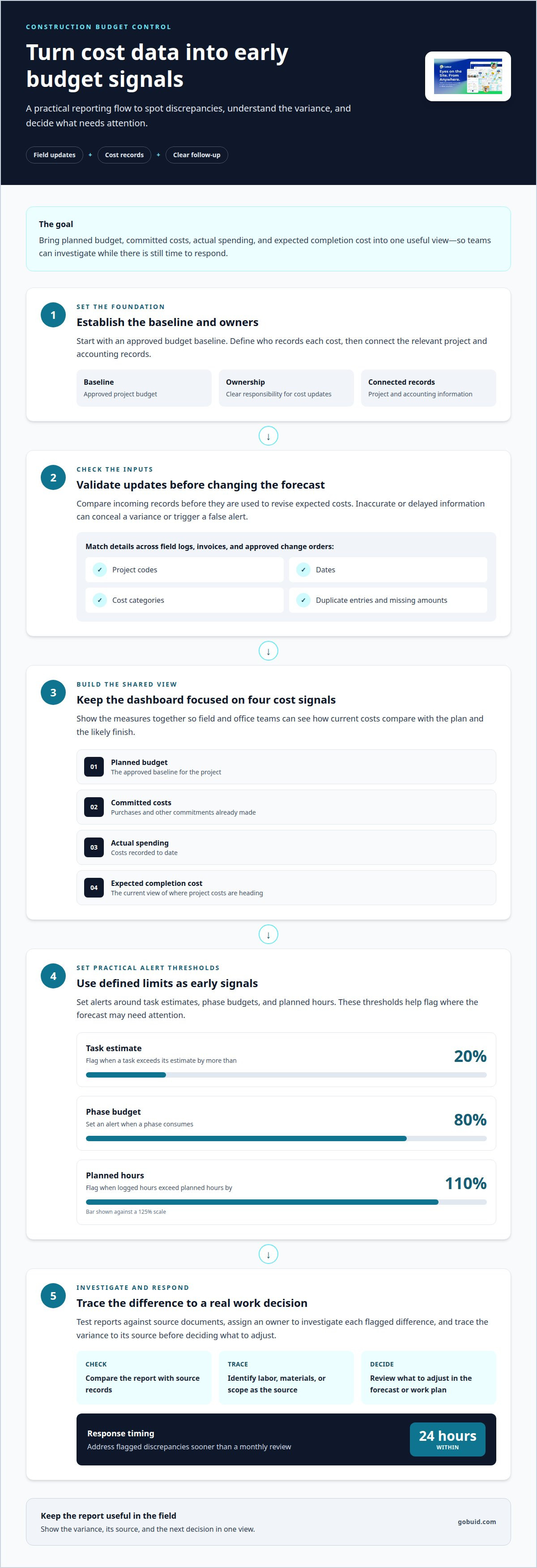
Build a dashboard around planned budget, committed costs, actual spending, and expected completion cost. Set alerts when a task exceeds its estimate by more than 20%, or when a phase consumes 80% of its budget. These thresholds turn reporting into an early signal, not just a record of past spending.
Validate updates before using them to revise the forecast. Match project codes, dates, and cost categories across field logs, invoices, and approved change orders. Check for duplicate entries and missing amounts. Inaccurate or delayed data can conceal a variance, trigger a false alert, or leave a client commitment based on outdated costs.
To implement monitoring, establish an approved budget baseline, define who records each cost, and connect the relevant project and accounting records. Then test a report against source documents and assign an owner to investigate each flagged difference. Clear communication makes the response practical: teams can trace a variance to labor, materials, or scope before deciding what to adjust.
Set alerts to point toward action. For example, flag a phase when logged hours exceed 110% of planned hours, then compare progress with expected completion. Automated systems can flag discrepancies for teams to address within 24 hours instead of waiting for monthly reviews. That faster response gives project leads time to update forecasts and explain cost changes.
Keep the reporting useful in the field: show the variance, its source, and the next decision in one view. Explore a clearer project reporting workflow for bringing updates and follow-up together.
GoBuid
GoBuid helps construction teams organize project updates and field records, supporting clearer cost visibility and timely decisions. When information is spread across site updates, labor records, and inspection notes, consistent documentation helps teams see what is changing and coordinate a response.
Use Customised forms to capture project information consistently and Manpower Tracking to record workforce details. Safety & Quality Inspections support structured field records, while one-click report generation turns documented information into a report for review. These tools help teams monitor project conditions; they still need to compare costs with approved budgets and act on variances.
If your team wants clearer project documentation and reporting, contact GoBuid.
Make cost visibility part of the next project
Build budget control into everyday work records, not just month-end reviews. Consistent field information gives project leads a clearer basis for decisions as scope, labor, and site conditions change. That is the practical value of learning how to prevent budget overruns with real-time data: teams can act on a shared picture instead of piecing together updates later.
GoBuid supports this workflow with a Digital Site Diary, Customised forms, and one-click report generation. These tools help teams capture project information and bring it into reports, so leaders can review current conditions and decide what needs attention.
Start with the gap that creates the most friction on your projects, whether it’s scattered updates or slow reporting. Contact GoBuid to discuss your project and identify a practical next step for your team.
Frequently Asked Questions
What Is a Cost Overrun?
A cost overrun is the amount by which a project’s final actual cost exceeds its approved budget or original estimate. It differs from a temporary variance: a variance is a gap identified during delivery, while an overrun means spending has exceeded the budget. Tracking the gap early helps teams decide whether to adjust the plan, control costs, or revise expectations.
Why do project budgets really blow up?
Budgets often grow as several small pressures compound. A late decision can delay a work sequence, leave crews waiting, and extend equipment use. Rework consumes labor and materials without moving the project forward. Slow approvals can also leave teams working from outdated scope or pricing assumptions. Reviewing cost changes alongside site progress helps expose these connections.
What causes budget overruns and how can real-time data identify them early?
Scope changes, inaccurate forecasts, labor constraints, supply disruptions, and weather delays can all raise project costs. Real-time records help teams see the effect sooner: compare current spending and committed purchases with completed work, then look for a rising burn rate or new costs without corresponding progress. For example, a material commitment made before a planned activity may point to a scheduling or coordination issue.
How often should forecasts and budgets be updated using real-time data?
Record cost and progress changes as they occur, then compare the forecast with actuals every week. Update the projected final cost whenever a change in scope, labor, material pricing, or schedule alters the remaining work. A weekly review creates a dependable decision point, while timely field entries help prevent that review from relying on stale information.
Which KPIs and thresholds help detect budget overruns?
Monitor budget consumed against work completed, forecast final cost, and cost performance index. A cost performance index below 1.0 indicates overspending relative to progress. Set budget-consumption alerts at 75% for a heads-up, 90% for a warning, and 100% for a review. Treat these as prompts to investigate, not substitutes for checking scope, commitments, and site progress.