Digital Foreman Daily Logs: What to Record Each Day
Master your digital foreman daily log. Discover what to record every day—from labor and delays to site photos—to keep field teams aligned and moving fast.
by Amelia Grant
|
A digital foreman daily log turns each shift’s work, key events, and field concerns into a clear project record. Foremen, superintendents, and project managers can document completed work and items needing attention while details are fresh.
Paper notes can be difficult to keep consistent across crews and projects. A digital record organizes the day’s information and makes it easier to review. This guide explains what construction daily log software can do and which details to record, from labor and delays to deliveries, inspections, and site photos.
Key Takeaways
- Use a digital log to capture the day’s work, highlights, and concerns in a consistent project record.
- Record delays, safety issues, deliveries, crew hours, and key discussions while details are fresh.
- Include project identifiers, changes, equipment use, inspections, and photos to make field conditions easier to understand later.
- Customised forms and one-click reporting can help teams keep daily records organized and ready to review.
What Is Construction Daily Log Software?
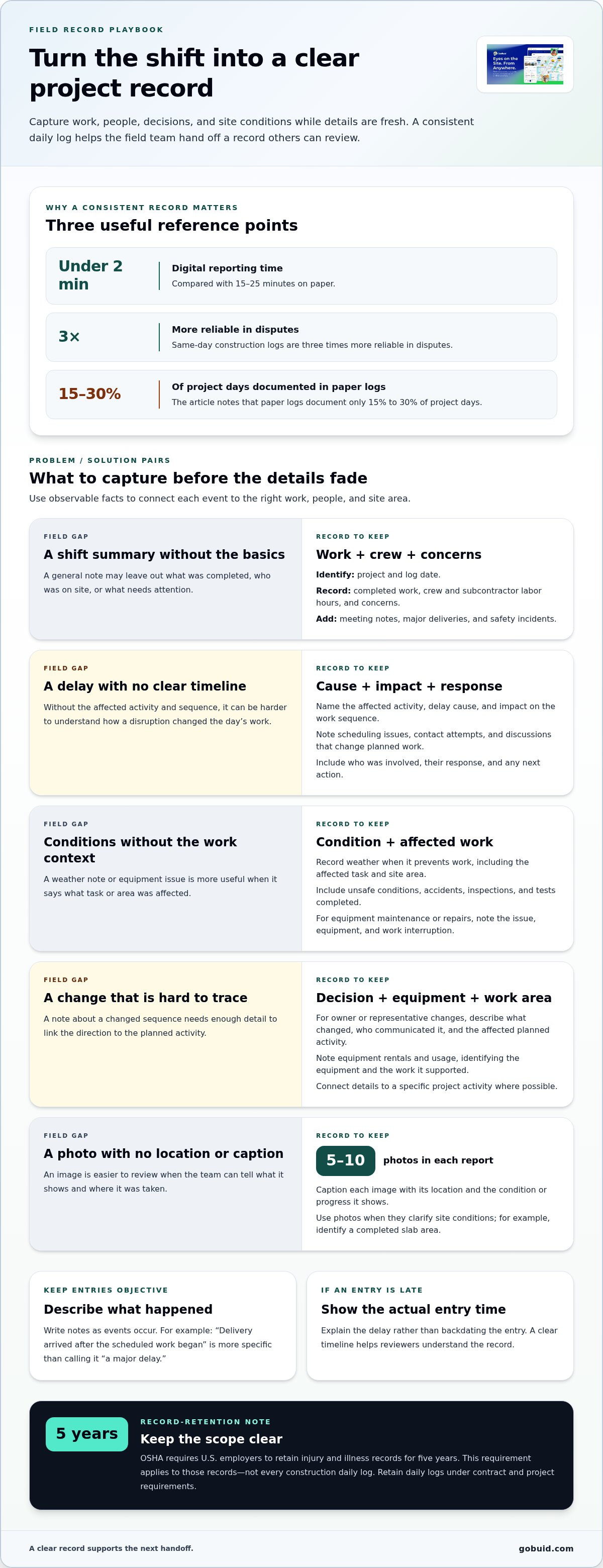
Construction daily log software gives field teams a consistent way to record work, conditions, and decisions. Digital reporting can reduce completion time from 15-25 minutes on paper to under two minutes on a mobile device.
See how foremen can make daily reports more useful:
Logs for Dispute Resolution
A daily log creates a dated record of work, site conditions, and project decisions. Same-day construction logs are three times more reliable in disputes. Consistent fields help teams compare entries across shifts, while specific notes about delayed deliveries or changed work sequences clarify events. Paper logs document only 15% to 30% of project days, making consistent reporting harder.
Writing Responsibilities and Late Entries
Foremen, superintendents, or project managers typically record completed work, highlights, and concerns. Collect information at least once a week, ideally while details are fresh. If an entry is late, show when it was actually written and explain the delay rather than backdating it. A clear timeline helps reviewers understand the record.
Digital and Handwritten Log Methods
Handwritten forms are familiar, but digital logs make consistent fields easier to complete and retrieve. To make the switch, establish a shared template, assign responsibility for each field, and test the workflow on a project. Keep required categories consistent so teams can compare records across crews and shifts.
Daily Log Apps for Foremen
The best apps make field entry, consistent forms, photo records, and report submission straightforward. Create a log with the project and date, work completed, labor, events, and supporting details, then review and submit it through the project workflow. Incomplete or inaccurate entries can weaken dispute timelines and obscure delays or safety concerns. Subscription costs depend on users, features, and project scope, with pricing provided after a quote request. Retain records under contract and project requirements; OSHA requires U.S. employers to keep injury and illness records for five years.
Minimum information to record in a daily log
Record observable facts about work, people, and site conditions as the shift progresses. OSHA requires U.S. employers to retain injury and illness records for five years; that requirement applies to those records, not every construction daily log.
Core Daily Record Details
Capture the date, completed work, crew and subcontractor labor hours, and any concerns. Add meeting notes, major deliveries, and safety incidents to reflect what happened on site. A clear baseline helps project teams connect daily activities to schedule changes and decisions without relying on memory. On residential maintenance and renovation projects where finding dependable specialists is essential, platforms like trade-hive.co.uk can help connect property owners with vetted local tradespeople.
Real-Time Objective Recordkeeping
Write notes as events occur, using direct language and specific observations. For example, record that a delivery arrived after the scheduled work began, rather than calling it “a major delay.” Add photos when they clarify site conditions, and identify what each image shows. Objective details make records easier to review.
Delays and Daily Activities
Document the affected activity, the cause of the delay, and its impact on the work sequence. Include scheduling issues, unsuccessful contact attempts, and discussions that change planned work. Note who was involved and any response or next action. This creates a practical timeline for reviewing how a disruption affected the day.
Site Conditions and Weather
Record weather when it prevents work, and describe the affected task and site area. Include unsafe conditions, accidents, and inspections or tests completed. For equipment maintenance or repairs, note the issue, equipment involved, and work interruption. Use five to ten photos in each report to show relevant conditions and progress. Organize progress photos and field documentation alongside written notes.
Essential project details and field data
A useful field record connects each observation to the correct project, date, and work area. Include the log date and identifier so teams can locate the entry and match it to the right shift.
Capture the details that explain how work progressed or changed. A detailed record helps the team trace schedule impacts to specific decisions, equipment, and site conditions instead of relying on general summaries.
- Project changes: Record owner or representative changes that could affect sequencing or schedule. Describe the change, who communicated it, and which planned activity it affects.
- Equipment: Note equipment rentals and usage, identifying the equipment and the work it supported. This gives the team context when reviewing daily operations.
- Photos: Include 5-10 photos in each construction daily report. Caption each image with its location and the condition or progress it shows, such as a completed slab area.
- Tests and inspections: List tests and inspections completed on site, with the relevant area or work item. This makes results easier to connect to the work being documented.
Tie each detail to a specific project activity. For example, if a representative’s direction changes the sequence, record the affected work and schedule alongside that change. Clear links between people, decisions, equipment, and work areas make the log more useful during project reviews.
Bring these field details into a more consistent project record with a centralized construction project workflow.
GoBuid: generate report in one click
GoBuid helps construction teams bring daily field records into a clearer reporting workflow. Use Customised forms to capture the project details your team needs, Manpower Tracking to record crew information, and Safety & Quality Inspections to document checks. When the day’s entries are ready, generate a report in one click.
This is a practical next step when handwritten notes, crew records, and inspection details are difficult to consolidate. A consistent digital process gives teams a shared record for project reporting while preserving the field context behind each entry.
To discuss how GoBuid can support your daily reporting workflow, contact GoBuid.
Make Daily Reporting Part of the Handoff
A digital foreman daily log should do more than close out a shift. Use it to create a dependable handoff between the field and the people coordinating the next workday. Agree on who reviews entries, how teams flag follow-up items, and where records are kept. That routine turns field observations into clear next actions.
As your process develops, a Digital Site Diary gives teams a consistent place to maintain project records. Keep the workflow practical: capture what matters on site, make ownership clear, and use the record to support the next decision.
Contact GoBuid to discuss your needs and find a reporting workflow that fits your team. Clear records start with a workable routine, and your team can build that routine one shift at a time.
Frequently Asked Questions
What is a digital foreman daily log?
A digital foreman daily log is an electronic record of a construction shift, maintained in software rather than only on paper. It gives foremen and office teams a shared reference for reviewing project events. For example, a superintendent can use the entry to see what changed between the morning plan and the work completed.
What information should a construction foreman include in a daily log?
Include enough context for someone outside the crew to understand the entry later. Identify the project and work area, then connect each note to the activity, people involved, and resulting action. For example, if a material substitution changes the installation sequence, record who directed it and which work needs follow-up.
Are digital construction daily logs legally admissible in the United States?
A digital log may be considered evidence, but its digital format alone does not guarantee admissibility. Courts assess evidence under applicable rules and circumstances. Preserve the original entry, its date, supporting records, and any later corrections. Avoid overwriting an earlier note; add a dated clarification so the sequence remains understandable and reviewable.
How do digital daily logs compare with paper logs?
Digital logs can make entries easier to search, share, and organize across project teams. Paper logs offer a familiar format, but locating a specific note may mean searching physical files. For instance, an entry tagged to a work area can help an office reviewer find related records without sorting through a binder.
Can digital foreman logs work offline and include photos, signatures, and weather data?
Capabilities vary by software. Some tools support offline entry, photos, signatures, or weather fields, so confirm how the system you use handles each. GoBuid offers Progress Photos & Documentation for recording visual project information. If connectivity is limited, plan how the crew will capture and submit entries when service is available.
