Equipment Utilization Guide for Construction Teams
Master equipment utilization reporting with clear field records. Track idle time, verify site data, and make smarter allocation decisions on every project.
by Sheldon Huang
|
Equipment utilization reporting is only useful when the records behind it are consistent. If an excavator looks idle in a report but its field records are incomplete, you can’t tell whether to move it or investigate. Start by recording what each asset did, when it was scheduled to be available, and what activity was documented. Then compare assets using the same definitions and reporting periods.
This guide explains how to capture useful equipment activity, distinguish confirmed non-use from missing information, and build a repeatable report for allocation decisions. You’ll learn which records to gather, how to apply a consistent utilization measure, and how to keep the process manageable on an active site. QR-code equipment tracking and digital site documentation can help organize asset records, while one-click reporting can compile documented project information. Build dependable records first, then use the report to guide equipment decisions.
Key Takeaways
- Make equipment utilization reporting comparable by defining equipment use, available time, and the reporting period.
- Build a practical report around clear asset identifiers, dated activity records, and consistent equipment status labels.
- Check for gaps and inconsistencies before summarizing records, so missing information isn’t mistaken for idle time.
- Use consistent trends to flag equipment for review, then check the job context before making allocation decisions.
What Equipment Utilization Reporting Measures on a Construction Site
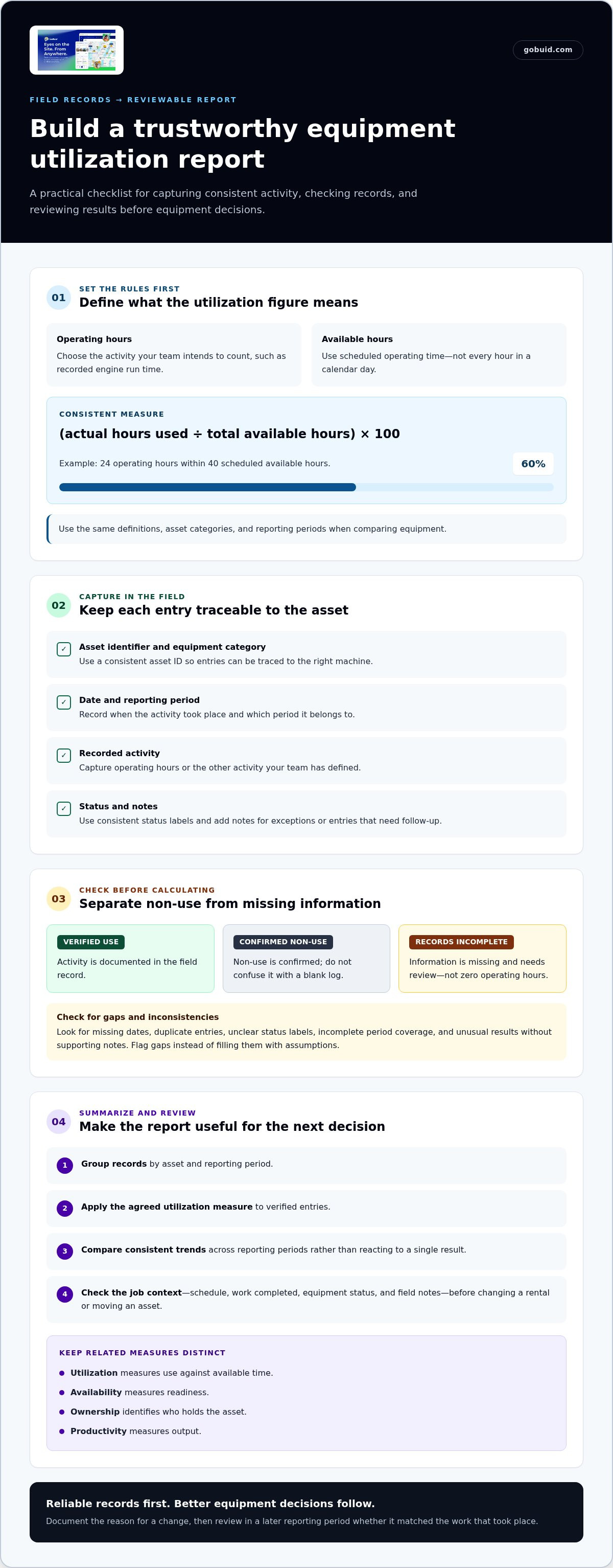
Equipment utilization measures how much of an asset’s defined available time it was used during a reporting period. Before comparing assets, agree on the numerator, denominator, and period. A common calculation is (actual hours used ÷ total available hours) × 100. For example, if a machine records 24 operating hours within 40 scheduled available hours, its utilization is 60%. The result is meaningful only when the definitions are consistent and activity records are dependable.
Utilization is not a substitute for every equipment measure. Utilization measures use against available time; availability measures readiness, ownership identifies who holds the asset, and productivity measures output. Keep these concepts separate when reviewing rental or owned equipment. General capacity utilization principles are outlined in Capacity Utilization in Construction.
For a visual overview, watch this video:
Choose a Consistent Utilization Measure Before Comparing Assets
Define operating hours as the activity your team intends to count, such as recorded engine run time. Define available hours as scheduled operating time, not every hour in a calendar day. Apply the same definitions throughout each reporting period. If your equipment records need a shared, identifiable reference, QR-code-enabled equipment tracking helps teams connect an asset with its documentation.
Separate verified use, confirmed non-use, and missing records. A blank log is an information gap, not proof that a machine sat idle. Mark incomplete entries for review rather than treating them as zero operating hours. Compare like with like by using the same asset categories and reporting periods, and note schedule differences that affect the denominator. This gives equipment utilization reporting a dependable basis for decisions instead of reducing the review to a potentially misleading figure.
How to Build an Equipment Utilization Report from Field Records
A useful report comes from a repeatable field process, not a last-minute spreadsheet cleanup. Use the same steps across sites and reporting periods so managers can compare records and spot gaps before making rental or allocation decisions.
- Identify each asset. Use a consistent asset ID so entries can be traced to the right machine. QR-code equipment tracking helps teams identify assets alongside their documented site activity.
- Capture activity. Record the operating hours or other defined activity, the date, and the asset’s status using a consistent field process.
- Check the records. Look for missing dates, duplicate entries, and status labels that different teams may interpret differently. Flag gaps instead of filling them with assumptions.
- Summarize the period. Group records by asset and reporting period, then apply the utilization measure your team has defined.
- Review before sharing. Check that the entries cover the period and that unusual results have supporting notes.
Keep Equipment Logs Complete Enough to Trust
A utilization figure is only as reliable as the records behind it. Use a compact report structure that lets a manager trace each result back to a field entry:
- Asset identifier and equipment category
- Date and reporting period
- Recorded activity, such as documented operating hours
- Status, with consistent labels for active, unavailable, or records incomplete
- Notes to explain exceptions or entries needing follow-up
Digital forms can standardize how crews capture these details. After checking the records, construction report generation can compile documented project information. The utilization calculation still depends on your chosen measure and verified entries. GoBuid supports field documentation with a digital site diary, equipment management, and one-click report generation.
Using Utilization Reports for Better Equipment Decisions
A report is most useful when it shows what to review next. Compare an asset’s utilization across consistent reporting periods and look for patterns rather than reacting to a single result. Repeated low use may suggest that a machine is underused, assigned to the wrong work, or no longer needed at that location. Rising use may point to a need to plan access more carefully.
Low utilization isn’t automatic proof of waste. The equipment may have been on standby for a scheduled task, unavailable for part of the period, or recorded incompletely. Check the project schedule, work completed, equipment status, and field notes before changing a rental or moving an asset. Reliable equipment utilization reporting helps answer a more useful question: what explains the trend, and what action fits the job?
Turn Report Findings into a Reviewable Action
Make each decision traceable. Before reassigning or returning equipment, compare the report with upcoming work and site conditions. Record the reason for the decision, such as a schedule change or a shift in equipment demand. In a later reporting period, review whether the change matched the work that took place. This closes the loop between field records and equipment planning.
GoBuid’s QR-code equipment tracking and one-click report generation support connected equipment documentation and compile recorded project information. They provide records for review, not an automatic utilization calculation. Keep the measure and decision with the team reviewing the site context.
For a connected way to document equipment activity, explore GoBuid equipment tracking.
Make Your Next Equipment Decision More Deliberate
Use an upcoming reporting period to strengthen how your team works with equipment data. Set a clear review point, note what changed on site, and compare the next set of records using the same measure. Over time, equipment utilization reporting can become a practical feedback loop that helps teams refine assignment decisions instead of relying on assumptions.
GoBuid supports field documentation with QR-code-enabled equipment tracking and one-click generation of daily site reports. Use those records as a foundation for your team’s review, then apply your own definitions and site context to guide decisions. Explore GoBuid equipment tracking and take the next step toward clearer equipment records.
Frequently Asked Questions
How often should construction teams review equipment utilization reports?
Review reports at a cadence that matches the decisions they support. If rental extensions are considered during project planning meetings, prepare the report before those meetings. If assignments shift during an active phase, review records in step with those changes. Consistent reporting periods matter more than a one-size-fits-all schedule. Revisit the cadence when the work sequence changes.
Can equipment utilization be compared across different types of construction equipment?
Yes, but compare assets cautiously and explain the basis. A machine supporting continuous earthworks may have a different work pattern from equipment brought in for specific lifts or finishing tasks. For clearer context, compare assets with similar roles first, then review broader categories separately. This helps managers avoid mistaking differences in assignment or schedule for performance gaps.
What can cause a low equipment utilization figure?
A low figure can reflect several site conditions, not just avoidable downtime. Check whether the asset’s work was concentrated in another phase, whether its planned task shifted, or whether the reporting period included time when it wasn’t scheduled for use. Review the dates behind the result and compare them with project activity before deciding whether a rental or assignment change makes sense.
What should a team do if equipment activity records are missing?
Mark the affected entry as incomplete and keep it distinct from recorded non-use. Look for supporting information in existing site documentation, such as diary entries or progress records, and note what those sources can and can’t establish. Then identify where the capture process broke down and clarify who records equipment activity going forward. This gives the next review a stronger starting point.
