Getting Field Crew to Use New Software: A No-Nonsense Adoption Guide
Tired of chasing paperwork? This guide on getting field crew to use new software shows how to eliminate resistance and boost adoption for real-time site data.
by Guillermo Sánchez
|
Your crew doesn't hate technology. They hate tools that make their jobs harder. If you're struggling with getting field crew to use new software, it's likely because the system feels like an administrative chore rather than a digital power tool. When a platform crashes in low-signal areas or forces double-entry on paper and digital forms, the field sees it as a burden. They want to build, not spend hours fighting an interface that feels like 'big brother' is watching from the office.
It's frustrating to invest in a platform only to find your team still relies on messy notebooks and verbal updates. You deserve real-time site visibility and accurate daily logs without the constant chasing. This guide provides the exact strategies to eliminate field resistance and turn your construction software into a tool your crew actually wants to use. We will explore how to bridge the gap between office expectations and site realities to drive higher field productivity and better project documentation. It's time to stop chasing paperwork and start leveraging your data for better execution.
Key Takeaways
- Identify and eliminate "Administrative Drag" by ensuring software functions as a field utility rather than just a management tracking tool.
- Master the framework for getting field crew to use new software by demonstrating the personal ROI for foremen, such as ending the 5 PM report-chasing phone calls.
- Leverage the "Champion Strategy" to identify tech-forward crew members who can lead the transition and provide peer-to-peer support on-site.
- Adopt "Field-First" technology like a Digital Site Diary to replace manual notebooks and eliminate the chaotic Friday afternoon documentation scramble.
- Prioritize tools designed for mobile precision to ensure real-time site visibility and accurate manpower tracking without increasing the field's workload.
The 'Office-First' Trap: Why Field Crews Resist Construction Software
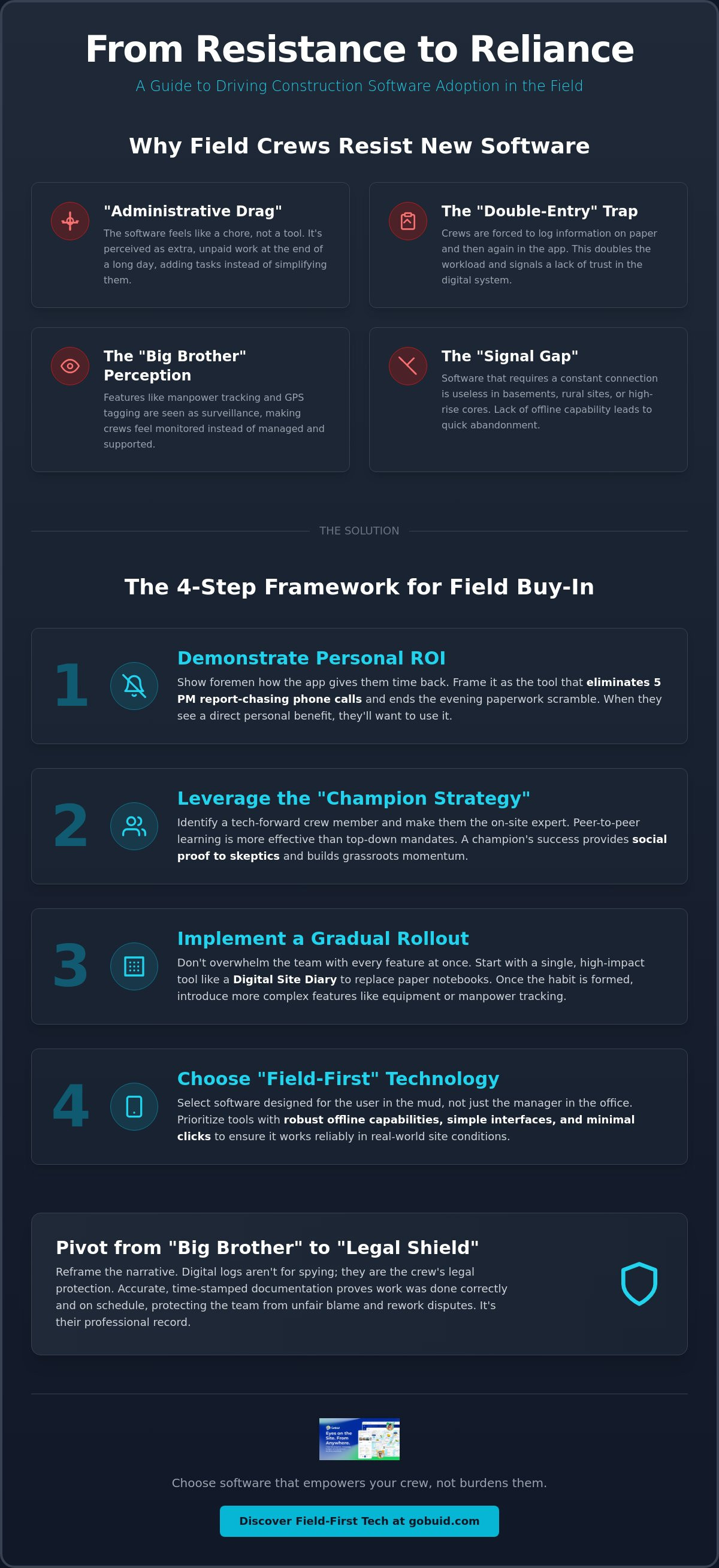
Software adoption fails when it creates "Administrative Drag." This occurs the moment a digital tool stops being a utility and starts being a task. For a project manager, a dashboard provides clarity. For a foreman, it often feels like an extra hour of unpaid data entry at the end of a ten-hour shift. Successfully getting field crew to use new software starts with acknowledging that their time is the most valuable asset on the job site. If the tool doesn't help them build faster or safer, they'll treat it as an obstacle.
This is the "Obligation Problem." Crews often perceive new apps as management tracking tools designed for the office, not the field. According to the Technology Acceptance Model (TAM), users only adopt new systems if they perceive them as both useful and easy to use. When the perceived usefulness is purely for the "higher-ups," resistance is inevitable. Getting field crew to use new software requires shifting this perception from surveillance to support.
To better understand this concept, watch this helpful video:
Consider the difference between a new power tool and a new app. A crew welcomes a high-performance hammer because it makes the physical work easier. They resist software because it often complicates the mental work. If you want to find the Best construction project management software 2025, look for tools that prioritize the user in the mud, not just the one in the air-conditioned trailer.
Identifying the Friction Points in Your Current Workflow
The "Double-Entry" trap is the primary killer of field adoption. If a foreman records manpower on a paper log and then has to type it into an app later, the software has doubled their workload. This redundancy signals that the digital system isn't trusted. Another critical failure is the "Signal Gap." If a platform requires a constant 5G connection to save data, it will fail in basements, rural sites, or high-rise cores. Lack of robust offline capability ensures a crew will abandon the app within the first 48 hours.
The 'Big Brother' Perception and How to Pivot
Many workers fear that manpower tracking and GPS tagging are strictly for surveillance. They feel monitored rather than managed. To fix this, pivot the conversation toward transparency and protection. Digital site diaries aren't just for the office; they are a legal shield for the crew. Accurate documentation proves that the team did the work correctly, on time, and following safety protocols. When the crew realizes the software protects them from unfair blame or rework disputes, they stop seeing it as an "eye in the sky" and start seeing it as an essential record of their professional execution.
The Adoption Framework: 4 Steps to Secure Field Buy-In
Moving from theory to action requires a structured approach. Successfully getting field crew to use new software depends on demonstrating immediate, tangible benefits to the person holding the device. If the foreman doesn't see how the app saves them time, they'll treat it like a chore. You must sell the personal ROI first. Show them how real-time data capture stops the 5 PM "where is the report?" phone calls from the office. When the documentation happens as the work occurs, the foreman goes home on time without an evening of paperwork ahead of them.
Successful implementation also relies on the "Champion" strategy. Don't try to train every worker simultaneously. Instead, identify your most tech-forward crew member and make them the lead. Their success on-site acts as a proof of concept for the skeptics. Research into barriers to technology integration suggests that workforce readiness and peer influence are critical factors in how quickly a team accepts new tools. A champion bridges the gap between management's vision and the crew's daily reality.
Don't dump the entire platform on the team at once. Use a gradual rollout. Start with a Digital Site Diary to replace the standard notebook. Once the habit is formed, you can expand into equipment management or manpower tracking. You can Explore GoBuid Features to see which tools offer the highest impact for your specific project needs.
Step 1: Focus on the 'One-Click' Win
Demonstrate the immediate value of automated reporting. One-Click Reporting is the end of manual data entry. Instead of spending an hour at the end of the day compiling photos and notes, the system generates a professional report instantly. This immediate gratification proves the software is a utility, not a burden. When a foreman sees a complex task disappear with a single tap, their resistance evaporates.
Step 2: Remove the Fear of Failure
Perfection is the enemy of adoption. Frame the rollout as a low-risk trial to lower the stakes. Encourage "messy" data entry during the first week to focus on building the habit of using the app. This approach removes the anxiety of "getting it wrong." You can start improving your site transparency today by treating the first few days as a learning phase rather than a performance audit.
Choosing 'Field-First' Tech: How GoBuid Minimizes Interaction Drag
The GoBuid philosophy centers on one principle: design for the thumb, not the mouse. Most construction apps fail because they import desktop complexity onto a five-inch screen. This creates interaction drag, where workers spend more time fighting menus than completing tasks. Minimizing this friction is the secret to getting field crew to use new software. When a platform feels like a natural extension of the tool belt, adoption becomes organic. It stops being a digital hurdle and starts being a professional asset.
Digital site diaries fundamentally change the end-of-week workflow. They eliminate the "Friday Afternoon Scramble" where foremen try to recall events from Monday morning to satisfy office requirements. By capturing data in the moment, the record is always current. This leads to Automated Construction Reporting that requires zero manual compilation. You gain accurate daily logs while the crew regains their time. Real-time manpower tracking works with the crew by simplifying the check-in process, ensuring everyone's hours are recorded accurately without the need for follow-up emails.
Minimizing Screen Time with Customised Forms
Customised forms are designed to reduce typing and maximize "tap and go" data entry. By using pre-set fields and drop-down menus, you ensure the crew provides the right data without the frustration of a virtual keyboard. Progress photos play a vital role here. They provide instant, non-verbal documentation that conveys more than a paragraph of text ever could. A single photo can verify installation quality, material delivery, or site conditions in seconds, providing total transparency with minimal effort.
Connecting the Field to the Analytics Dashboard
Transparency works best when it's a two-way street. Show the crew the "Mission Control" view on the Project Analytics Dashboard. When they see how their individual entries contribute to the overall project health, they understand their value in the larger operation. Similarly, robust equipment management prevents downtime. If a crew can see maintenance schedules or equipment availability, they spend less time waiting and more time building. Getting field crew to use new software is easier when they see the system working for them, ensuring they have the tools and information needed to succeed every day.
Drive Operational Precision with Field-First Tools
Digital adoption isn't about forcing compliance; it's about providing utility. Successful project management relies on the bridge between site realities and office data. When you eliminate administrative drag and provide tools that solve immediate field pains, resistance turns into participation. Successfully getting field crew to use new software requires a shift from surveillance to support. Focus on the tools that empower your foreman to finish their day without an extra hour of paperwork.
Your site documentation should be a byproduct of good work, not a separate task. By deploying a Digital Site Diary designed specifically for the field, you ensure accuracy and immediacy across every location. You can regain control over chaotic workflows and stop the cycle of chasing daily logs. Streamline your field operations with GoBuid's one-click reporting and experience professional report generation that actually works for your team. It's time to stop fighting your tools and start building with precision.
Frequently Asked Questions
How do I motivate a crew that is resistant to any new technology?
Show them the personal ROI immediately. Motivate your team by demonstrating how a Digital Site Diary replaces the need for late-night phone calls or messy paper logs. When a foreman realizes the software lets them leave the site on time without an evening of paperwork ahead, their resistance drops. Use a peer champion to demonstrate these wins on-site. This hands-on proof is the most effective way of getting field crew to use new software without constant management pressure.
What are the most important features to look for in field-ready software?
Prioritize offline functionality and a field-first interface. Construction sites often have poor connectivity; software that crashes without a signal is useless to a crew. Look for customised forms that minimize typing and maximize tap-and-go entries. Features like progress photos and one-click report generation provide immediate value to the field. These tools reduce interaction drag and ensure the data captured is accurate, timely, and useful for the entire team.
Is it better to use tablets or personal smartphones for field data entry?
The choice depends on your specific site needs and the complexity of your documentation. Smartphones are highly portable and already in every worker's pocket, making them ideal for quick manpower tracking or capturing progress photos. Tablets provide more screen real estate for viewing complex drawings or completing detailed safety inspections. Regardless of the device, ensure the software interface is optimized for mobile use to prevent frustration and maintain high field productivity levels.
How long does it typically take for a construction crew to fully adopt new software?
Full adoption typically occurs within four to eight weeks of consistent use. Habit formation is a gradual process that starts with simple tasks like daily site diaries before moving to complex equipment management. During the first few weeks, expect some messy data as the crew learns the interface. Consistent support and a phased rollout are essential for getting field crew to use new software effectively while maintaining project momentum and data integrity.
