A Site Manager’s Guide to Effective Construction Documentation
Use this site manager's guide to effective documentation to capture clear daily records, organise field photos, and streamline reporting with zero hassle.
by Sheldon Huang
|
What good is a site record if nobody can find it when a decision needs backing? Site managers know the problem: updates land in paper diaries, messages, photos and spreadsheets, while daily notes can miss details that matter later. This site manager's guide to effective documentation starts with a practical principle: record clear facts as work happens, then organise them so the team can retrieve and understand them.
You’ll learn what to record each day, how to make entries factual and consistent, and how to organise photos, forms and project updates so they remain useful beyond the shift. We’ll also cover how a simple documentation routine can make progress reviews and reporting easier, with less time spent copying information by hand. The aim isn’t more paperwork. It’s a reliable site record that helps the team see what’s happening and what needs attention.
Key Takeaways
- This site manager's guide to effective documentation shows how to build records that support clear communication about progress, decisions, safety observations and quality checks.
- Capture notes close to the event, add useful context, assign follow-up and review the record so next steps stay visible.
- Label progress photos with the work area, date and a written observation so they make sense when viewed later.
- Look for documentation workflows that connect field forms, inspections and progress records, helping you prepare reports with less manual copying.
What makes construction site documentation effective?
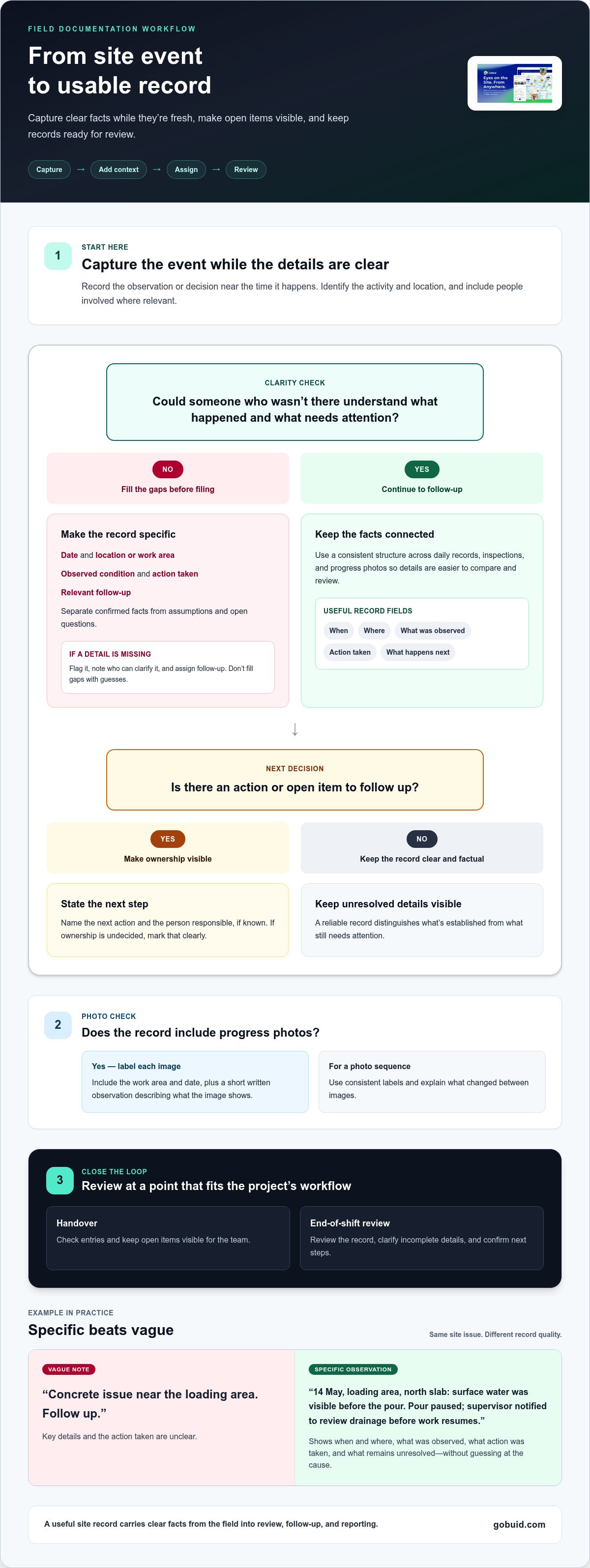
Effective construction site documentation captures factual, dated site information in a usable record. It helps the team communicate about progress, decisions, safety observations and quality checks using a shared reference point. A site manager's guide to effective documentation starts with a simple test: could someone who wasn’t there understand what happened and what needs attention?
Clear records support day-to-day coordination. They give site teams and office staff a consistent account of completed work, observed conditions, decisions and follow-up. That clarity matters across the connected roles and processes involved in construction management.
Vague note: “Concrete issue near the loading area. Follow up.”
Specific observation: “14 May, loading area, north slab: surface water was visible before the pour. Pour paused; supervisor notified to review drainage before work resumes.” The second entry identifies when and where the issue occurred, what was observed, what action was taken and what remains unresolved. It avoids guessing at the cause.
Which details make a site record clear and useful?
Capture the date, location or work area, observed condition, action taken and relevant follow-up. Keep confirmed facts separate from assumptions, opinions and open questions. If the cause isn’t known, record what was seen and mark the cause as unconfirmed. Use a consistent structure across daily records, inspections and progress photo documentation so information is easier to compare and review.
For each photo, add a label that connects it to the date and work area, plus a short written observation. A photo without context can be difficult to interpret later. For a series of images, use consistent labels and explain what has changed between them. Timely, specific records make it clearer what happened, where it happened and what followed.
How can site managers capture and review records consistently?
Consistency comes from using the same short workflow for routine updates and unexpected events. In this site manager's guide to effective documentation, the goal is to capture information while it’s fresh, then make sure someone reviews it and acts on any open items.
- Capture near the event. Record the observation or decision while the details are clear.
- Add context. Identify the relevant activity and location, note the people involved where relevant, and attach a supporting photo or form if useful.
- Assign follow-up. State the next action and the person responsible, if known. If ownership is still undecided, mark that clearly.
- Review the record. Check entries at a point that fits the project’s daily workflow, such as a handover or end-of-shift review.
Use a consistent label for each progress photo so it can be understood alongside the related work record. Include the work area and date, then add an observation explaining what the image shows. A sequence of labelled photos can help reviewers track visible changes without relying on memory.
Digital forms can make routine entries more consistent by prompting teams to record the same relevant fields. GoBuid’s construction form templates support structured field documentation, including customised forms for project workflows. This gives teams a consistent way to capture details rather than relying on free-form notes for every recurring task.
How should a site manager handle incomplete or unclear entries?
Don’t fill gaps with guesses. Flag the missing detail, note who can clarify it and assign follow-up. Set a review rhythm that fits the team’s work, with the responsible site roles checking open items during a suitable handover or daily review. A reliable record separates confirmed facts from pending information, so the team knows what’s established and what still needs attention.
A mobile-first workflow such as GoBuid’s site documentation tools gives teams a digital place to capture site records and forms as part of project documentation.
How can a documentation system turn site records into usable reports?
A documentation system becomes useful beyond the field when it carries records from capture through review and into reporting. For this site manager's guide to effective documentation, assess the workflow by asking whether teams can record information on site, use consistent forms, organise entries for later review and build reports from information already captured.
Connected progress updates and inspection findings give project teams a clearer view of work completed and items needing attention. When records are kept together, teams can bring routine information into automated construction reports instead of copying the same details between separate files. That reduces duplicate entry and helps keep reports aligned with the information recorded in the field.
What should teams look for in a digital documentation workflow?
Start with field use. Mobile-first capture should fit the way people record work on site, while forms should reflect actual project processes rather than force teams into irrelevant fields. Check how routine records are organised for review and whether report outputs use information entered during the work. Also consider whether the system can produce the formats your team needs to share and review records.
GoBuid’s one-click report generation supports PDF and Excel exports, giving teams practical formats for project information. The quality of the report still depends on the records entered: consistent, connected entries provide a stronger basis than information assembled from disconnected notes.
Choose a workflow that supports the team’s documentation habits and makes information easier to carry from the field to the office. Explore GoBuid’s construction documentation workflows to see how connected project records and one-click reporting can support clearer reporting.
Make your next site record easier to use
Build the routine around the way your team works. Start with one recurring record, make its fields and review step clear, then refine the process as the project changes. A practical site manager's guide to effective documentation isn’t about adding more admin. It’s about giving the team reliable information to act on and carry forward.
GoBuid’s customer examples show how connected workflows can support different parts of project operations: Ironwood cut 35 hours of weekly payroll admin using GPS geofencing, and CBS Builders reported 100% compliance and zero stop-work orders with GoBuid ePTW. Results depend on the project and workflow, but clear records give teams a stronger basis for coordination and review.
Take the next step by choosing one recurring record to improve, then make the capture and review steps clear for everyone involved. Explore GoBuid’s documentation and reporting tools to help your team capture and use project information more consistently.
Frequently Asked Questions
What should a construction daily site report include?
A daily site report should give the team a compact account of work completed, active constraints, key decisions, safety or quality items needing attention and open actions. Group entries by work area or activity so readers can scan them without untangling unrelated updates. For example, separate completed installation work from a material hold affecting the next task.
How should a site manager document a delay?
Document a delay as a change to planned work, not as a conclusion about blame. Identify the affected activity and area, when the delay became apparent, what was directly observed and which decisions or next steps followed. If the cause is still being checked, mark it as pending. Attach related correspondence or photos to the same project record for later review.
Can construction documentation be managed digitally?
Yes. A digital workflow can bring daily diary entries, forms, inspection records and progress evidence together in a project system instead of leaving them across paper records and message threads. GoBuid provides a Digital Site Diary, customised forms, progress documentation and one-click report generation. A consistent team routine helps keep those digital records useful as project information grows.
How can a site manager make construction records easier to retrieve?
Use a consistent naming pattern and keep related items under the same project and work-package reference. Choose terms the crew and office already use for areas or activities, rather than nicknames that change between shifts. For example, label a slab inspection so its checklist, supporting images and follow-up record can be identified together without searching individual message histories.
