Construction Site Photo Management App: The 2026 Buyer’s Guide
by Sam Chen
|
Your personal phone gallery isn't a project management tool; it's a liability that costs the average firm $12,500 in unrecovered variations every year. You know the frustration of scrolling through 400 unrelated photos to find one specific timestamp from three months ago. Relying on messy WhatsApp chats and fragmented folders makes it impossible to maintain a single source of truth. Implementing a dedicated construction site photo management app is the only way to bridge the gap between field reality and office documentation.
You deserve a professional workflow that doesn't involve wasting 180 minutes every Friday afternoon on manual reporting. This 2026 buyer's guide delivers a clear roadmap to transform your site captures into legal-grade documentation with automated GPS and timestamp verification. We'll explore the specific features required to achieve one-click report generation and seamless site diary integration. You're about to discover the tech that provides 100% visibility for stakeholders and ensures your team stays focused on building, not bookkeeping.
Key Takeaways
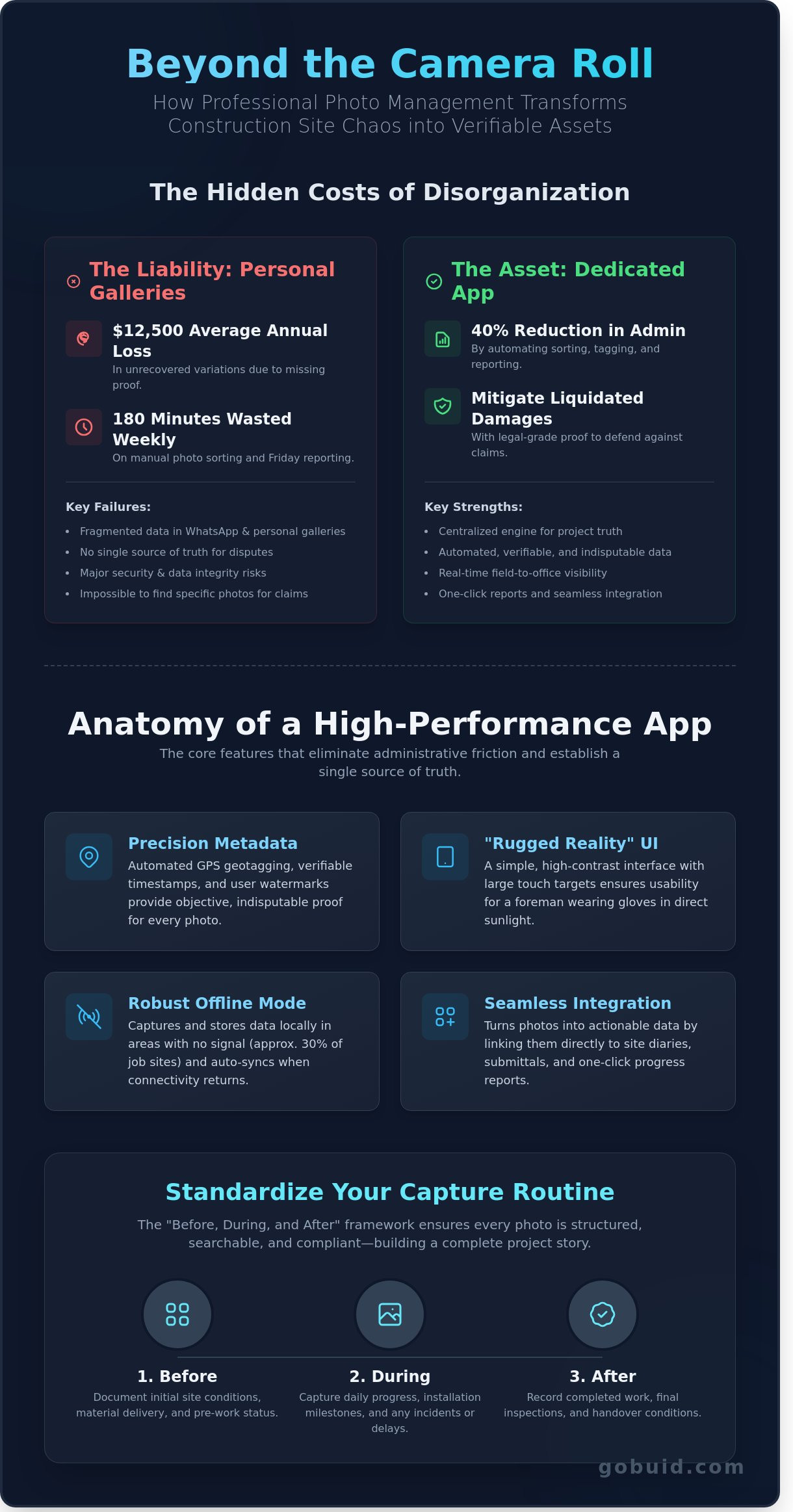
Stop losing critical evidence in fragmented chat apps and personal galleries. Learn why professional documentation is your best defense against disputes and lost profits.
Identify the essential features of a high-performance construction site photo management app , focusing on rugged UI simplicity and automated data capture.
Evaluate the trade-offs between standalone tools and integrated platforms to eliminate app fatigue and establish a single source of truth.
Master the "Before, During, and After" framework to standardize your daily capture routine and ensure every photo is searchable and compliant.
Discover how to transform raw field data into professional, one-click progress reports that bridge the gap between the job site and the office.
⭐ Learn more about GoBuid's feature- without the heavy enterprise price tag
Beyond the Camera Roll: Why Professional Photo Documentation is Non-Negotiable
Construction sites move fast. Relying on WhatsApp or generic cloud storage creates disconnected data silos that fail during audits. A professional construction site photo management app is a centralized engine for project truth. It captures more than pixels; it records metadata, location, and context. High-quality Architectural and construction photography serves as your primary defense against litigation. Companies using these specialized tools report a 40% reduction in administrative overhead, turning wasted hours into billable progress.
The financial stakes are too high for amateur solutions. Professional documentation is the only way to mitigate liquidated damages, which often reach 10% of total contract value in late-stage disputes. When every minute on site translates to profit or loss, you need a tool that works as hard as your crew.
To better understand how professional tools eliminate site chaos, watch this breakdown:
The Failure of Personal Phone Galleries
Personal phones are where project data goes to die. Storing site photos next to family vacation shots is a massive security risk. It also kills productivity. Searching for a specific structural detail for a 2-year warranty claim shouldn't take all morning. Without a dedicated system, you face the "Friday Afternoon Headache." This is when project teams spend 180 minutes manually sorting files that should have been automated at the source. It's a waste of talent and a risk to your data integrity.
Bridging the Field-to-Office Communication Gap
Efficiency requires a direct line from the dirt to the desk. Professional apps provide real-time visibility, allowing project managers to inspect progress without leaving the office. This creates a single source of truth for every stakeholder, from subcontractors to owners. Instant syncing stops the "he-said, she-said" cycle. When a subcontractor disputes a delay, a timestamped photo from the construction site photo management app provides the cold, hard facts needed to resolve the issue immediately. You get total accountability and zero guesswork.
Essential Features of a High-Performance Jobsite Photo App
A professional construction site photo management app must eliminate administrative friction. Automation is the priority. Your team shouldn't spend 60 minutes every evening sorting through camera rolls or renaming files. High-performance tools do the heavy lifting by automatically categorizing images by project, phase, and location. This reduces office-based clerical work by up to 25% for project engineers.
The interface needs to pass the "Rugged Reality" test. Site conditions are harsh. Software must be usable for a foreman wearing work gloves in direct sunlight. This requires large touch targets, high-contrast layouts, and a streamlined navigation path. If it takes more than three taps to capture and tag a photo, the tool will fail in the field.
Connectivity is never guaranteed on a jobsite. In basement levels or remote regions, approximately 30% of work happens without a stable signal. Your app must support a robust offline mode that stores data locally. It should trigger automatic cloud synchronization the moment a 5G or Wi-Fi signal returns. This ensures no data is lost and the office sees the latest progress without delay.
Integration capabilities turn photos into actionable data. Photos shouldn't live in a silo. They belong in your site diaries, submittals, and manpower logs. Linking a photo directly to a daily report creates a single source of truth. This connectivity keeps stakeholders informed and ensures that every image supports the broader project narrative.
Precision Metadata: GPS, Timestamps, and Watermarks
Automated timestamps provide the objective proof required for progress payment claims. Geotagging verifies the exact location of work, ensuring that 100% of your documentation is indisputable. These metadata layers are vital when proving that specific milestones were met by a contract deadline. Custom watermarking adds professional branding to every export. It reinforces your firm's reputation for detail and precision whenever you share reports with owners or architects.
Advanced Markup and AI Tagging
Communication must be instant and clear. Use markup tools to draw directly on photos, highlighting specific defects or safety hazards. Voice-to-text notes allow field teams to add context without typing on a mobile screen. AI-powered tagging transforms your library into a searchable intelligence tool. Searching for "excavator" or "rebar" takes 3 seconds rather than 30 minutes of scrolling. This level of detail is critical during OSHA's investigation process, where tagged evidence can mitigate liability and prove compliance. To see how these features streamline your workflow, consider how you centralize your project data for better visibility.
Choosing Between Standalone Photo Apps and Integrated Site Management
Deciding on a construction site photo management app requires an honest look at your current workflow. You must determine if you need a digital shoebox for images or a central engine for your project. A 2023 industry study showed that 42% of site managers spend over four hours every week just organizing files. This time waste happens when photos exist in a vacuum, disconnected from the daily logs that explain them.
App fatigue is a silent profit killer. Every new login decreases the likelihood of your team actually using the software. Standalone apps create data silos. When your photos live in one place and your manpower logs live in another, you lose the single source of truth. Fewer platforms mean better data. Integrated systems turn images into actionable project analytics instead of static files.
Standalone Photo Apps: Pros and Cons
Standalone tools are often the first choice for small trades focusing purely on visual proof. They're easy to deploy. The limitation is the lack of context. A photo of a slab pour doesn't tell you which subcontractor was present or if the equipment was inspected. You risk paying $20 per user for features that fail to meet 2024 BCA compliance standards. These standards require photos to be linked to specific site events and retained for up to 7 years in an accessible format.
Integrated Platforms (The GoBuid Approach)
GoBuid treats photos as the connective tissue of the project. Every image links directly to a digital site diary entry. This creates a complete narrative of the workday. You see the progress, the people, and the problems in one view. It's about visibility and control. Integrated platforms ensure that field data moves instantly to the office without manual uploads.
One-click reporting: Merge photos, manpower data, and weather logs into a professional PDF in 30 seconds.
Live Dashboards: Monitor site progress alongside equipment logs to spot delays before they impact the schedule.
Automated Metadata: Every photo captured in the GoBuid construction site photo management app is automatically geotagged and timestamped.
This integrated approach eliminates the need for manual data entry. It ensures that every dollar spent on software translates into a 15% increase in site reporting efficiency. Stop managing photos and start managing your project. Centralizing your data is the only way to protect your margins and your reputation.
Best Practices for Jobsite Photo Documentation and Compliance
Effective documentation turns a chaotic site into a transparent project. Establish a daily capture routine. Adopt the "Before, During, and After" framework for every task. This isn't just taking pictures. It's building a visual record of progress. Standardize your photo descriptions immediately. Use a naming convention like [Date]-[Location]-[Task] to ensure searchability. A construction site photo management app fails if your team can't find the evidence they need in seconds. Train your crew until documentation is a "don’t leave site without it" habit. A 2023 industry survey showed that teams with daily photo habits reduced dispute resolution time by 30%.
Documentation for Progress Claims and Disputes
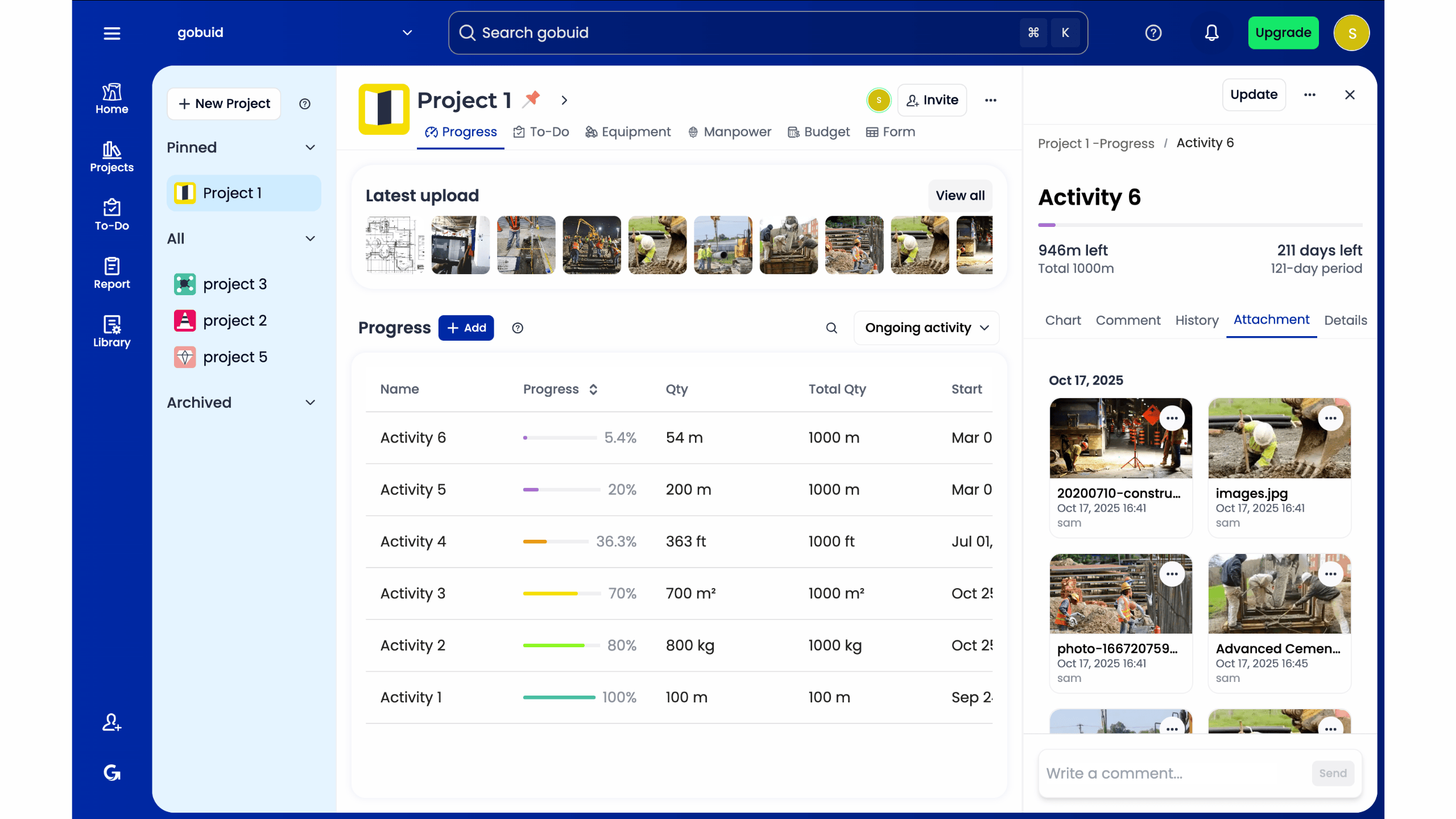
Capture hidden works before they disappear. Once the drywall is up or the slab is poured, your evidence is gone. Document M&E runs and reinforcement spacing to verify compliance. Use photos to verify subcontractor manpower counts on specific dates. This prevents over-billing and clarifies delays. You're creating a digital paper trail that holds up under legal scrutiny. Arcadis reported that the average global construction dispute value reached $52.6 million in 2021. Clear visual evidence protects your profit margins.
Safety and Quality Inspection Workflows
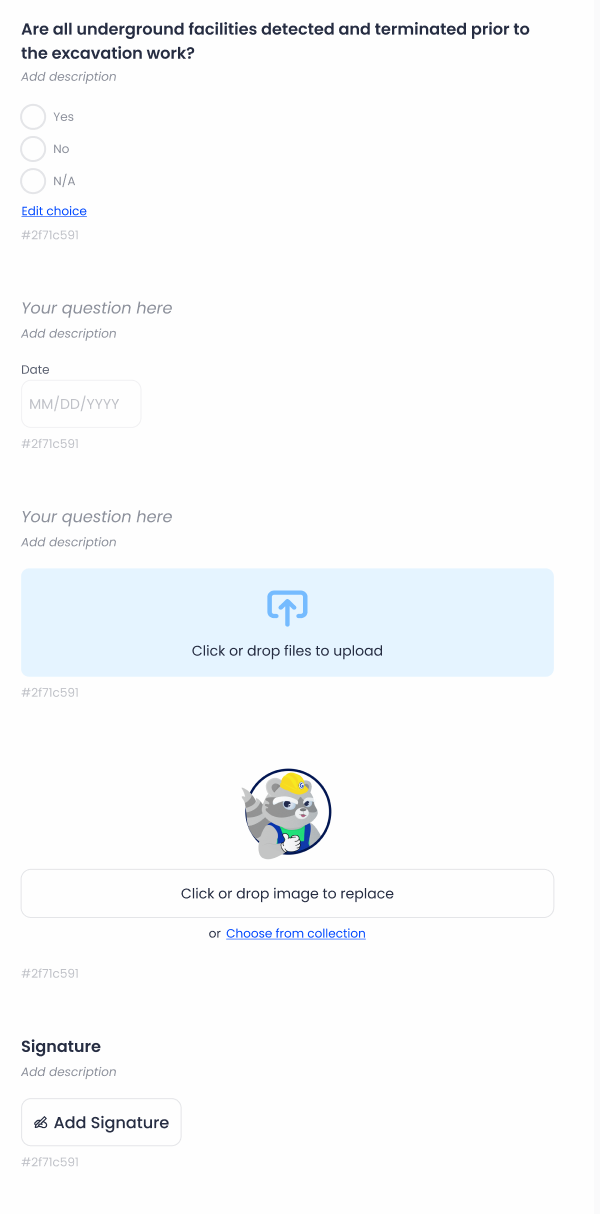
Link photos directly to customized safety inspection forms. This bridges the gap between the field and the office. Don't just flag a hazard. Close the loop. Document rectified issues with "After" photos to prove compliance. Modern platforms generate professional safety reports for site audits in one click. This eliminates hours of manual data entry. Using a centralized construction site photo management app ensures every punch list item has visual proof. This typically reduces project closeout cycles by 20% or more.
Regain control of your site documentation and start your free trial with GoBuid today.
GoBuid: The No-Nonsense Choice for United States Contractors
GoBuid was built by industry veterans who understand the grit of a real-world job site. It isn't a generic software solution. It's a specialized construction site photo management app designed for the reality of the field. Most site supervisors spend 2.5 hours every evening compiling daily logs and manual photo folders. GoBuid eliminates this waste. It turns raw site data into polished, professional reports instantly.
The "One-Click" promise is the core of the platform. Instead of chasing subcontractors for updates, you capture progress as it happens. The system automatically categorizes images and data, allowing you to generate a full site report before you even leave the site office. This speed ensures that your project documentation is always current and accurate.
Project-based work requires agility. GoBuid offers no lock-in contracts because project timelines are rarely fixed. You pay for what you use; you don't get trapped in multi-year licenses that don't fit your 6-month project cycle. The platform provides a single source of truth through a centralized dashboard. It tracks 100% of your manpower, equipment usage, and progress photos in one view. This visibility ensures total accountability across every subcontractor on the site.
Efficiency Meets Professionalism
Field operations often feel disconnected from the office. GoBuid bridges this gap. It's a mobile-first tool that cuts out administrative bloat. You generate PDF reports that impress consultants and keep clients informed without spending hours on formatting. It translates site photos into actionable project analytics. You get a clear view of your project's health in real-time, allowing you to catch potential delays 48 hours before they impact your schedule.
Get Started with GoBuid Today
Stop waiting for the right time to digitize. GoBuid allows you to transition from paper-based workflows to a digital construction site photo management app in less than 24 hours. The support team speaks your language and understands the specific pressures of a demanding construction schedule. They help you hit the ground running without the need for complex training sessions. Regain control of your site documentation with GoBuid.
Future-Proof Your Jobsite Documentation
The 2026 construction landscape leaves no room for manual errors or lost data. Professional documentation is now the backbone of project accountability. By transitioning from a cluttered camera roll to a dedicated construction site photo management app, you secure a single source of truth for every project milestone. This shift can reduce administrative overhead by 35% and ensures your team stays focused on the build, not the paperwork. High-performance apps provide the real-time visibility needed to bridge the gap between field progress and office reporting.
GoBuid delivers this efficiency to the United State market with a platform that's already regulation compliance ready. Over 50 top United State contractors rely on our no-nonsense tools to manage field reports and punch lists without the burden of lock-in contracts. You don't have to navigate complex software to get results; you just need a tool that works as hard as your crew does. It's time to reclaim your time and protect your margins with a system built for the modern foreman.
Generate your first professional site report in one click with GoBuid
Your project deserves the precision of modern technology. Let's get to work.
Frequently Asked Questions
Why shouldn’t I just use WhatsApp for site photos?
WhatsApp creates data silos where 30% of critical project context is lost in unsearchable chat threads. It lacks the metadata and structure required for a robust legal defense. A dedicated construction site photo management app attaches timestamps and GPS coordinates automatically. This ensures your team maintains a single source of truth instead of scrolling through 500 messages to find one specific foundation crack.
Do construction photo apps work offline in basements or remote areas?
Yes, these apps use local caching to store data when you're working in basements or remote zones. The software saves your images to the device memory immediately. Once the device detects a 4G or Wi-Fi signal, it syncs all 50 or 100 photos to the cloud automatically. This prevents data loss in dead zones where connectivity is zero, ensuring no record is left behind.
How much storage space do these apps typically provide?
Professional platforms typically offer 500GB to unlimited cloud storage within their standard tiers. This capacity is essential because a single 12-month project can generate over 10,000 high-resolution images. You won't need to delete old files to make room for new ones. Your entire project history remains accessible for the 6 or 12 years required by statutory limitation periods.
Can I link photos directly to my daily site diary entries?
You can link photos to daily diary entries with a single tap to bridge the gap between the field and the office. This automation reduces the time spent on manual reporting by 50% compared to traditional paper logs. When you tag a photo to a specific task, it populates the daily report instantly. This creates a clear, chronological record of progress that is easy to audit.
Is it easy to export photos if I need to change software later?
Exporting is straightforward through bulk download tools that generate ZIP files or structured PDF reports. You can filter by date, floor level, or subcontractor to get exactly what you need. Most systems support CSV exports for metadata, ensuring you keep 100% data ownership. You aren't locked into one provider; you can migrate your entire 20GB database in under 30 minutes.
Can these apps help with BCA compliance and site inspections in Singapore?
These apps are designed to meet BCA CONQUAS standards and Singapore's 2024 digital transformation goals. They capture the high-resolution evidence required for structural inspections and TOP applications. By using a construction site photo management app, you provide the 100% transparency that BCA inspectors demand. It simplifies the submission of your Quality Mark documentation and reduces rework by identifying defects early.
What is the best way to train my site workers to use a new app?
The most effective method is a 15 minute on-site toolbox talk followed by a live demonstration. Focus on the three buttons they'll use most: capture, tag, and upload. Site workers usually adopt the technology within 2 days when they see it eliminates their end-of-day paperwork. Provide a simple one-page PDF cheat sheet for new hires to ensure 100% compliance across the entire team.
How does GPS tagging help in construction dispute resolution?
GPS tagging provides indisputable evidence of where and when a photo was taken. If a subcontractor claims they finished a slab on Friday but the GPS-stamped photo shows it was Sunday, the dispute ends instantly. This level of detail reduces legal review time by 60% during mediation. It protects your firm from liquidated damages by proving exactly when delays occurred on the 10th floor.
