Procore vs GoBuid: Best Construction Site Diary Comparison
Compare Procore vs GoBuid by pricing, project scale, collaboration, and portfolio analytics to find the site diary platform that fits your construction teams.
by Sophia Bennet
|
A bigger platform isn’t automatically a better fit. In a Procore vs GoBuid comparison, the right choice depends on how your teams manage projects and what information they need to act confidently.
It’s reasonable to weigh price and project scale first. But day-to-day collaboration and the ability to see performance across a portfolio can matter just as much. This comparison breaks down pricing considerations, project fit, team workflows, and portfolio analytics to help you identify which platform aligns with your business. You’ll see what to prioritize, where each option may suit your operation, and how to make a practical choice based on the work your teams need to manage.
Key Takeaways
- Compare pricing structures against your project volume and the work your teams need the platform to support.
- Match platform capabilities to your project scale and the number of stakeholders who need clear, current information.
- Look beyond individual project updates: portfolio dashboards can help turn field data into clearer decisions.
- Identify where streamlined site records, inspections, and reporting can reduce friction in day-to-day construction work.
Pricing models and construction-volume-based costs
Construction software pricing may depend on project scope, annual construction volume, user access, or a negotiated plan. Compare the pricing basis, included features, and renewal terms against your workload. Procore and GoBuid are construction software platforms, so assess each against how your teams capture and use project information.
For estimating, budgeting, and financial management, compare the capabilities included in each plan instead of assuming the tools are equivalent. Map your process from estimates to budget updates, cost tracking, and reporting. A residential contractor managing several active jobs may prioritize cost visibility across projects, while a team with fewer, larger jobs may focus on project-level controls. The right comparison depends on your workflow and each plan’s stated scope.
Procore’s pricing predictability depends on how its structure aligns with your project volume and access needs. With volume-based pricing, annual construction volume may be a key planning input; with user-based pricing, the number of people needing access matters more. Don’t compare headline prices alone. Account for project activity, team access, and the work involved in capturing and reporting financial data.
| Pricing option | Cost basis to assess | Best fit to evaluate |
|---|---|---|
| Procore | Plan scope, project volume, and access terms | Whether the structure fits your construction management workflow |
| GoBuid | Plan scope and the expected volume of project use | Whether the structure fits your team’s tracking and visibility needs |
| Per-user or volume-based model | People requiring access or annual construction volume | Which cost driver better reflects your operation |
Match each platform’s stated pricing basis to your project volume, access needs, and financial workflow.
CPWR reports Hispanic workers make up roughly 30% of the U.S. construction workforce. A 2025 Dodge Construction Network survey found 90% of optimized owner respondents reported teams can manage more capital projects, 88% agreed projects now meet or exceed quality benchmarks, and 92% of expert-level general contractors reported increased project-management productivity.
The comparison cites 5,000 reviews but does not identify their source.
Project scale and stakeholder collaboration
Compare how Procore and GoBuid support project records, coordination, and stakeholder access. When evaluating integrations and support, consider implementation needs and the working relationships your teams rely on.
Project Data and Document Collaboration
Project data and documentation help field teams, project managers, and clients work from shared records. Compare how each platform organizes updates, photos, and documents, then identify who needs access during project delivery. On a commercial job, for example, a superintendent may need current site information while the office team manages records. The key is whether each platform’s documented collaboration features support those handoffs.
Work Planning and Project Coordination
Work planning connects tasks, responsibilities, and progress across active projects. Compare the steps each platform supports for recording updates and coordinating teams; similar project-management labels don’t guarantee identical workflows. A company handling residential and commercial work may need consistent documentation across both. Assess how implementation fits existing routines, including how teams share changes with clients.
Target Customers and Project Types
Project type and organizational structure shape collaboration needs. A smaller team may prioritize straightforward field-to-office updates, while enterprise coordination may call for consistent processes across departments, clients, and projects. Compare Procore and GoBuid against these needs, relying on documented features rather than assumptions about their target customers. Assess how integrations and support fit your implementation plan and the systems your teams use.
For a fair comparison, map each platform’s documented capabilities to project documentation, planning, and stakeholder coordination. The better fit is the one that supports your team’s execution and access needs.
Dashboards and portfolio analytics
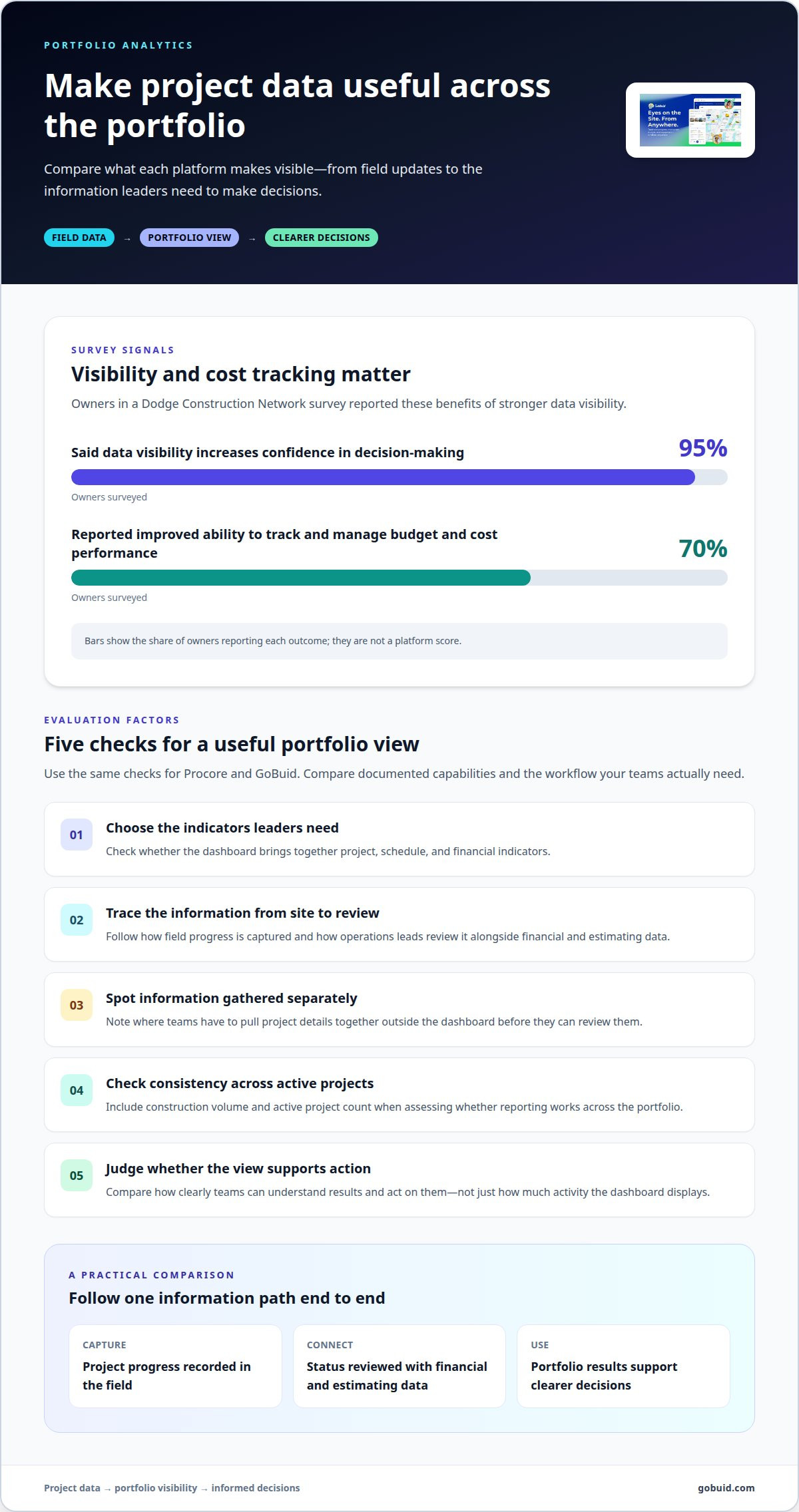
A project dashboard is valuable when it brings separate workflows together in a clear view. For portfolio decisions, compare which project, schedule, and financial indicators each platform combines. Field updates are more useful when managers can relate them to progress across active projects, not just one site.
Data visibility also affects decision-making. In a 2025 Dodge Construction Network survey, 95% of owners said data visibility increases confidence in decision-making. The same survey found 70% of owners reported an improved ability to track and manage budget and cost performance. These findings make budget visibility and consistent reporting practical criteria for comparing platforms.
Trace the information path from field capture to portfolio review. For example, a project team records progress on mobile, then an operations lead reviews status alongside financial and estimating data. Compare the steps each system supports and note where information must be gathered separately. For enterprise teams, consistent reporting across projects may matter more than an unlimited-user label alone.
Use a straightforward evaluation: select the project indicators leaders need, trace how each reaches the dashboard, then compare how clearly teams can act on the results. Include construction volume and active project count in your review. This reveals whether portfolio analytics support real decisions or simply display activity.
Build a more connected view of project reporting with a unified project data platform.
GoBuid
GoBuid helps construction teams maintain clear site records and consistent field workflows. Its tools support project documentation, manpower tracking, and safety and quality inspections. Customised forms let teams capture required information, while one-click report generation turns recorded details into reports.
Consider GoBuid when your priority is improving how site information is captured and shared, rather than choosing a platform by project scale alone. Its capabilities connect routine field records with reporting, helping teams see what work is complete and what needs attention.
For a closer look at how GoBuid fits your construction workflows, contact GoBuid.
Put the right workflow into motion
The Procore vs GoBuid choice becomes practical when you connect it to what your crews need to record, share, and act on. Start with a recurring site process that causes friction, then define what clearer documentation should look like for field and office staff. This gives your decision a practical purpose beyond comparing feature lists.
GoBuid’s Digital Site Diary, customised forms, and one-click report generation support a consistent path from site records to usable reports. Shape that workflow around your projects and the people who use it. Focus on information crews can capture and teams can act on.
Discuss your project workflows with GoBuid, and take the next step toward clearer site records.
Frequently Asked Questions
Which platform is right for your business?
The right platform fits your team’s daily work and reporting needs. In a Procore vs GoBuid comparison, start with a routine task, such as documenting a site update, and assess how clearly each platform supports it. Let the needs of the people recording and using project information guide your decision.
What features does Procore offer compared with GoBuid?
GoBuid offers a Digital Site Diary, customised forms, manpower tracking, safety and quality inspections, and one-click report generation. Compare Procore’s documented capabilities with the field workflows your team needs.
How do Procore and GoBuid compare for mobile apps and field use?
GoBuid supports everyday field documentation, customised forms, and reporting. Assess how each platform supports field-to-office updates and mobile capture; specific mobile app capabilities are not established.
What are the main pros, cons, and risks of choosing Procore versus GoBuid?
GoBuid’s strengths include site records, manpower tracking, inspections, customised forms, and one-click reports. A key risk is choosing based only on headline pricing, project scale, or an unlimited-user label: compare plan scope, project volume, access needs, and workflow fit. Specific disadvantages of either platform are not established.