Superintendent Daily Report Template: Essential Guide for 2026
Ditch manual paperwork. Our 2026 guide to the superintendent daily report template helps you save time, improve visibility, and create defensible one-click r...
by Amelia Grant
|
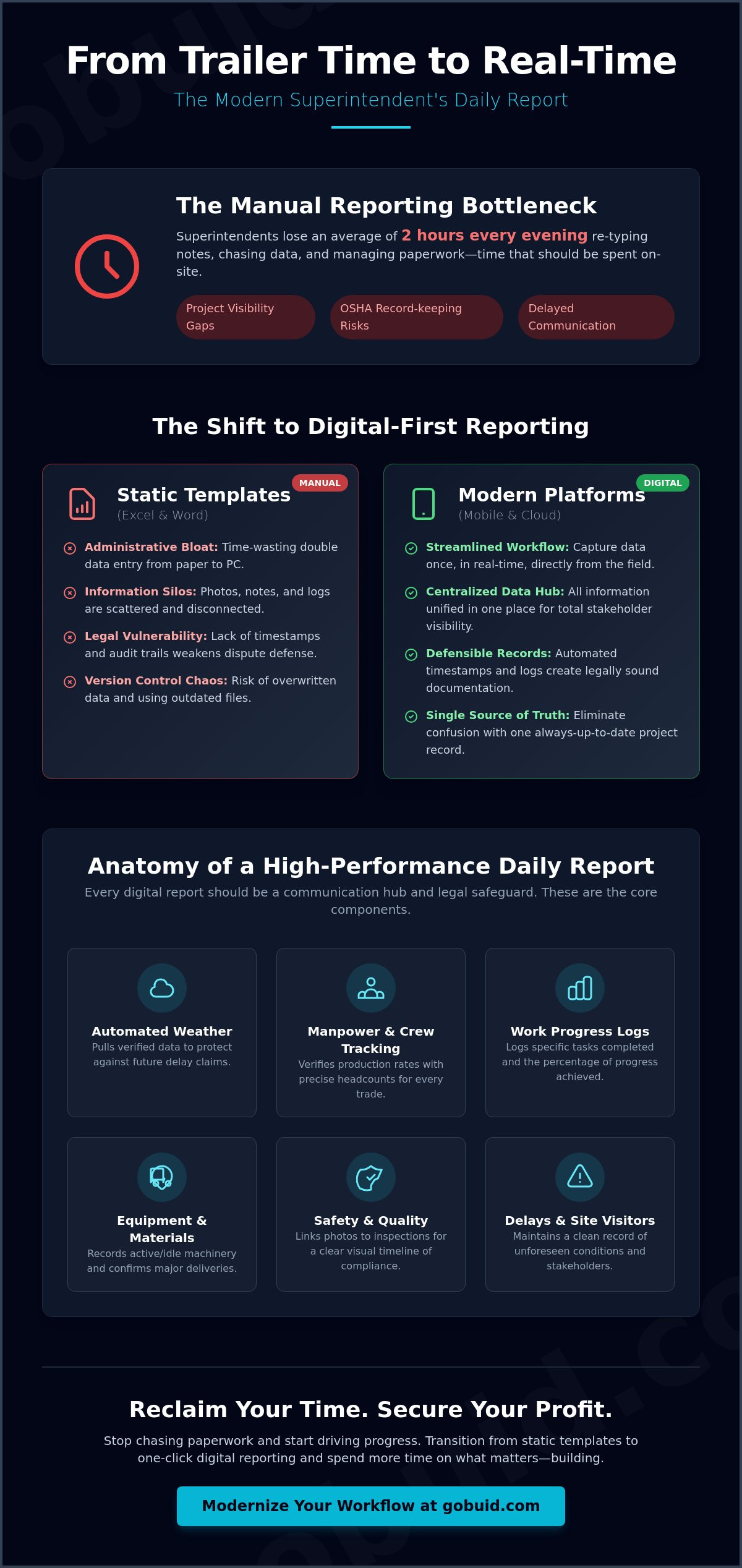
If you are still spending two hours every evening re-typing handwritten notes into a spreadsheet, you aren't just losing time; you're losing project visibility. Most superintendents dread the "trailer time" spent chasing subcontractor manpower counts and hunting for lost progress photos. It's a manual bottleneck that delays communication and leaves your project vulnerable to OSHA record-keeping gaps. You need a superintendent daily report template that works as hard as you do on-site.
We understand that operational management requires precision without the fluff. You deserve a system that eliminates double-handling and provides real-time visibility for every stakeholder. In this guide, you will learn exactly what every professional daily report must include to remain defensible and how to transition from manual paperwork to one-click digital documentation. We'll explore the shift toward digital-first project delivery in 2026 and how to use modern tools to spend more time on the slab and less time behind a desk. It's time to regain control over your workflow and move your project toward total transparency.
Key Takeaways
- Identify the core components of high-performance reporting, including automated weather tracking and trade-specific manpower counts.
- Eliminate the administrative trap of double-handling data by replacing your manual superintendent daily report template with a streamlined digital workflow.
- Centralize progress photos and field notes into a unified data point to remove information silos and improve stakeholder visibility.
- Transform raw site data into professional, defensible PDF documents with one-click report generation directly from the field.
- Reduce daily "trailer time" and focus on site execution by capturing project documentation as it happens.
- ⭐ Learn more about GoBuid's feature - without the heavy enterprise price tag
Table of Contents
-
Essential Components of a High-Performance Superintendent Daily Report
-
Transitioning from Static Templates to One-Click Digital Reporting
Essential Components of a High-Performance Superintendent Daily Report
A high-performance report isn't just a compliance task. It's a legal safeguard and a communication hub. Every professional project diary must begin with accurate project data. This includes the specific site location, current date, and automated weather conditions. Don't rely on memory for the temperature at 7:00 AM; use a system that pulls verified weather data to protect against future delay claims.
Your superintendent daily report template must also serve as the central hub for manpower and crew tracking. List every subcontractor and trade on-site with precise headcounts. This isn't just about counting heads. It's about verifying production rates against your schedule and ensuring you have the right resources to hit your milestones.
To better understand how these components come together in the field, watch this helpful breakdown:
Detail matters for the work progress logs. Log specific tasks completed and the percentage of progress achieved for each. Don't forget equipment and material tracking. Record which machinery was active, which sat idle, and confirm major deliveries to ensure your progress tracking remains accurate and up to date.
Capturing Safety and Quality Observations
Documentation is your best defense. Record safety inspections, near misses, and corrective actions immediately while the details are fresh. Don't wait until you're back in the trailer. Link progress photos directly to quality checks and ITP results. This creates a visual timeline of completed milestones that proves work was done to specification before it's covered by the next trade.
Tracking Delays and Site Visitors
Delays are inevitable, but losing money on them is optional. Log every unforeseen condition, from weather impacts to missing material deliveries. Maintain a clean record of all site visitors, including owners, consultants, and inspectors. A clear visitor log provides accountability and ensures you have a record of every stakeholder who stepped foot on your site.
The Hidden Costs of Using Manual Excel and Word Templates
Administrative bloat kills productivity. Many Construction Managers find themselves trapped in a cycle of double-entry data management. They take notes on paper or in a basic superintendent daily report template during the day, then spend their evenings transcribing those notes into a computer. This isn't just tedious; it's expensive. You're paying for leadership but getting clerical work.
Managing this physical paper trail also requires keeping site office equipment in top condition. For those still handling high volumes of paperwork, utilizing maintenance supplies from Custom Binding Products ensures that your shredders and binding machines remain reliable as you transition toward digital workflows.
Static documents create dangerous information silos. Photos often stay on personal mobile devices, while critical logs remain hidden in long email threads. This lack of centralization makes it nearly impossible to maintain total transparency across the project. When data isn't unified, stakeholders lose the real-time visibility they need to make informed decisions.
Legal vulnerability is perhaps the most significant hidden cost. In any construction dispute, contemporary records carry the most weight. Reconstructed memories or logs created weeks after the fact won't hold up in court. Static templates lack the automated timestamps and audit trails necessary for a truly defensible report. Transitioning to a digital site diary ensures your records are captured in real-time, protecting your profit margins from claims.
Why Static Templates Fail in 2026
Version control is a constant battle with Excel files. When multiple team members edit the same document, data gets overwritten or lost. Searching through months of individual files for a specific event or RFI is a massive time sink. A manual superintendent daily report template simply cannot keep up with the speed of modern project delivery.
The Risk of Incomplete Documentation
Incomplete logs lead directly to rejected change orders and payment delays. If it isn't documented, it didn't happen. Many professionals claim they don't have time for digital tools, but the reality is the opposite. Digital reporting captures data as it happens, eliminating the "trailer time" that manual templates require. You aren't just saving time; you're securing your cash flow.
Transitioning from Static Templates to One-Click Digital Reporting
Moving from a manual superintendent daily report template to a digital workflow is a strategic necessity. Static files are reactive; they tell you what went wrong after the damage is done. One-click digital reporting changes the math. It allows you to capture data as it happens, turning documentation from a chore into a real-time asset. This transition ensures that your project records are always current and accessible.
Centralizing your project data using a digital site diary eliminates the friction between the field and the office. Foremen and superintendents can contribute simultaneously, ensuring a unified data point for the entire project. This collaboration prevents the information gaps that typically occur when teams rely on individual spreadsheets. By following Daily Construction Report Best Practices, you ensure that every entry is factual, timely, and defensible.
The real power lies in automation. Software generates professional PDFs in one click, removing the need for manual formatting or evening data entry. This shift also unlocks project analytics. You stop just reporting what happened and start predicting what will. Trends in manpower or recurring delays become visible, allowing for proactive adjustments before they impact your bottom line.
Implementing GoBuid for Site Documentation
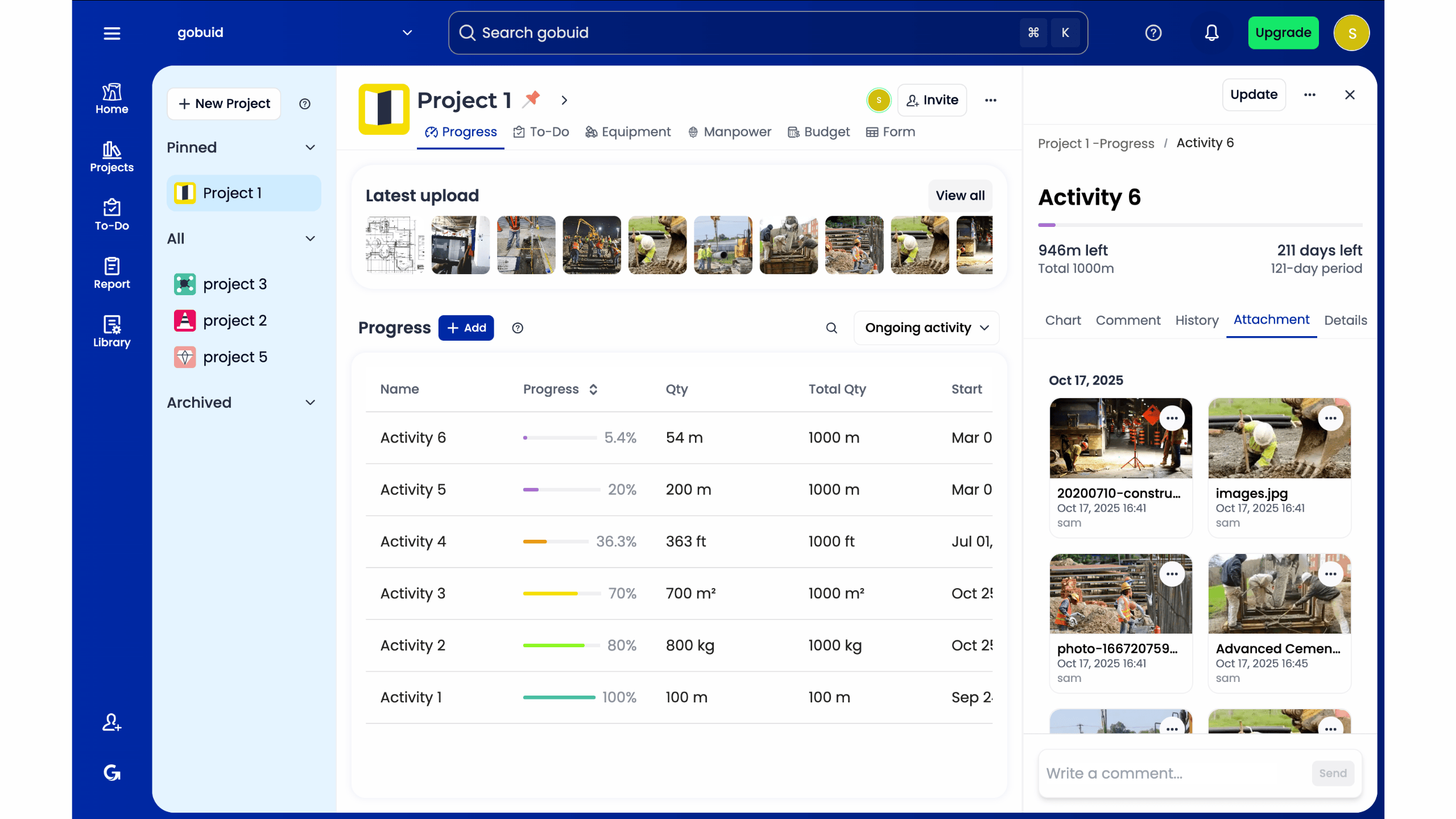
Success starts with consistency. Set up customized forms that match your specific project requirements. These forms ensure that every team member captures the exact data points you need for compliance. Utilize manpower tracking to eliminate end-of-day headcount guessing. This precision allows you to generate a professional daily construction report for stakeholders that builds trust through total transparency.
Maximizing Efficiency with Mobile-First Tools
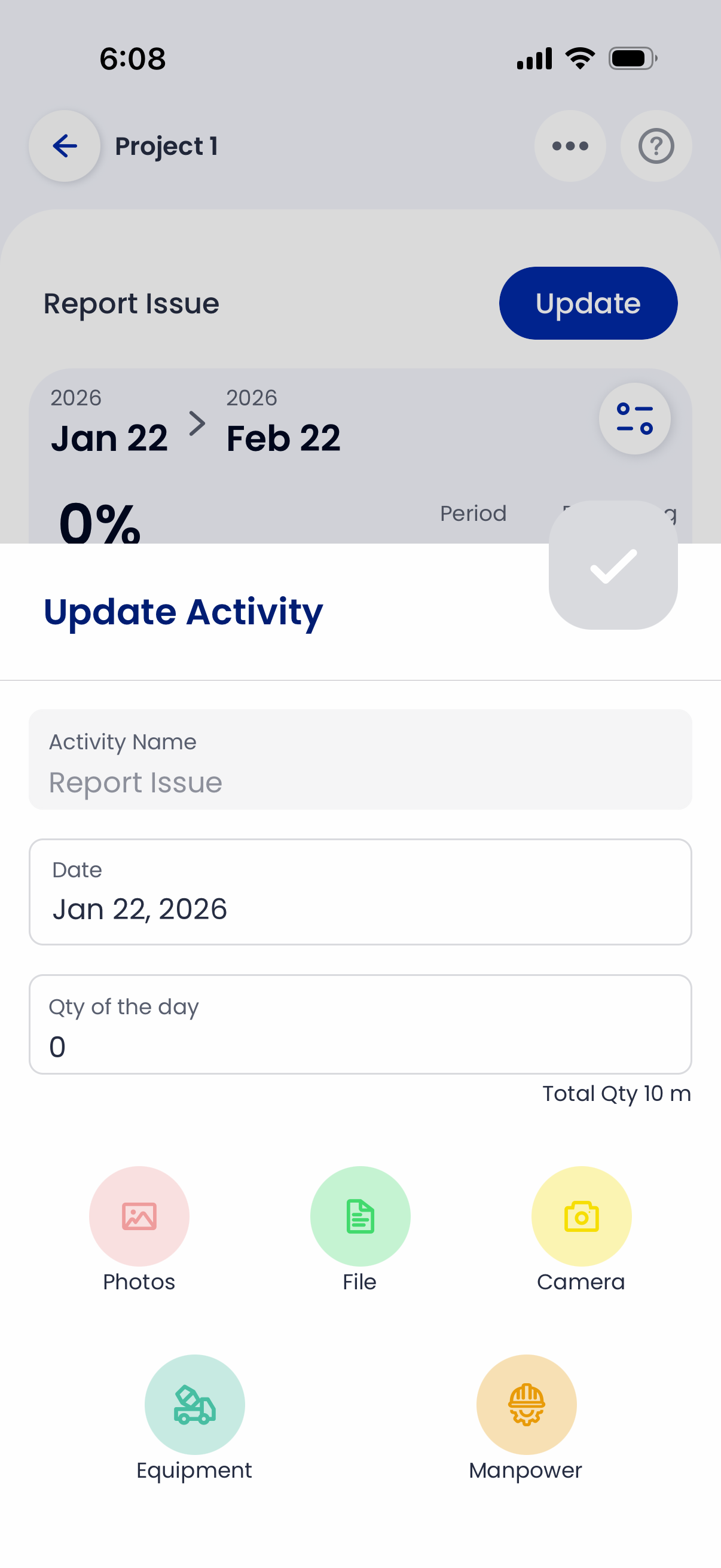
Efficiency happens in the field, not the trailer. Use mobile-first tools to capture photos and voice-to-text notes directly from the slab. This immediacy ensures that critical details aren't lost in transit or forgotten by the end of the shift. GoBuid provides the flexibility required for various project sizes. We focus on results and utility, providing the connective tissue for a successful project without unnecessary complexity or administrative bloat.
Modernize Your Field Operations Today
The construction industry is accelerating toward a digital-first future where data-driven project delivery is the standard. Continuing to rely on a manual superintendent daily report template isn't just a time sink; it's a risk to your project's profitability and legal defensibility. You've seen how administrative bloat and information silos compromise site visibility. By centralizing your documentation and leveraging real-time insights, you regain control over chaotic workflows and ensure total transparency for every stakeholder.
Effective reporting shouldn't keep you in the trailer until sunset. It should empower you to spend more time on-site, driving progress and ensuring quality. Transitioning to a digital site diary allows your team to capture critical data as it happens, creating a unified record that protects your interests. It's time to bridge the gap between physical site realities and digital precision.
Stop fighting with spreadsheets and start leading with data. Generate professional daily reports in one click with GoBuid. Our platform is trusted by site teams for real-time manpower tracking and offers the flexibility of no lock-in contracts. Take the first step toward a more efficient, professional site today.
Frequently Asked Questions
What is the difference between a daily log and a superintendent daily report?
A daily log is a raw chronological record of site events, whereas a superintendent daily report is a structured summary designed for project stakeholders. The log acts as a primary data source; the report synthesizes that information into a professional document for compliance. Utilizing a consistent superintendent daily report template ensures that your raw observations are translated into a defensible project record that meets all contractual obligations for transparency and accountability.
Should I use a digital or paper daily report template for legal protection?
You should use a digital template for maximum legal protection because it provides automated timestamps and unalterable audit trails. Paper reports are vulnerable to being lost, damaged, or dismissed in court as reconstructed memories. A digital superintendent daily report template guarantees that your documentation is contemporary and verifiable. This level of data integrity is essential for defending against delay claims or OSHA record-keeping audits in a modern legal environment.
How long should a superintendent spend on a daily report each day?
A superintendent should spend approximately 15 minutes on a daily report when using a streamlined digital workflow. Manual paperwork often forces professionals into two hours of trailer time each evening to transcribe field notes. Capturing data in real-time as site events occur eliminates this administrative bottleneck. By documenting progress and photos throughout the day, you ensure accuracy and free up your schedule to focus on site execution and trade coordination.
Can I include subcontractor progress in my daily report automatically?
You can include subcontractor progress automatically by using digital site diaries that allow for collaborative data entry. Instead of chasing foremen for manpower counts, you can have them submit their data through customized digital forms. This information syncs directly into your daily report, removing the need for manual transcription. It creates total transparency across the site and ensures that your project analytics dashboard reflects the most current workforce data available.
