
A Guide to Digital Site Diaries for Construction Projects
by Sam Chen
|
A single missing weather entry or an unrecorded subcontractor delay can strip 12% off your project margin when a dispute hits the boardroom. Learning how to maintain a construction site diary isn't a secondary administrative task; it's your primary defense against litigation and lost revenue. You've likely spent 40 minutes at the end of a long shift chasing subcontractors for manpower numbers or trying to recall exactly when a specific material delivery arrived. It's a chaotic process that pulls you away from site supervision and leaves your records vulnerable to scrutiny.
We agree that the manual reporting grind is broken. This guide gives you the tools to master construction documentation to protect your margins, ensure 100% regualtion compliance, and eliminate administrative friction once and for all. You'll learn how to build a streamlined reporting process that serves as a single source of truth for every activity on-site. We're moving past the era of messy notebooks and into a centralized system where field data translates directly into project success.
Key Takeaways
Transition from paper logs to digital field truth to protect your project margins and ensure total BCA compliance.
Identify the critical data points and learn how to maintain a construction site diary that serves as a bulletproof chronological record.
Stop the 48-hour information lag by replacing manual reporting liabilities with real-time site visibility.
Implement a "log-as-you-go" routine to eliminate the end-of-day administrative scramble and ensure daily consistency.
Leverage one-click reporting to bridge the gap between the field and the office, turning site data into professional documentation instantly.
What is a Construction Site Diary and Why Does it Matter in 2026?
A construction site diary is the official, chronological record of every event, decision, and condition occurring on a project. It captures the daily heartbeat of the site, from labor counts and equipment usage to weather disruptions and safety observations. By 2026, the industry has moved past the era of coffee-stained paper logs. Modern projects now rely on digital field truth. This shift replaces vague memory with high-resolution data that keeps everyone accountable.
Understanding how to maintain a construction site diary is no longer just a clerical task. It's a strategic necessity. A digital diary acts as a centralized source of truth, bridging the gap between field teams and office management. It tracks operational progress while simultaneously building a robust legal and commercial defense. If a project faces a dispute, this log serves as the "black box" that investigators use to reconstruct the sequence of events with 100% accuracy.
Effective documentation is a core pillar of a professional Construction Management Overview. Without a reliable record, your project is vulnerable to hearsay and memory lapses. Digital tools ensure that data is captured in real-time, preventing the "Friday afternoon scramble" where site supervisors try to recall events from the previous Monday. This discipline reduces reporting errors by 35% and ensures that the project history is preserved for the entire lifecycle of the asset.
The Legal and Commercial Power of Consistent Logging
Delay claims and variation orders are the primary drivers of conflict in construction. Statistics show that roughly 75% of construction disputes involve Extension of Time (EOT) requests. A meticulous site diary provides the objective evidence needed to justify these claims. It records the exact moment a delay began, the cause, and the resources affected. This level of detail turns a subjective argument into a factual certainty.
Construction law heavily favors the "contemporaneous record" rule. Courts and arbitrators prioritize records created at the time of the event over witness testimony provided months later. If it isn't in the diary, it didn't happen. Consistent logging also simplifies subcontractor management. When payment conflicts arise, the diary serves as the definitive proof of work completed and hours logged. This transparency prevents overbilling and ensures that every dollar spent is backed by verified site activity.
Compliance and Regulatory Standards
In the United States, construction documentation is governed by a combination of the International Building Code (IBC), adopted at the state and local levels, and federal OSHA (Occupational Safety and Health Administration) standards. Compliance isn't optional; it's a license to operate. Digital site diaries facilitate seamless audits by allowing inspectors to filter records by date, trade, or safety incident. This capability reduces the time spent on regulatory preparation by 40% compared to manual filing systems. It ensures your project remains in good standing with local authorities.
Environmental documentation in the US must account for diverse regional climates and federal mandates. Under the EPA’s National Pollutant Discharge Elimination System (NPDES), most sites must maintain a Stormwater Pollution Prevention Plan (SWPPP), which requires logging rainfall and site inspections after significant weather events. You must log these environmental variables daily. Knowing how to maintain a construction site diary that includes specific local metrics like rainfall and air quality protects your project from liquidated damages caused by force majeure events.
The Anatomy of a High-Performance Site Diary: What to Include
A site diary is a legal record, not a personal journal. To master how to maintain a construction site diary, you must distinguish between activity logs and event logs. Activity logs track the planned progress, such as 450 square meters of slab poured on level 5. Event logs capture the unexpected variables, like a 3-hour mechanical failure on a tower crane. Every entry must prioritize objective facts over subjective opinions. Writing "the sub-contractor was lazy" is useless in a dispute. Recording that "the sub-contractor arrived at 09:15 with 4 workers instead of the agreed 8" provides actionable data.
Precision is the foundation of Site Diary Best Practices. When your records are detailed, you build a shield against litigation and payment delays. Digital systems make this easier by forcing a structure that paper logs lack. You don't need flowery prose; you need data points that stand up in a 2024 audit. High-performance diaries bridge the gap between field reality and office expectations by providing a single source of truth for every stakeholder involved.
Manpower and Equipment Tracking
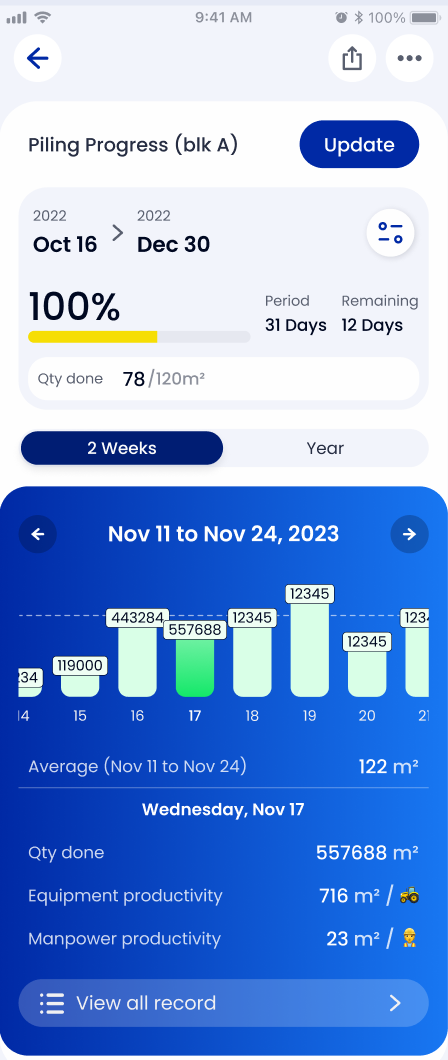
Record every trade on site with exact headcounts. Total numbers are insufficient; you need to know you had 14 electricians and 8 plumbers to verify progress against the baseline schedule. Track equipment hours with the same rigor. Note if a 20-ton excavator worked 5 hours or sat on standby for 3 because of site access issues. Documenting fuel deliveries to the liter and material arrivals helps prevent bottlenecks. If the rebar doesn't arrive by 08:00, the afternoon pour is at risk. Tracking these details allows you to centralize your field data and regain control over your daily workflows.
Progress Photos and Visual Documentation
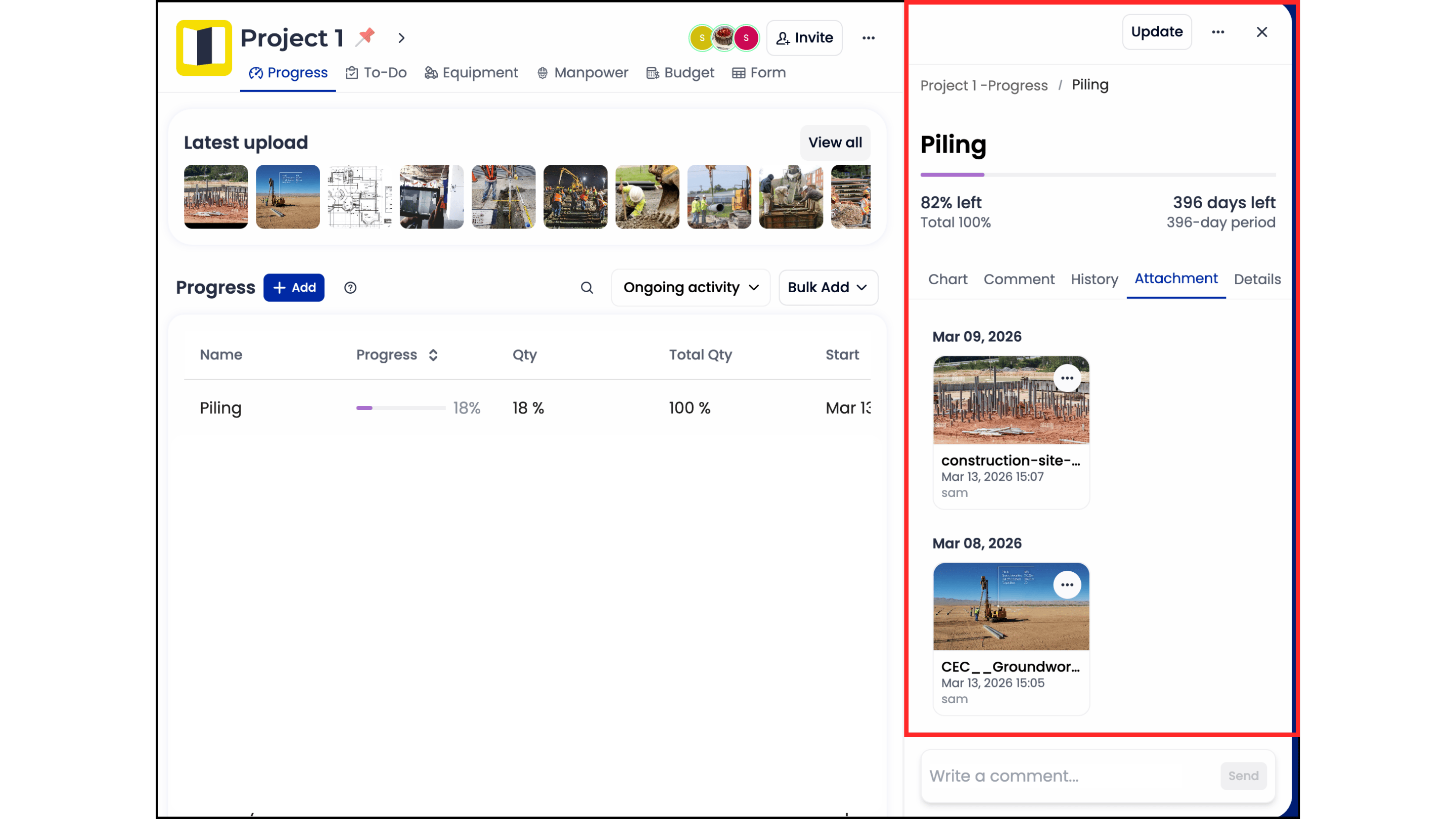
A photo without metadata is just a digital file. Professional site diaries require photos with time series and geo-tagging for every image captured. Take "before and after" photos for all covered-up works, particularly rebar cages before a 14:00 concrete pour. Once the concrete is in, that evidence is gone forever. Use real-time photos to document safety violations, such as missing guardrails on level 3, immediately. This creates an indisputable trail of accountability. Visual evidence reduces the time spent on punch lists by 30% because the office can see the site's status without a physical walkthrough.
Weather Conditions and Site Delays
Weather is the most common justification for an Extension of Time (EOT) claim. Don't just record "rain." Specify that heavy rain fell from 09:00 to 11:30, followed by 3 hours of drying time before work could resume. This results in 4.5 lost man-hours for the entire finishing crew. Document external delays like utility failures or restricted access with exact start and end times. Link these delays directly to specific activities on the project schedule. When you show exactly how a 2-hour power outage pushed back a critical path task, your claim for additional time becomes impossible to ignore.
Essential Daily Entry Checklist:
Manpower: Headcount by trade and sub-contractor name.
Equipment: Operating hours, standby time, and maintenance issues.
Deliveries: Material types, quantities, and arrival timestamps.
Visuals: Geo-tagged photos of progress and safety hazards.
Environment: Specific weather impacts and site condition changes.
Delays: Root cause, duration, and affected schedule IDs.
Consistency is the final requirement for success. Knowing how to maintain a construction site diary is only half the battle; the other half is ensuring the data is entered before the foreman leaves the site. Late entries lose 40% of their accuracy for every 24 hours that pass. Digital tools ensure that the data is captured while the mud is still wet on the boots.
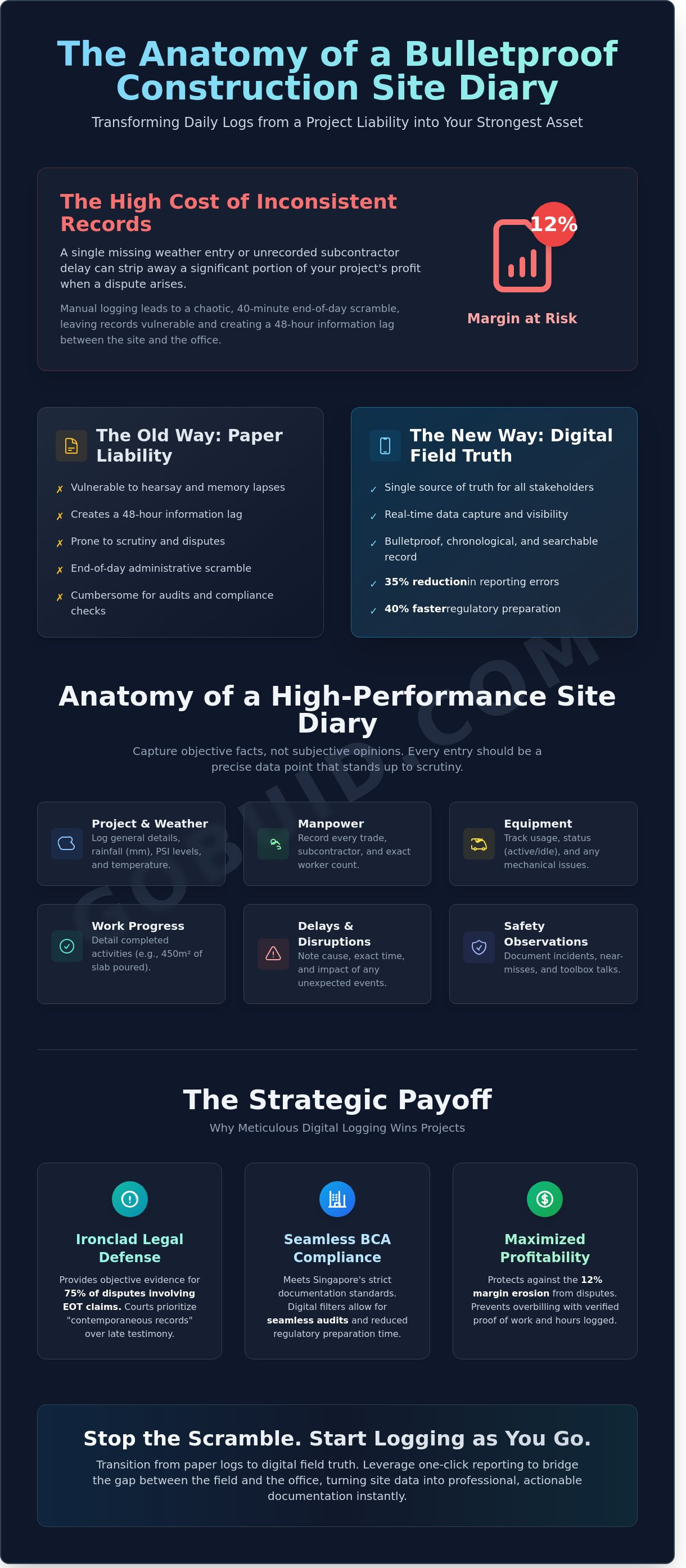
Manual vs. Digital: Why Paper Diaries are a Project Liability
Paper records are a project's weakest link. They are fragile, slow, and prone to human error. On a high-stakes USA project, relying on a physical notebook is a gamble that costs time and money. The hidden costs of manual reporting start with transcription errors. When a foreman transcribes handwritten notes into an Excel sheet at the end of the week, data integrity drops. A 6% error rate in manual data entry can lead to a $12,000 discrepancy in subcontractor payments on a mid-sized commercial build. This isn't just a clerical issue; it's a financial drain.
The lag time problem is equally dangerous. In a manual system, office staff often see site issues 48 hours too late. If a material shortage occurs on Tuesday, the project manager might not see the report until Thursday afternoon. This 48-hour window is where budgets blow out and schedules slip. Digital diaries eliminate this delay. They provide a single source of truth that all stakeholders access simultaneously. This transparency ensures that the office isn't just reacting to history but is actively managing the present.
Physical damage is a constant threat on a rugged construction site. Rain, mud, and coffee spills are common. Statistics show that 14% of paper logs are either lost or rendered illegible before a project reaches completion. When a legal dispute arises three years later, a damaged notebook is a liability, not a defense. Knowing how to maintain a construction site diary effectively requires a medium that survives the environment. Digital platforms secure your data in the cloud, making it immune to the physical chaos of the site.
The Administrative Friction of Traditional Reporting
Manual reporting creates massive administrative friction. A typical foreman spends 45 minutes at the end of a 10-hour shift writing logs by hand. This is a poor use of skilled labor. Searching through 12 months of paper notebooks for one specific weather event or delivery takes hours of billable time. Furthermore, paper logs lack accountability. Entries can be backdated or altered without a trace, which weakens your position in a liquidated damages claim. Following Construction Site Diary Best Practices is nearly impossible when the system relies on memory and pen. Digital logs provide unalterable timestamps, ensuring every entry is an authentic record of the day's events.
The Power of Real-Time Field Data
Digital diaries transform static notes into actionable intelligence. They allow for instant project analytics and real-time manpower dashboards. A project manager can see exactly how many workers are on-site at 9:00 AM without making a single phone call. This bridges the gap between the field and the office. When you implement a digital system for how to maintain a construction site diary, you gain the benefit of one-click reporting. Generating a weekly stakeholder update takes 60 seconds. You no longer need to spend a full afternoon consolidating messy data. The office can support the field with precision because the data is transparent and immediate. This connectivity is the hallmark of a modern, efficient construction project.
How to Maintain Consistency Without the Administrative Burden
Consistency in site documentation often fails because it relies on human memory. Memory is unreliable on a high-pressure construction site. To solve this, you must adopt a Digital Foreman routine. This approach shifts the focus from heavy administrative work to a rhythmic, lightweight documentation process. It ensures that every critical event is captured without forcing supervisors to spend hours behind a desk at the end of a shift.
The "log-as-you-go" philosophy is the foundation of this routine. Waiting until 6:00 PM to recall weather changes that occurred at 10:00 AM or a specific material delivery at 2:00 PM leads to a 30% drop in data accuracy. When you understand how to maintain a construction site diary effectively, you treat documentation as a real-time activity. Use mobile-first tools to snap a photo, add a brief voice-to-text note, and tag the relevant trade in under 60 seconds. This turns documentation into a background task that happens alongside the work, eliminating the dreaded "end-of-day" scramble.
Training site staff is the next hurdle. Avoid long, theoretical training sessions. Instead, conduct 15-minute toolbox talks focused on the "Capture, Tag, Sync" method. Show your team that 10 minutes of mobile input throughout the day saves them 45 minutes of paperwork later. The site supervisor acts as the final quality gate. Their role is to review the digital feed at 4:30 PM daily, ensuring all entries are clear and attachments are linked correctly. This 10-minute review process guarantees 100% compliance before the site closes for the day.
Standardizing Your Reporting Workflow
Consistency requires rigid guardrails. Deploy customized digital forms that require supervisors to complete 12 specific data points, including manpower counts, equipment hours, and safety observations. Set automated push notifications for 11:00 AM and 3:00 PM to prompt staff for updates. Establish a strict naming convention for all media: [Date]_[Location]_[Trade]. This simple rule reduces the time spent searching for specific evidence by 40% during internal audits or progress claim disputes.
Turning Documentation into Actionable Insights
Data only has value if you use it to drive decisions. Use your daily site diary data to identify recurring productivity bottlenecks. For example, if logs show a specific sub-contractor was delayed by site access issues 4 times in a single month, you have the evidence needed to adjust the schedule. These logs allow you to prepare for weekly progress meetings in 15 minutes rather than 3 hours. Historical data from your 2023 projects can also improve bidding accuracy on 2024 tenders by 15% by providing realistic production rates for specific soil conditions or weather patterns.
Field teams need tools that match their environment. Rugged, mobile-first interfaces ensure that even staff with limited tech experience can contribute to the single source of truth. By removing the friction of manual entry, you create a culture of accountability. Every worker knows that their progress is visible, and every manager knows they have the data to back up their claims. This transparency is what bridges the gap between the field and the office, ensuring the project stays on track and within budget.
GoBuid: Streamlining Your Site Diary with One-Click Reporting
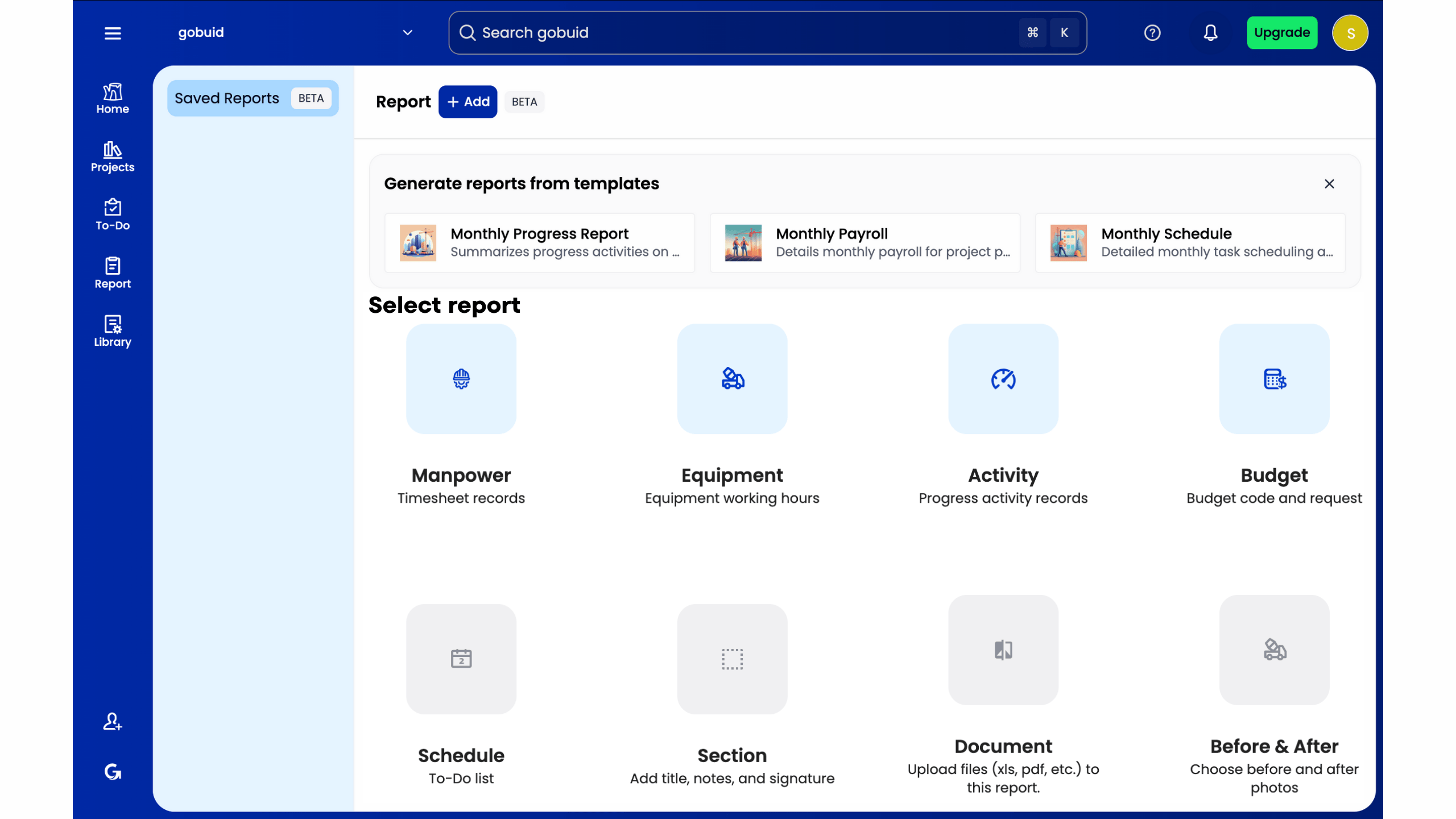
GoBuid acts as the digital foreman your project team is missing. It handles the administrative heavy lifting that typically bogs down site supervisors and engineers. Most project managers spend 12 hours a week on manual data entry and report compilation. GoBuid slashes this by 75 percent. Knowing how to maintain a construction site diary effectively means moving away from paper and toward automated systems that capture data at the source. This ensures that your records are accurate, timely, and legally defensible.
The One-Click Report feature is the core of this efficiency. Instead of spending your evening formatting photos and typing out weather conditions, you simply hit a button. The system pulls every entry, photo, and timestamp into a professional PDF template. This document is ready for the client or consultant immediately. It eliminates the lag time between field activity and office awareness. Mastering how to maintain a construction site diary requires a tool that bridges the gap between the field and the office without adding to your workload.
We built this software for the rugged reality of a worldwide job site. It handles the heat, the humidity, and the rapid pace of local infrastructure projects. The interface is mobile-first, ensuring that workers can input data in seconds while standing on a slab or inside a tunnel.
If a construction company has a specific site diary format, the GoBuid system allows builders to customize their own digital form templates to mirror existing company standards. You can map custom fields to track specific US-centric data like OSHA safety headcounts, SWPPP erosion control checks, or union-specific labor hours. This flexibility ensures that while you modernize your workflow, you maintain the consistent reporting style your clients and legal teams already trust.
Real-Time Manpower and Equipment Management
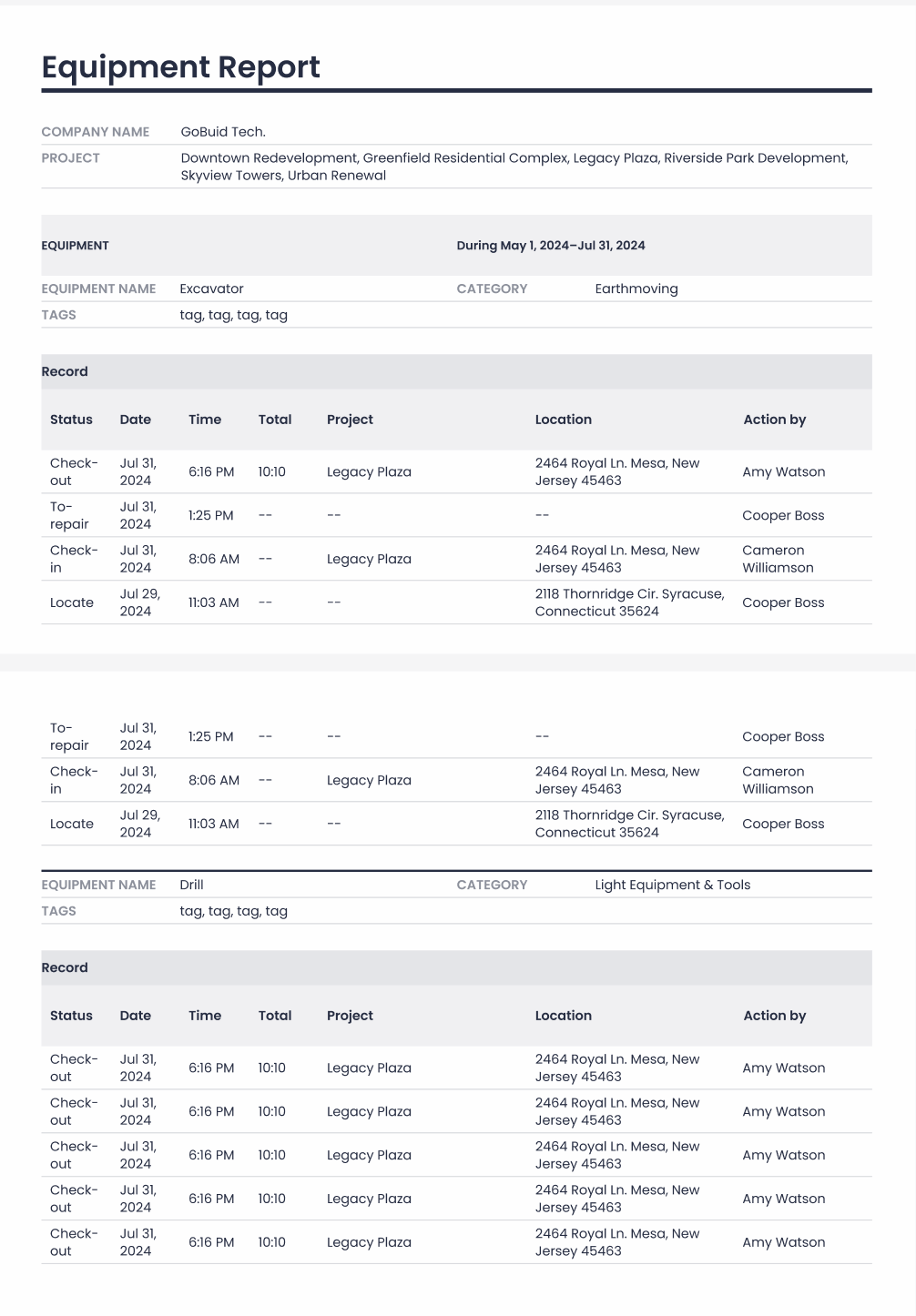
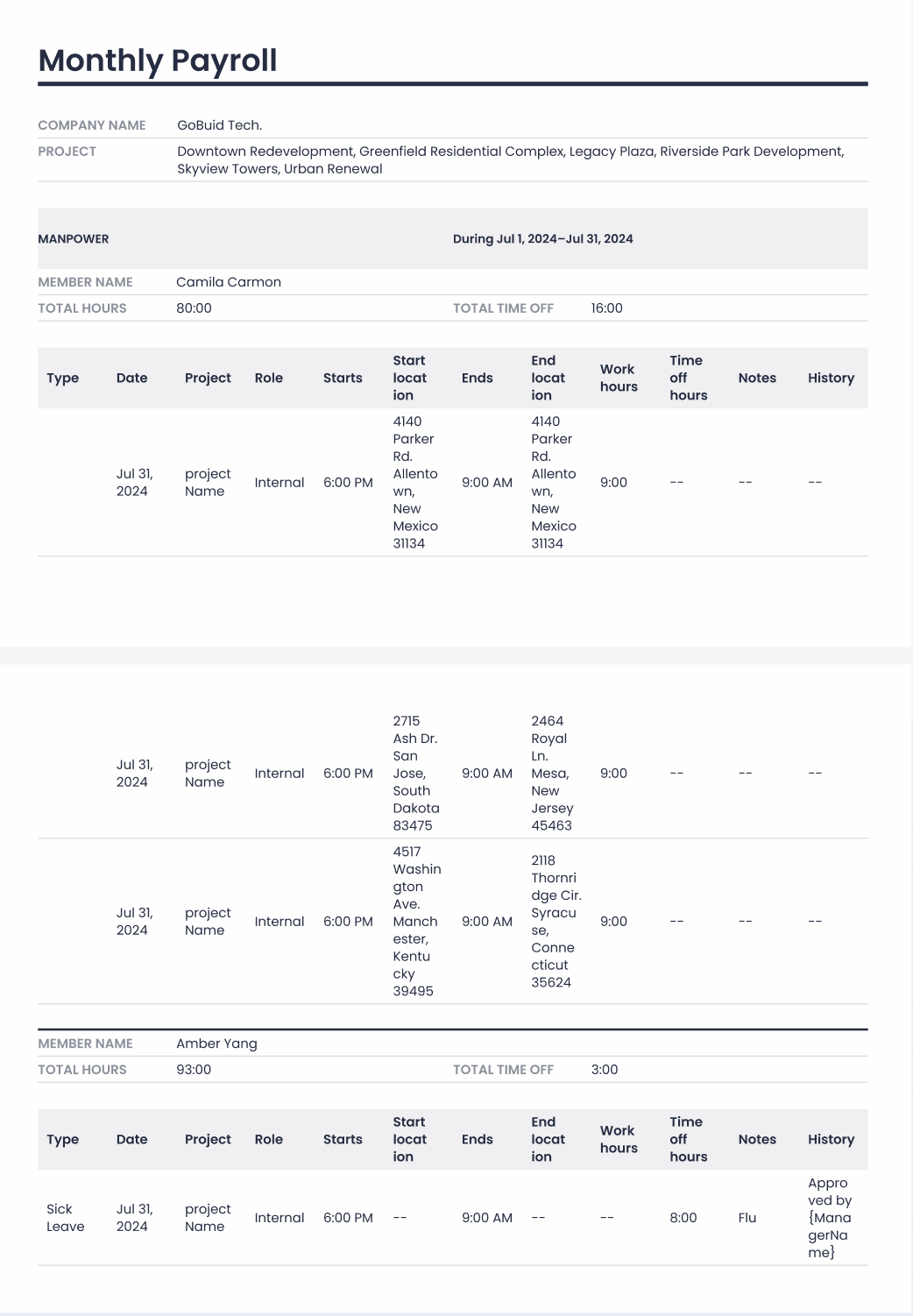
Tracking 40 different subcontractors across a single site is a logistical nightmare. GoBuid automates manpower tracking by allowing supervisors to log headcounts and trade types instantly. You get a real-time breakdown of labor distribution across the project. The equipment management module tracks plant health and usage hours. It alerts you when a 25-ton excavator is due for maintenance, preventing costly downtime. Safety and quality inspection forms integrate directly into the diary. If a safety officer flags a missing handrail at 10:00 AM, it's recorded in the daily log by 10:01 AM.
From Field Entry to Project Analytics
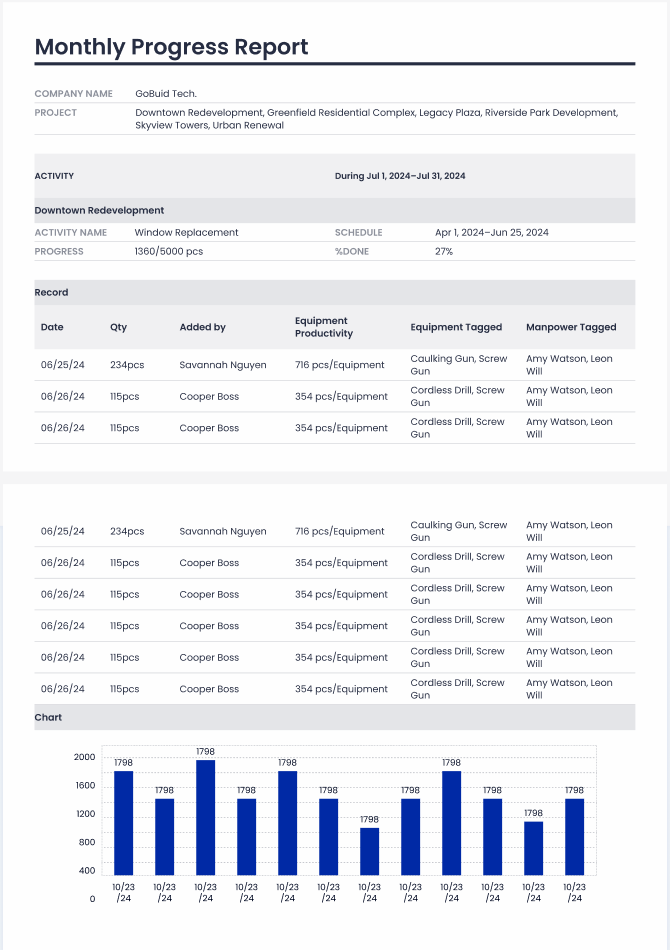
The GoBuid dashboard gives project managers a bird's-eye view of all site activities across multiple locations. You can spot delays before they become critical path issues. The software secures all data with 256-bit encryption, providing a permanent, searchable project archive. This is your single source of truth for dispute resolution or audit requirements. You can find a specific entry from July 12, 2023, in less than five seconds. This level of visibility transforms the site diary from a chore into a strategic asset for the entire firm.
Getting started is straightforward. We offer a No Lock-In Contract because we believe the value of the tool speaks for itself. New projects can be fully onboarded and configured in 15 minutes. It's time to stop chasing paper and start driving progress. Start your digital site diary today with GoBuid and reclaim your project hours.
Own Your Field Truth with Professional Documentation
Mastering how to maintain a construction site diary is the only way to ensure your project remains protected against disputes and costly delays. Relying on paper logs is a liability that costs project managers over 5 hours of manual data entry every week. Leading contractors have already moved away from fragmented notebooks to secure a centralized source of truth. By digitizing your workflow, you capture real-time data that bridges the gap between the field and the office instantly. This level of visibility ensures that every submittal and punch list is accounted for without the risk of human error.
GoBuid provides the tools to generate professional reports in one click, removing the friction from your daily site routine. You don't have to worry about complex setups or restrictive long-term commitments because we offer no lock-in contracts. It's time to stop chasing missing paperwork and start focusing on the physical build. Take control of your site data today and build with total confidence.

Ready to eliminate site admin? Get a 1-on-1 consultation to implement GoBuid on your existing project.
Frequently Asked Questions
Is a digital site diary legally admissible in United State courts?
Yes, digital site diaries are legally admissible in US courts under the Federal Rules of Evidence (Rule 803: Business Records Exception). You must prove the record was created in the ordinary course of business and remains untampered. Digital platforms provide automated audit trails and encrypted metadata that carry more weight than easily altered paper logs during a $500,000 liquidated damages claim.
What happens if a foreman forgets to log a day in the site diary?
Missing a day creates a gap in your project history and weakens your legal position during disputes. If a foreman forgets, enter the data immediately and mark it as a late entry to maintain honesty. Modern software sends automated 5 PM notifications to field staff, which reduces missed logs by 85% compared to manual paper systems.
How much detail should be included in a daily construction report?
Your report should include labor headcounts, equipment hours, material deliveries, and specific work progress milestones. Knowing how to maintain a construction site diary effectively means documenting 100% of site activities to prevent payment disputes. Include photos of rebar inspections or concrete pours to provide visual proof that complements your written descriptions and daily site data.
Can I use a site diary to track subcontractor performance?
Use your site diary to track subcontractor headcount against their committed schedule of works. This centralized data allows you to identify if a firm is 20% behind on manpower before it affects your critical path. Clear documentation provides the leverage needed for performance reviews or back-charging for delays caused by specific trades on the ground.
How do I document weather delays for a BCA-regulated project?
Record weather conditions twice daily and cross-reference them with NEA 24-hour rainfall data for BCA-regulated projects. Document the specific hours lost and the exact number of workers affected by the stoppage. This data is critical when filing for an Extension of Time (EOT) under the SIA Conditions of Contract or PSSCOC requirements.
What is the difference between a site diary and a site logbook?
A site diary is a comprehensive narrative of daily operations, while a site logbook typically focuses on specific equipment or regulatory checks. For example, a crane logbook tracks lifting operations, but the site diary records the overall impact of those lifts on the project timeline. Digital tools merge these into a single source of truth for better visibility.
Should I include safety incidents in the general site diary?
Record every safety incident in the general site diary to ensure a complete project timeline. While you must still file a formal incident report for MOM compliance, the diary entry provides context for resulting work stoppages. Highlighting a 2-hour safety briefing in your diary explains why productivity dipped on a specific Tuesday without leaving room for interpretation.
How long should I keep construction site diary records after project completion?
Keep your records for at least 6 years according to the Limitation Act 1959 to protect against breach of contract claims. If your project is under a deed, extend this storage period to 12 years. Learning how to maintain a construction site diary digitally makes this long-term storage easy, as cloud-based servers eliminate the need for physical archive space.