Customised Forms for Construction: Streamlining Field Data into Actionable Insights
by Guillermo Sánchez
|
A construction project's profitability is won or lost in the 15-minute gap between a field observation and an office action. You've felt the friction of double-handling data from crumpled paper to rigid Excel sheets, often losing 4 hours every week to manual data entry. It's frustrating when inconsistent reporting from subcontractors leaves you chasing missing signatures or safety photos instead of managing the build. You deserve a single source of truth that doesn't require a desk to maintain.
Implementing industry-specific customised forms eliminates this administrative lag, turning raw field data into actionable insights that ensure 100% compliance across your entire portfolio. These tools bridge the gap between the rugged site and the office, removing the guesswork from project management and reclaiming lost time. This guide explores how to achieve real-time visibility into manpower and safety while enabling one-click professional report generation that keeps your projects moving forward.
Key Takeaways
Reclaim up to 20% of your foreman’s daily productivity by eliminating manual data entry and paper-based administrative bottlenecks.
Learn how customised forms built specifically for the field ensure data capture continues seamlessly even without a 5G connection.
Discover why construction-first platforms outperform generic tools by centralising site diaries and safety inspections into a single source of truth.
Master the transition from raw site data to professional, one-click PDF reports that provide instant visibility for project stakeholders.
⭐ Learn more about GoBuid's feature- without the heavy enterprise price tag
Beyond Paper: Why customised forms are Essential for Modern Construction
Paper is a liability on a modern job site. It gets lost, torn, or stained beyond recognition. Beyond the physical risks, manual data entry drains 20% of a foreman's daily productivity. That is 8 hours every week lost to administrative friction. Generic form builders often fail in the dirt and sweat of a construction site because they lack the specific logic required for complex field workflows. To regain control, teams are turning to customised forms that act as a single source of truth for every project record.
To better understand how to elevate your digital documentation from basic tools to professional standards, watch this video:
Bridging the field-to-office gap requires more than just a digital version of a paper form. It requires real-time data synchronisation. When a site supervisor submits a report, the office sees it instantly. This connectivity eliminates delays and ensures project managers make decisions based on facts, not three-day-old guesses. It transforms the site diary from a passive record into an active management tool.
The Evolution of Site Documentation
Documentation has evolved from messy carbon-copy books to sophisticated digital site diaries. Early software attempts often failed because they used a one-size-fits-all approach. This led to poor data quality as workers skipped irrelevant fields. Modern Construction field computing prioritises mobile-first documentation. It puts the power of data collection directly into the hands of on-site workers. These customised forms ensure that the data captured is specific to the task at hand, whether it's a concrete pour or a safety induction.
Impact on Project Accountability
Digital signatures and automatic timestamps are the best defense against legal disputes and payment delays. Project accountability is the verifiable record of project events, participants, and timing that creates a transparent digital audit trail. By using mandatory form fields, you enforce subcontractor compliance at the point of entry. If the safety check or progress photo is missing, the form can't be submitted. This discipline protects your margins and your reputation by ensuring every action is documented and every requirement is met.
Anatomy of a Field-Ready Form: Features That Matter on the Job Site
A form that fails in a basement or a remote site is a liability. Construction environments are unforgiving, and your digital tools must reflect that reality. Customised forms bridge the gap between chaotic field data and structured office insights. They replace generic templates with precision instruments designed for the dirt.
Reliability starts with offline capability. Connectivity drops on 15% of urban sites and up to 60% of rural projects. Data must be captured locally and synced the moment a signal returns. Verification is equally critical. GPS and time stamping ensure that a 7:00 AM safety walk actually happened at the perimeter, not in a trailer. This level of accountability mirrors the rigour found in standard federal construction forms, where documentation accuracy is a legal mandate. Photo annotations add another layer of clarity. Foremen can snap a picture of a structural defect and circle the exact stress crack. This eliminates guesswork for the engineering team.
Conditional logic keeps the process lean. If a foreman marks a safety check as "Fail," the form immediately triggers a sub-form for corrective actions. If the check is "Pass," those extra fields stay hidden. This reduces cognitive load and speeds up completion times by 30% compared to static paper logs.
Construction-Specific Data Fields
Generic forms don't understand the nuances of a job site. Effective customised forms include dedicated fields for manpower tallying. You need to track 12 HVAC technicians and 8 dry-wallers across specific cost codes without manual calculation. Equipment logs are just as vital. Tracking fuel levels and engine hours for a fleet of 5 excavators prevents unexpected downtime. Weather integration automates the process further. It pulls temperature and wind speed data from local stations, providing a factual record of site conditions that might impact the project schedule.
User Experience for the Foreman
The field is no place for tiny text or complex menus. High-contrast interfaces ensure readability under direct sunlight. Large buttons accommodate users wearing heavy-duty gloves. When typing isn't practical, voice-to-text features allow for rapid, hands-free entry of detailed observations. Automated notifications ensure that if a safety inspection fails, the project manager receives an alert within 2 seconds. You can explore how these features integrate into your workflow by reviewing the form management tools available today.
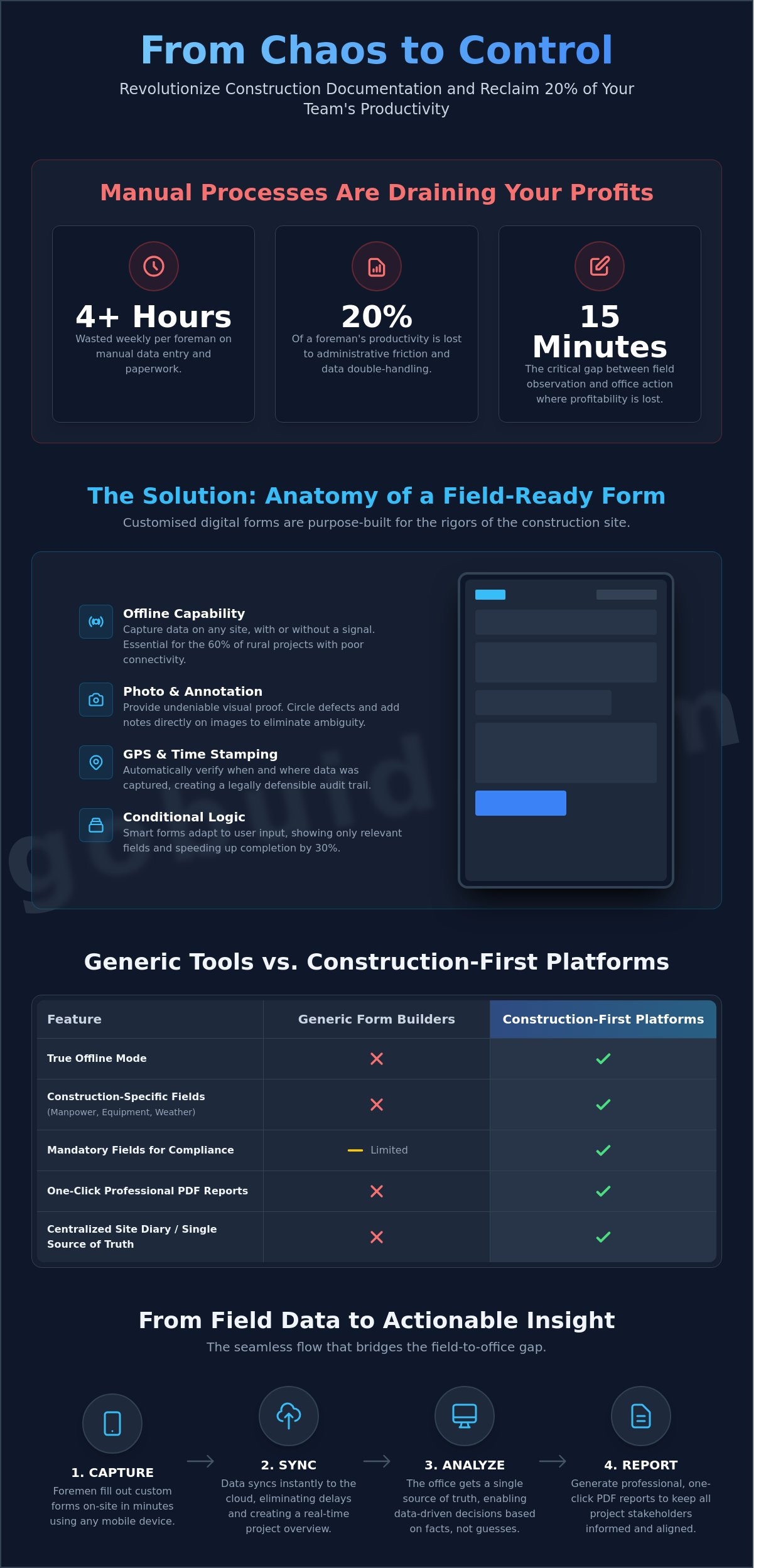
Generic Form Builders vs. Construction-First Platforms
Generic tools like Canva or Typeform excel at design and basic surveys. They look professional in a boardroom but fail in the field. These platforms create data silos where information stays trapped in isolated spreadsheets. You can't achieve one-click reporting when your data lives in a marketing app. GoBuid replaces these disconnected tools with customised forms built specifically for the rugged reality of a job site. Our platform ensures every submission feeds directly into your project's ecosystem.
Security remains a non-negotiable factor. Generic apps often lack the specific compliance triggers required for heavy industry. GoBuid meets national standards for construction data storage, ensuring your construction quality assurance data remains protected and accessible for years. According to technical reports from the Federal Highway Administration, high-quality data acts as a leading indicator for infrastructure performance. We turn your form responses into these actionable project insights instantly.
The Integration Factor
A form is a dead end if it doesn't talk to your site diary. If your safety inspection doesn't update your project timeline, you aren't managing; you're just collecting paper. GoBuid consolidates manpower, equipment, and progress into a single dashboard. This creates a single source of truth that bridges the gap between the field and the office. You move from simply gathering data to actively managing a project's trajectory in real time.
Cost vs. Value Analysis
Low subscription costs for generic apps are a trap. You might save $20 a month on software but lose 15 hours in administrative overhead as staff manually transfer data between systems. The ROI of automated reporting becomes clear when you consider legal protection. A single documented site incident can prevent a $50,000 dispute. While a generic form takes 2 hours to rig for construction use, a GoBuid industry-specific form deploys in under 10 minutes. Focus on the work, not the paperwork.
Eliminate manual data entry errors.
Ensure 100% compliance with safety protocols.
Access real-time visibility into field progress.
5 Essential Customised Forms to Standardise Your Site Operations
Standardisation is the foundation of a predictable job site. Without it, data remains siloed in various heads and handwritten notebooks. Digital customised forms force a uniform language across the entire project team. This structure eliminates the 30% of project delays typically caused by poor communication or missing field data. By using a single source of truth, contractors ensure every sub-contractor and site supervisor follows the same protocol.
Daily Site Diary: This is the backbone of project documentation. It tracks manpower and site conditions to protect against future claims.
Safety Inspection/Toolbox Talk: These forms ensure WSH compliance. They provide a digital trail of worker safety briefings and hazard identifications.
Quality Control & Punch Lists: Standardising defect management across trades ensures nothing falls through the cracks during the final handover.
Equipment & Material Delivery: Tracking the arrival and status of site assets prevents the 10% loss in material overhead often caused by poor record-keeping.
Permit to Work (PTW): Digitising high-risk activity approvals creates a faster turnaround. It keeps the schedule moving while maintaining strict safety standards.
Form 1: The Intelligent Daily Report
A site diary is useless if it's incomplete or illegible. These customised forms include mandatory fields for weather conditions, total manpower count, and specific work progress. Field teams link progress photos directly to their daily entries, creating a visual timeline of the build. GoBuid then aggregates this data to automate a daily summary for management. It cuts report generation time from two hours to ten minutes, allowing supervisors to focus on the build rather than the paperwork.
Form 2: Safety and Compliance Checklists
Safety is a legal requirement that demands precision. Digital checklists standardise safety walks to meet national regulatory requirements every time. If a supervisor spots a hazard, they capture it with photo evidence and assign immediate corrective actions. These safety reports reach stakeholders in one click. This level of transparency has been shown to reduce site incidents by 22% on average. It moves safety from a reactive task to a proactive culture.
Ready to replace your paper trail with digital precision? Explore how GoBuid streamlines your form management.
Implementing GoBuid: Transforming Field Data into One-Click Reports
GoBuid replaces the friction of manual data entry with a high-speed engine designed for the field. Deploying customised forms takes minutes, not weeks, allowing site teams to capture ground-level truth immediately. The platform’s One-Click Report feature eliminates the lag between site activity and office awareness. You convert raw data into a professional PDF instantly, which reduces reporting time by 85% compared to traditional spreadsheet methods. This speed ensures that stakeholders receive updates while the information is still relevant.
Real-time project analytics provide a level of visibility that paper-based systems cannot match. You can see a 12% drift in labor productivity or a spike in material waste before these trends compromise the project budget. GoBuid functions as a digital foreman, identifying risks through data patterns. Because construction work is inherently project-based, GoBuid offers no lock-in contracts. You maintain the flexibility to scale your software usage up or down based on your current contract pipeline. This ensures you only pay for the value you receive on active sites.
The Onboarding Process
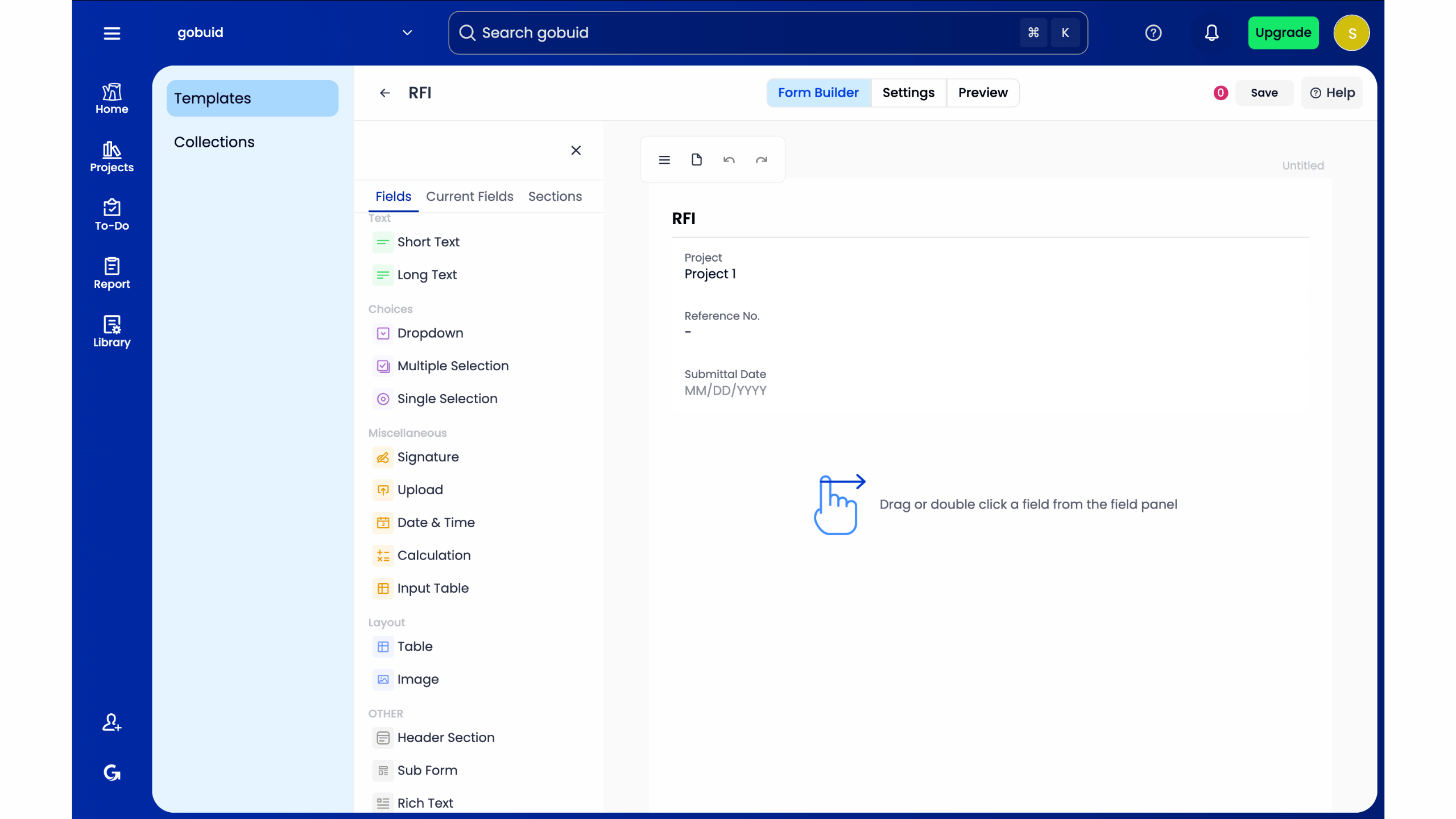
Converting your existing paper forms into digital GoBuid templates is a straightforward process. Your team won't need a degree in IT to start. Field training takes less than 20 minutes because the interface mimics the logic of a physical job site. You can establish custom workflows for approvals and notifications, ensuring that a safety hazard report reaches the project manager's phone in seconds. This creates a closed loop of accountability that keeps projects moving forward without administrative bottlenecks.
Scaling Across Multiple Projects
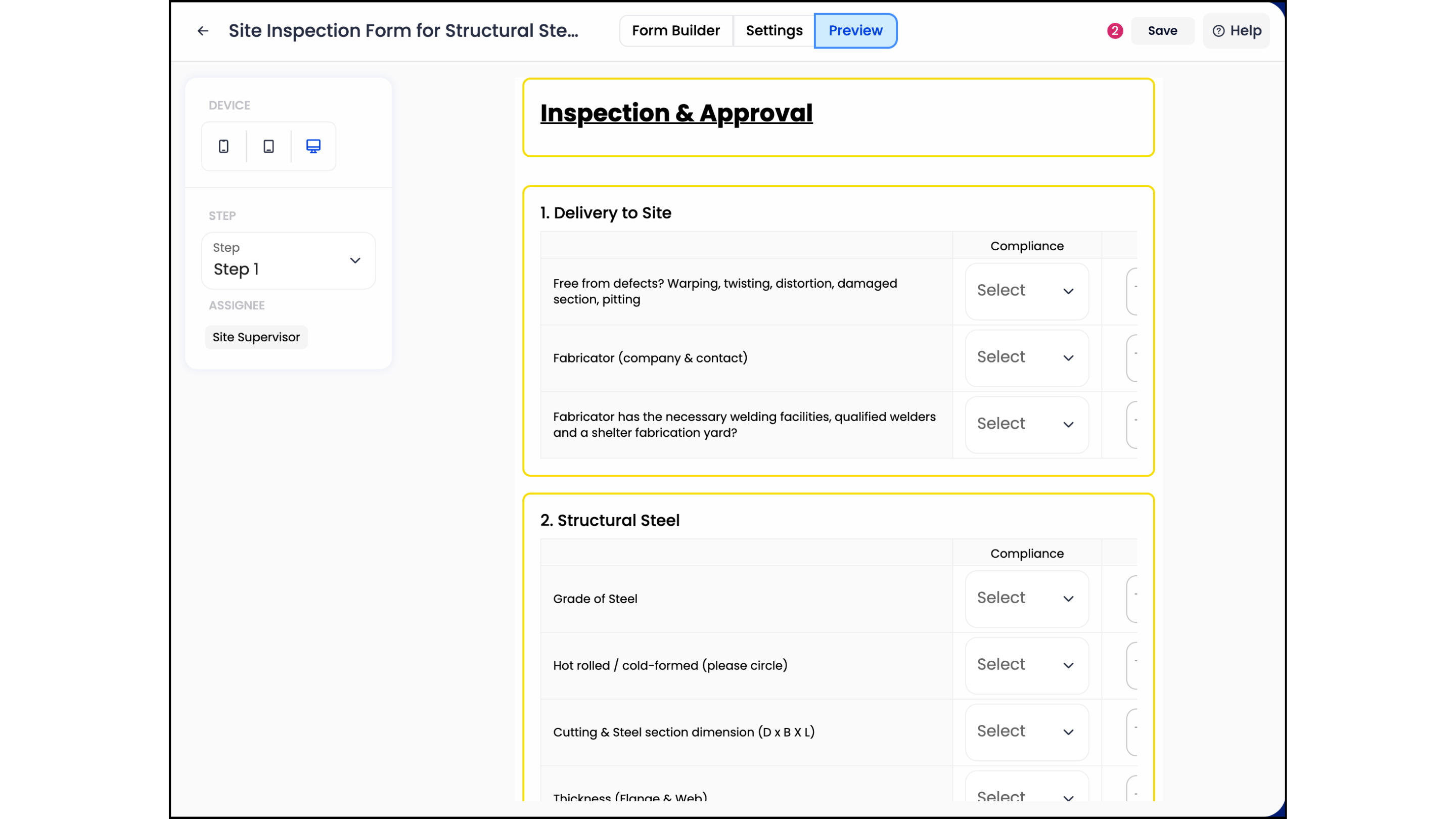
Standardising customised forms across your entire national portfolio ensures data consistency. You can compare the performance of a site in Melbourne with one in Brisbane using centralised benchmarking. This visibility allows project managers to replicate success and isolate failures across all active jobs, turning individual project data into company-wide intelligence. Start digitising your site forms with GoBuid today to bridge the gap between the field and the office with a single source of truth.
Command Your Site Data
Success on a modern project depends on how fast you turn site observations into management decisions. Moving beyond paper means more than just digitizing; it's about building a single source of truth that the office can actually trust. Construction-first platforms outperform generic tools because they understand the specific logic of a daily diary or a safety inspection. Using customised forms ensures your team captures high-quality data without the friction of irrelevant fields or clunky interfaces.
GoBuid gives you the power to generate reports in one click, turning hours of manual collation into seconds of automated output. You stay in control with a real-time project analytics dashboard that provides 100% visibility into site progress and potential risks. We keep things simple with no lock-in contracts, giving you the flexibility your business demands. It's time to stop chasing paperwork and start leading your crew with precision.
Streamline your site reporting with GoBuid's customised forms
Your next project deserves the clarity of a digital foreman. Let's get to work.
Frequently Asked Questions
Can I customise the forms to match my existing paper templates?
Yes, you can replicate your current paper workflows exactly within the platform. Our builder allows you to drag and drop fields to mirror the layout of your physical 2023 site logs. This ensures your field team transitions to customised forms without needing extensive retraining on new layouts. It's about maintaining your proven processes while upgrading the delivery speed for 100% of your data.
Do your customised forms work offline when there is no internet on site?
Yes, our forms operate fully offline to ensure data capture never stops. Field teams can complete 100% of their reports in remote locations or basements where signal is zero. Once the device reconnects to a 4G or Wi-Fi network, the data syncs automatically to the central office dashboard. This prevents the loss of 15% of site data typically dropped during connectivity gaps on large scale projects.
How many users can access the forms on a single project?
Our platform supports unlimited users across every project tier. Whether you have a 5-person crew or a 200-person workforce on a $50 million infrastructure job, every stakeholder gets access. You can assign 4 distinct permission levels to ensure only the right personnel view or edit sensitive site data. This keeps your project communication streamlined and secure across the entire 12-month construction cycle without extra per-seat costs.
Can I export the data from my customised forms into Excel or PDF?
Yes, you can export all captured data into professional PDF reports or raw Excel files with one click. This feature allows you to generate 24-hour progress summaries or weekly safety audits instantly. It eliminates the 4-hour weekly manual data entry task usually required to compile field notes for client meetings. Your office team gains 100% visibility without chasing paper trails or deciphering messy handwriting from the field.
Does GoBuid support digital signatures for safety and inspection forms?
Yes, GoBuid includes secure digital signature fields for all safety and inspection documents. Site supervisors and subcontractors sign directly on tablets or phones to verify 100% compliance with ISO 45001 standards. These signatures are time-stamped and geo-tagged to provide an unalterable audit trail for every site inspection. It's a foolproof way to ensure accountability across 50 different subcontractors and internal teams during high-risk activities.
Can I attach photos and documents to my customised forms?
Yes, you can attach high-resolution photos and PDF documents directly to any form field. This allows you to document 15 specific site defects with visual evidence or link 2024 revised structural drawings to a daily report. Visual proof bridges the gap between field reality and office oversight, reducing dispute resolution time by 30%. You'll have a clear, timestamped record of every single site event for your project archives.
Is there a limit to the number of customised forms I can create?
There is zero limit on the number of customised forms you can build and deploy. You can create 50 different templates for everything from pre-start checks to complex concrete pour logs. This flexibility ensures your digital toolkit grows alongside your project portfolio without incurring extra per-form costs. It's a scalable solution designed for firms managing 10 or more active sites simultaneously while maintaining a single source of truth.
How does GoBuid handle manpower and equipment tracking within forms?
GoBuid tracks manpower and equipment through dedicated resource modules embedded in your forms. You can log exact hours for 12 different trades and track 100% of heavy machinery uptime on a single screen. This data feeds directly into your cost-to-complete reports, giving you a 10/10 view of project profitability. It replaces the messy 20-page spreadsheets usually used for tracking site resources, saving your foremen 45 minutes every day.
