A roundup of technology that helps junior site engineers learn faster
Explore technology to help junior site engineers learn faster, from hands-on practice and mentor feedback to using AI and project records with sound judgment.
by Guillermo Sánchez
|
The fastest way for a junior site engineer to learn may not be another app. Technology to help junior site engineers learn faster works best when it connects a clear explanation to a task on site, not when it replaces practical experience.
Digital tools can make project records and lessons easier to follow, but learning still depends on applying what you understand and asking thoughtful questions. AI can explain a process or organize information, but its output still needs to be checked against real project conditions.
This roundup explains how to compare learning tools by their practical value, pair theory with hands-on work, and use AI as a learning aid without handing over your judgment. It also shows how shared project documentation can connect lessons across the team and keep decisions visible.
Key Takeaways
- Compare learning tools by how well they support real site decisions, not just how quickly they deliver information.
- Pair theory with hands-on tasks that build in complexity, and use mentor feedback to turn lessons into practical skills.
- Use AI to explain concepts and explore alternatives, then test your understanding by describing the solution in your own words.
- Connect learning to project records with GoBuid’s Digital Site Diary, keeping site information and lessons easier to follow.
1. Comparing approaches and tradeoffs
Choose construction management software that makes project records, inspections, tasks, and relevant drawings easy to find. Junior site engineers learn more when they can connect a drawing revision to the affected work area instead of studying each concept in isolation. Specialized progress tracking solutions from Skyview Media can also supply clear visual documentation, helping junior engineers compare physical site developments directly against project drawings.
For everyday field learning, compare mobile apps by how clearly they support inspections, reporting, and documentation. A useful workflow lets an engineer record an issue, add context, and share it with the team. Explore construction field software features as one example of tools organized around site work.
Technology works best alongside a named mentor. Have the junior engineer review a digital record, explain what it shows, then compare that interpretation with the mentor’s. A 20-hour video course may teach concepts, but a real site task reveals where they apply.
AR overlays digital information on a physical view, helping engineers relate an instruction or model to a work area. VR can simulate a site scenario for practice before an engineer encounters it in the field. Either way, connect the experience to actual project tasks.
BIM tools help junior engineers view building elements and coordinate information across disciplines. For instance, reviewing a model can help them see where a service route intersects another element before work proceeds.
OSHA-related training depends on the applicable requirements and work hazards. A digital course, app, or VR module is simply a delivery method, so choose content relevant to the training topic and the worker’s task.
The cost of platforms, software, and VR depends on the tool, access model, and training content. Compare what each option enables, such as field reporting or simulated practice, rather than judging by format alone.
Construction field software can support on-site learning when it lets engineers document inspections, add context to reported issues, and share records with the team. Dedicated inspection platforms like PHOTO iD can help automate photo labeling and reporting during field assessments. Choose tools that make project records, tasks, and relevant drawings easy to find.
2. Practice alongside theory
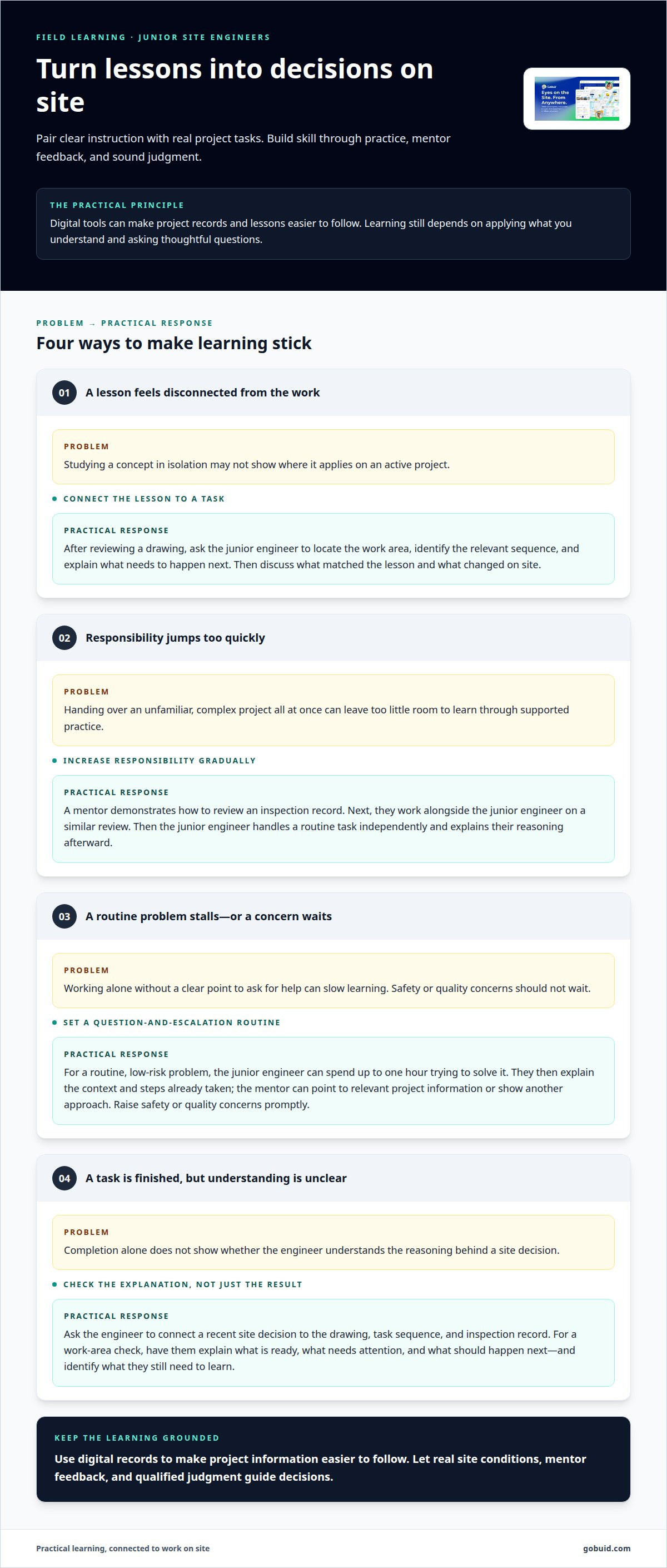
Turn each lesson into a task on an active project. After reviewing a drawing, ask the junior engineer to locate the work area, identify the relevant sequence, and explain what needs to happen next. This links concepts to field decisions. Start with a defined task, then discuss what matched the lesson and what changed on site.
Build responsibility gradually. A mentor can demonstrate how to review an inspection record, then work alongside the junior engineer as they complete a similar review. Next, let them handle a routine task independently and discuss their reasoning afterward. This gives them practice without handing over an unfamiliar, complex project all at once.
Make questions part of the workflow. For a routine, low-risk problem, a junior engineer can spend up to one hour trying to solve it, then explain the context and steps already taken. A mentor can point them to relevant project information or demonstrate another approach. Raise safety or quality concerns promptly rather than delaying escalation to keep working alone.
Check learning through explanation, not completion alone. Ask the engineer to describe how a recent site decision connects to the drawing, task sequence, and inspection record. If they can explain the reasoning and identify what they still need to learn, the practice has built useful understanding. Use digital field workflows to keep project learning connected to work on site.
Pair instruction with a site task: ask the junior engineer to use the relevant drawing and inspection requirements to check a work area, then explain what is ready, what needs attention, and what should happen next.
Create an environment where junior engineers feel safe making mistakes, since mistakes are part of learning.
3. Using AI as a learning tool
AI can help junior site engineers learn faster when it clarifies unfamiliar concepts without making site decisions for them. Ask it to explain a construction sequence, define a technical term, or compare ways to record an observation. Treat the response as a starting point for discussion, not an instruction to follow automatically.
Check each answer against the drawings, project requirements, and actual site conditions. AI can sound certain while giving incorrect or unsuitable guidance. Ask it to explain its assumptions, then compare them with approved project information. Bring safety or quality decisions to the responsible team member.
Useful technology to help junior site engineers learn faster supports a process they can explain themselves. Ask AI to clarify an inspection item, then apply the relevant concept to the task. Afterwards, describe what you observed, why it matters, and what information supports your conclusion. Explaining it without AI can reveal gaps a polished response may hide.
AI, cameras, and wearables can create risks if they distract workers, capture sensitive information, or produce misleading guidance. Keep devices from interfering with field tasks. Record only for a clear work purpose, and follow project procedures for access and storage. Treat AI as a learning aid, never as a safety control or a replacement for qualified judgment.
Keep people accountable while making project information easier to follow. Explore tools for clearer site documentation.
AI can help junior site engineers review field observations without making decisions for them. For example, ask it to organize notes about an inspection or identify questions to check against the drawings. The engineer should confirm the information on site and decide what needs to be raised with the responsible team member.
Use AI to support site engineering decisions by asking it to compare an observation with relevant project information or highlight details that may need a closer look. Check its suggestions against approved documents and site conditions, and consider safety, quality, and project requirements. Keep qualified people responsible for conclusions and next steps.
GoBuid: Digital Site Diary
GoBuid’s Digital Site Diary helps junior site engineers connect daily site activity with project records. Reviewing documented work can help them understand what happened, what changed, and what the team needs to track next.
Use Customised forms to capture information consistently and Manpower Tracking to record workforce details. When a report is needed, GoBuid generates it in one click. These tools create clear records that junior engineers can learn from alongside practical site experience.
Turn to GoBuid when your team needs a clearer way to document site activity and make project information easier to follow. Contact GoBuid to discuss your team’s needs.
Build a stronger learning routine on site
Set a clear learning target for each new assignment. Give junior engineers room to take ownership, then make time to discuss what helped them progress and where they need guidance. Regular feedback turns daily work into a deliberate path toward greater responsibility.
Choose technology to help junior site engineers learn faster based on how well it supports this routine. The right tool makes work and decisions easier to follow, keeping learning connected to project needs instead of adding another task. Focus on useful information and clear team communication.
GoBuid can support teams looking to make project work clearer and easier to document. Contact GoBuid to discuss your needs. Keep learning practical, give each engineer room to grow, and build the next step together.
Frequently Asked Questions
What technologies help junior site engineers learn faster on construction projects?
Digital project records, drawing and model viewers, inspection apps, and AI learning assistants can all support a junior engineer’s development. Use them around a real task: review relevant project information before work, capture observations during the activity, then compare the record with the completed work. This helps engineers connect digital information to site conditions and identify where they need guidance.
What mobile apps support on-site learning, inspections, and reporting for engineers?
Construction field software can support on-site learning when it makes inspections and issues easy to record, add context to, and share with the team.