Affordable Procore Alternative for Singapore Contractors
Compare an affordable Procore alternative Singapore contractors can use, with guidance on pricing, site coordination and offline features for your team.
by Michael R. Henderson
|
The biggest construction platform isn’t always the best fit. An affordable Procore alternative should suit the way your projects run without adding complexity your team won’t use.
Cost matters, but so does the work on site. If field updates are difficult to capture or connectivity is unreliable, a lower price alone won’t make a platform practical. The right choice depends on how well it supports coordination between site and office.
This comparison helps you assess construction platforms by price, field coordination, and offline functionality. See which capabilities matter for different teams, then use a simple decision guide to narrow down options that fit your project workflows.
Key Takeaways
- Match a platform to the records, workflows and project scale your team actually manages, rather than paying for complexity you won’t use.
- Assess field coordination and offline functionality against the conditions crews face on site, where updates need to reach the office clearly.
- Compare pricing by the capabilities and implementation demands involved, not just the starting subscription cost.
- For clearer site records, GoBuid offers customised forms, manpower tracking, safety and quality inspections, and one-click report generation.
Alternatives to Procore for construction project management
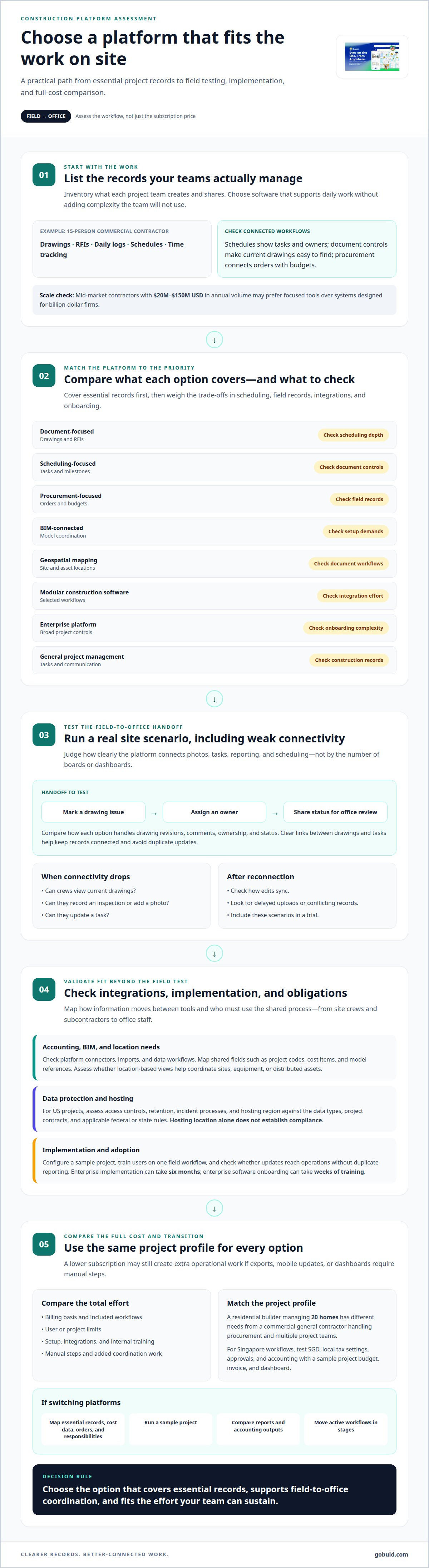
A 15-person commercial contractor may need drawings, RFIs, daily logs, schedules, and time tracking, rather than a broad enterprise suite. List the records each project team creates and shares. That inventory shows whether construction management software supports daily work without adding unnecessary complexity.
For general contractors, compare scheduling, document management, and procurement as connected workflows. Schedules should identify tasks and owners; document controls should make current drawings easy to find. Procurement tracking should connect orders with budgets. Mid-market contractors with $20M to $150M USD in annual volume may prefer focused tools over systems designed for billion-dollar firms.
For US projects, data protection and hosting requirements depend on data types, project contracts, and applicable federal or state rules. Assess access controls, retention, incident processes, and hosting region against those obligations. Hosting location alone does not establish compliance.
Accounting and BIM integrations depend on platform connectors, imports, and data workflows. Map shared fields, such as project codes, cost items, and model references, before selecting software. Geospatial mapping and asset tracking address different needs: assess whether location-based views help coordinate sites, equipment, or distributed assets.
| Option | Best fit | Trade-off to assess |
|---|---|---|
| Document-focused | Drawings and RFIs | Scheduling depth |
| Scheduling-focused | Tasks and milestones | Document controls |
| Procurement-focused | Orders and budgets | Field records |
| BIM-connected | Model coordination | Setup demands |
| Geospatial mapping | Site and asset locations | Document workflows |
| Modular construction software | Selected workflows | Integration effort |
| Enterprise platform | Broad project controls | Onboarding complexity |
| General project management | Tasks and communication | Construction-specific records |
Choose an option that covers essential records first, then compare integrations and onboarding effort. Enterprise implementation can take six months.
Field coordination and offline functionality
Field coordination works when site updates reach the office with enough context to act. For example, a supervisor records a drawing issue, assigns an owner, and shares its status with the project team. Compare platforms by how clearly they connect photos, tasks, reporting, and scheduling, not by the number of boards or dashboards.
Offline access needs a practical test. Identify what crews must do where connectivity drops: view current drawings, record an inspection, add a photo, or update a task. Then check what remains available offline and how edits sync after reconnection. Delayed uploads or conflicting records can interrupt field-to-office workflows, so include those scenarios in a trial.
Field execution platforms differ in how they link drawings to tasks and follow-ups. Test a common handoff: a site team marks a drawing, assigns an action, and sends it for office review. Compare how each option handles revisions, comments, ownership, and status. Clear links between drawings and tasks help teams keep records connected and avoid duplicate updates.
Adoption depends on the steps crews repeat each day. Enterprise construction software onboarding can take weeks of training. Keep implementation focused: configure a sample project, train users on one field workflow, then review whether updates reach operations without duplicate reporting. Include subcontractors and office staff, since collaboration depends on both sides using the same process.
For a field-to-office workflow that keeps team updates together, explore construction team collaboration as part of your platform assessment.
Pricing and lower-cost alternatives to Procore
Assess Procore pricing against the functions and project scope your contractor needs. Compare the billing basis, included workflows, user or project limits, and implementation effort. A lower subscription can still add operational work if accounting exports, mobile updates, or dashboards require manual steps.
Transparent pricing means understanding what each option includes and how the total changes with use. Separate recurring fees from setup, integrations, and internal training. Then compare the same project profile across platforms. This can reveal limitations a headline price hides, such as missing workflows or extra coordination effort.
Compare platform pricing with Procore using consistent criteria, not assumptions about either product. A residential builder managing 20 homes has different requirements from a commercial general contractor handling procurement and multiple project teams. Match each platform to the portfolio, orders, reporting, and accounting processes your team relies on.
For Singapore dollars, local tax, and regional workflows, choose software that can record SGD, represent local tax settings, and support your approval and accounting processes. Test these needs with a sample project budget, invoice, and dashboard before deciding. Currency display alone does not establish that tax or accounting workflows fit.
To switch from Procore, map essential records first, including project documents, cost data, orders, and user responsibilities. Run a sample project in the alternative platform, compare reports and accounting outputs, then move active workflows in stages. This limits disruption while teams learn new processes. Review project cost visibility as part of your platform assessment.
GoBuid
GoBuid supports construction teams that need clearer site records and practical project workflows. Use it when your priorities include tracking manpower, documenting inspections, and producing reports without adding unnecessary complexity to daily work.
Customised forms structure the information teams collect on site. Manpower Tracking records workforce information, while Safety & Quality Inspections support inspection workflows. Teams can also generate a report in one click, turning project information into a report for review.
These tools suit contractors looking to improve field documentation and reporting alongside their project management processes. They are not a replacement for every enterprise platform function, so match them to the workflows you need to improve. Contact GoBuid to discuss your project workflows.
Set Up Your Next Project With Clearer Workflows
Choose an affordable Procore alternative in Singapore by starting with the work your team wants to make clearer. Define the project records that matter, who updates them, and how site information should reach the office. This gives your team a practical basis for deciding which workflows to improve first.
GoBuid supports this work with a Digital Site Diary, Customised forms, and one-click report generation. These tools help teams organize site information and prepare project reports within their workflows.
Make the next step a focused conversation about your project needs and the records your teams manage. Contact GoBuid to discuss your options and move toward a workflow that fits the way your team works. Clearer processes start with choosing what needs to change first.
Frequently Asked Questions
Why are Contractors Looking for Procore Alternatives?
Contractors look for alternatives when their current platform’s scope, workflows, or operating demands don’t fit the way their teams work. A small firm focused on daily records may not need the same setup as a general contractor coordinating complex projects. The decision often comes down to reducing friction in everyday tasks while keeping essential project information accessible.
Final Thoughts - Which Procore Alternative Fits your Construction Business?
The best fit is a platform that supports essential project workflows and works for the people who maintain them. Identify which records must be reliable, who owns each update, and what would make a system impractical for site teams. Use those criteria to compare options, then prioritize the workflow causing the most operational friction.
Which Procore Alternative Should you Consider in 2026?
Choose an option that matches your project scale and the work you need to manage, rather than choosing by name alone. For contractors focused on site documentation and reporting, GoBuid is one platform to assess. For teams with broader requirements, compare how each candidate handles the full set of project controls and integrations they depend on.
What are the best low-cost construction management tools for small contractors in Singapore?
There isn’t one best tool for every small contractor. Start with the workflows that consume the most coordination time, such as recording site activity or routing approvals. Compare each platform’s included capabilities, user limits, onboarding effort, and integration needs. A focused tool can suit a team better than a broad system if it covers essential work cleanly.
Which Procore alternatives include project scheduling, document control, RFIs, and site reporting?
Feature coverage varies by platform, so compare the four functions as a connected workflow. For example, trace a drawing revision to its RFI, related schedule task, and site report. Check whether teams can maintain those links without duplicate entry or separate records. This reveals whether a platform supports your project’s handoffs, not just a feature checklist.