Automated Construction Progress Reports: A Guide to One-Click Documentation
by Sam Chen
|
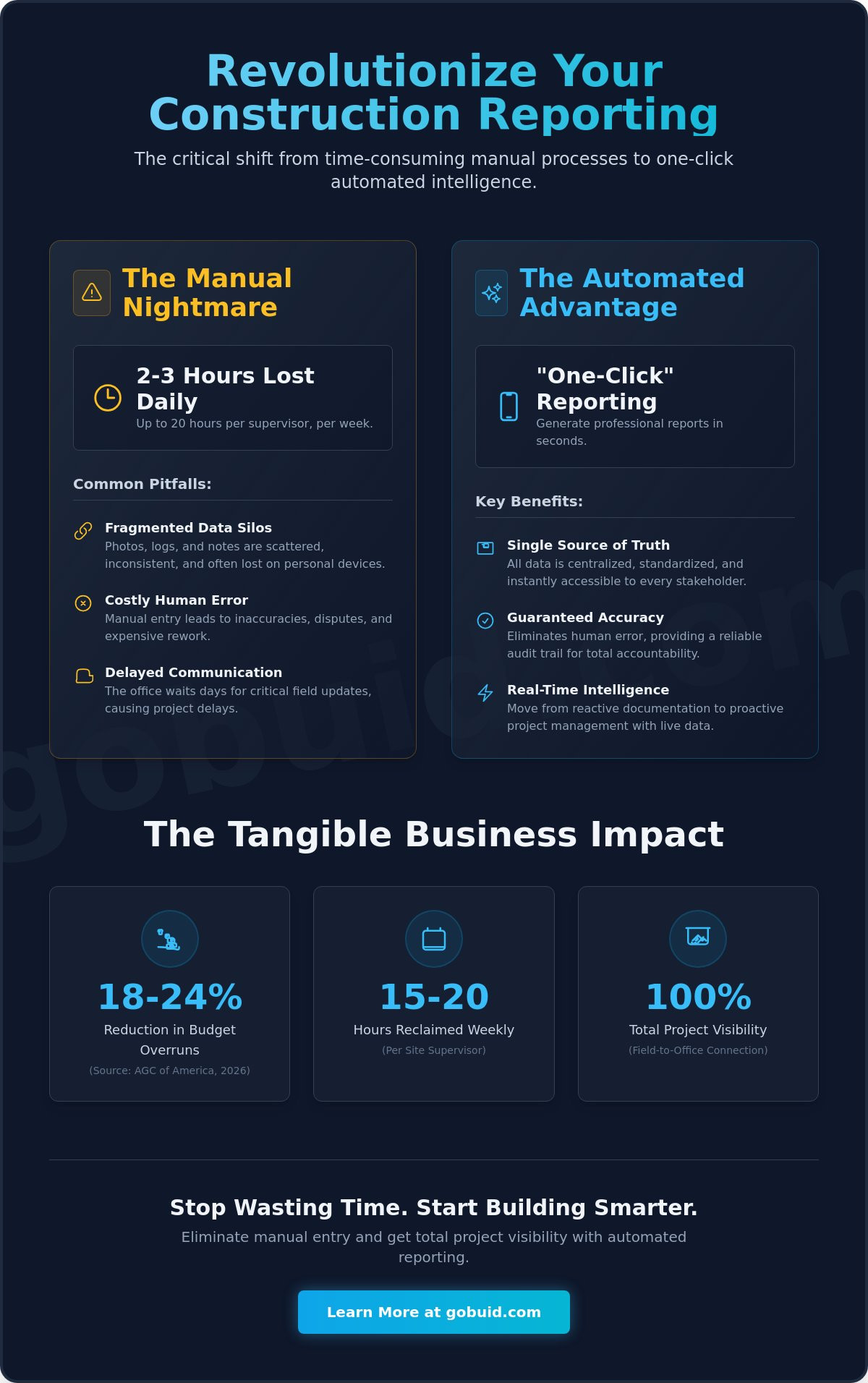
Your site supervisor didn't join the industry to spend three hours every night wrestling with spreadsheets and blurry photos. Manual data entry is a productivity killer. It creates a wall between the field and the office. You already know that delayed communication and inaccurate manpower tracking lead to costly rework. Research from the Associated General Contractors of America in May 2026 shows that firms using integrated reporting systems can reduce budget overruns by 18 to 24 percent compared to those relying on manual methods. Implementing automated construction progress reports is no longer a luxury. It's an operational necessity for teams that value their margins.
Reclaim your evenings and restore accuracy to your project documentation. This guide shows you how to eliminate manual entry and generate professional, real-time reports with a single click. We'll explore the transition from fragmented site diaries to a centralized digital engine that offers total project visibility. Discover how to connect your field data to a unified reporting system that drives accountability and keeps your projects on schedule.
Key Takeaways
Identify the hidden administrative costs of manual reporting and reclaim up to three hours of lost productivity every day.
Integrate real-time manpower and equipment tracking to feed your reporting engine with accurate data from the ground up.
Generate professional automated construction progress reports in seconds by leveraging a one-click documentation philosophy.
Boost field adoption rates with a mobile-first interface that makes capturing progress photos and site notes effortless for every team member.
Establish total project visibility by connecting disparate field activities into a single, unified source of truth for all stakeholders.
⭐ Learn more about GoBuid's feature - without the heavy enterprise price tag
The Administrative Burden: Manual vs. Automated Construction Progress Reports
Manual reporting is a drain on your most valuable resource: time. Site managers often lose two to three hours every day on redundant paperwork. This administrative overhead creates dangerous data silos where progress photos stay trapped on personal phones and manpower logs go missing. Automation in construction isn't just about robotics; it's about digitizing these workflows to ensure total project transparency. By implementing automated construction progress reports, you move from reactive documentation to real-time project intelligence.
To see how this works in practice, watch this step-by-step breakdown of modern reporting workflows:
Professional stakeholders prioritize automated transparency because it mitigates risk. When manpower logs are missing or photo documentation is inconsistent, liability increases. Automated systems provide the audit trail necessary to protect your margins. It's the difference between guessing and knowing your project's exact status.
Quantifying the Shift to Digital Site Diaries
Paper logs are static and prone to loss. Transitioning to a digital site diary allows for instant data retrieval and centralized storage. This move creates a unified point of truth for the entire team. Project owners and contractors no longer argue over what happened on-site; they simply check the dashboard. Centralization ensures that every update from the field is immediately accessible to the office, eliminating the lag that causes project delays.
Manual vs. Automated: A Productivity Breakdown
Let's look at the numbers. Manual reporting requires manual data entry, manual photo sorting, and manual email distribution. It's a slow, error-prone chain that consumes 15 to 20 hours of a supervisor's week. In contrast, automated construction progress reports capture logs directly in the field. Photos are tagged to specific tasks automatically. Report generation happens in one click. This shift doesn't just save time. It eliminates the human error that leads to disputes, rework, and costly legal claims.
Essential Components of a High-Impact Automated Reporting System
A high-impact system does more than digitize paper. It connects every field activity to a central intelligence hub. Traditional construction progress reports often lack the granularity needed for modern risk management. High-impact automated construction progress reports rely on three pillars: real-time tracking, visual verification, and standardized data entry. When these elements work together, you create a document that's both a record of work and a tool for future planning.
Connecting Field Operations to Office Analytics
Accurate reporting starts with the workforce. Effective manpower tracking is the foundation of every reliable document. It ensures that every hour spent on-site is accounted for and linked to a specific task. This eliminates the guesswork that often plagues manual logs. Similarly, equipment management logs justify project costs. They provide the evidence needed to explain timeline shifts or budget variations. When these data points flow automatically into a project analytics dashboard, you can identify schedule deviations before they turn into expensive delays. This dashboard acts as a mission control center. It visualizes trends and flags anomalies that human eyes might miss during a busy shift.
Customized Forms for Standardized Data
Consistency is the key to professional documentation. Customized digital forms ensure that safety and quality inspections are captured without friction. They force a standardized format across every site. This means your data is clean, searchable, and audit-ready. You aren't just logging progress; you're building a narrative of compliance and quality. Linking visual evidence directly to daily activities provides the final layer of accountability. Progress photos shouldn't sit in a separate folder. They belong inside the report, pinned to the relevant task. This creates an undeniable record of truth that protects your business from disputes. Integrating these components transforms your reporting from a chore into a strategic advantage. You can explore these digital features to see how they fit your specific workflow.
Implementing One-Click Reporting with GoBuid
GoBuid eliminates the gap between complex field data and professional documentation. Implementation of automated construction progress reports should be seamless, not a secondary project. Our 'One-Click' philosophy isn't a marketing slogan. It's a technical standard. We distill thousands of data points, from manpower logs to equipment hours, into a clean, professional PDF instantly. You don't need expensive 3D cameras or complex BIM integrations to get results. A mobile-first interface ensures high field adoption rates because it works on the devices your team already owns. It's built for the person wearing boots on the ground.
GoBuid's Reporting Engine: Professionalism Meets Speed
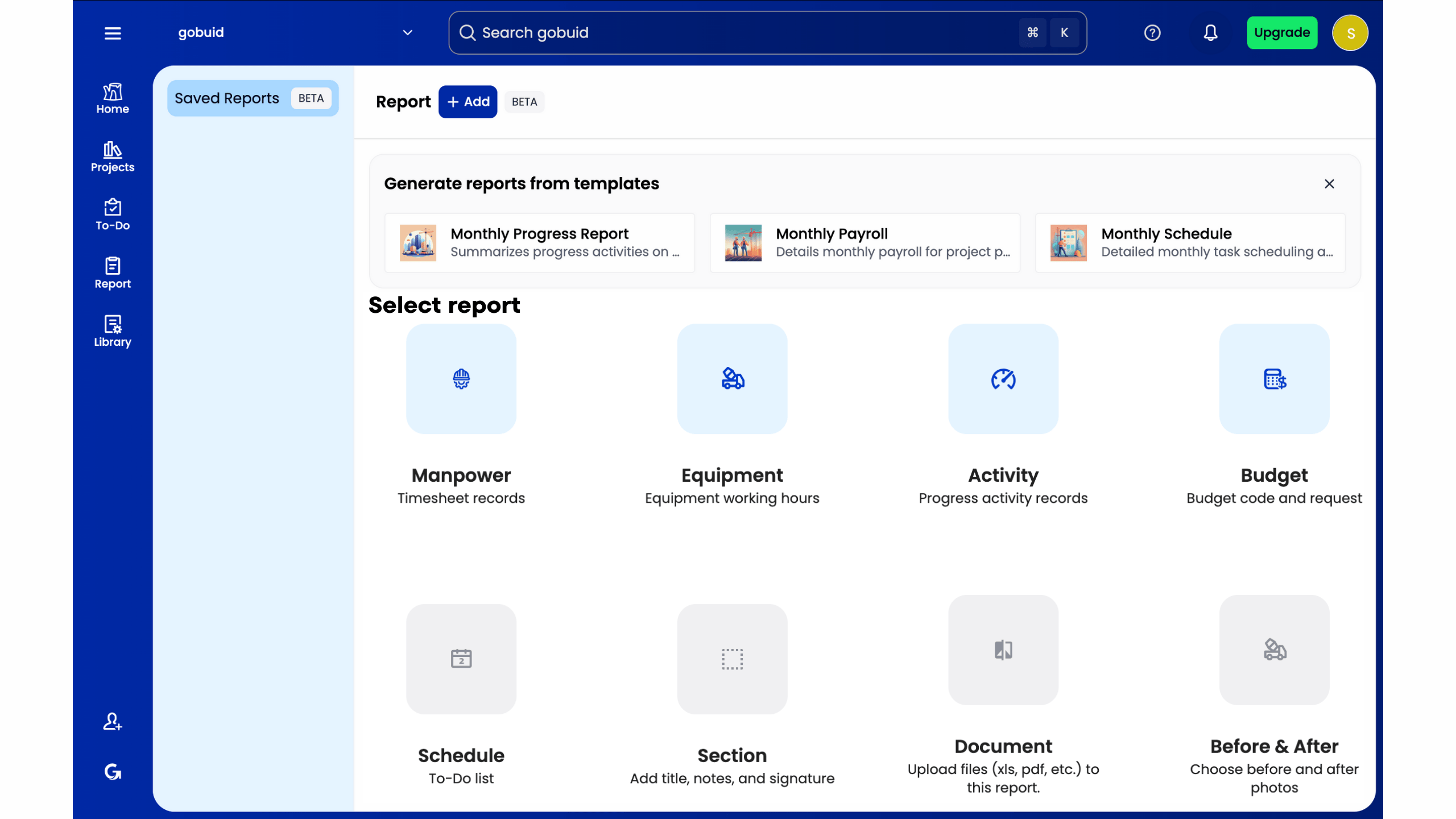
Stakeholders demand clarity. They want to see progress without digging through endless email threads or messy spreadsheets. Generating comprehensive automated construction progress reports builds immediate trust with project owners and investment partners. You deliver a level of professionalism that manual methods simply cannot match. By leveraging the project analytics dashboard, you move beyond simple logs. You engage in data-driven decision making that keeps projects profitable and keeps your team accountable.
A No-Nonsense Approach to Construction Software
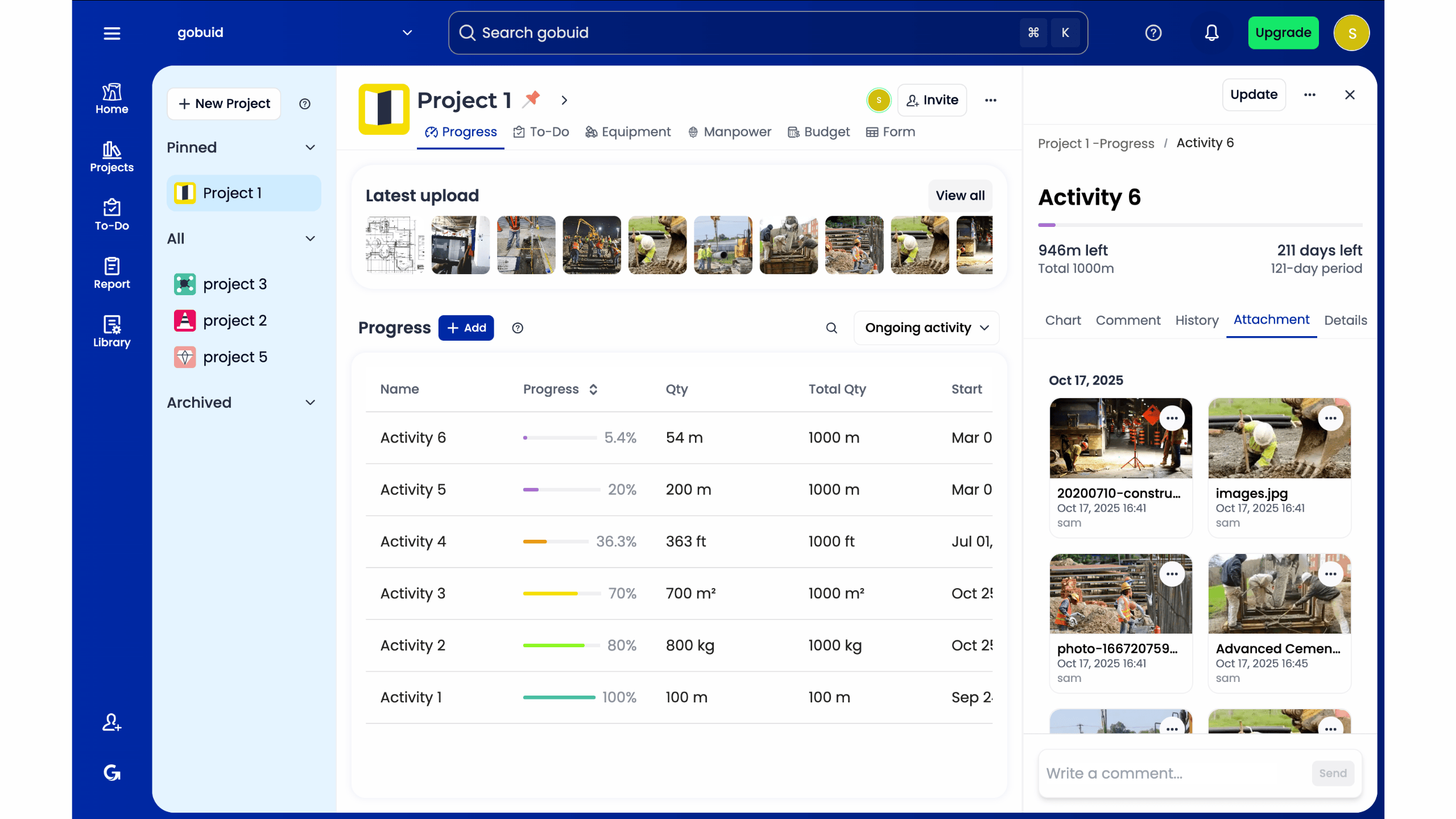
We focus on utility over fluff. GoBuid bridges the gap between field and office by prioritizing the features that actually move the needle for operational managers. Our flexible approach empowers contractors to scale their digital tools alongside their project volume while maintaining total visibility into every operational workflow. You maintain total control over your data and your project narrative. There are no hidden fees or complex hardware requirements to slow you down.
Stop losing hours every evening to manual paperwork. Start automating your documentation today to reclaim your time and protect your project margins. It's time to replace the traditional clipboard with a digital system built for the modern job site. Start your digital site diary with GoBuid and experience the efficiency of one-click reporting.
Upgrade Your Operational Standards
Manual paperwork is an outdated operational risk that drains your team's energy. You've seen how digital site diaries and integrated tracking eliminate the three-hour nightly reporting grind while protecting your project margins. Modernizing your workflow doesn't require complex software overhauls or long-term commitments. By centralizing your manpower and equipment tracking, you create a unified data point that ensures total transparency across every job site. Automated construction progress reports turn chaotic field data into professional records that stakeholders can actually trust. You gain total flexibility with no lock-in contracts; you only scale when your project volume demands it. It's time to stop managing spreadsheets and start managing progress with professional reports generated in one click. High-quality execution depends on high-quality data. Streamline your project reporting with GoBuid's one-click solution and reclaim your competitive edge. Take control of your site documentation today.
Frequently Asked Questions
How do automated construction reports improve site accuracy?
Automated systems improve accuracy by capturing data at the source and eliminating manual transcription errors. When field teams log manpower and equipment directly into a digital site diary, the risk of data silos or lost logs disappears. These automated construction progress reports pull from a single, unified data point. This ensures that the information office teams see matches the physical operational reality on the job site exactly.
Do I need special hardware to use automated reporting software?
No special hardware or proprietary mobile devices are required to implement this technology. The software is designed to run on the smartphones and tablets your team already uses in the field. This mobile-first approach ensures high adoption rates without the capital expenditure of new equipment. You maintain full control over your project documentation using existing tools to capture progress photos and site notes in real time.
Can I customize the report format for different stakeholders?
Yes, you can utilize customized digital forms to tailor documentation for various project stakeholders. Whether you need to highlight safety inspections for a site auditor or summarize budget progress for an owner, the system adapts to your specific needs. Standardizing these formats ensures that every report looks professional and meets the unique requirements of the recipient. This flexibility allows you to maintain transparency without adding administrative friction.
How much time can a project manager save with one-click reporting?
A project manager can save between two and three hours every day by eliminating manual data entry and report compilation. Generating automated construction progress reports in one click replaces the tedious process of sorting through photos and chasing down manpower logs. This reduction in administrative overhead allows your leadership team to focus on high-value tasks like task tracking and site safety. Efficiency translates directly into increased profitability and faster project completion.
