Buildertrend Alternatives in 2026: Compare Construction Software for Field Teams
Find the right Buildertrend alternatives for your crew. Compare top construction management tools built to streamline field documentation and reporting today.
by Guillermo Sánchez
|
The platform with the longest feature list may be the wrong fit for your crew. Buildertrend alternatives support different kinds of work, from residential project management to field coordination, documentation, and reporting.
If you’re weighing a switch, it’s reasonable to worry about disrupting active projects or adding a tool your field team won’t use. The right choice depends on the workflow you need to improve, not the size of a feature list. Compare how each platform handles the work from site capture through review and reporting, and test it with the people who will use it. GoBuid supports mobile field documentation, digital forms, workforce and equipment management, and report generation. Use a real site workflow to assess whether those tools fit your team’s needs.
Key Takeaways
- Identify the workflow causing the most friction before comparing Buildertrend alternatives, so you can focus on tools that fit the work.
- Compare platforms by field documentation, reports, forms, workforce and equipment needs, not by feature count alone.
- GoBuid provides mobile-first documentation, digital forms, and report generation for teams managing site records and reporting.
- Before switching, test a real workflow with field users and review how records, attachments, permissions, and reporting will carry over.
Why consider Buildertrend alternatives? Start with the workflow that needs to improve
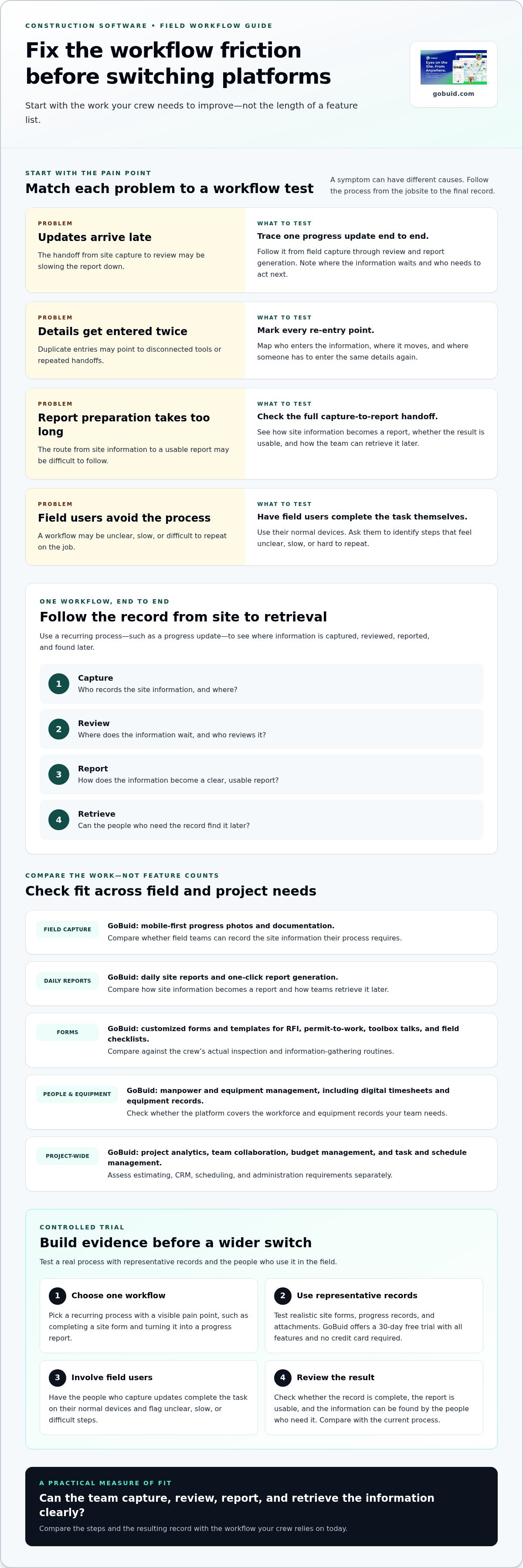
Changing construction software affects active projects, field teams, and documentation routines people already rely on. A switch can create friction if records move differently or crews have to change how they capture site information. Before comparing Buildertrend alternatives, pinpoint what isn’t working. Are updates delayed? Are people entering the same information twice? Does report preparation take too long, or is there a process field users avoid?
Those symptoms can have different causes. Duplicate entries may come from disconnected tools, while late reports may reflect a slow handoff between site capture and review. A longer feature list won’t fix either issue by itself. Define the workflow outcome you need, then compare platforms against it.
This video offers one perspective on comparing construction software, with a focus on home service contractors.
Which construction workflow should a Buildertrend alternative fix first?
Map one recurring process from the jobsite to the final record. For example, follow a progress update from field capture through review and report generation to later retrieval. Note who enters the information, where it waits, and where people re-enter details or struggle to find them. GoBuid supports this workflow with mobile documentation, digital forms, progress monitoring, and daily site reports.
Then separate field documentation from broader platform needs. If the priority is site diaries, progress photos, inspections, or daily reporting, assess how each option supports those tasks. If the main gap is estimating, CRM, scheduling, or project administration, compare those workflows directly. Construction estimating software, for example, addresses estimating tasks such as takeoffs and cost worksheets, which differ from field reporting.
Set a clear test: can the team capture, review, report, and retrieve the information with less friction? Compare the steps, the clarity of the resulting record, and how easily the team can find it later. That’s a stronger basis for a switch than choosing the platform with the most features.
Compare Buildertrend alternatives by field documentation, reporting, and project fit
Compare the work each platform supports, not just its feature count. Trace how site information gets captured, reviewed, reported, and retrieved. Then check whether the same system covers your wider project needs, including workforce, equipment, budgeting, and task coordination.
| Workflow | GoBuid | What to compare in other platforms |
|---|---|---|
| Field capture | Mobile-first progress photos and documentation. | Can field teams record the site information their process requires? |
| Daily reports | Daily site reports with one-click report generation. | How does site information become a report, and can teams retrieve it later? |
| Forms | Customised forms and templates for RFI, permit-to-work, toolbox talks, and field checklists. | Do forms support the crew’s actual inspection and information-gathering routines? |
| Workforce and equipment | Manpower management and equipment management, including digital timesheets and equipment records. | Can the platform cover the workforce and equipment records your team needs? |
| Project-wide needs | Project analytics, team collaboration, budget management, and task and schedule management. | Compare estimating, CRM, scheduling, and administration requirements separately. |
How does GoBuid fit among Buildertrend alternatives?
GoBuid is built for teams that need to capture and organize field records, use structured forms, manage workforce and equipment information, and prepare reports. Progress monitoring and daily site reports support project documentation, while one-click report generation helps turn site information into a report. Explore its construction management features against the tasks your team handles on site.
Other platforms may place more emphasis on broader project administration or specific workflows such as plan coordination, cost control, or customer management. For trade contractors needing dedicated takeoff and bidding tools, specialized software such as Best Bid focuses specifically on electrical estimating rather than broad field administration. Compare those capabilities against your actual requirements rather than assuming one tool will suit every team. Check that the workflows you rely on are supported, and consider how information moves between connected tasks.
Assess GoBuid for field-records-led work alongside your wider system requirements. See how GoBuid supports field documentation, then compare the rest of your project needs feature by feature.
How to evaluate a Buildertrend alternative before switching
A controlled trial gives your team evidence before a software change touches every active project. Set a clear test and judge the workflow, not just the demo.
- Choose one workflow. Pick a recurring process with a visible pain point, such as completing a site form and turning the record into a progress report.
- Use representative records. Test with realistic site forms, progress records, and attachments. GoBuid offers a 30-day free trial with all features and no credit card required, so your team can work through a relevant process.
- Involve field users. Ask the people who capture updates to complete the task on their normal devices. Have them point out steps that feel unclear, slow, or difficult to repeat.
- Review the result. Check whether the record is complete, the report is usable, and the information can be found by the people who need it. Compare the result with your current process.
What should a construction software trial prove before you move?
Look for practical evidence. Can crews submit the forms they use? Are progress details documented in a consistent place? Can the team generate and review automated construction reports without creating extra work? Test the whole handoff, from the person entering information to the person reviewing the report. A trial should also reveal what needs to change in your routine before broader adoption.
Plan migration separately from workflow testing. Inventory historical records and attachments, confirm how permissions should work, and identify reports that must remain available across the transition. Map how reporting will continue while teams move between systems. Don’t assume records transfer automatically. Document what needs to be retained, where it will be stored, and how the team will access it.
Use the trial findings to compare alternatives against your defined workflow, then review GoBuid plans as part of your decision. If the field-record process fits your team, explore GoBuid for construction teams as a next step.
Make your next software decision on site
A software change is useful only if it gives the team a clearer way to complete its work. Before choosing among Buildertrend alternatives, agree on what a successful field workflow looks like: fewer handoffs, clearer records, or reports ready when needed.
Give the pilot a clear owner and a simple way to capture feedback from the people entering information on site. Decide what must remain accessible during the transition, and set a review point before expanding the change to other projects. That keeps the decision grounded in the work rather than assumptions.
Ready to assess GoBuid against a real site workflow? Start your GoBuid trial. Put the process in the hands of the team, review what works, and decide on the next step with confidence.
Frequently Asked Questions
Can construction software alternatives import Buildertrend project data?
Some platforms may support data imports, but compatibility depends on the destination software and the files or records being moved. Don’t assume every item will transfer in the same structure. Before committing, use a small sample to check whether project names, dates, attachments, and key fields remain usable. Keep a separate copy of source records during the transition.
Is a free trial enough to evaluate a Buildertrend alternative?
A free trial can reveal whether a platform suits your team, but only if you test more than the sign-up or dashboard experience. Have a field user complete a realistic task, then ask a manager to review the resulting record. Note unclear steps, missing information, and extra work. A trial can inform the decision, but it won’t prove every migration or long-term support requirement.
Can one construction platform replace every Buildertrend workflow?
Not necessarily. A platform may cover several connected tasks while leaving a specialized workflow outside its scope—for instance, teams often pair general platforms with specialized solutions like PHOTO iD for automated photo labeling and organization during site inspections. GoBuid supports digital forms, progress monitoring, daily site reports, equipment management, workforce management, budgeting, and task and schedule management. Compare those capabilities with the processes your company depends on, including estimating or customer management, before deciding whether one system can meet the full need.
What should a small contractor test first when comparing Buildertrend alternatives?
Start with the task that happens often and creates the clearest operational burden, such as collecting a daily site record or preparing information for a progress update. Include the person who enters the data and the person who uses it later. Compare the steps required, the clarity of the record, and the effort it takes to retrieve information. This keeps the evaluation manageable and helps small teams judge practical fit before expanding the test.
