Beyond Photos: The Best CompanyCam Alternatives for Construction Site Management in 2026
by Sheldon Huang
|
What if your site photos were actually the least valuable part of your project documentation? While capturing visual evidence is critical, many contractors now find themselves paying up to $99 per user every month just to store pictures. If you are searching for a companycam alternative, you've likely realized that photos alone don't finish projects. You need a system that connects those images to manpower, equipment, and daily progress without forcing you to toggle between five different apps.
It's frustrating to spend hours every evening manually compiling reports from fragmented data. You deserve total operational transparency and better visibility into your site resources. This guide explores how professional teams are moving beyond simple photo storage toward integrated site documentation. We will show you how to achieve one-click professional reporting and real-time tracking through a centralized digital site diary. You'll learn to leverage customized forms and project analytics to regain control over chaotic workflows and increase your overall productivity.
Key Takeaways
Stop treating photos as isolated files and start using them as operational data points to drive project progress.
Evaluate any companycam alternative based on its ability to track manpower and equipment alongside visual documentation.
Eliminate administrative fatigue by adopting systems that generate professional site reports in one click.
Centralize disparate site activities into a digital site diary to ensure total transparency across your entire team.
Use real-time project analytics to identify bottlenecks and increase productivity before they impact your bottom line.
⭐ Learn more about GoBuid's feature - without the heavy enterprise price tag
Why Construction Teams are Searching for a Companycam Alternative in 2026
In 2026, professional contractors are hitting a "photo-only" ceiling. Visual evidence is a staple of construction management, but photos without operational context are just digital clutter. Teams realize that images alone don't track labor hours or equipment status. This lack of transparency creates a disconnect between the field and the office. It's time to stop treating photos as isolated files and start using them as data points.
The administrative burden is growing. Project managers spend hours every evening manually linking photos to daily logs. This manual process is prone to error and creates significant delays in reporting. Finding a viable companycam alternative is now a matter of operational efficiency. You need a unified data point that connects every site action to a central dashboard in real-time.
The Problem with Fragmented Site Documentation
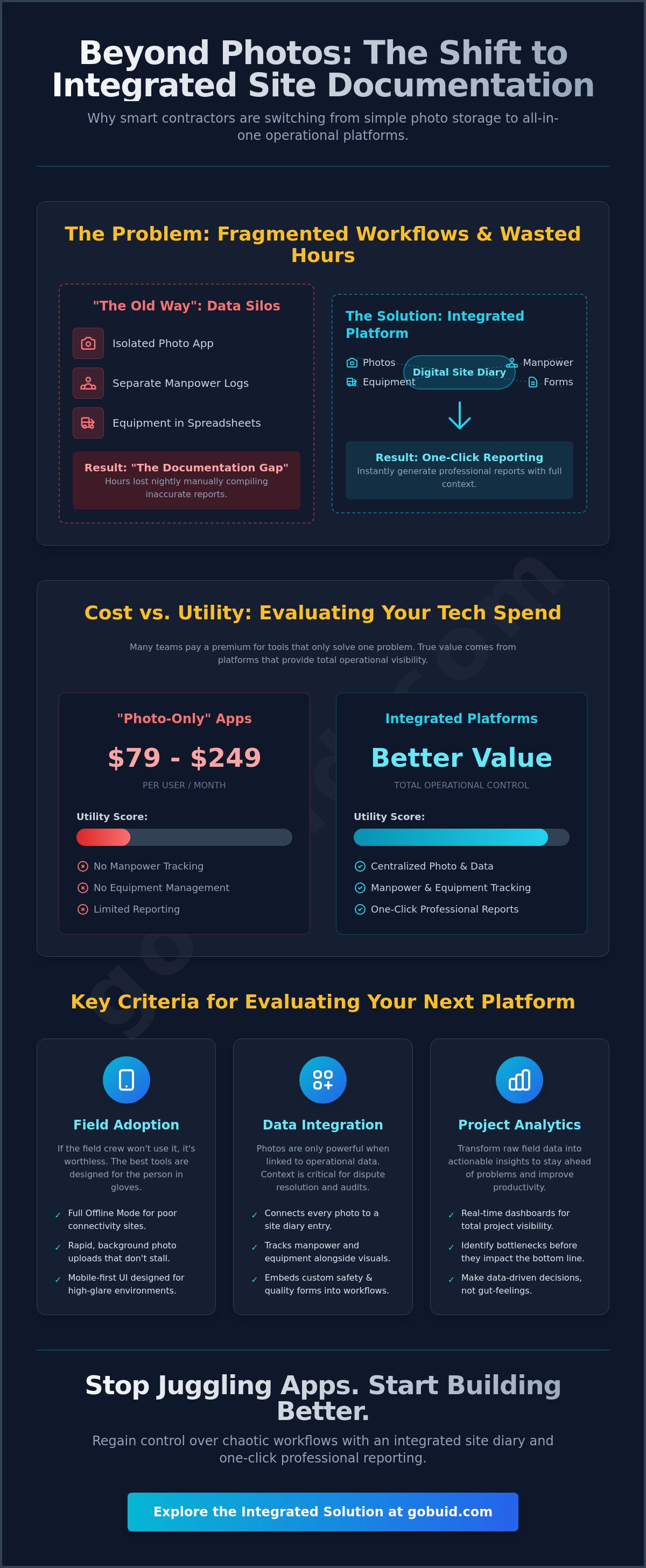
When photos live in one app and manpower logs in another, critical data falls through the cracks. You can't achieve one-click reporting if your documentation is scattered across multiple platforms. A centralized digital site diary ensures every photo is tied to a specific task, worker, or piece of equipment. The Documentation Gap is the time lost between capturing a photo and filing a report.
Cost vs. Utility: Evaluating Your Tech Spend
Per-user costs for basic documentation tools are climbing. Research shows some pro plans now cost between $79 and $249 per user monthly. This pricing often lacks the utility to justify the spend. Professional teams prioritize platforms that offer equipment management and safety inspections. Evaluate your tech stack based on total operational visibility. It is also important to consider the flexibility of your software agreements to ensure your tech can scale alongside your business growth.
Key Criteria for Evaluating Jobsite Documentation Platforms
Selecting a companycam alternative requires looking past the camera lens. You need a framework that prioritizes operational depth over simple photo storage. High-level project analytics only matter if the data coming from the field is accurate and consistent. This means your software must bridge the gap between site reality and office oversight through a unified interface.
Field Adoption: The Make-or-Break Factor
Foremen don't have time for complex menus. If an app takes more than three taps to log an entry, field crews will abandon it. Administrative overhead vanishes when tools are designed for the person wearing gloves, not just the person in the office. High-quality research on technology adoption confirms that ease of use and perceived ROI are the primary drivers for software success in construction. Focus on these essential features to ensure your team actually uses the tool:
Offline mode for sites with poor connectivity
Rapid, background photo uploads that don't stall the device
Mobile-first navigation built for high-glare environments
Integration of Visual and Operational Data
Photos are just one piece of the puzzle. A robust platform links every progress photo to a specific site diary entry and manpower log. This creates a chronological record that stands up to scrutiny during disputes or audits. Integrating Equipment Management ensures you know exactly which assets were on-site when a photo was taken. Standardized Customised forms further enhance this by embedding safety and quality inspections directly into the daily workflow.
Data-driven decisions require a project analytics dashboard that synthesizes these disparate inputs into actionable insights. You can explore how integrated platforms simplify this process to ensure your team stays productive without the administrative drag. Real-time tracking of manpower and site resources transforms a simple photo gallery into a powerful operational engine.
GoBuid: The Integrated Site Diary and Reporting Alternative
GoBuid is the professional upgrade for contractors who have outgrown simple photo apps. It functions as a comprehensive digital site diary that captures the full scope of your project's health. While other tools focus on pinning photos to plans, GoBuid integrates those visuals into a broader operational framework. It's the companycam alternative built for teams that value data-driven execution over manual documentation. You gain total visibility into your site resources through a single, unified interface.
Streamlining Daily Operations with Mission Control
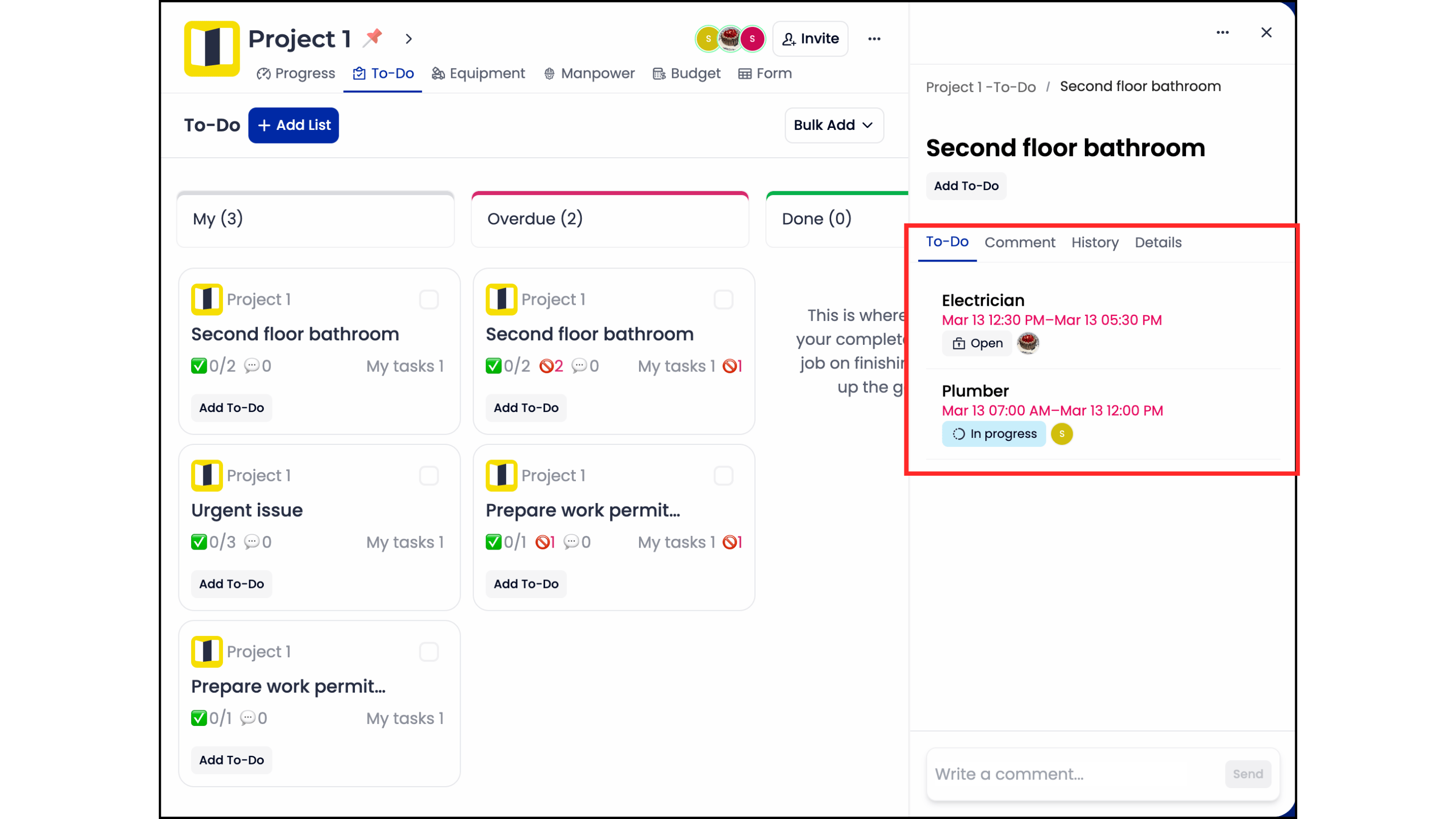
Mission Control serves as your central hub for project oversight. It allows you to view progress photos and documentation within the context of specific tasks and site locations. This centralized approach ensures that every team member sees the same reality in real-time. GoBuid enables real-time manpower tracking to ensure project timelines stay on track and labor costs remain under control. You can stop guessing about site progress and start managing with precision.
Professional Reporting at the Touch of a Button
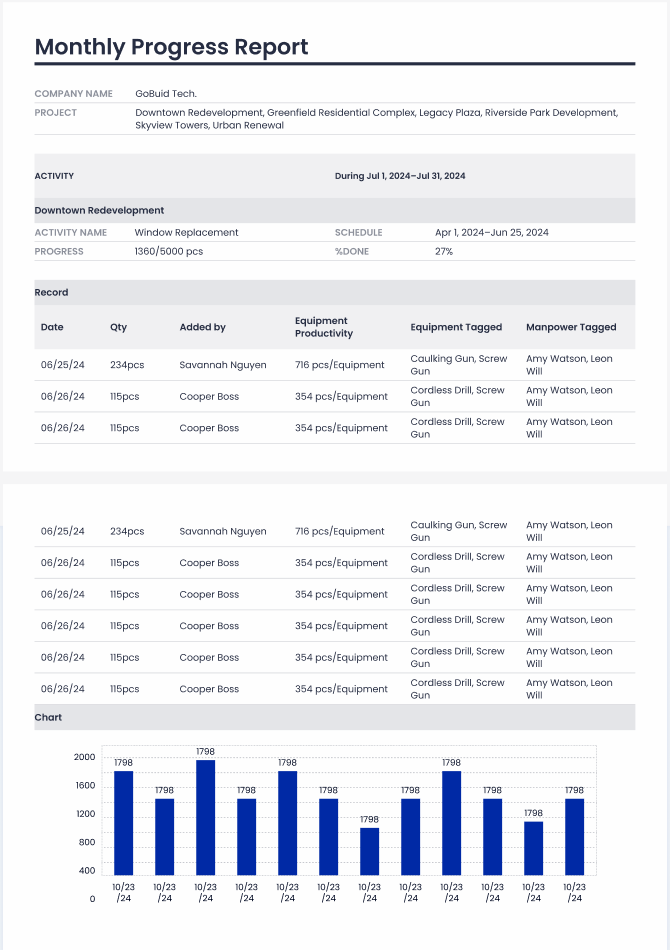
Reporting fatigue is a major bottleneck for growing construction firms. Using GoBuid Reports eliminates hours of manual data entry every week. You can generate a report in one click, pulling together manpower logs, equipment usage, and site photos into a polished document. These reports are professionally formatted for stakeholders and meet strict compliance requirements. It's a level of efficiency that simple photo apps can't match.
Your team needs total transparency to stay ahead of potential delays. The project analytics dashboard provides a high-level view of site resources and progress, allowing you to spot issues before they become expensive mistakes. By centralizing your operations, you increase productivity and ensure every project is documented with absolute precision. See how GoBuid generates professional reports in one click.
Master Your Site Operations Beyond the Lens
You've likely realized that site photos are only one part of the story. Relying on fragmented apps for documentation and separate logs for manpower creates an unnecessary administrative burden. A modern companycam alternative must centralize these data points into a single, high-performance platform. You need a system that translates field activity into actionable project analytics without the evening paperwork grind.
GoBuid bridges the gap between physical site reality and digital precision. You can track manpower and equipment in real-time while generating professional reports in one click. This level of oversight ensures your projects stay on track and your documentation remains audit-ready. Take control of your site data and eliminate the friction of manual reporting through a unified site diary. Your team deserves a tool that matches the high quality of their execution.
Start capturing better site data with GoBuid today and experience total operational clarity. Your team is ready for a more efficient way to work. Build with confidence and lead your projects with authority.
Frequently Asked Questions
What makes GoBuid a better alternative to CompanyCam for larger projects?
GoBuid provides an integrated digital site diary that bridges the gap between field photos and operational data. Larger projects benefit from centralized manpower tracking and equipment management within a single dashboard. This approach provides a unified data point that simple photo apps cannot maintain across complex, multi-location workflows. You gain total transparency without the need for fragmented tools.
Can I track manpower and equipment alongside my site photos?
Yes, this companycam alternative allows you to link manpower logs and equipment status directly to your progress photos. This integration provides a chronological record of who was on site and what machinery was in use when specific milestones were captured. It ensures your visual documentation is always supported by concrete operational context. You can manage all site resources within the same interface used for documentation.
How does one-click reporting actually work in GoBuid?
One-click reporting functions by automatically aggregating your site diary entries, photos, and customized forms into a professional layout. You simply select the relevant project data and the system generates a formatted PDF instantly. This process removes the administrative burden of manual data entry. It ensures your stakeholders receive clear, accurate project updates without the evening paperwork grind.
Is there a minimum user requirement or a long-term contract?
You should review the official pricing page for current information regarding user minimums and service agreement terms. Professional site management requires tools that adapt to your specific operational needs and project cycles. Focus on selecting a platform that provides the transparency and productivity gains necessary for your firm's growth. It's important to choose a solution that aligns with your scaling requirements.
