Construction Progress Reporting Software: A Buyer’s Guide to Claims-Ready Records
Find construction progress reporting software that ties site updates to claims-ready proof. Compare field workflows and build rock-solid records faster.
by Sheldon Huang
|
Construction progress reporting software is most useful when it connects site updates with the photos, daily records, and documents your team may need to prepare a claim. A polished dashboard matters less if staff still have to search through separate folders to explain what happened.
A dashboard can show what changed, but claims preparation depends on a clear trail of supporting evidence. When updates sit across forms, photos, and diary entries, office teams must reconcile them before they can review progress. This guide compares construction progress reporting software through a field-to-claim workflow: how teams record work, connect photos and documentation, and keep context available for review. You’ll learn what to check in evidence workflows, where one-click reporting and a 1-Click Evidence Bundle fit, and how to weigh workflow fit against implementation effort. Choose by how well the system supports a traceable record, not by the number of features on a dashboard.
Key Takeaways
- Assess construction progress reporting software by how it captures completed work, progress photos, and supporting records in a traceable workflow.
- Compare configurable forms and report outputs with the way supervisors and office staff record and review progress.
- Set clear expectations: software can organize evidence for claim preparation, but it can’t guarantee a claim’s approval.
- GoBuid’s progress monitoring, daily site reports, one-click report generation, and 1-Click Evidence Bundle support a connected reporting and claims workflow.
What construction progress reporting software needs to capture for claims
Construction progress reporting software records, organizes, and communicates completed site work. For claims preparation, ask whether the team can trace reported work back to clear records and relevant supporting evidence. A progress percentage on its own may show status, but it does not explain what work was completed or what supports the report.
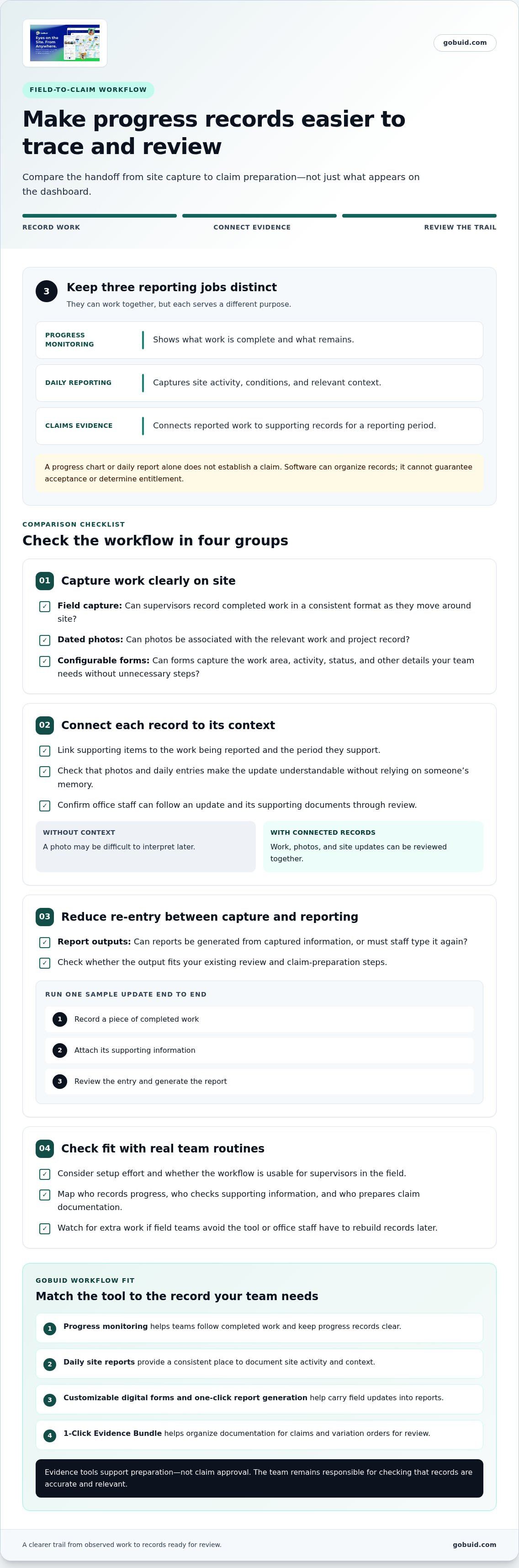
Keep three jobs distinct. Progress monitoring helps teams understand what’s complete and what remains. Daily reporting captures site activity and conditions. Claims evidence connects reported work to supporting records for a specific reporting period. These functions can work together, but a progress chart or daily report alone doesn’t establish a claim. Software can organize the record; it can’t guarantee acceptance or determine entitlement. For a broader view of how progress reporting fits within construction management, see this Construction Management Overview.
How site records become useful progress-claim evidence
Make each record understandable without relying on someone’s memory. A progress photo can show visible work; a structured form can capture the work area, activity, and status; a daily report can explain the context, including relevant site updates. Connect each item to the work being reported and the period it supports. A photo without context may be difficult to interpret later. A report without linked supporting records can leave reviewers searching across folders.
Look for a workflow that carries progress records forward instead of separating field capture from office review. GoBuid’s progress records and monitoring help teams document site updates as they prepare claim records. The aim is a clear trail from observed work to records ready for review, not a software-generated promise of a successful claim.
How to compare construction progress reporting software for your workflow
Compare the handoff, not just the dashboard. Test how a supervisor records work on site, how the office reviews it, and how information moves into your claim-preparation process. Construction progress reporting software should reduce duplicate entry while keeping the context behind each update easy to follow.
Use this framework to compare the workflow:
Run a sample update through the full workflow. Record a piece of completed work, attach its supporting information, review the entry, and generate the report. Check setup effort, field usability, and whether the output fits your existing review and claim-preparation steps. A tool can look capable in a demonstration yet create extra work if supervisors avoid it or office staff have to rebuild records later.
Questions to use when reviewing a software workflow
Ask where work updates, photos, and forms are kept, and how reviewers can find the related records later. Check whether teams can adapt digital forms for site reporting to capture the details they need. Then test whether reports can be generated from that information without typing the same details again. GoBuid supports customizable digital forms and one-click report generation, helping teams carry field updates into their reports.
For a practical next step, map your current handoffs: who records progress, who checks the supporting information, and who prepares the claim documentation? Compare that process with GoBuid’s reporting workflow to identify where records can stay connected.
When GoBuid fits a construction progress claims workflow
GoBuid suits teams looking to connect progress monitoring and daily site reporting with variation order and claims management. This can be useful when supervisors document work in the field and office staff later assemble and review claim records. Rather than treating those as disconnected tasks, teams can use a shared workflow for progress information and supporting documentation.
GoBuid’s 1-Click Evidence Bundle is part of its variation order and claims management capability. It brings relevant evidence together for review, helping teams organize documentation around variation orders and claims. It supports evidence preparation, but it doesn’t guarantee that a claim will be accepted or determine its outcome. The team remains responsible for checking that records are accurate and relevant to the claim.
Match GoBuid’s features to the team’s reporting needs
Start with the records your crew needs to capture. Daily site reports provide a consistent place to document site activity, while progress monitoring and progress photos help keep work updates and supporting documentation together. GoBuid’s progress feature supports this need for clear progress records. Customizable digital forms let teams collect project information in a structured way that suits their reporting process.
- Use progress monitoring to follow completed work.
- Use daily reports to record site activity and context.
- Use the 1-Click Evidence Bundle to organize documentation for claims and variation orders.
For small-to-mid-size contractor teams, a practical fit supports existing field routines and gives office staff a clearer path from site updates to claim review. Explore GoBuid’s construction workflow to see how progress monitoring, daily reports, and claims documentation work together.
Move from comparison to a clearer workflow
The right system is only part of a dependable reporting process. Agree on what a complete update includes, who reviews it, and how the team follows up on missing information. Keep the routine practical for crews on site. A clear process helps records remain useful as project needs change, instead of making reporting another task people work around.
Set a workable standard across field and office teams before rolling out a new tool. Construction progress reporting software should support that standard and the way your team operates, rather than force a process that adds friction. Review a sample report with the people who prepare and use it, then adjust forms and responsibilities where the handoff is unclear.
Explore GoBuid’s construction progress reporting workflow to see how it can support your team’s reporting and claims process. With a shared routine and connected records, field updates are easier for office staff to review and use.
Frequently Asked Questions
What should I look for in construction progress reporting software?
Look for a workflow that makes it easy to record completed work, add supporting photos or documentation, and generate reports without re-entering the same details. Also assess the setup: can you configure project forms, assign responsibility for updates, and bring active jobs into the process without disrupting current work? Check what supervisors need to learn and whether routine adjustments can be handled by your team. A pilot on one project can reveal gaps in forms, responsibilities, or report review before you expand the process.
Can construction progress reporting software replace scheduling software?
Usually, no. Progress reporting records what has happened on site, while scheduling software is used to plan activities and sequence work. A progress report may help teams compare recorded status with their plan, but it doesn’t replace schedule planning and updates. Keep each tool’s role clear, and decide how your team will share relevant status information between reporting and scheduling.
How often should a construction team prepare progress reports?
Set the reporting rhythm around the project’s review cycle and the decisions the reports need to support. Field staff can record work as it happens, while managers compile or review updates at agreed intervals. For example, document notable changes during site work and prepare a summary for the next project review. Consistent timing helps teams compare reporting periods and follow up on gaps before records become difficult to verify.
How can a contractor assess whether new reporting software is working?
Measure whether the process improves reporting, not just whether staff have logged in. Before rollout, note how reports are prepared and where information is commonly missing or re-entered. After teams use the software, review the same points: are reports easier to assemble, are records more complete, and do field updates reach reviewers with fewer corrections? Gather feedback from supervisors and office staff, then adjust the forms and handoffs based on what they find.
