Creating a Legally Defensible Project Record That Holds Up
Learn how creating a legally defensible project record helps teams meet retention terms, protect sensitive information, and keep records clear and traceable.
by Amelia Grant
|
Creating a legally defensible project record means preserving relevant project information under contractual retention requirements, protecting confidential and privileged material, and keeping documentation organized and traceable. Set clear rules for what to retain, where it is stored, who manages it, and how changes are recorded. The right approach depends on the project’s agreements, records, and potential disputes.
Project teams know that emails, photos, field reports, and design files can be scattered across people and systems. This guide explains how retention policies and contract terms shape what stays, how confidentiality and privilege affect access and sharing, and how verification supports reliable records. It also covers practical checks to align legal, IT, and project teams so documentation remains clear and usable when questions arise.
Key Takeaways
- Map contract and policy requirements before deciding which project records to retain or dispose of.
- Control access to confidential information and handle potentially privileged material with care.
- Coordinate legal, IT, and project teams to document how records are gathered, reviewed, and verified.
- Use GoBuid’s Project Analytics Dashboard to bring project information into a clearer view and support reporting.
1. Contractual record-retention obligations
A practical starting point for creating a legally defensible project record is to review the project contract and compare its retention terms with company policy. Record required retention periods, responsible custodians, storage locations, and approved disposal steps. A closeout file, for example, may include inspection records, change orders, progress photos, and email approvals. Keep the contract requirements visible to project, legal, and records teams.
Review related agreements as well. Outside counsel guidelines and client engagement letters may set expectations for retaining or disposing of project records. Past business deals and divestitures can also create contractual obligations for records held by different teams. Before deleting legacy files, identify their owners and check whether an agreement requires continued retention.
Which federal and state laws govern project recordkeeping and retention? The applicable rules depend on the record type, jurisdiction, parties, and project. Identify those requirements alongside contract terms before setting a retention schedule. Don’t assume one schedule applies to every record category or location.
Are there industry-specific project recordkeeping requirements in construction, government contracting, or healthcare? Requirements can vary by project, contract, agency, record type, and applicable jurisdiction. Review the relevant agreements and rules for each project rather than applying one broad industry label to every file.
When litigation or an audit is anticipated, identify relevant records before routine deletion continues. Confirm active legal holds and the custodians, document categories, and date ranges they cover. Preserve related project emails, photos, design files, and field reports, and document where each group is stored. For a construction dispute, map which project team members hold communications about the disputed work.
Apply retention and deletion rules consistently. A documented schedule helps teams retain records with long-term value and dispose of data only when obligations allow. Train staff on the process, then monitor and audit compliance. These steps make creating a legally defensible project record part of routine project management.
2. Confidentiality and privilege
A project record is information that documents project work, decisions, or results. Chat messages and emails can become project records when they capture a change approval, safety issue, or schedule decision. Their informal format doesn’t make them irrelevant. Confidentiality concerns who may access or share information; privilege is a separate legal protection that may apply to certain communications made for legal advice.
Keep these categories distinct. A confidential design file may contain sensitive business information without being privileged. An email discussing a dispute may also contain project facts, even if a lawyer is copied. Don’t label every message “privileged” as a substitute for careful handling. The communication’s purpose and context matter.
Set practical controls for project teams. Limit access to sensitive folders, use approved channels for controlled documents, and avoid forwarding legal advice into general project chats. If a field supervisor needs direction based on legal advice, share the operational instruction without circulating the advice itself. Record who approved the direction and where the supporting project document is stored.
The AAA-ICDR construction arbitration e-discovery guidance aims to protect confidentiality and privilege while supporting proportionality, fairness, and cost control. Build those goals into document-handling procedures before a dispute arises. Define who can collect and review potentially privileged material, how confidential files are separated, and how accidental disclosure is escalated. Document review decisions and access changes.
For example, preserve a chat confirming a concrete pour delay if it explains a schedule change. Store it with the related daily report, but restrict separate legal analysis to authorized reviewers. Clear labels, access controls, and links to project context help teams distinguish routine coordination from sensitive advice without losing the record of what happened.
3. Planning and verification checklist
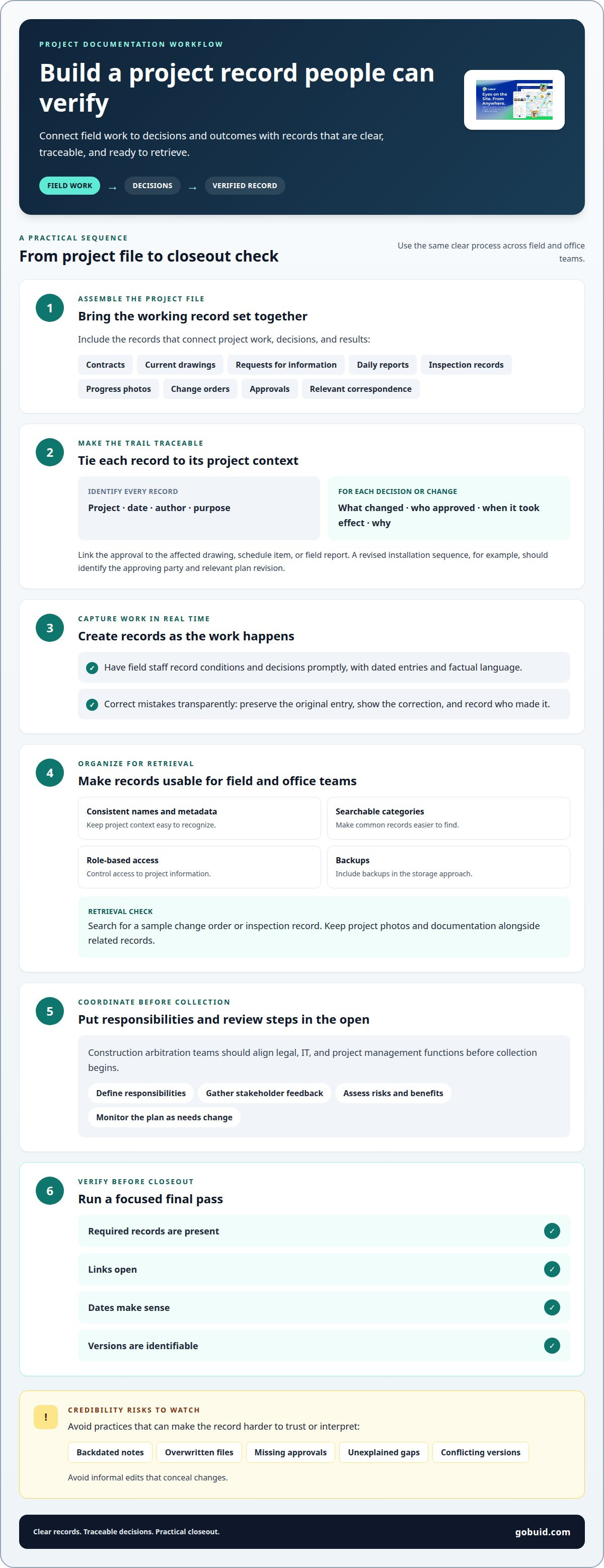
Creating a legally defensible project record starts with a file that connects field work to decisions and outcomes. Include contracts, current drawings, requests for information, daily reports, inspection records, progress photos, change orders, approvals, and relevant correspondence. Organize each record so its project, date, author, and purpose are clear.
For every decision or change, capture what changed, who approved it, when it took effect, and why. Link the approval to the affected drawing, schedule item, or field report. For example, a revised installation sequence should identify the approving party and refer to the relevant plan revision.
Create records as work happens, not from memory at closeout. Have field staff record conditions and decisions promptly, using dated entries and factual language. Correct mistakes transparently: preserve the original entry, show the correction, and record who made it.
Store records in a project structure that works for field and office teams. Use consistent names and metadata, searchable categories, role-based access, and backups. Test retrieval by searching for a sample change order or inspection record. Keep project photos and documentation alongside related records.
Common credibility risks include backdated notes, overwritten files, missing approvals, unexplained gaps, and conflicting versions. Avoid informal edits that conceal changes. Construction arbitration teams should align legal, IT, and project management functions before collection begins. Define responsibilities, gather stakeholder feedback, assess the risks and benefits of different approaches, and monitor the plan as project needs change.
Use a short verification pass before closeout: confirm required records are present, links open, dates make sense, and versions are identifiable. Creating a legally defensible project record also depends on making the process usable for crews across locations. Bring project records into a clearer workflow as teams document work.
GoBuid: Project Analytics Dashboard
GoBuid’s Project Analytics Dashboard helps teams get a clearer view of project information. Use analytics to support routine reviews, then generate a report in one click when teams need a concise update. Customised forms can standardize field entries, while Manpower Tracking helps record workforce information.
These tools support consistent project documentation, but they don’t replace contract retention rules, legal holds, or careful handling of privileged material. Keep those controls in place as your team records work and reviews project information.
Contact GoBuid to discuss how these tools can support your project records.
Make Documentation Part of the Daily Workflow
A strong record comes from steady site habits, not a last-minute file cleanup. Give crews a clear way to capture work as it happens, then make review part of regular project coordination. This keeps project knowledge connected to the people making decisions across the field and office.
Creating a legally defensible project record is an ongoing practice supported by clear ownership and consistent documentation. GoBuid’s Digital Site Diary supports day-to-day project records, helping teams keep field activity visible as work progresses. Use it as part of a workflow that fits how your crews report conditions and communicate updates.
Set the routine, make responsibilities clear, and improve the process as project needs change. Contact GoBuid to discuss your project and take the next step toward clearer project documentation. Your team can build a more dependable record, one field update at a time.
Frequently Asked Questions
How long should project records be retained under U.S. law?
There is no single retention period for every U.S. project record. The appropriate schedule depends on the record category, applicable federal and state requirements, contract terms, and any active legal hold. A project’s safety documentation and financial records, for example, may follow different schedules. Set retention rules by record type, and pause routine deletion for records covered by a legal hold.
How do privacy, confidentiality, and data security rules affect project records?
They shape how teams collect, access, store, share, and dispose of project information. Limit access to personal or proprietary details, and securely dispose of records when retention rules allow. Under California Privacy Rights Act Section 1798.100, covered businesses must disclose how long they intend to retain personal information or the criteria used to determine that period. Apply controls consistently across digital and paper files.