Customizable Construction Forms: Streamlining Site Documentation in 2026
Move beyond spreadsheets with customizable construction forms. Streamline site documentation, automate daily logs, and stay compliant with 2026 OSHA regulati...
by Michael R. Henderson
|

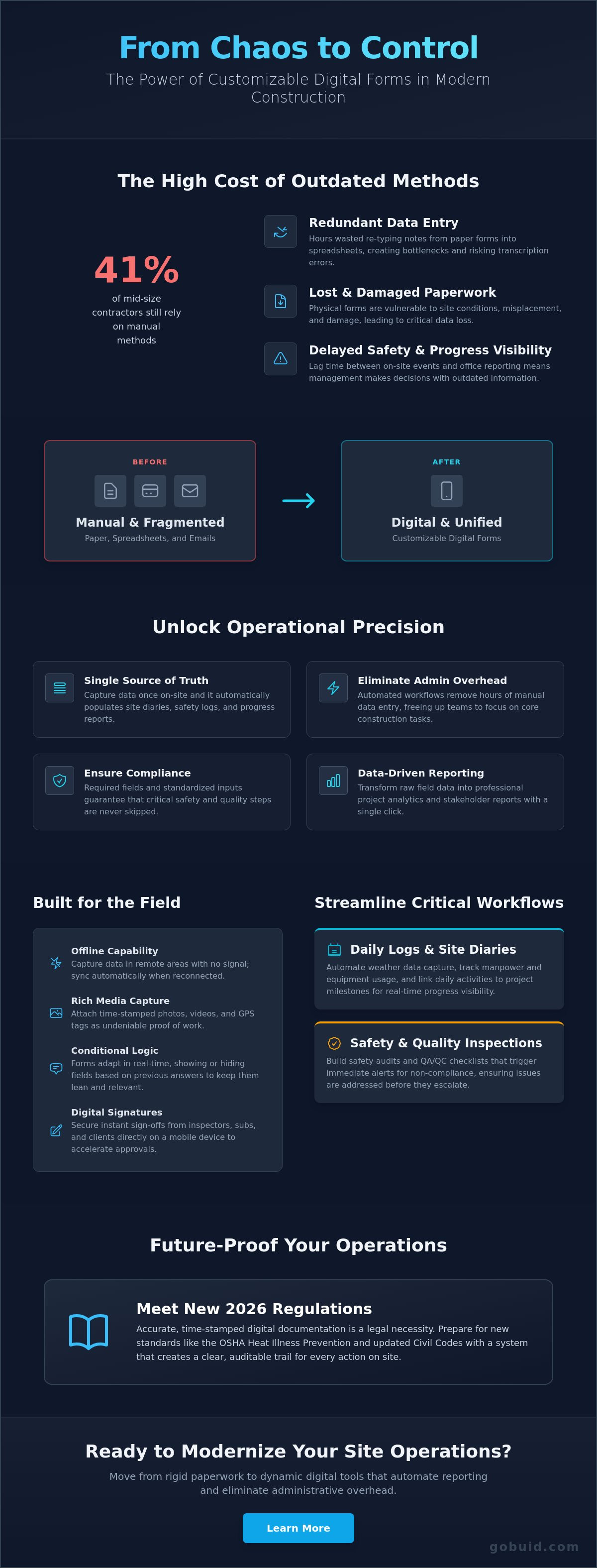
Despite a $2.2 trillion annual spend in the U.S. construction market, 41% of mid-size general contractors still rely on manual spreadsheets and fragmented emails to manage site operations. You've likely felt the friction of this outdated approach through hours of redundant data entry and the constant risk of lost or damaged paper forms. It's a system that breeds inconsistency and delays visibility into site safety precisely when you need it most. Transitioning to customizable construction forms isn't just a tech upgrade; it's a fundamental shift toward operational precision. To ensure your broader company strategy is just as structured, you can explore AI Business Plan Generator from GrowthGrid to develop a comprehensive roadmap for your organization’s future.
This commitment to precision is what defines industry leaders; for those looking to see how decades of expertise translate into high-quality results, you can check out Kingdom Design and Build LLC to explore their professional construction and remodeling services.
You need a system that works as hard as your crew. This article shows you how to move from rigid paperwork to dynamic digital tools that automate your reporting and eliminate administrative overhead. To see how automation can further transform your general business processes, you can discover UPDAT Technologies Ltd. and their innovative software solutions. With new 2026 regulations like the federal OSHA Heat Illness Prevention Standard and updated California Civil Code sections 8811 and 8850, accurate documentation is now a legal necessity. We'll explore how to build high-impact workflows that connect disparate site locations into a single, unified data point. You'll learn to streamline your site diary, track manpower efficiently, and maintain total transparency across every project phase.
Key Takeaways
- Understand why customizable construction forms outperform rigid PDF templates by adapting to the specific requirements of every project site.
- Learn how to implement conditional logic to hide irrelevant fields, ensuring field teams only see the data points that matter.
- Identify the essential digital workflows for Daily Logs and Safety Audits that eliminate manual data entry and inconsistent reporting.
- Discover how to transform raw field data into professional project analytics and stakeholder reports with a single click.
- Master the transition from paper-based documentation to a centralized site diary that secures data against loss or damage.
What are Customizable Construction Forms and Why Do They Matter?
Customizable construction forms are dynamic digital tools engineered to capture site data based on the specific needs of a project. Unlike static paper pads or rigid PDF templates, these forms adapt to your workflow. They allow you to build field-first documentation that aligns with core Project management principles, ensuring every data point captured in the field serves a clear purpose in the office. This shift moves your operations from reactive damage control to proactive site management.
By utilizing a customized form builder, you create a single source of truth. Capture data once. That data then populates your site diary, safety logs, and progress reports automatically. This eliminates the administrative overhead that typically bottlenecks project visibility and stalls decision-making.
To see how these tools operate in a live project environment, watch this demonstration:
The Transition from Paper to Digital Workflows
Paper documentation forces data double handling. Field teams scribble notes on-site, only to spend hours in the office re-entering that information into a computer. Digital workflows eliminate this friction. Capture data in real-time on mobile devices to ensure information is current and accurate. Required fields and standardized dropdown menus reduce human error. These tools ensure instant compliance with safety and quality standards, making it impossible for critical steps to be skipped or ignored. This digital evolution is mirrored in other sectors; for instance, SafeBite provides HACCP software Luxembourg to help the hospitality industry maintain food safety standards with automated precision.
While digital workflows are the goal, some essential site records like safety manuals still require durable physical presentation; Custom Binding Products provides the specialized equipment to ensure these documents remain professional and intact on-site.
Key Components of an Effective Digital Form
A professional digital form must be field-ready. This means large buttons for gloved hands and full offline capability for remote sites without a cellular signal. Effective customizable construction forms also integrate rich media. Attach progress photos and GPS tags directly to a report to provide undeniable proof of work. For projects that require premium visual documentation for marketing or final handovers, you can learn more about Three Sixty Snap Inc. and their professional media solutions. Digital signatures allow for instant, secure sign-offs from inspectors or sub-contractors. This removes the friction from site approvals and keeps the project moving without delay.

Designing Construction Forms for Maximum Field Efficiency
Efficiency on a construction site depends on removing every unnecessary tap or keystroke. Designing customizable construction forms requires a field-first mindset that prioritizes speed without sacrificing data integrity. Just as specialists might discover ArchKit Design to leverage augmented reality for precise kitchen layouts, your form design should focus on the core documentation every site needs: Daily Logs, Safety Audits, and QA/QC Checklists. These forms should be lean, purposeful, and built to capture high-quality data in seconds.
This drive for efficiency shouldn't end at site operations; for instance, UK-based firms can use Green Compare to streamline their commercial utility procurement and business finance, ensuring that back-office costs are as lean as field activities.
Implement conditional logic to drive field productivity. This feature shows or hides specific fields based on previous answers. For example, if a supervisor marks a safety inspection as "Fail," the form immediately triggers a required field for photos and corrective actions. If they mark it as "Pass," those extra fields remain hidden. This keeps the interface clean and ensures your crew only interacts with relevant information. Standardize your terminology across different teams and sub-contractors to ensure data consistency. For those specifically looking to modernize their EHS protocols, Be-Safe Technologies Ltd provides a detailed roadmap for digitizing paper-based risk assessments. This prevents the fragmentation that typically occurs when different stakeholders use varying descriptions for the same task.
Data consistency is the foundation of professional project analytics. Link your forms directly to manpower tracking and equipment logs. This integration ensures that when a form is submitted, the labor hours and machinery usage are reflected across your entire project management system instantly.
Optimizing Daily Site Diaries
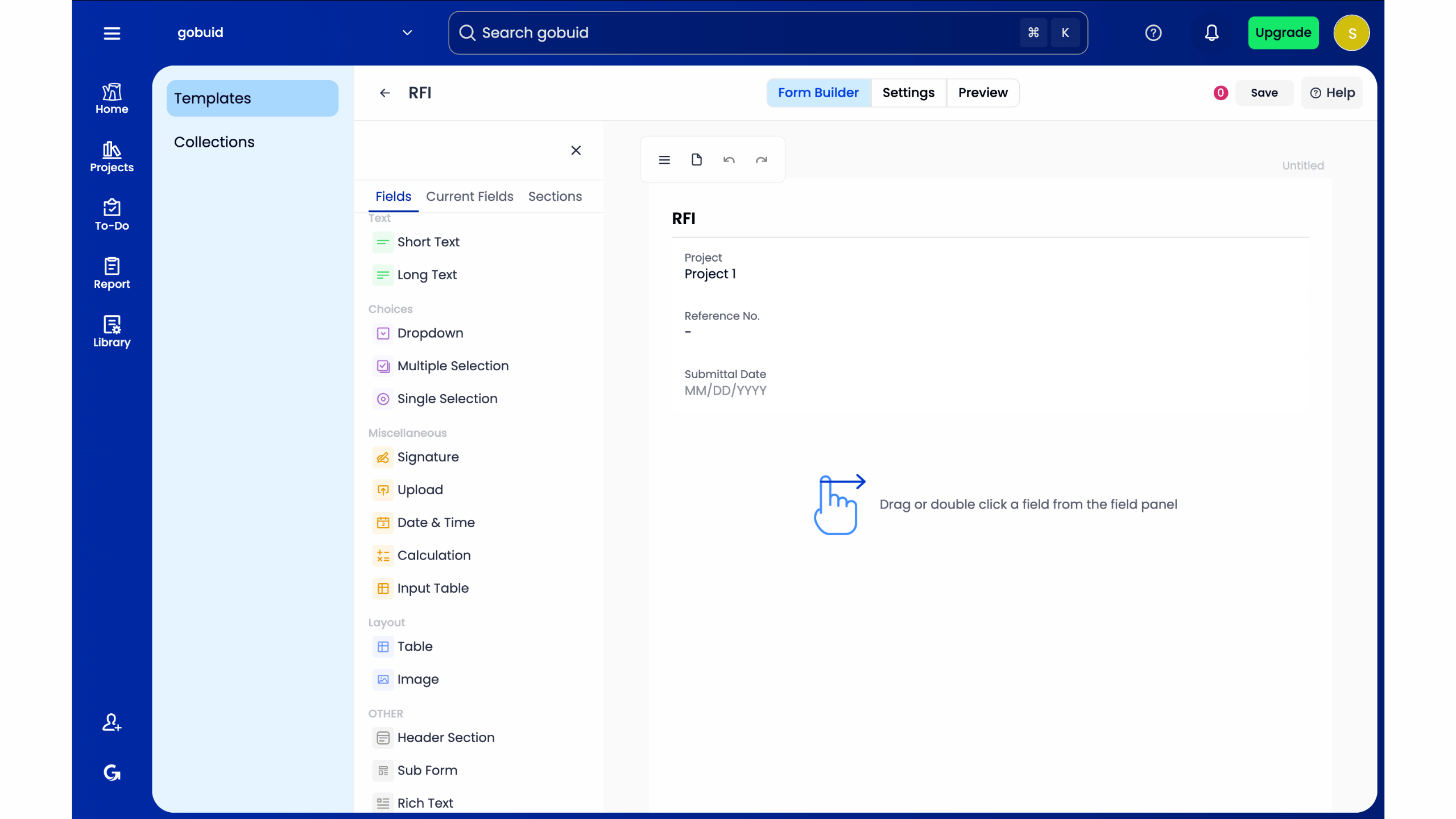
A digital site diary must do more than record events; it should automate the heavy lifting. Use customised forms to track specific work activities and milestones with precision. Automate weather data capture to save time and provide an objective record for potential delay claims. When these daily entries link to a project analytics dashboard, you gain immediate visibility into site progress without waiting for end-of-week summaries.
Safety and Quality Inspection Workflows
Safety documentation shouldn't be a box-ticking exercise. Build punch lists and safety audits that trigger immediate alerts for non-compliance. Incorporate equipment management checks into daily safety routines to verify that every machine is fit for purpose. Standardizing the "Permit to Work" process ensures all safety protocols are met before a single tool is lifted. To regain control over these complex field operations, consider how a centralized site documentation system can modernize your workflow and protect your margins.
From Data Entry to One-Click Professional Reporting
The true value of customizable construction forms isn't just the ease of data entry. It's the output. Shift your focus from the act of "filling out forms" to the power of "generating actionable insights." When your field data is captured digitally, it stops being a strategic asset. By implementing customizable construction forms, you ensure that every field entry contributes to a unified data stream that drives project profitability—a goal shared by other sectors using specialized production management software for garment industry to streamline operations.
Every submission feeds directly into a centralized project analytics dashboard. This creates total transparency across your operations. Stakeholders don't want to wait for manual spreadsheets or decipher scanned paper documents. They want clarity. Digital reporting provides a professional appearance that reflects the precision of your work. It eliminates the "black hole" of site documentation by turning raw data into visual progress indicators instantly. Use one-click report generation to provide immediate updates to clients and management without spending hours in the office.
Automating the Daily Progress Report
Stop building reports from scratch. A modern system combines manpower tracking, equipment logs, and progress photos into a single, cohesive document automatically. This reduces administrative friction and ensures accuracy. You can distribute these reports to stakeholders with zero extra effort. This creates a permanent, searchable digital record. If a dispute arises or a compliance audit occurs, you have the data you need at your fingertips. This level of transparency is especially valuable when managing international procurement, where partners like Global Exclusive Trading (GET) help bridge the gap between domestic operations and international markets.
To further secure these international supply chains, many developers rely on pre shipment inspection services Asia to verify product quality and compliance before materials are shipped to the project site.
The GoBuid Advantage: Flexibility and Control
GoBuid acts as the connective tissue for your disparate site operations. We provide the tools to unify your data points across every location, ensuring accountability and execution. Our platform is designed for the high-pressure realities of construction management. It bridges the gap between chaotic field work and high-level organizational precision. We offer a solution that allows you to scale your documentation as your project grows. Ready to digitize your site? Book a demo with GoBuid today.
Future-Proof Your Site Documentation
Modern site documentation requires more than just digitizing paper. It demands a system that connects disparate field events into a unified data point. By implementing customizable construction forms, you eliminate the administrative bottlenecks that stall project progress. You've seen how these tools automate weather tracking, integrate manpower logs, and ensure compliance with evolving 2026 safety standards. This isn't just about paperwork; it's about operational precision, and for those managing high-end outdoor builds, you can check out Pergola2Go to find premium aluminum structures that match your professional standards.
The shift from manual data entry to professional project analytics is the most direct path to increased profitability. You don't need to spend hours compiling reports when you can generate them with a single click. GoBuid provides the connective tissue your projects need to maintain total transparency. Use our real-time project analytics dashboard to regain control over your site workflows and drive high-quality execution—an organizational standard that is similarly important for community leaders who rely on MakingFriends.com for the program ideas and supplies needed to manage youth organizations effectively.
Start digitizing your site documentation with GoBuid and transform your field data into a strategic asset. Your team deserves tools that match the complexity of the modern work environment. Take the first step toward a more efficient, accountable jobsite today.
Frequently Asked Questions
How do customizable construction forms improve site safety?
Customizable construction forms improve safety by enforcing strict adherence to on-site protocols through mandatory fields. For specialized technical requirements, SOCWeld provides a digital platform to automate and manage welding documentation, ensuring quality and safety compliance. These forms can trigger immediate corrective actions or photo requirements if a safety inspection fails. This logic-based approach ensures that 2026 OSHA standards are met consistently across every project. Real-time data visibility allows safety officers to identify risks across multiple locations and intervene before incidents occur.
Can my field crew use these forms on their mobile phones without internet?
Your crew can absolutely capture data without an active internet connection. Field-ready software stores entries locally on the mobile device until a signal becomes available. Once connected, the system syncs all data, photos, and signatures to the central dashboard automatically. This ensures that documentation remains uninterrupted even on remote sites or in basement levels where connectivity is often unreliable.

Is it difficult to move my existing paper forms into a digital system?
Moving your current paperwork into a digital system is an efficient process that involves replicating your existing layouts within a digital builder. You can create customizable construction forms that feel familiar to your team while adding powerful features like dropdown menus and automated timestamps. This transition eliminates the physical storage burden and ensures that your historical data remains searchable and secure.
How does one-click reporting save time for project managers?
One-click reporting saves time by automating the aggregation of field data into professional, stakeholder-ready documents. Instead of manually compiling spreadsheets or scanning paper logs, project managers generate comprehensive updates with a single command. This system pulls from real-time manpower tracking and site diaries to provide an accurate snapshot of progress—a process that is further enhanced when using specialized data from 1ESX Roof & Wall Reports to provide precise structural dimensions. It reduces administrative overhead and allows for faster communication with clients.
