Digital Equipment Tracking Guide for Construction
Keep field crews moving with digital equipment tracking software. Compare GPS and QR codes to cut tool loss and build practical jobsite tracking workflows.
by Sheldon Huang
|
The most useful equipment tracking method isn’t always GPS. Tools and machines can move between crews and work areas faster than a paper log gets updated, leaving the team unsure what’s available or where an asset was last recorded. Digital equipment tracking software creates a shared record, but the method needs to fit how each asset moves.
GPS can provide location updates for assets in transit. QR-code scans offer a practical way to record equipment details and update its status at handoffs or work areas. Both depend on consistent records and a workflow the crew can follow. This guide explains how GPS, QR codes and digital records work, how to choose an approach for different tracking needs, and how GoBuid’s QR-code-enabled equipment tracking supports clearer site-level visibility.
Key Takeaways
- Use digital equipment tracking software to keep an asset’s identity, assigned team or location, status, and update history in a consistent record.
- Match the tracking method to the asset: GPS provides location updates, while QR scans record interactions and status changes.
- Set clear update points for equipment issue, return, reassignment, and status changes so records stay useful to field teams.
- Start with priority assets, then review record accuracy to build a practical workflow and improve site-level visibility.
What Digital Equipment Tracking Software Does on a Construction Site
Digital equipment tracking software keeps equipment details and status updates in a shared record. Whether managing owned tools or machinery sourced from plant hire specialists like Rocket Rentals Ltd, it addresses a common site problem: tools and machines move between crews and work areas, while paper logs or informal handovers can leave teams unsure what’s available or where an asset was last recorded.
Tracking methods capture different information. GPS can provide location updates, while a QR-code scan can log an equipment interaction or status change. As the general overview of asset tracking explains, tracking can use different technologies. A digital record should not be mistaken for continuous location monitoring.
For a visual overview of construction asset management, watch this video:
What information should an equipment tracking record contain?
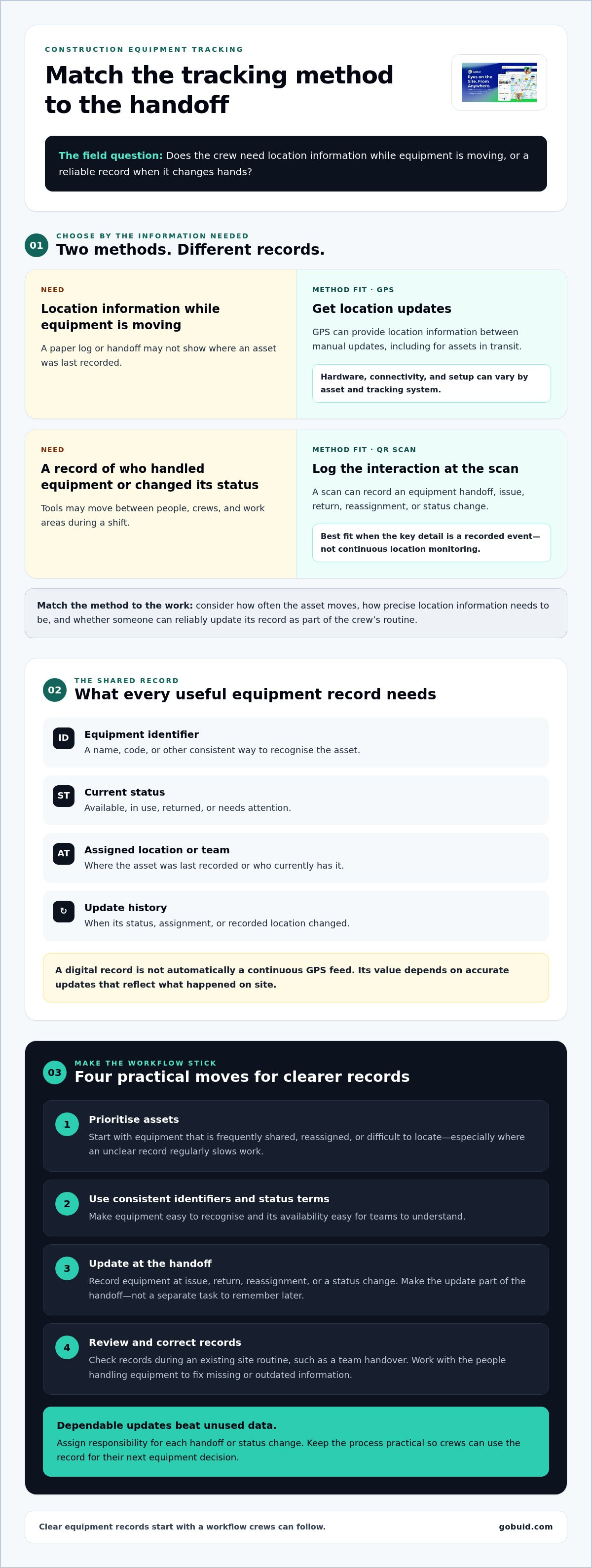
A digital equipment record describes an asset and its reported status or location. On its own, it is not a continuous GPS feed. To make records useful at a glance, capture:
- Equipment identifier: a name, code, or other consistent way to recognise the asset.
- Current status: whether it’s available, in use, returned, or needs attention.
- Assigned location or team: where it was last recorded or who currently has it.
- Update history: when its status, assignment, or recorded location changed.
When crews update these details at issue, return, or reassignment, others can check the same record before moving equipment or planning work. GoBuid’s QR-code-enabled equipment tracking helps teams record equipment information for clearer site-level visibility.
GPS or QR Codes? Choose an Equipment Tracking Method That Fits
Choose a method based on the question your crew needs answered. GPS provides location information between manual updates. A QR scan records an interaction at the point of scanning, such as equipment being issued, returned, or reassigned. The methods capture different information: GPS reports location, while QR scans log a recorded event or status.
For example, a machine that travels between work areas may need location updates while it’s moving. A tool that changes hands during a shift may be easier to track through scans at handoff points. Neither approach fits every asset. Consider how often it moves, how precise the location information needs to be, and whether someone can reliably update its record as part of the crew’s routine. Deltek’s construction equipment management overview outlines how software can support broader equipment workflows.
When does GPS tracking make sense for construction assets?
GPS can make sense when teams need location information between site updates, such as for equipment moving between work areas or locations. For operations running transport vehicles and road-going machinery, specialist providers like Fleet Software Solutions offer dedicated vehicle tracking and fleet management tools. The hardware, connectivity, and setup can vary by asset and tracking system, so don’t assume every item will be tracked in the same way. QR scanning is a practical fit when the key information is who recorded an equipment handoff or status change.
Match the record method to the work rather than forcing every asset into one system. GoBuid’s QR-code-enabled equipment tracking supports scan-based equipment records. Learn how GoBuid supports construction site management with a consistent workflow for your team.
Build a Practical Digital Equipment Tracking Workflow
A reliable workflow fits the way equipment already moves across the site. Start with assets that are frequently shared, reassigned, or difficult to locate. Keep the initial process focused, then refine it with feedback from the crew.
- Prioritise assets: Choose equipment where a missing or unclear record regularly slows work.
- Set a consistent record: Use the same identifier and status terms so teams can recognise equipment and understand its availability.
- Define update moments: Record equipment at issue, return, reassignment, or a change in status. Make the update part of the handoff, not a separate task to remember later.
- Review accuracy: Check records during an existing site routine, such as a team handover, and correct missing or outdated information.
How can a team keep equipment records useful over time?
Assign responsibility for recording each handoff or status change. For example, the person issuing or returning equipment can update the record before the next crew takes over. Review incomplete entries with the people who handle the equipment, then adjust the routine if updates are being missed. Consistent updates matter more than collecting data nobody uses. Crews need dependable information to make the next equipment decision.
Digital equipment tracking software works best when its records reflect the site’s actual workflow. GoBuid is construction site-management software with QR-code-enabled equipment tracking. Teams can use its equipment tracking features to record equipment information through scans and support clearer site-level visibility. For a wider perspective on how digital records support asset planning and maintenance, see OpenGov’s asset management software for public works.
Keep the process practical: choose priority assets, agree on update points, and review whether the records help crews act. To learn more about GoBuid’s construction site-management software, visit GoBuid.
Make the Next Handoff Easier to Track
Start with one practical change: make equipment handoffs part of the site’s record-keeping routine. As the team gets used to updating records, refine the workflow to reflect how equipment moves between people and work areas. The goal is a process crews can follow consistently, not more data to manage.
GoBuid’s equipment management uses QR-code-enabled tracking alongside digital site records and one-click daily report generation. These tools support equipment records and project documentation within the site-management workflow.
Ready to make equipment records clearer for your team? Explore GoBuid for construction teams and take the next step toward a tracking workflow that fits the way your site works.
Frequently Asked Questions
Is GPS tracking necessary for every construction asset?
No. Use GPS when crews need location information between manual updates, particularly for assets that move beyond a known work area. For equipment managed through a controlled site workflow, a recorded scan or handoff may provide enough visibility. Choose based on how the asset is used and what decision the team needs to make.
Can QR codes track construction equipment without GPS?
Yes. QR codes can support equipment records without GPS hardware. A scan can help a crew access or update information about an asset, such as during a handoff. It won’t continuously report the equipment’s physical position, so treat scan records as documented interactions, not live location data.
What is the difference between GPS asset tracking and QR-code tracking?
GPS captures location information through a tracking setup, while QR-code tracking records information when someone scans an asset. For example, GPS may help locate a moving machine; a QR scan can document that a crew member handled or updated a tool. Choose based on whether the task calls for location visibility or a record of interaction.
How do construction teams get started with digital equipment tracking?
Start by deciding who needs to view equipment information and who will keep it current. Then introduce digital equipment tracking software alongside an existing process, such as a store issue desk or crew handover, and show staff how the record fits that task. Gather feedback from the people using it and adjust the workflow before expanding it across the site.
