Digital Field Inspection Software: A Practical Trend in Sustainable Construction Technology
Streamline site QA/QC and safety tracking with digital field inspection software. Build clearer records and practical, evidence-based sustainable workflows.
by Amelia Grant
|
What if the clearest evidence of a sustainable construction project starts with a better inspection record? Paper forms can be difficult to organise and retrieve, while inconsistent field notes make it harder to understand what happened on site. Digital field inspection software gives teams a consistent way to capture, organise and share inspection information. Moving records online can reduce paper use, but it does not prove broader sustainability gains on its own.
Reliable documentation connects site activity to the information teams use to review quality, track progress and decide what needs follow-up. In this article, you’ll learn how digital inspections fit into construction technology, what to check in a practical workflow, and how to keep sustainability claims tied to evidence. You’ll also find steps for making field records clearer and easier to use.
Key Takeaways
- Use digital field inspection software to capture and organise site records, but assess documentation quality separately from environmental impact.
- Evaluate a workflow in order: define the inspection, check the form, test it in the field, review record access and confirm reporting needs.
- Start with one recurring safety or QA/QC inspection and use consistent forms to capture the information the team needs.
- Review completion, recurring observations and record quality before expanding the workflow. Treat these as process measures, not sustainability metrics.
What digital field inspection software changes in sustainable construction
Digital field inspection software helps teams capture, organise and report site inspection records in a digital workflow. Instead of filing paper forms and searching through separate photo folders, teams can keep inspection information together for project review. A digital record can make findings easier to trace, but it does not show by itself whether a project is performing sustainably.
That distinction matters. An inspection record documents what a team observed and recorded. Assessing sustainability requires relevant measures and evidence that can be interpreted in context. The principles of sustainable construction provide broader context, while inspection records help teams document site findings and follow-up.
See a digital inspection and safety checklist workflow in practice:
How inspection records support evidence-led site decisions
A useful record might include a completed form, the observed condition, supporting progress photos and the status of any follow-up. Consistent fields help reviewers understand what was checked, what was recorded and what still needs attention. Customisable construction inspection forms can structure safety and QA/QC documentation around the details a team needs to capture.
Keep the responsibilities clear: software stores and organises information, while people assess findings, decide what they mean and take action. A record can support a decision, but it does not make that decision or prove a sustainability result. Separating documentation from interpretation keeps both site records and sustainability claims grounded in evidence.
How to evaluate digital field inspection software for practical site use
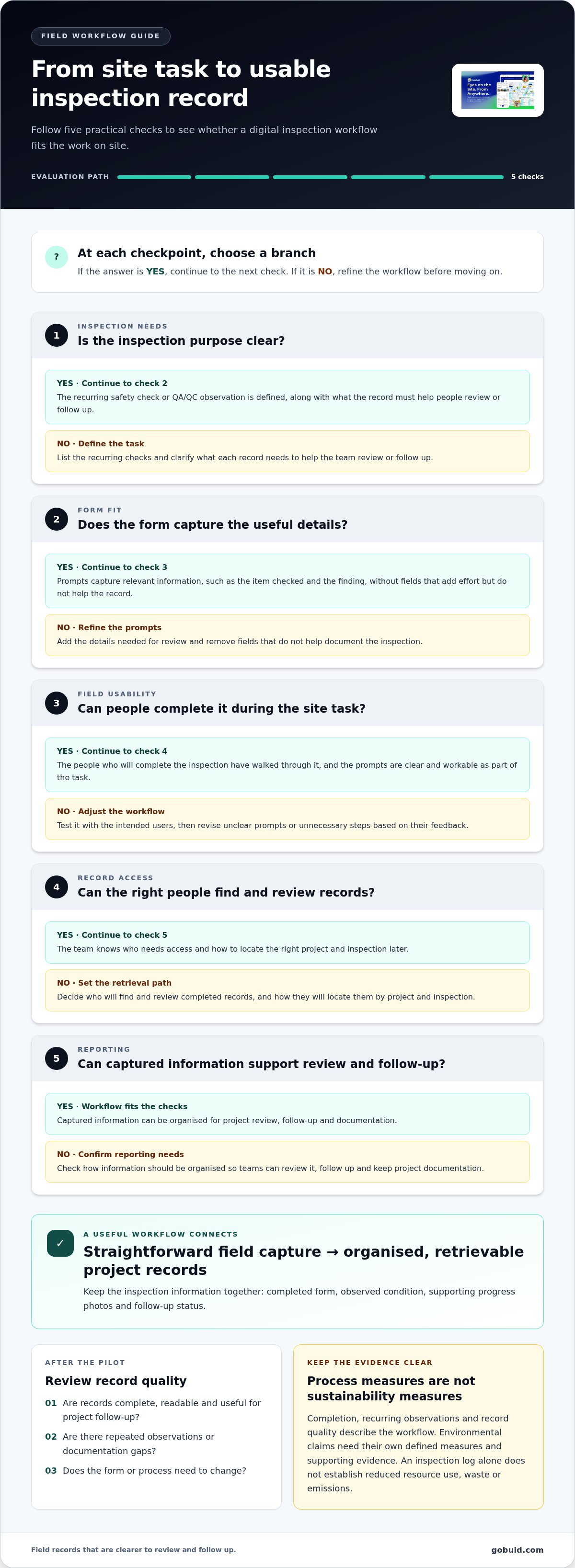
Start with the work, not the feature list. Follow an inspection from the site task through to the completed project record. Use these checks to assess whether digital field inspection software fits the workflow:
- Inspection needs: List recurring safety checks and QA/QC observations the team needs to document. Be specific about what the record must help people review or follow up.
- Form fit: Check that each prompt captures information relevant to the inspection, such as the item being checked and the finding. Remove fields that add effort without helping the record. Customisable construction forms can help standardise entries across the team.
- Field usability: Walk through a real inspection with the people who will complete it. Check that the prompts are clear and the form can be completed as part of the site task.
- Record access: Decide who needs to find and review completed records, and how they will locate the right project and inspection later.
- Reporting: Confirm how captured information can be organised for project review, follow-up and documentation.
Useful inspection software connects straightforward field capture to organised, retrievable project records.
Which field workflow should a digital inspection process support?
Choose a recurring task with a clear purpose, such as a safety check or QA/QC observation. Make sure the form prompts for consistent entries and that progress photos and written notes stay connected to the relevant project documentation. For example, an inspection record should make it easy for a reviewer to understand what was checked and what needs attention without relying on the inspector’s memory.
Reports should help teams review submitted information and identify gaps that need follow-up. For example, construction reporting features can organise captured project information into reports. Test the workflow with the people who use it, then adjust unclear prompts or unnecessary steps based on their feedback. GoBuid’s construction management tools include digital forms and one-click report generation to support field documentation and reporting.
Putting digital field inspections into a sustainable construction technology plan
Build the workflow in stages. Start with one recurring inspection that has a clear purpose, such as a safety check or QA/QC review. A focused pilot helps the team see whether the process fits site routines before adapting more forms. It also makes it easier to spot missing information, unclear instructions and points where the workflow slows people down.
How to start small and keep sustainability claims credible
Before the pilot, agree on what the record needs to capture, who completes it, who reviews it and how the team handles follow-up. Keep the instructions practical: explain what to record, where the completed record belongs and who is responsible for resolving missing or unclear information.
GoBuid’s progress documentation features support project records with information such as progress photos. Keep the pilot focused, use the review to refine the process, and expand when the records are serving their purpose. Explore GoBuid’s construction management platform to bring field documentation into project workflows.
Make your next inspection workflow easier to act on
Choose one recurring inspection and make its purpose clear to everyone involved. Starting with a defined task gives your team room to build a reliable routine, identify where records need improvement and decide what to refine before extending the process. Digital field inspection software helps organise field information; assessing sustainability performance still depends on relevant measures and evidence.
GoBuid brings field documentation into a construction management workflow with digital forms for safety and QA/QC, progress monitoring and one-click daily report generation. These tools help teams keep project records organised without treating those records as sustainability measurements.
Explore GoBuid’s construction documentation features and start with the inspection workflow your team uses most. Use what you learn to make the process clearer and easier to act on.
Frequently Asked Questions
What is digital field inspection software?
Digital field inspection software is a digital workspace for completing and managing construction inspection records. It helps teams keep forms, notes and related photos with the relevant inspection and project information, rather than relying on a paper checklist and files stored separately. The software supports documentation, but people still assess whether a condition is acceptable and decide what response is needed.
Can digital field inspections make a construction project more sustainable?
Digital inspections can support sustainable practices, but they do not make a project sustainable by themselves. Teams can use an inspection workflow to record project-defined observations, such as an issue with materials handling, and route follow-up through their normal process. To report environmental performance, define suitable measures and collect the evidence those measures require. Inspection completion alone is not a sustainability result.
What should a construction inspection form include?
A practical construction inspection form should give another team member enough context to understand the entry later. Include the project and work area, inspection type, date, inspector and criteria being checked. Add a clear result field and space for a concise note. If follow-up is needed, record its owner, due date and status. Keep the fields relevant to the task so the form stays useful in the field.
How can teams encourage field workers to use digital inspection tools?
Involve field workers in shaping the workflow before a wider rollout. Walk through the form during the site task, explain why each field matters and remove questions that do not help the inspection or handover. Give workers a straightforward way to flag confusing steps, then refine the form based on their feedback. When the process reflects how the work is done, it is more likely to feel practical rather than like extra paperwork.
