Digital pile driving logs for field teams
Use a digital pile driving log to capture field data, track each pile, and create clearer project reports with less manual work for easier field reviews.
by Sophia Bennet
|
A pile record is useful only when field data stays connected. A digital pile driving log brings pile dimensions, driving depth, equipment settings, soil conditions, operating times, and field observations into one structured record. Teams can document each pile and track work across a project.
Paper records can be difficult to keep consistent when crews are focused on the work at hand. A digital workflow gives field teams a clear way to capture and organize entries, while keeping information accessible for review and reporting.
Learn what a pile driving record tracker does and how teams create and edit logs, capture driving data, and review records. This guide explains what information a log can hold and how digital records connect field activity with project oversight.
Key Takeaways
- Capture pile dimensions, depth, equipment details, and field observations in a structured record for clearer project review.
- Customize log fields and workflows to match the information crews need to record on site.
- Move driving data into digital records to reduce manual entry and make project information easier to analyze.
- Use GoBuid’s customised forms and one-click report generation to organize field documentation and prepare reports.
What is Pile Driving Record Tracker?
A pile driving record tracker organizes information captured as each pile is installed. A digital pile driving log links field entries to project reviews for bridge and foundation work.
For U.S. projects, verify final documentation requirements, driving criteria, tolerances, and accepted forms against current DOT specifications, project plans, and the project engineer’s direction.
Software and monitoring equipment costs vary with project scope, features, equipment setup, and service terms. Obtain pricing based on the project’s requirements.
Equipment and Soil Condition Records
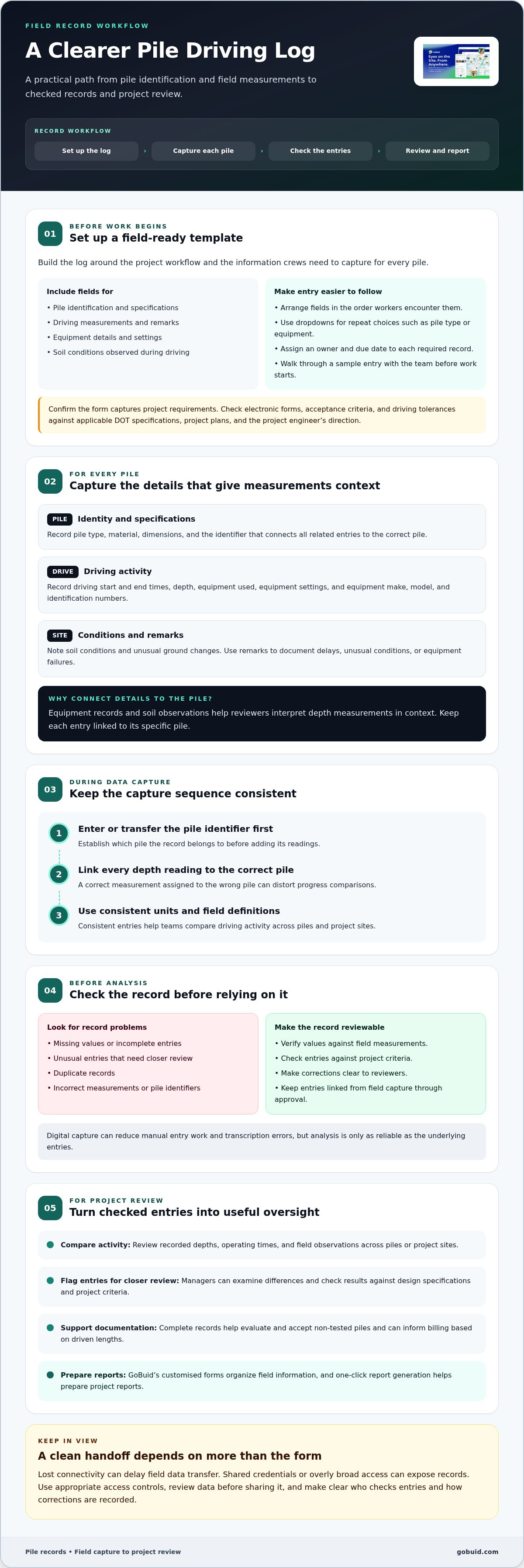
Record the pile-driving equipment used, including its make, model, and identification numbers. Note equipment settings and soil conditions observed during driving, such as unusual changes in the ground. These details help reviewers interpret depth measurements in context. For a bridge pile, linking the equipment record and soil observations to that specific pile makes the record more useful.
Purpose of Pile Driving Records
For each pile, record its type, material, dimensions, driving start and end times, and depth. Construction managers and site supervisors use these entries to track the operation, while civil engineers review results against design specifications. Remarks can document delays, unusual soil conditions, or equipment failures. Together, these details support the evaluation and acceptance of non-tested piles and can inform billing based on driven lengths.
Automated and Manual Recordkeeping
Manual records can become dirty, incomplete, or inaccurate, and measurement or transcription errors can weaken the documentation. Digital capture organizes driving data for review and processing, reducing the work and errors associated with manual entry. Teams can compare records across sites, but should check entries against project criteria before relying on the analysis.
Creating and editing pile driving logs
Start with a template that reflects the project workflow and required fields. Assign an owner and due date to each record so field entries move into review.
Creating Pile Driving Logs
Build the log around the information crews need to capture for every pile. Include fields for pile identification, specifications, driving measurements, and remarks, arranged in the order workers encounter them. Use dropdowns for repeat choices, such as pile type or equipment, to reduce inconsistent free-text entries and simplify review. Assign an owner and due date to each required record. Before work begins, walk the team through a sample entry and confirm that every field is clear and useful on site.
Editing Logs and Electronic Requirements
Update the template when project workflows or documentation needs change. Revise fields and dropdown choices, then explain the changes to everyone entering or reviewing records. Keep entries linked to the correct pile and make corrections clear so reviewers can follow the record from field entry through approval.
Are there state or local requirements for electronic pile driving logs? Requirements may vary by project and overseeing agency. Compare electronic forms, acceptance criteria, and driving tolerances with applicable DOT specifications, project plans, and the project engineer’s direction. For UK developments managing statutory and environmental standards alongside ground engineering records, Oxford Environmental Consultants (OEC) provides multi-disciplinary property compliance services to ensure site documentation meets regulatory benchmarks.
Before adopting a form, confirm that its fields capture the required project information and that reviewers can use the resulting records. A consistent template makes review easier across crews and sites.
Automated data capture and analysis
Recording pile-driving measurements digitally reduces the time and effort of manual entry and limits transcription errors between field notes and project records. A digital pile driving log brings entries together for review, but teams still need to verify each value against the field measurement.
Use the same capture sequence for every pile. Enter or transfer the pile identifier first, then link each depth reading to the correct pile and driving record. Check for missing values, unusual entries, and duplicates before using the data. A depth assigned to the wrong pile, for example, can distort progress comparisons even if the measurement itself is accurate.
Centralized records help managers compare driving activity across piles and project sites. They can review differences in recorded depths, operating times, or field observations and flag entries for closer review. Analysis is only as reliable as the underlying entries, so use consistent units and field definitions across teams.
What are common data accuracy, connectivity, and cybersecurity risks? Incorrect measurements, mismatched pile identifiers, and incomplete entries can undermine accuracy, while a lost connection can delay data transfer from the field. Shared credentials or overly broad access can expose records, so use appropriate access controls and review data before sharing it.
Set a clear review step between field capture and project analysis. Explore field documentation workflows to connect site records with project oversight.
GoBuid: generate report in one click
GoBuid helps teams organize project documentation and generate reports in one click. Use Customised forms to structure the information crews collect, while Manpower Tracking and Safety & Quality Inspections support other field reporting needs.
Use these tools when site records need a clearer, more consistent path from capture to project review. An organized workflow helps managers bring field information together and prepare reports without rebuilding each update from scratch. Keep pile-driving requirements aligned with project documents, then use reporting tools to present completed records clearly.
Explore how GoBuid can support your project documentation, or contact GoBuid to discuss your workflow.
Make the next field handoff clearer
Set a practical standard for moving pile-driving information from the crew to project review. Decide who checks entries, how corrections are recorded, and when completed records are ready to share. Consistent handoffs make a digital pile driving log useful for everyday project coordination, not just a file created after the work is done.
GoBuid’s Digital Site Diary helps keep site documentation organized alongside other project updates. Pair a clear field routine with the tools your team uses, then refine the process as project needs change. The goal is to make records easier to follow and handoffs easier to manage.
Contact GoBuid about pile driving logs and take the next step toward a clearer documentation workflow.
Frequently Asked Questions
Can I export a pile schedule or as-built report?
A pile schedule or as-built report can be exported if the record system supports the required format. Before using an export for project handoff, compare a sample with the project’s reporting layout. Confirm that pile identifiers match the schedule, installed status is clear, and revisions are distinguishable. This helps prevent polished reports from containing ambiguous or outdated entries.
Does this work with RTK GPS for pile elevation verification?
RTK GPS readings can support elevation verification when they use the correct project datum and are linked to the corresponding pile. Set out how crews will transfer coordinates and elevations into project records, and retain source details for review. RTK measurements should complement, not replace, the verification method specified for the project.
What is a digital pile driving log?
A digital pile driving log is a structured electronic record for documenting and reviewing pile installation. For field teams, it provides a traceable link between a pile’s entry and its follow-up review. Its practical value is helping users find the right record and identify the next documentation step.
What information should a pile driving log record?
Start with the project form and design criteria, then ensure each entry can be identified and interpreted consistently. Use the pile identifier from the schedule, specify measurement units, and include revision or review status when the workflow requires it. These details let reviewers compare entries without guessing which pile or version a record refers to.
What are the benefits of digital pile driving logs compared with paper logs?
Digital records can be sorted by pile, date, or review status for handoff. Project leads can use this organization to identify entries awaiting review and route them to the right person before closeout. The process works best with consistent naming and review steps. Because software cannot fix unclear entries on its own, partnering with construction consulting specialists like pkservices.com.au can help project teams establish sound operational standards from the outset.
