Best Project Management Software for Construction Projects in 2026
by Sam Chen
|
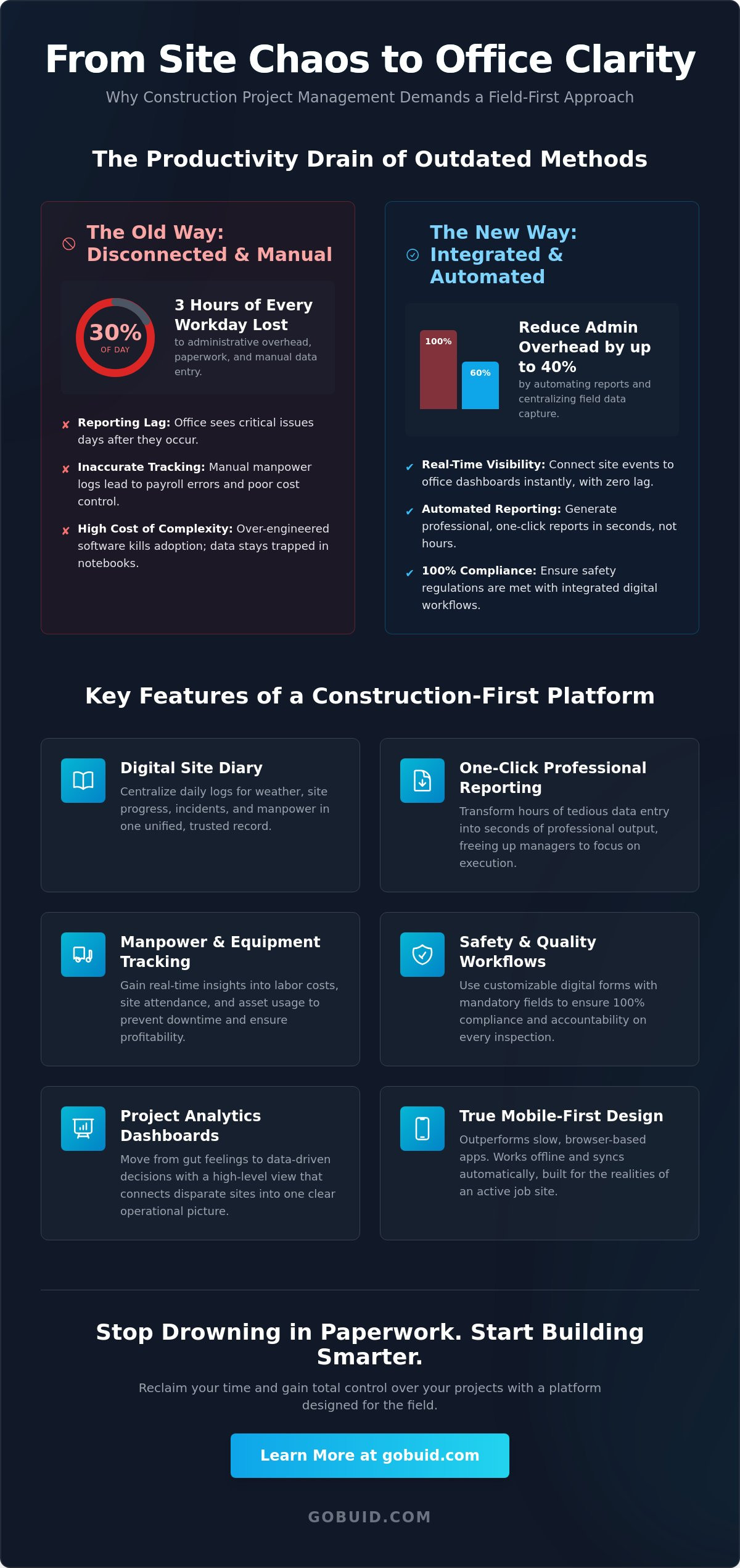
What if you could reclaim three hours of every workday currently lost to administrative tasks? In 2026, admin overhead still consumes 30% of the average construction manager's day, leaving critical site progress buried under a mountain of paperwork. Finding the right project management software for construction projects is no longer a luxury; it's a requirement for staying competitive in a high-speed market. You understand the frustration of delayed reporting from the site to the office and the inaccuracy of manual manpower tracking that leads to costly reporting lag.
Discover the top-rated construction management tools designed to bridge the gap between field operations and office reporting. This guide highlights how to achieve one-click professional reporting and real-time visibility into site progress with zero administrative lag. We'll explore how to evaluate platforms based on their field-first capabilities and identify the best solutions for high-efficiency teams ready to move beyond outdated manual processes. Learn how to centralize your data and regain control over chaotic site workflows today.
Key Takeaways
Identify why project management software for construction projects must prioritize field-first data capture over office-centric task cards.
Discover how digital site diaries eliminate reporting lag by connecting site events to office dashboards in real-time.
Learn to reduce administrative overhead by up to 40% through automated, one-click professional report generation.
Understand the importance of integrated manpower and equipment tracking for maintaining 100% compliance with 2026 safety regulations.
Evaluate software options based on their ability to provide total transparency across disparate operational locations without complex implementation.
⭐ Learn more about GoBuid's feature - without the heavy enterprise price tag
Why Generic Project Management Software Fails Construction Projects
General task management tools prioritize digital boards and colorful cards. These are fine for office environments but fail on a live job site. Construction requires site-specific documentation like digital diaries and incident logs. When field data is disconnected, you suffer from reporting lag. This delay means the office sees critical progress or safety issues days after they occur. Effective project management software for construction projects must solve this disconnect immediately.
To better understand how to select the right tools for your team, watch this expert guide:
Many firms choose over-engineered enterprise platforms that require weeks of implementation. If the software is too complex, your crew won't use it. This creates a high cost of complexity where data remains trapped in notebooks. Specialized capital program management software is designed to handle these specific field-first realities. It prioritizes data capture over administrative bloat. Complexity kills adoption.
The Gap Between Office Strategy and Field Reality
Manual data entry is a liability. When foremen rely on paper or generic apps, human error increases and compliance risks multiply. Real-time manpower tracking is essential for accurate payroll and progress monitoring. It ensures the office isn't guessing about labor costs or site attendance. Transparent data leads to better decisions and higher profitability.
Mobile-First vs. Mobile-Responsive Design
Browser-based apps fail on active sites. They are slow and require constant connectivity. True app-first tools outperform these because they are built for the tactile needs of a field environment. They work offline and sync when a signal is found. Field-first software is the connective tissue between the foreman and the stakeholder.
Key Features to Evaluate in Construction-First Platforms
Standard project management software for construction projects must go beyond simple task lists. You need a Digital Site Diary that centralizes weather, progress, and incidents in one place. This creates a unified data point that every stakeholder trusts. Stop relying on fragmented spreadsheets for equipment and asset management. Tracking usage and maintenance digitally ensures your heavy machinery stays operational without the administrative lag of manual logs.
Administrative overhead shouldn't dictate your schedule. The ability to generate reports in one click transforms hours of tedious data entry into seconds of professional output. This immediacy allows project managers to focus on execution rather than paperwork. Customized forms further bridge the gap by adapting the software to your specific inspection workflows. You can increase productivity by standardizing how data enters the system from the start.
Safety and Quality Inspection Workflows
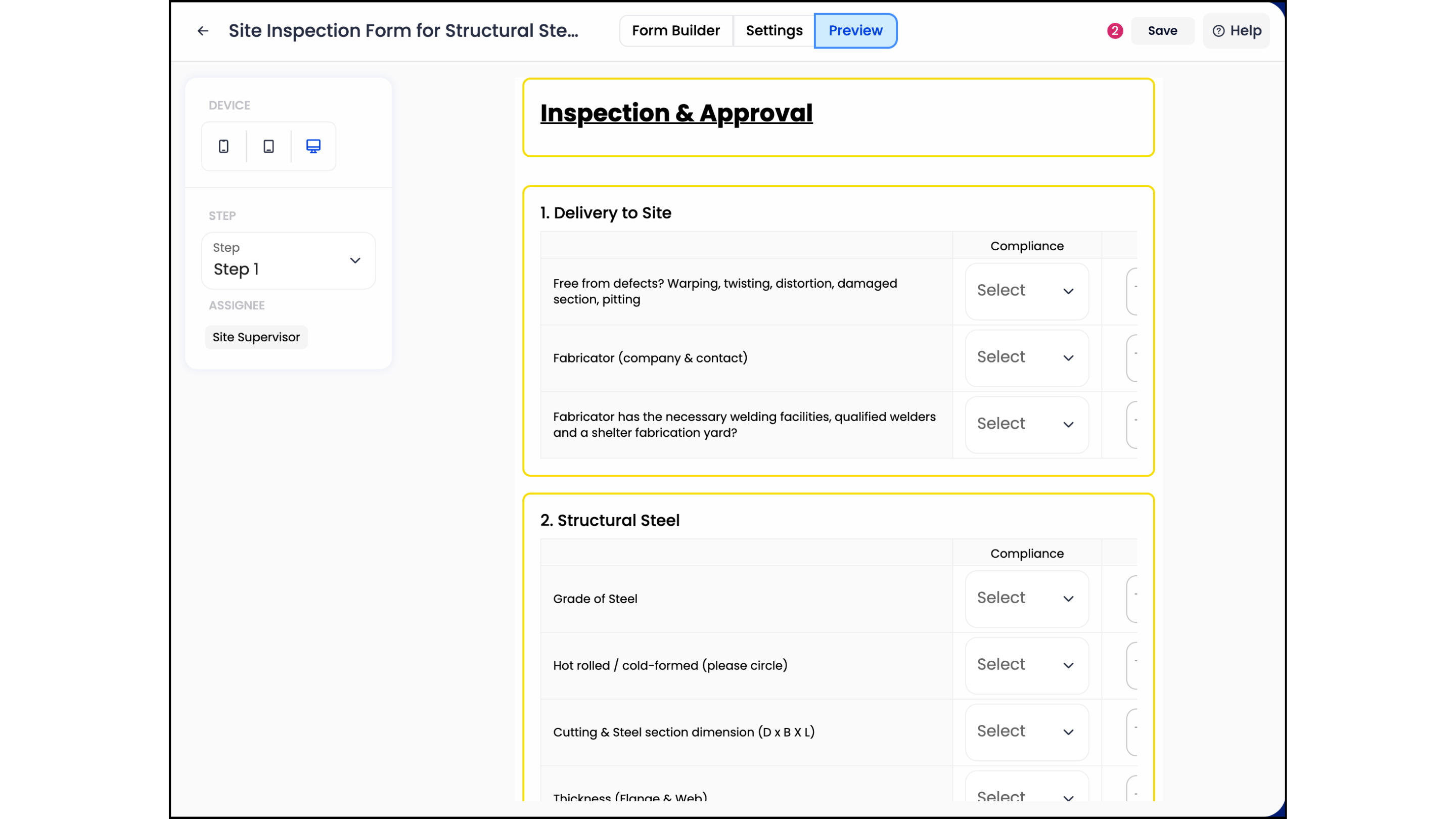
Digital forms ensure 100% compliance with safety standards by making mandatory fields impossible to skip. This accountability protects both the firm and the crew. Progress photos play a vital role in resolving site disputes and verifying work quality. They provide an indisputable visual record that links specific tasks to physical results on the ground.
Project Analytics and Real-Time Dashboards
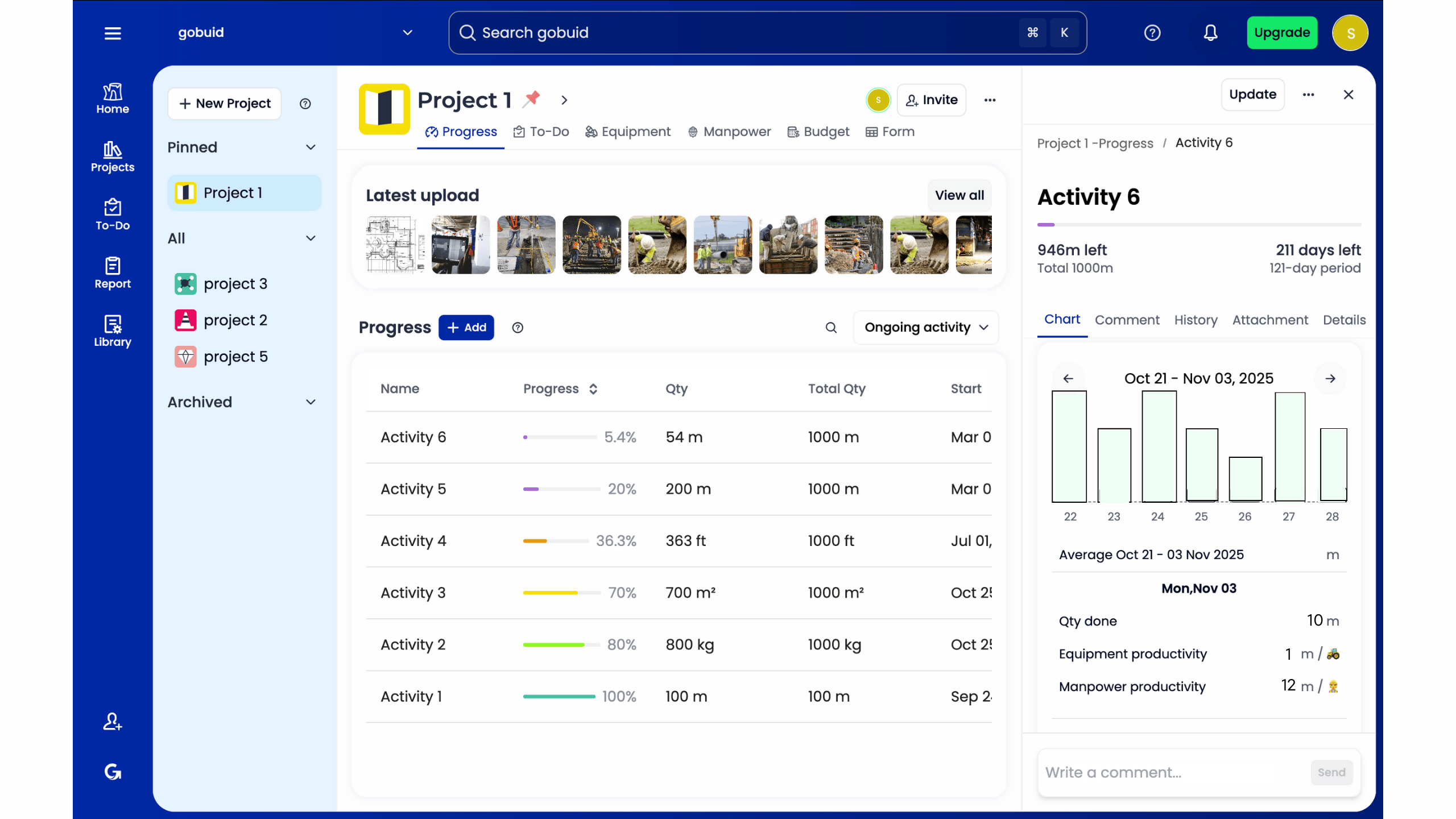
Move from gut feelings to data-driven insights with a project analytics dashboard. Real-time visibility into equipment management prevents costly downtime by flagging maintenance needs before failures occur. When evaluating project management software for construction projects, prioritize these high-level views that connect disparate site locations into one clear operational picture.
Top Project Management Software for Construction Teams in 2026
Selecting the right project management software for construction projects depends on your operational scale and technical resources. For massive firms managing billion-dollar portfolios, enterprise platforms like the recently rebranded Autodesk Forma provide deep integration with BIM and digital twins. These systems often demand significant upfront costs and lengthy implementation periods. If your priority is immediate field adoption and rapid data capture, you need a solution that prioritizes speed over administrative complexity.
GoBuid stands out as the high-efficiency alternative for teams that value agility. Unlike many enterprise providers that require long-term commitments, GoBuid empowers contractors with a no lock-in approach. This ensures the software remains a tool for productivity rather than a contractual burden. It bridges the gap between the physical site and the digital dashboard without the friction of over-engineered features that crews often ignore.
GoBuid: Best for teams requiring rapid site-to-office connectivity and one-click reporting.
Autodesk Forma: Best for enterprise-level projects requiring complex design collaboration and BIM workflows.
Niche Field Tools: Best for specialized subcontractors focusing solely on single-point tasks like plan markups.
Why GoBuid Ranks as the Best Efficient Alternative
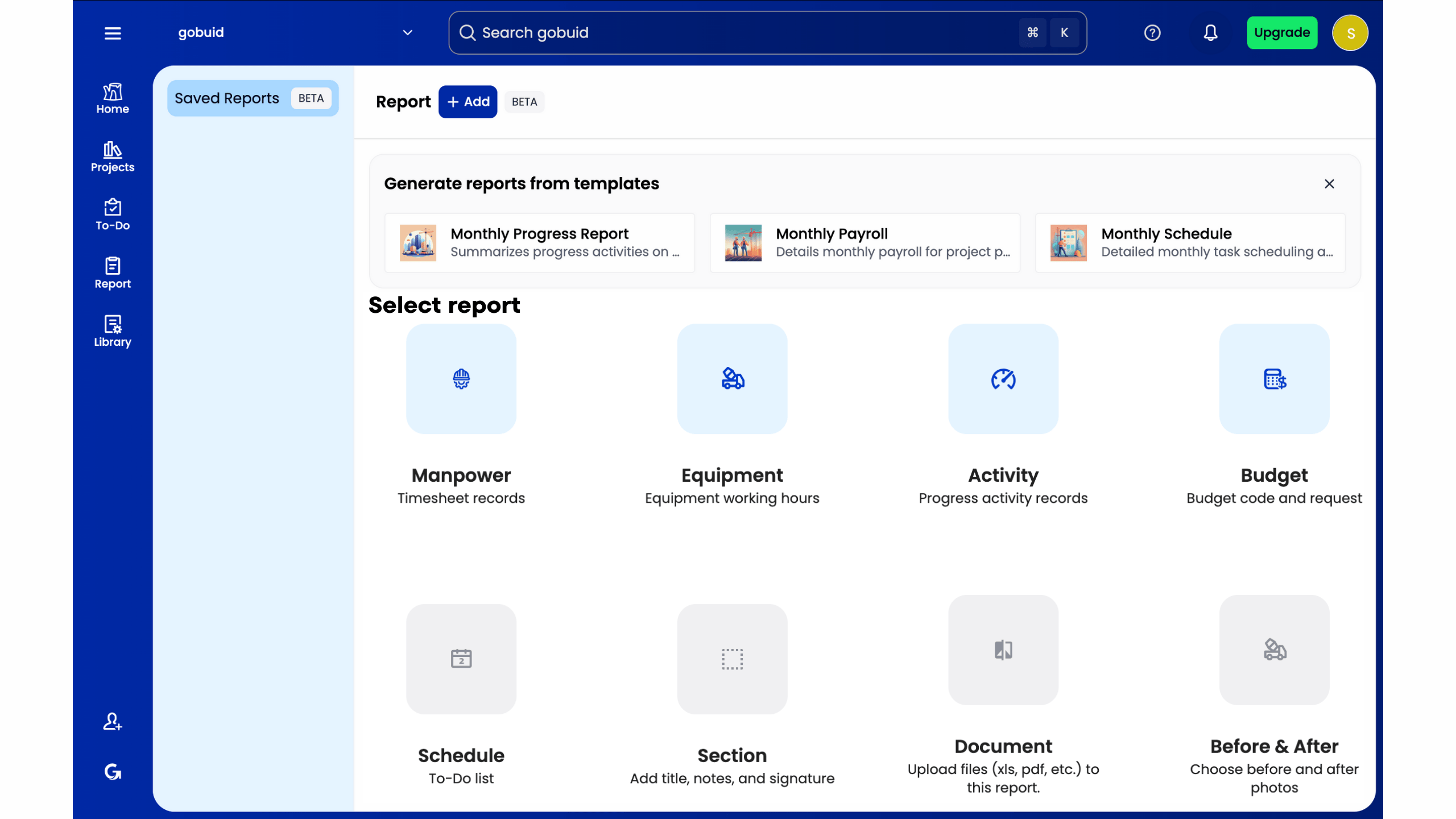
GoBuid operates as a hybrid authority. It understands the manual labor of the work environment but applies the organizational skill of a technical innovator. The platform's one-click report generation is the definitive solution for reducing the reporting lag discussed earlier. By centralizing disparate operational locations into a unified data point, it ensures that stakeholders have total transparency without the typical hours of manual entry.
Implementation: Moving from Paper to Digital
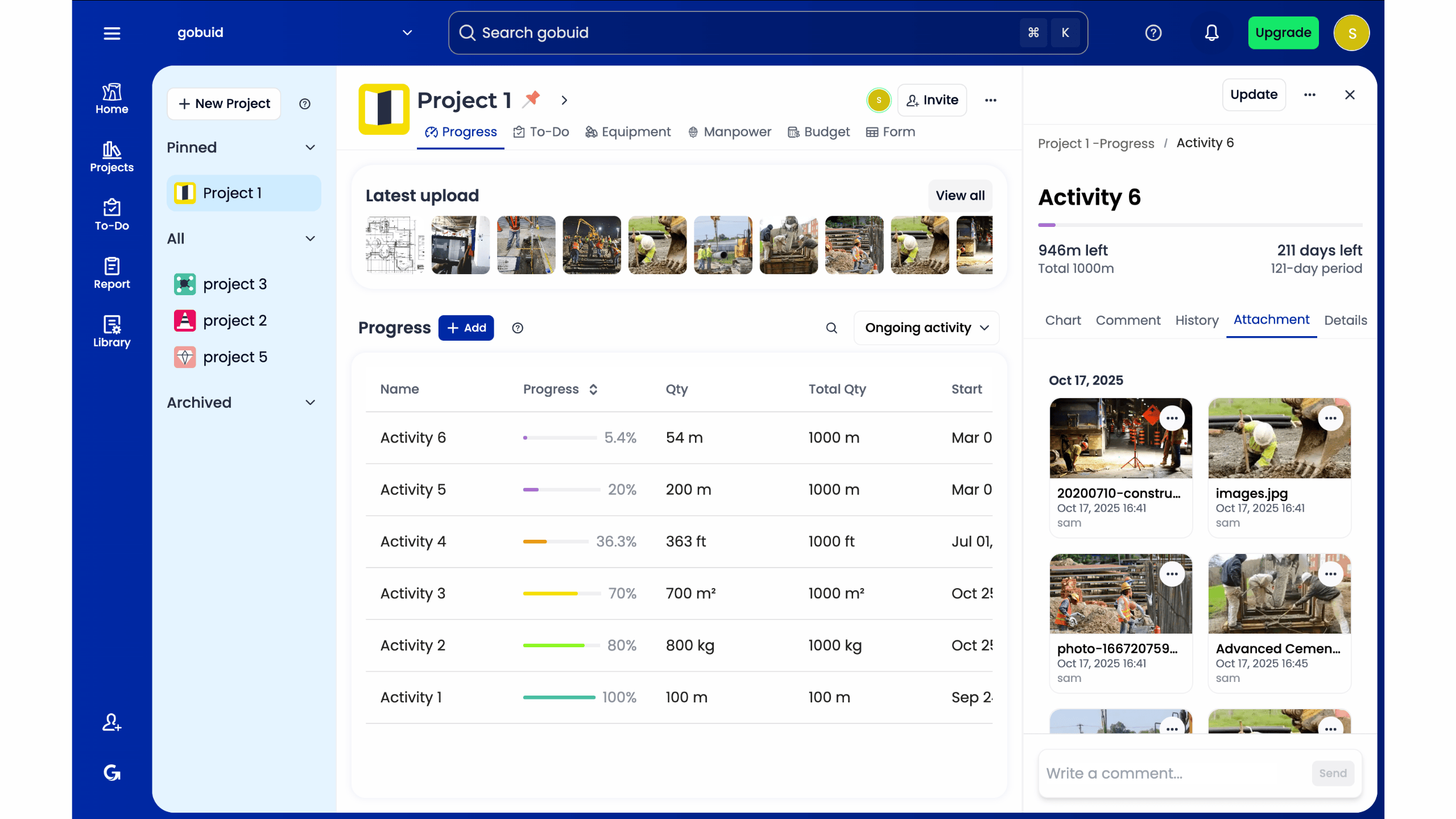
Transitioning to project management software for construction projects doesn't have to stall your active timelines. The key is a phased rollout that starts with high-impact areas like digital site diaries and safety inspections. Use customized forms to mirror your existing paper processes. This familiar structure encourages high adoption rates among site crews. When the digital tool feels like a natural extension of the foreman's workflow, you achieve zero administrative lag and immediate ROI.
Take Control of Your Site Operations
Modern construction demands more than just a digital version of a spreadsheet. You've seen how generic tools fail to capture the grit of daily site life and why specialized features like digital diaries are non-negotiable. Selecting the right project management software for construction projects is the difference between reactive firefighting and proactive leadership. By prioritizing field-first data, you eliminate the administrative lag that stalls progress and drains profitability.
Now is the time to bridge the gap between your foreman's reality and the office's reporting needs. You deserve a platform that delivers a real-time project analytics dashboard and one-click professional reporting. GoBuid offers these essential tools with the added flexibility of no lock-in contracts. Streamline your site documentation with GoBuid, start for free today. Regain total transparency across your operational locations and stop letting paperwork dictate your schedule. Your team is ready for a solution that works as hard as they do.
Frequently Asked Questions
What is the best free project management software for construction projects?
While generic free tools exist, they often fail to meet the rugged demands of a job site. The best project management software for construction projects usually requires a specialized paid subscription to unlock essential features like automated site diaries and safety inspections. Free trials are a good starting point to test the interface, but professional construction firms prioritize reliable data capture over zero-cost alternatives that lack industry-specific reporting capabilities.
How does construction software improve site safety and compliance?
Software improves safety by digitizing inspection workflows and standardizing compliance checks. Digital forms make specific safety fields mandatory, ensuring that inspections are completed thoroughly before a report is submitted. This creates an indisputable audit trail. For example, it helps establishments meet the March 2, 2026, deadline for electronic OSHA submissions by centralizing all safety documentation and incident logs in one secure location.
Can I track manpower and equipment in the same app?
Centralized platforms allow you to track manpower and equipment within the same application. This integration provides a unified view of your site resources, allowing you to monitor labor productivity alongside machinery usage. Combining these data points helps you identify bottlenecks before they impact your timeline. You can ditch disparate spreadsheets in favor of a single dashboard that offers real-time visibility into every operational asset on your site.
What features should I look for in a digital site diary?
Prioritize a digital site diary that offers one-click report generation and automated data syncing. It must handle weather conditions, progress photos, and incident logging in a single, mobile-first interface. Look for software that allows your foremen to capture data quickly without leaving the field. A high-quality diary ensures that field events are translated into professional office reports instantly, maintaining total transparency across all project stakeholders.
