Top Construction Site Management Software in Singapore
Explore construction site management software Singapore teams can use to organise documents, tasks and inspections, keeping updates clear from field to office.
by Amelia Grant
|
Good site management depends on clear information reaching the people doing the work. Construction site management software in the US brings project documents, tasks, inspections and progress records into a shared digital workflow, helping teams keep site activity visible and coordinated.
Paper forms, scattered files and delayed updates can make it harder to respond to site conditions. This guide explains how construction project management software supports daily work through shared documents, digital inspections and maintenance tracking. It also covers what to assess when choosing a platform, so you can find tools that fit your team’s workflow and keep project information accessible from the field to the office.
Key Takeaways
- See how project management software helps coordinate workforce needs, site tasks and project updates.
- Learn how a common data environment keeps project documents organised and accessible to the team.
- Understand how digital inspections can capture site findings and support a more consistent approach to equipment upkeep.
- Explore how GoBuid’s Digital Site Diary, Equipment Management, Customised forms and one-click reports can make site records easier to manage.
What is construction project management software?
Construction project management software connects site records, schedules and team workflows in a digital process. In the US, construction site management tools can support workforce coordination, document control and project tracking. The right platform depends on the work your teams need to manage.
Labor and Workforce Management
Workforce management records who is assigned to each task, where crews are needed and how work is progressing. For example, a project manager can compare planned manpower with site updates and flag a gap before it affects the next activity. Look for clear workforce records and reports that support decisions across contractors, shifts and work areas. Manpower data helps teams coordinate, while managers remain responsible for planning and directing work.
Developer and Contractor Workflows
Developers need a view of project progress, decisions and records, while contractors need practical workflows for completing and reporting site tasks. Construction ERP platforms connect functions such as project controls and business operations; site applications focus on field workflows. An integrated workflow carries information between teams and reduces duplicate entry. Check whether reports and analytics draw on shared project data and serve each role.
Scheduling and RFI Workflows
Scheduling software links planned activities, responsibilities and timelines, helping teams see how a delayed task may affect later work. RFI and RFA workflows record a request, route it to the responsible person and track the response against the related drawing or task. A useful system makes status and decisions visible to affected contractors. US teams can choose among standalone site applications, common data environments and construction ERP platforms.
Project Tracking, Safety, and Document Control
Compare tools by how they handle progress updates, inspection records and controlled documents. Tracking applications organise reports and analytics, while safety functions can record inspection findings and follow-up actions. A common data environment helps teams find current documents and distinguish revisions. Applicable requirements depend on project jurisdiction and contract. Software can support records and workflows, but it does not establish compliance by itself. Incomplete updates, low adoption and inaccurate source records can undermine the system, so teams still need clear processes and timely entries.
Common data environment and document management
A common data environment (CDE) gives project teams a shared place for current drawings, specifications and site records. For example, linking a drawing revision to its related inspection helps field teams work from the same project information.
Quality Assurance Documentation
Digital quality assurance connects inspection results with evidence and follow-up. A site team can record a defect, attach a progress photo, assign corrective work and log its completion. This creates a traceable process instead of separate paper forms and image folders. Check that the platform lets teams identify the relevant project area, document the finding and retrieve its status later. Clear records help project managers understand progress and review recurring issues.
Document and Information Management
Document management covers how teams store, organise, update and share project information. A practical workflow labels files by project, location, discipline and revision, then makes the current version easy to find. When a contractor receives an updated drawing, the related task and site record should point to that revision. This helps prevent confusion from duplicate files and disconnected processes. An integrated platform can connect documents with inspections, progress records and reports, giving teams a consistent resource across office and site workflows. During digital transformation, keep naming rules and approval steps clear. These processes matter as much as the platform.
For a practical approach to project records, connect field documentation with day-to-day progress updates. Explore site documentation workflows that help teams keep project information organised and useful.
Digital inspections and preventive maintenance
Digital inspections turn site observations into assigned actions and records. For equipment and infrastructure, maintenance tracking helps teams plan checks and follow up on issues before work proceeds.
Digital Inspection Workflows
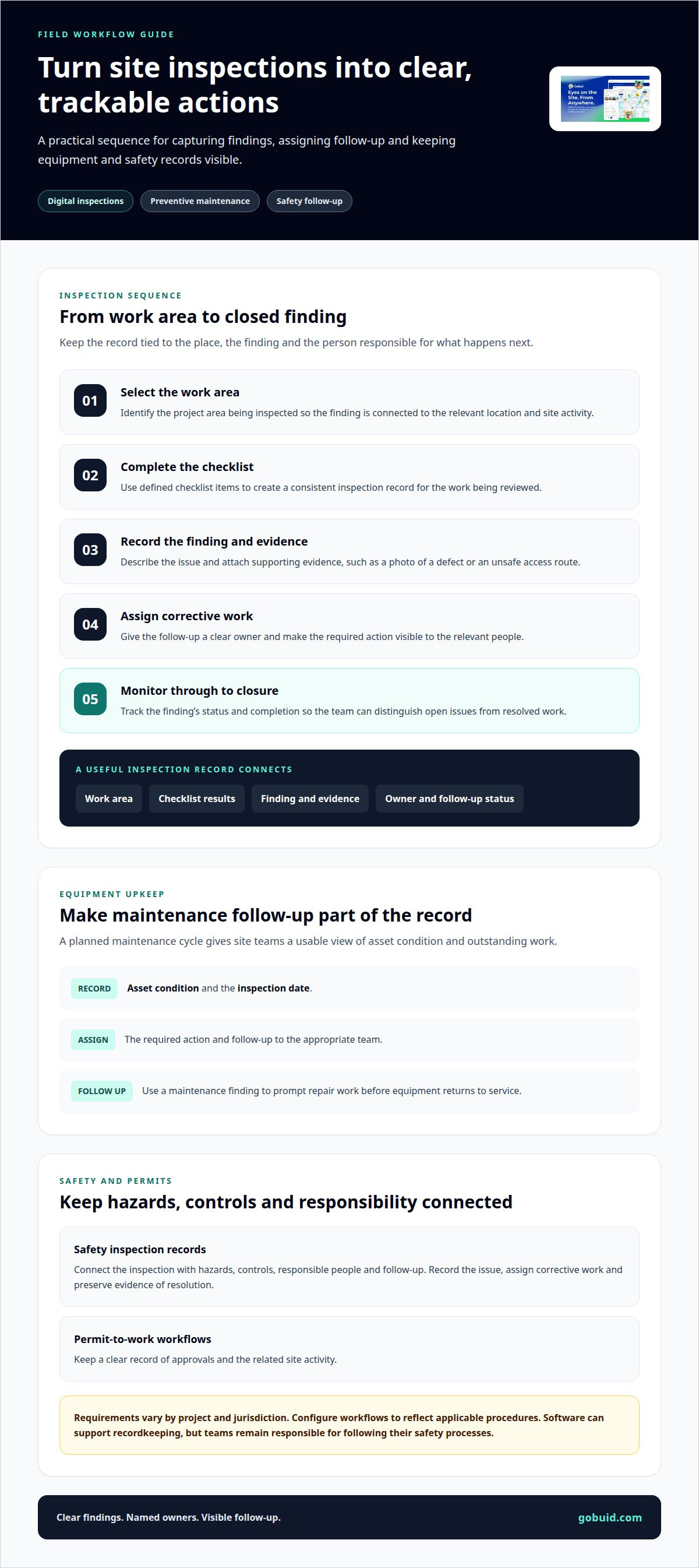
A site inspection can follow a defined sequence: select the work area, complete checklist items, record findings and assign corrective actions. For example, a quality inspector can attach a photo to a defect and track it through to closure. Look for project management software that makes inspection results visible to relevant stakeholders. Clear ownership and monitoring help teams distinguish open issues from completed work.
Safety Inspections and Work Permits
Health, safety and environment workflows should connect inspections with hazards, controls, responsible people and follow-up. A safety inspection might record an unsafe access route, assign corrective work and preserve evidence of its resolution. For permit-to-work processes, teams need a clear record of approvals and related site activity. Requirements vary by project and jurisdiction, so configure digital workflows to reflect the applicable procedures. Software can support recordkeeping, while teams remain responsible for following their safety processes.
Preventive maintenance adds a planned cycle to equipment operations. Record each asset’s condition, inspection date and required action, then assign follow-up to the appropriate team. For example, a maintenance finding can prompt a repair task before equipment returns to service. This gives site teams a usable view of asset status and outstanding work. Choose workflows that fit field routines, rather than adding steps crews cannot maintain. Organise digital inspection workflows around clear findings, owners and follow-up.
GoBuid: Digital Site Diary
GoBuid’s Digital Site Diary helps teams manage daily site records in a shared workflow. Use it when updates, equipment information and reporting need better organisation. Customised forms can capture the information your team needs, while Equipment Management organises equipment-related records. Generate reports in one click using recorded project information, without rebuilding the report manually.
This approach suits teams looking to make site documentation more consistent across daily operations. It connects field records with reporting tasks, giving project teams a clearer view of the information they have collected. Start with the records your team already maintains, then consider where a digital diary or customised form can reduce scattered paperwork.
For a conversation about how GoBuid can support your site documentation workflow, contact GoBuid.
Make the Next Workflow Clearer
For construction teams evaluating site management software while managing projects inspired by global standards like those in Singapore, start by identifying one site routine that needs clearer ownership. Map how information moves from field capture to review, action and reporting. Then involve the people who use those records in designing the workflow. A practical starting point is a daily record that connects observations with the follow-up they require.
GoBuid supports this work with a Digital Site Diary, Customised forms and one-click report generation. These tools help teams structure site records around their working processes. Set a clear purpose for each form and report so the information remains useful to the people acting on it.
Contact GoBuid about your project and discuss a practical next step for your team. Build a workflow that supports the work on site.
Frequently Asked Questions
Which construction site management platforms are popular with Singapore contractors?
Contractor needs vary, so platform popularity matters less than fit with daily site work. GoBuid brings digital site records, manpower and equipment tracking, safety and quality inspections, and reporting together in one platform. Other solutions may focus more heavily on enterprise resource planning, document control or scheduling. Compare platforms against the workflows your team needs to manage.
What features should Singapore construction site management software include?
Prioritise features that support the team’s actual work: site records, workforce coordination, equipment records, inspections and reporting. Assess how staff capture information, organise project records and share updates with responsible people. For example, a supervisor should be able to record a site issue and make its status clear to the team. GoBuid offers a Digital Site Diary, Customised forms and one-click report generation.
Does construction site management software integrate with BIM, accounting, and project scheduling tools?
Integration depends on the software and systems involved. Confirm which information can move between platforms, such as schedules, project identifiers or approved documents, and whether updates require manual entry. BIM capability is distinct from linking project records to drawings. GoBuid is not a BIM tool, so teams that need BIM authoring should treat it as a separate requirement.
How can contractors implement construction site management software on a Singapore project?
Start by choosing one repeatable workflow, such as daily site reporting or recording inspection findings. Define who enters information, who reviews it and how the team handles incomplete records. Configure forms around existing site processes, then use the same workflow with the relevant project team. Review whether entries are clear and useful before extending the system to more operations.
Which construction site management software is best for small contractors in Singapore?
The best fit is a platform that supports the contractor’s core site workflows without adding unnecessary complexity. Consider who will use it in the field, what records they need to capture and how managers will turn those records into reports. GoBuid suits teams seeking a Digital Site Diary, Customised forms, equipment management and straightforward reporting in a shared platform.