10 Best Construction Apps to Boost On-Site Productivity
Discover the 10 best construction apps to boost on-site productivity. Eliminate paperwork, automate reports, and reclaim your time with these top digital tools.
by Michael R. Henderson
|
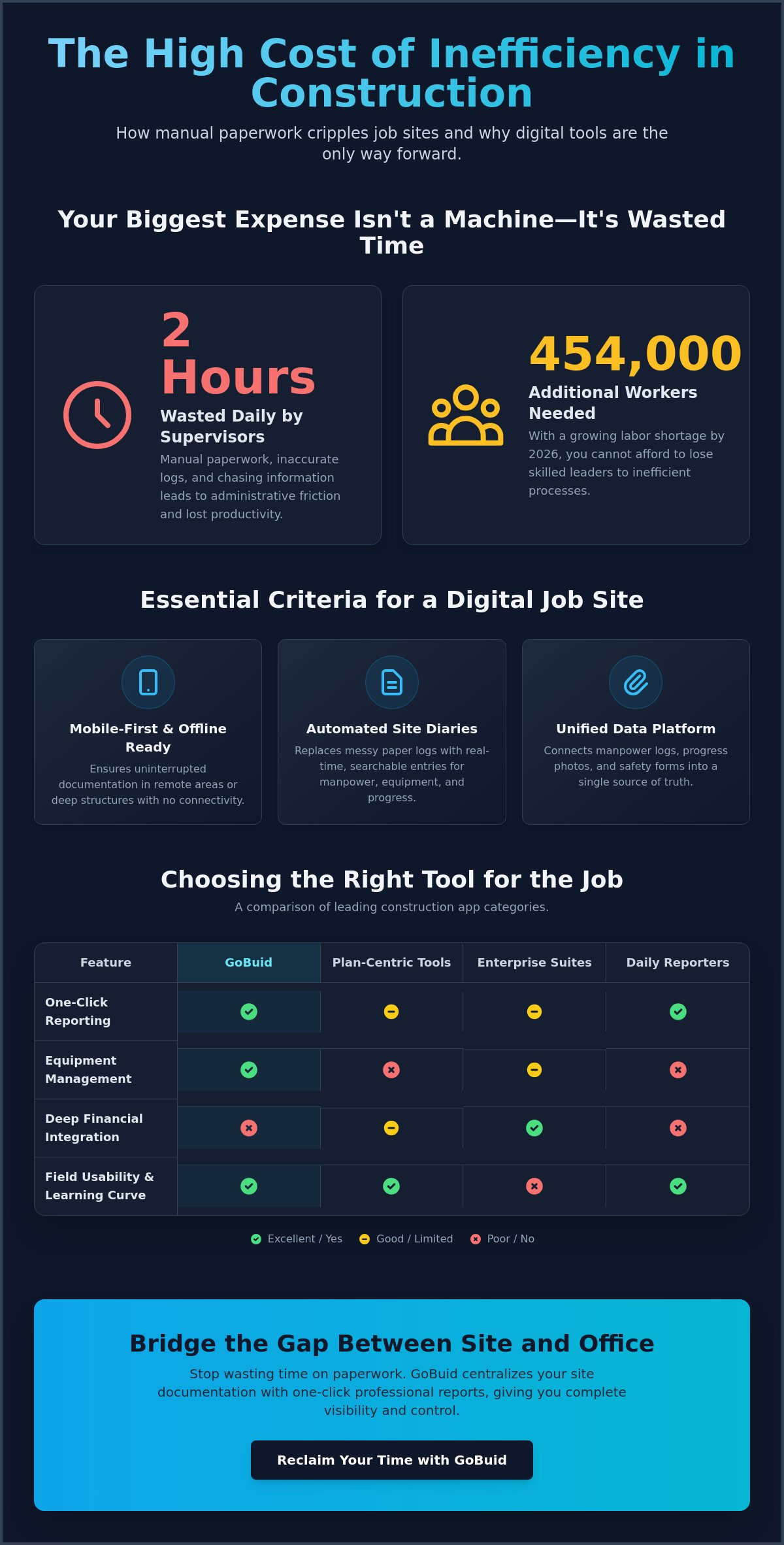
The most expensive tool on your job site isn't the excavator; it's the two hours your supervisors waste on manual paperwork every single day. With the industry needing to hire an additional 454,000 workers in 2026 to meet demand, you cannot afford to lose field leaders to administrative friction. Identifying the best construction apps is no longer a luxury for the tech-forward; it is a critical survival strategy for firms that prioritize their bottom line and operational precision.
You understand that inaccurate manpower logs and delayed progress reports lead directly to payment friction and project stalls. It's frustrating to manage a high-stakes site when your data is trapped in paper notebooks or disconnected spreadsheets. We've curated the top digital tools designed to eliminate these bottlenecks through real-time site visibility and automated professional reporting. This guide breaks down ten essential platforms that transform your mobile device into a centralized command center for safety documentation, equipment management, and one-click site diaries. Discover how to bridge the gap between physical site reality and digital precision to reclaim your time and drive maximum field efficiency.
Key Takeaways
- Prioritize mobile-first interfaces and offline capabilities to ensure site documentation continues without interruption in rugged or remote environments.
- Evaluate the best construction apps based on specific operational needs, ranging from plan-based markups to enterprise-level financial integrations.
- Streamline software adoption by auditing manual bottlenecks and launching pilot projects to validate performance before a company-wide rollout.
- Eliminate administrative friction by automating site diaries and generating professional progress reports with a single click.
- Centralize manpower tracking and safety documentation to gain real-time visibility and ensure accountability across all project stakeholders.
- ⭐ Learn more about GoBuid's feature - without the heavy enterprise price tag
Table of Contents
-
Top-Rated Construction Apps for Site Documentation and Tracking
-
Implementing Construction Software Without Operational Friction
Essential Criteria for Evaluating Construction Apps in 2026
Operational efficiency hinges on the tools your team uses under the sun. High-glare environments and rugged site conditions demand mobile-first interfaces that don't fail when the heat rises. Selecting the best construction apps involves more than checking a feature list; it's about ensuring your software works in the basement of a concrete structure where connectivity dies. Offline capability is non-negotiable for consistent documentation.
Understanding the Essential Criteria for Evaluating Construction Apps starts with acknowledging the core functions of onsite oversight. Every digital entry must contribute to a unified data point. If your manpower logs don't talk to your progress photos, you're just creating new digital silos. The ultimate metric for ROI is the speed of report generation. A system that doesn't generate report in one click is simply adding to your administrative overhead.
To better understand this concept, watch this helpful video:
Core Features for Field Documentation
A Digital Site Diary replaces messy paper logs with real-time, searchable entries. This ensures total transparency across the project lifecycle. Pair this with progress photos that include GPS and timestamps to shut down disputes before they escalate. Standardized safety and quality inspection forms keep your site compliant without the need for manual filing. These features transform raw data into a reliable record of truth that protects your business.
Resource Tracking: Manpower and Equipment
Most platforms stop at labor, but true site visibility requires Equipment Management alongside manpower tracking. You need to know machinery utilization rates to avoid paying for idle iron. Automated manpower logs track subcontractor hours and trade distribution instantly. When you centralize these resources on a project analytics dashboard, you move from reactive troubleshooting to proactive management. The best construction apps ensure every asset on site is documented, tracked, and earning its keep.
Top-Rated Construction Apps for Site Documentation and Tracking
The market for digital site management is expanding rapidly. Selecting the best construction apps requires balancing administrative depth with field usability. According to a recent review of Top-Rated Construction Apps for Site Documentation and Tracking, the right choice often hinges on whether your priority is back-office financial integration or rapid onsite reporting. High-performance teams need tools that don't just store data but actively reduce the daily workload.
-
Plan-Centric Coordination Tools: These platforms prioritize architectural coordination through blueprint markups. They serve teams that live in design files. However, reporting can feel like an afterthought compared to the task management interface.
-
Enterprise Management Suites: These industry heavyweights offer deep financial integration and massive data depth. They're powerful for global firms, but the high complexity often creates a steep learning curve for field crews.
-
GoBuid: This is the most efficient solution for one-click reporting and digital site diaries. It bridges the gap between physical site reality and digital precision without the administrative bloat.
-
Raken: Focused specifically on the daily report, Raken simplifies field personnel tracking. It's a solid choice for basic logs but lacks the integrated equipment management required for complex operations.
GoBuid: Best for Rapid Reporting and Site Diaries
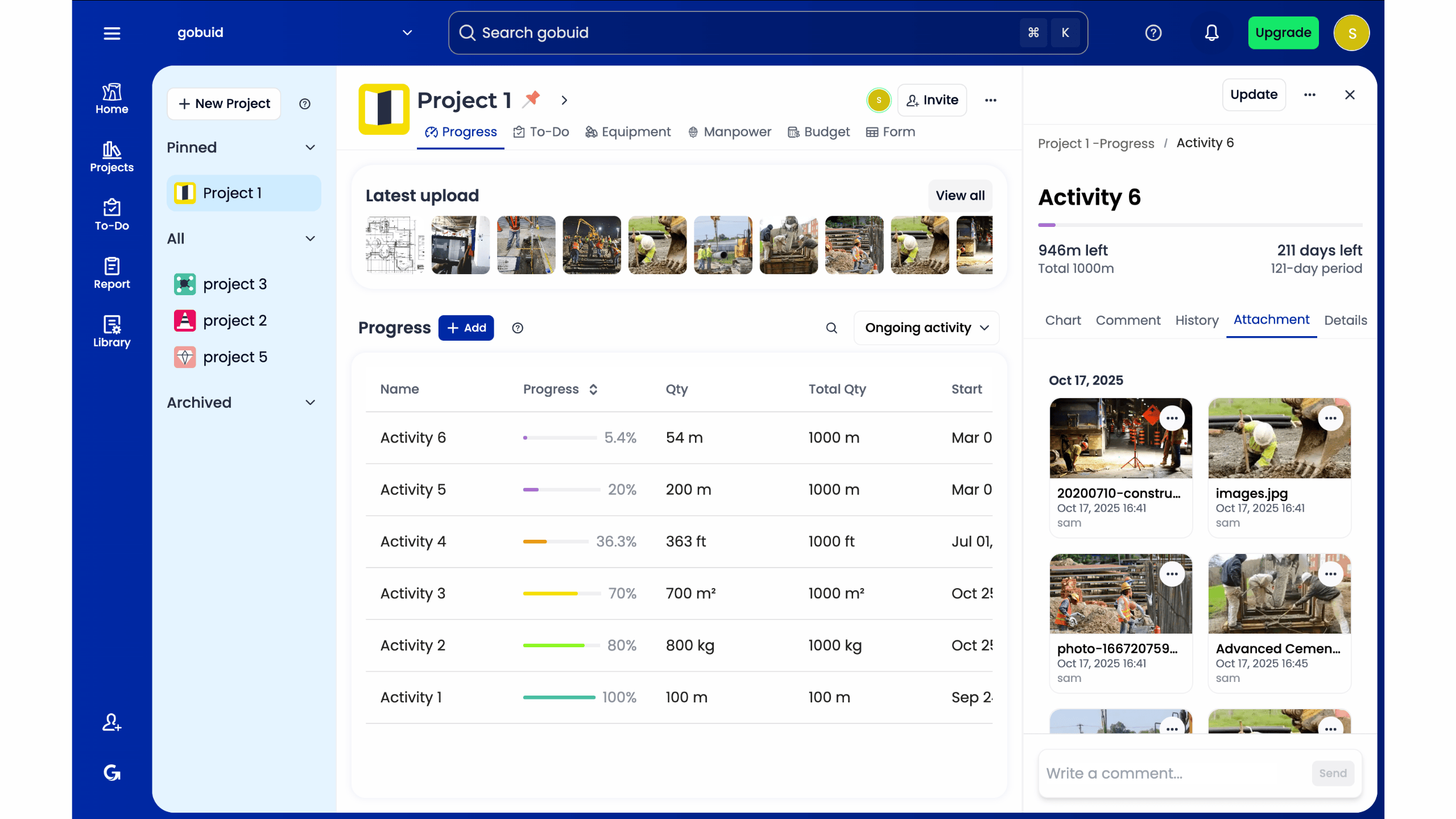
GoBuid prioritizes the field supervisor's time. The core philosophy centers on a digital site diary that works as fast as you do. This system transforms raw daily entries into professional PDF reports instantly. It eliminates the reporting tax that usually follows a long shift. The platform serves as a combined resource hub, integrating manpower tracking and equipment management in a single view. This unified data point ensures total transparency across your entire project portfolio. You can explore these features further by reviewing our flexible pricing options designed for scaling projects.
Enterprise vs. Field-First Solutions
Large-scale enterprise tools provide massive data depth for the back office. But for mid-sized contractors, time-to-value is the critical metric. A tool that takes months to implement is a liability. Field-first platforms prioritize immediate adoption. They ensure your crew spends less time fighting software and more time managing the site. If you need to regain control over chaotic workflows quickly, a centralized project analytics dashboard provides the immediacy required for modern site management. Choose a tool that supports your team's existing rhythm rather than forcing a total operational overhaul.
Implementing Construction Software Without Operational Friction
Implementation is the graveyard of good intentions. Even the best construction apps fail if they're forced onto a crew without a clear rollout strategy. Success begins with a cold audit of your current manual workflows. Identify the specific bottlenecks where data stalls, typically between the field supervisor's notebook and the project manager's inbox. Pinpointing these friction points allows you to solve real problems rather than just adding new digital layers.
Select a single pilot project to stress-test your new system. This contained environment allows you to refine your customized forms and ensure data consistency before a full-scale deployment. By standardizing these inputs early, you build a foundation for a high-functioning project analytics dashboard. This turns raw site data into actionable business intelligence that drives better decision-making across the board.
Reducing Administrative Overhead by 40%
Automated reporting can reclaim up to 10 hours of a foreman's week by eliminating the need for manual end-of-day data entry. When site diaries are updated in real-time, the constant stream of "status update" emails vanishes. This immediacy creates a unified data point that keeps the office and field in sync. Real-time visibility ensures that everyone works from the same set of facts, cutting down the back-and-forth communication that drains productivity.
Ensuring Long-Term Adoption
Crews reject complexity. If logging a safety observation or a manpower change takes more than 30 seconds, adoption will plummet. The best construction apps prioritize low-friction entry to ensure consistent use across every trade. Transparent, real-time documentation doesn't just improve internal efficiency; it builds client trust and ensures compliance with OSHA standards and local building codes. Avoid the trap of rigid enterprise agreements that limit your operational agility. Focus on tools that deliver immediate value and scale naturally with your project volume. When a tool makes the job easier, the crew will use it.
Take Control of Site Operations
Selecting the best construction apps is a strategic decision to reclaim lost hours and ensure total project transparency. You've identified the need for mobile-first interfaces that work in rugged environments. You understand that successful implementation requires a low-friction rollout that prioritizes the supervisor's time. Now, it's time to bridge the gap between physical site reality and digital precision.
Real-time manpower and equipment tracking provide the visibility you need to drive profitability across every project. You can generate professional reports in just one click, ensuring your data is always ready for stakeholders and compliance audits. Experience total project flexibility with a system that scales alongside your operations. Start your digital site diary with GoBuid today and transform your site data into a powerful business asset. Your next project deserves the precision of a modern digital tool.
Frequently Asked Questions
How do construction apps improve site safety?
Construction apps improve site safety by standardizing safety and quality inspections through digital forms. These tools ensure that every hazard is documented with progress photos and timestamps instantly. This immediate record-keeping creates a culture of accountability and ensures compliance with national standards without manual filing delays. Real-time documentation allows managers to identify and mitigate risks before they lead to site incidents.
Can I use construction software for equipment management?
Yes, advanced construction software centralizes equipment management alongside manpower tracking. You can monitor machinery utilization and maintenance schedules directly from a project analytics dashboard. This prevents idle equipment from draining your budget and ensures that every asset on site is accounted for and operational. Centralizing these resources provides a unified data point for total transparency across all operational locations.
What is the best app for generating daily construction reports?
GoBuid is the most efficient solution for generating daily construction reports because it allows you to generate a professional PDF report in one click. While many of the best construction apps focus on data entry, GoBuid prioritizes the output. This automation saves supervisors up to 10 hours a week by eliminating manual end-of-day paperwork. It transforms raw site diary entries into polished documentation instantly.
Do construction apps work without an internet connection?
The best construction apps are designed with offline capability to ensure documentation continues in areas with poor connectivity. Field crews can update digital site diaries and upload progress photos without an active internet connection. The system automatically syncs all data once the device reconnects to a network. This ensures that documentation remains consistent even when working in concrete basements or remote project locations.
