Compare Construction Field Management Software for Site Teams
Find the right tools for your crew with our practical construction field management software comparison. Connect field updates, plans, and daily logs easily.
by Sam Chen
|
More features don’t automatically make a construction platform a better fit. A construction field management software comparison is most useful when it shows how each option helps crews coordinate site work, share progress updates, and manage drawings and project records. The right choice depends on whether field and office teams can keep current information aligned in daily work.
Construction teams need tools that fit the pace and practical demands of the job site. This guide explains how field management software supports coordination and real-time progress updates, then compares options using the features that matter for site teams. You’ll also see what to consider for document and drawing management, so you can focus on the workflows your projects need.
Key Takeaways
- Compare tools by how well they connect field updates with office workflows, not by feature count alone.
- Prioritize coordination features that help teams track tasks, labor, schedules, and changing site conditions from shared information.
- Assess how easily crews can find, understand, and act on current drawings and project documents.
- Use the decision guide to match software capabilities to your team’s daily workflows and project needs.
What Is Construction Management Software?
Construction management software connects jobsite activity with office processes. It can support job costs, contracts, procurement, billing, submittals, compliance records, schedules, and field updates. For contractors, the practical test is whether teams can keep project information aligned without entering it repeatedly across different systems.
Integration links accounting, timekeeping, project management, BIM, reporting, and document workflows. For example, connecting procurement with job costs can make committed-cost updates visible in real time. A construction field management software comparison should assess how these exchanges support daily work, not just count features.
See how construction teams can evaluate and adopt software around jobsite processes:
No single platform fits every team in 2026. Leading products differ in coordination, reporting, document workflows, and integration. A construction field management software comparison helps teams weigh those differences against real project processes.
Check whether accounting, BIM, and project management tools exchange useful data. BIM workflows using Autodesk tools need a clear path for sharing project information. Small contractors may prioritize a straightforward interface and core processes; large firms may need consolidated reporting across 20+ projects.
Review data ownership terms, access controls, export options, and compliance records. Disconnected systems can push teams toward spreadsheets, where conflicting versions of project status can emerge. Adoption may also suffer when site leaders rely on offline reports instead of shared records.
| Option | Best comparison criteria |
|---|---|
| Construction management suite | Job costs, contracts, procurement |
| Field management tool | Daily updates, task coordination |
| Scheduling software | Dependencies, handoffs, changes |
| Document platform | Drawing access, comments, history |
| Accounting system | Cost and payroll data exchange |
| BIM coordination tool | Model and project workflow links |
| Reporting platform | Dashboards, consolidated reporting |
Choose an option that fits your team’s processes and connects the systems it uses every day. For Australian businesses looking to connect operations under a unified system, Mooov provides an all-in-one management platform.
Field coordination and real-time progress updates
Field coordination tools connect work plans with actual site conditions. Compare how platforms capture progress, flag constraints, and keep office and field workflows aligned.
Real-Time Progress Updates
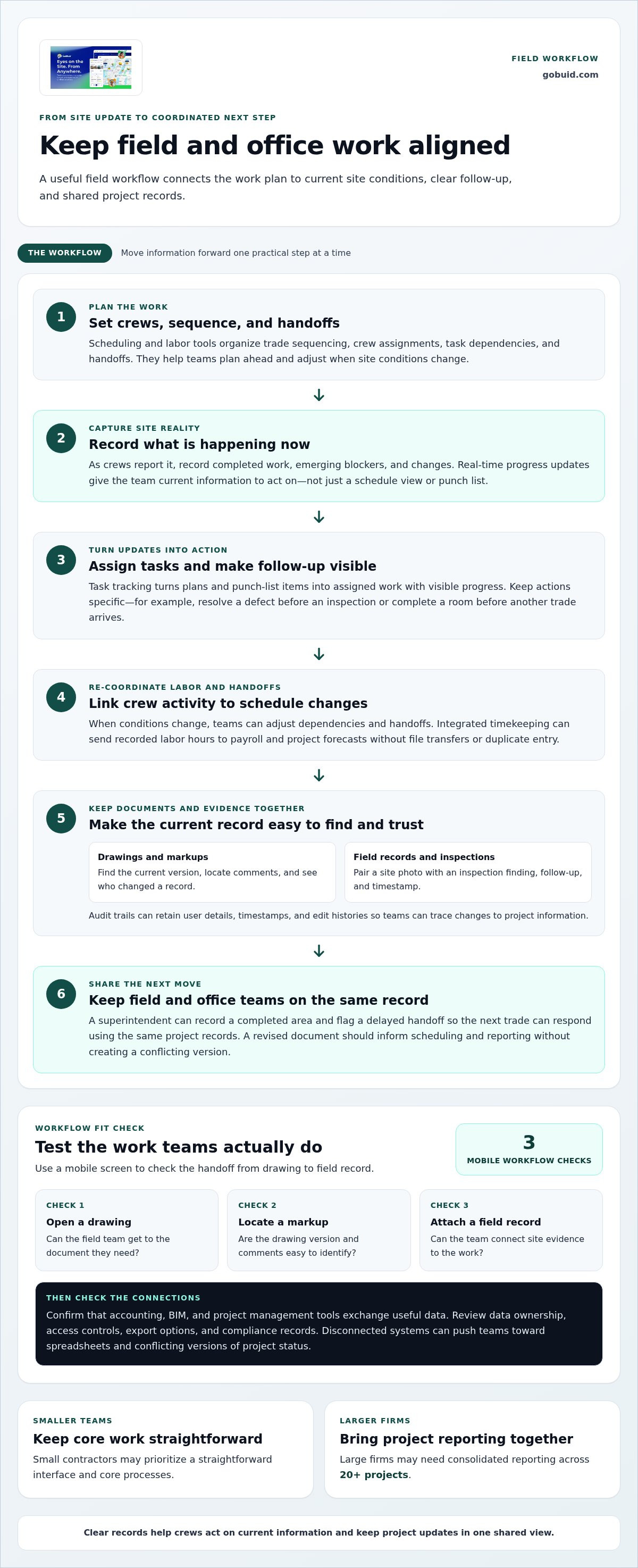
Real-time updates record completed work, emerging blockers, and changes as crews report them. Unlike schedule views or punch lists, they show what is happening now, giving project teams current information to act on. For example, a superintendent can record a completed area and flag a delayed handoff so the next trade can respond using the same project records.
Scheduling and Labor Coordination
Scheduling and labor tools organize trade sequencing, crew assignments, dependencies, and handoffs. They focus on forward planning: teams can see which work depends on another task and adjust when site conditions change. Integrated timekeeping can send recorded labor hours to payroll and project forecasts without file transfers or duplicate entry. Compare platforms by how clearly they link crew activity with schedule changes.
Task Tracking in the Field
Task tracking turns plans and punch-list items into assigned work with visible progress and follow-up. It differs from broad progress reporting by focusing on individual actions, such as resolving a defect before an inspection or completing a room before another trade arrives. For BIM-centric coordination, teams can link field work to model information; a hospital project with 12 design disciplines shows why clear coordination matters.
Choose workflows that let crews act on current information, then keep project updates in one shared view. Explore field progress documentation as one way to structure site records and updates.
Document and drawing management
Document tools support drawing collaboration and field records. Compare how teams find the current version, capture site evidence, and maintain a useful project record.
Document Collaboration
Document collaboration lets clients, contractors, and subcontractors share and comment on drawings in real time. Compare how easily users can identify the current version, locate markups, and see who changed a record. For example, a superintendent reviewing a revised room layout needs the drawing and its comments together, not in separate files. A clear interface helps field teams interpret visual information without sorting through unnecessary complexity.
Field Documentation and Inspections
Field documentation captures progress photos, inspection results, and notes against relevant work. Unlike drawing collaboration, its purpose is to record site conditions and quality checks. An inspection workflow can pair a photo with a finding, follow-up, and timestamp. Audit trails can retain user details, timestamps, and edit histories, helping teams trace changes to project information.
Test each workflow on a mobile screen: open a drawing, locate a markup, and attach a field record. Then check whether a revised document can inform scheduling and reporting without creating a conflicting version. These steps show whether the system supports practical site work as well as office review.
Organize progress photos and documentation as part of a clearer field record.
GoBuid: generate report in one click
GoBuid helps site teams turn field records into clear project reports. Its one-click report generation brings updates together, while customised forms support consistent information capture across project workflows.
For teams coordinating crews and site checks, GoBuid’s Manpower Tracking and Safety & Quality Inspections help organize essential field information. These tools suit teams focused on clearer records and reporting, rather than those seeking a platform centered on complex financial controls or design modeling.
Explore GoBuid’s tools to see how they fit your field processes, or visit GoBuid.
Turn your comparison into a practical next step
A construction field management software comparison is useful when it leads to a clear workflow decision. Before changing tools, choose one recurring process and map who records the information, who reviews it, and how the next person uses it. This gives your team a focused starting point and a practical way to assess how well a new workflow fits daily site operations.
Consider how GoBuid’s Digital Site Diary could support the records your team needs to maintain. Define what to capture, who needs access, and how the information supports project decisions. Start with actual field work, then build on what helps crews and office teams stay aligned.
Ready to discuss your project workflow? Contact GoBuid about your project. Choose a clear starting point and keep your team moving forward.
Frequently Asked Questions
What’s the Single Most Important Thing to Look For?
Choose software that crews and office staff can use consistently within their project workflow. A useful test is to follow a real task from field observation through review and closeout. Check whether each person knows what to do next and whether the record remains clear. A long feature list matters less if teams continue to work outside the system.
What are the pricing plans and per-user costs for construction field management software?
Pricing structures vary, so compare the total cost for your intended users and workflows rather than relying only on a per-user figure. Costs may depend on user count, selected features, billing terms, implementation, integrations, and data migration. For a specific software provider, the price depends on the case and is given after a quote request; these factors shape the estimate.
What mobile, offline, and field data capture capabilities do construction management apps offer?
Mobile apps commonly support field entries such as photos, notes, checklist responses, and time records. Offline access is a separate capability: test whether a worker can save an entry without connectivity and sync it later without losing edits. During a trial, capture a sample inspection on a phone, then review how the record appears to an office user.
How do construction field management tools handle RFIs, submittals, daily logs, and punch lists?
Project tools typically organize these items as records with fields for status, ownership, dates, and supporting documents. An RFI workflow routes a question for a response; submittal tracking follows a document review; daily logs capture site activity; and punch lists assign outstanding corrections. Test whether users can see responsibility and the next action without switching between unrelated project records.
What are common implementation steps, training needs, and migration costs for construction field software?
Start by mapping current workflows, selecting the records to move, setting user roles, and piloting one project. Train each role on daily tasks, such as submitting a log or reviewing an item, then refine the process using feedback. Migration costs depend on data volume, cleanup, integrations, and training scope. Account for staff time as well as software fees.
