Construction Project Engineer Daily Report Template: Streamline Your Site Documentation
by Sam Chen
|
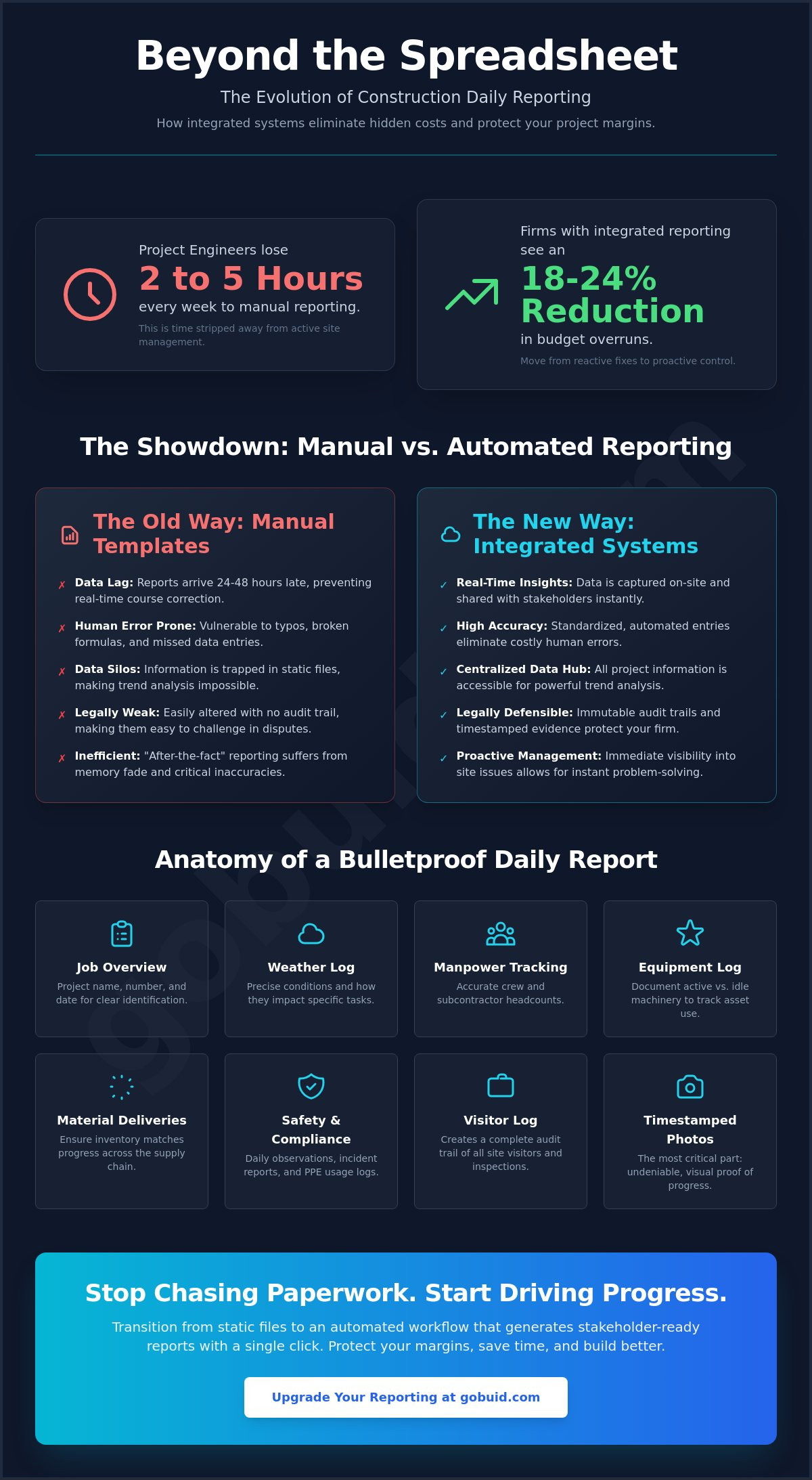
Firms using integrated reporting reduce budget overruns by 18 to 24 percent compared to those still relying on manual spreadsheet workflows. It's a stark reality for any project engineer stuck behind a desk at the end of a long shift. You spend hours chasing subcontractors for manpower counts and manually labeling progress photos. Using a standardized construction project engineer daily report template is the first step toward regaining control over your site documentation. However, a static document is only a baseline for compliance. To truly protect your project margins, you need a workflow that moves as fast as your crew.
We know that daily reporting often feels like a secondary chore rather than a strategic asset. You need accurate, real-time data for your stakeholders without the administrative headache of fixing broken Excel formulas or catching data entry errors. This guide will help you master the essential components of a professional daily report and show you how to automate your entire documentation workflow. We will break down the exact fields you need for legal protection and demonstrate how to move from manual entry to a high-speed digital system.
Key Takeaways
Identify the critical data points, from weather impacts to precise labor counts, that ensure your documentation meets professional standards.
Understand why a manual construction project engineer daily report template often results in hours of wasted administrative time every week.
Adopt real-time data capture strategies to eliminate reporting blind spots and improve accuracy across the entire project team.
Transition from static files to automated workflows that generate stakeholder-ready reports with a single click.
⭐ Learn more about GoBuid's feature - without the heavy enterprise price tag
Essential Components of a Project Engineer’s Daily Report Template
A professional construction project engineer daily report template serves as the primary record for field operations. It bridges the gap between site activity and office management. High-quality construction project documentation ensures that every stakeholder understands the project's pulse. A weak report leads to disputes. A strong one protects your margin. Every report must begin with a clear job overview. This includes the project name, number, and date. You must record weather conditions precisely. Don't just list the temperature. Document how rain or wind impacted specific tasks like concrete pours or crane lifts. This level of detail is vital for delay claims.
To better understand this concept, watch this helpful video:
Accurate manpower tracking is non-negotiable. Break down internal crew hours and subcontractor headcounts. This data allows you to monitor productivity against the baseline schedule. Similarly, track your assets. Document which machinery is active and which is sitting idle. You should also record major deliveries to ensure your material inventory matches your progress. This creates transparency across the entire supply chain.
Capturing Site Conditions and Safety
Site conditions change fast. Use your report to document safety observations and incident reports daily. This builds a proactive risk profile. Record all site visitors and official inspections. This creates a complete audit trail that protects the firm during future audits or safety reviews. Don't leave safety to memory. Document PPE usage and hazard identifications as they happen to ensure compliance with 2026 OSHA standards.
Progress Photos and Documentation
Visual evidence is the most critical part of modern site documentation. Photos provide context that text cannot. Always timestamp and label your images. This practice prevents future disputes over when a specific task was completed. High-quality progress photos turn a static report into a dynamic record of truth. It is the most effective way to prove work completion to stakeholders and secure timely payments.
The Hidden Costs of Manual Excel and PDF Templates
Relying on a basic construction project engineer daily report template built in Excel creates a false sense of security. It's not just a document; it's an administrative bottleneck. Project Engineers often lose between 2 and 5 hours every week to manual formatting and data consolidation. This is time stripped away from active site management. Information trapped in a PDF or spreadsheet is nearly impossible to analyze for long-term project trends. These data silos hide recurring productivity issues that drain your project's profitability over time.
Human error is inevitable in manual entries. One wrong formula or a missed equipment log compromises the entire project's integrity. Stakeholders often receive these reports 24 to 48 hours late, preventing real-time course correction. Adhering to OSHA record keeping requirements involves more than just filling out a form; it requires data accessibility that static files cannot provide. By the time the office sees a problem in a static PDF, it's already an expensive cost overrun that could have been avoided with immediate visibility.
The Problem with "After-the-Fact" Reporting
Memory is a poor database. Site diaries written at the end of a long shift suffer from memory fade. You can't accurately reconcile subcontractor claims against vague records written hours after the work was performed. Real-time logging is the only way to ensure accuracy. When you wait until the end of the day to document site events, you've already lost the specific details needed to defend against a delay claim or a back-charge dispute. Accuracy requires immediacy.
Why Static Templates Fail in Disputes
Static templates fail when legal disputes arise. Excel and Word documents lack non-editable audit trails. Anyone can change a date or a manpower count after the fact, making them easy to challenge in court. Photos without embedded metadata or timestamps are also easily dismissed by opposing counsel. You need a system that locks data the moment it's submitted. To protect your project and your firm's reputation, consider using a digital reporting system that ensures total transparency and accountability.
Best Practices for Accurate and Timely Daily Reporting
Standardizing your construction project engineer daily report template across every job site is critical for data integrity. Consistency allows the home office to compare project performance without translating different formats. You must implement real-time data capture. Relying on end-of-day memory leads to inaccuracies. Record site events, deliveries, and delays the moment they occur. This ensures your documentation is a factual record rather than a best guess. It turns a simple log into a reliable legal defense.
Clear accountability drives accuracy. Assign specific data input roles between the Project Engineer and the Foreman. The Foreman logs labor and equipment, while the Project Engineer provides the high-level narrative and validates the entries. Review and approve every report within 12 hours. This quick turnaround keeps information accurate while site activities are still fresh in your mind. Delays in approval often lead to missing details that are impossible to recover later.
Streamlining Data Collection from the Field
Efficiency starts in the field. Encourage your foremen to log manpower and equipment usage via mobile-first tools. This removes the friction of physical paperwork. Using customized forms eliminates guesswork for field teams. It ensures they only fill out the fields relevant to their specific task. This targeted approach increases completion rates and data quality. It's about making the right way the easy way for your crew.
Integrating Quality and Safety Inspections
Your daily diary shouldn't exist in a vacuum. Link safety and quality inspections directly to the daily record. This creates a unified audit trail. It connects your progress documentation with essential compliance requirements. When an inspector or stakeholder asks for proof of quality, you can provide a single, integrated record of truth. This centralized data approach is the most effective way to increase project productivity and reduce legal exposure.
One-Click Reporting: Moving from Static Templates to GoBuid
Static files are a liability. The traditional construction project engineer daily report template requires manual input for every field, every day. This repetitive labor invited the human error and delayed visibility discussed in previous sections. GoBuid eliminates this administrative burden by automatically pulling data directly from your digital site diary and manpower tracking logs. You don't need to retype information that already exists. This automation ensures your reports are ready for review the moment the shift ends.
Efficiency translates directly to profitability. You can generate professional, stakeholder-ready PDFs with a single click. This saves hours of formatting time every week. Beyond simple reporting, you gain access to the Project Analytics Dashboard. This tool allows you to see productivity trends across multiple daily reports instantly. It turns isolated data points into a unified narrative of project health. You maintain an immutable digital record that provides total transparency and accountability for every stakeholder involved.
The Power of Automated Site Documentation
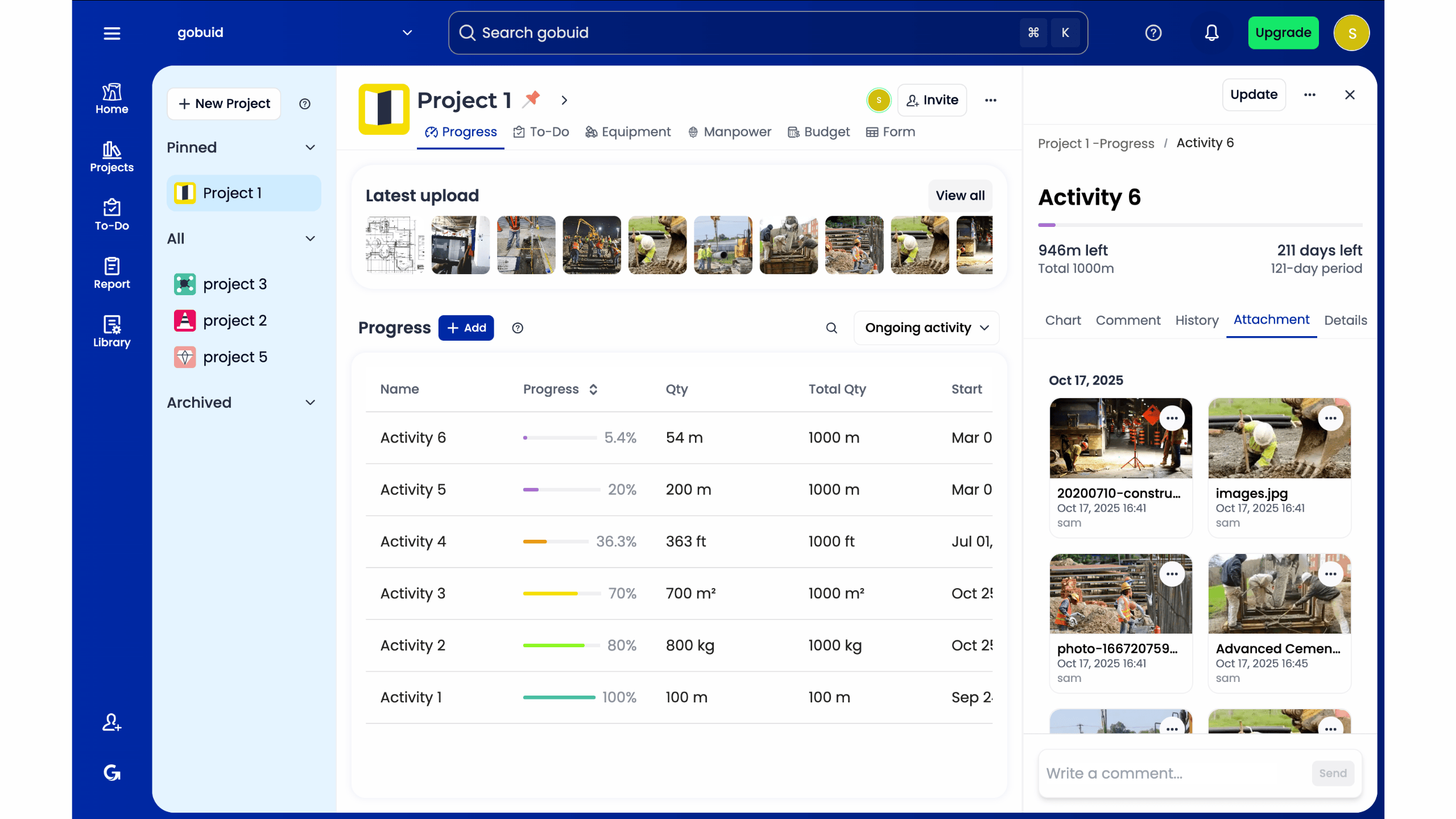
GoBuid acts as the connective tissue between field observations and office requirements. It connects site activity to formal reports without a single spreadsheet. Centralizing progress photos and documentation allows for instant retrieval during audits or disputes. You no longer have to search through email chains or personal phone galleries for evidence of work. Every photo is timestamped, labeled, and anchored to the specific day it was taken.
Getting Started with Digital Reporting
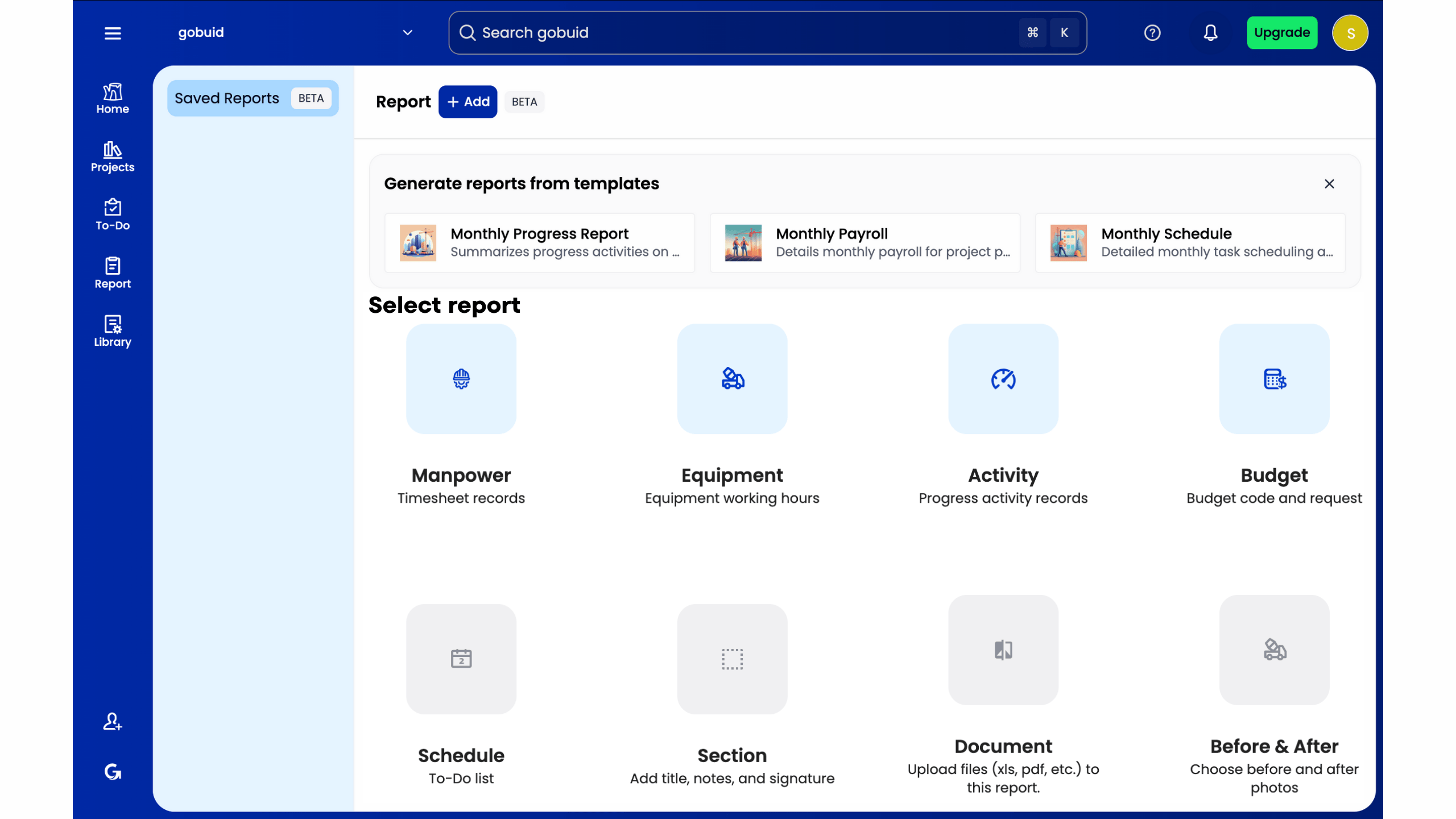
Transitioning your team from paper or Excel doesn't have to be complex. Move to a mobile-first platform that your foremen will actually use. Digital reporting should empower your field staff, not slow them down. Because GoBuid offers no lock-in contracts, you can test these automated workflows on your next project with zero risk. Stop chasing data and start managing your site. Experience one-click reporting with GoBuid today.
Take Control of Your Site Documentation
Your project's profitability depends on the precision of your field records. While a standard construction project engineer daily report template provides the necessary structure, manual entry remains a significant drain on your productivity. You've seen how memory fade and data silos compromise your project's integrity. Transitioning to a digital workflow isn't just about convenience. It's about protecting your margin and ensuring total accountability across every job site. You need a system that works as hard as your field crews.
Real-time data capture transforms your site diary from a chore into a strategic asset. You can now bridge the gap between physical labor and digital precision without the administrative headache. Stop wasting time on spreadsheets; generate reports in one click with GoBuid. Gain immediate access to real-time manpower and equipment tracking. Build an immutable digital site diary that serves as your ultimate defense against project risk. Regain control of your workflow and lead your team with the authority that comes from total transparency. It's time to focus on the build, not the paperwork.
Frequently Asked Questions
What is the difference between a site diary and a daily construction report?
A site diary is a raw, chronological log of all site events, while a daily construction report is a formalized summary intended for stakeholders. The diary captures every observation as it happens throughout the shift. The report distills that data into actionable insights using a construction project engineer daily report template to ensure consistency and professional presentation. One is a collection of field notes; the other is an official project record.
How long should a Project Engineer keep daily report records after a project ends?
Retain your daily report records for at least six to ten years after project completion, depending on your local statute of repose. This timeline ensures you're protected against latent defect claims or long-term legal disputes. Always check specific state regulations and contract requirements to determine the exact retention period for your firm. Digital storage makes this long-term archiving efficient and searchable.
Can daily reports be used as legal evidence in construction disputes?
Daily reports are frequently used as primary legal evidence in construction disputes. They serve as a contemporaneous record of site conditions, delays, and work performed. To hold weight in court, these reports must be consistent, objective, and timestamped to prove they were created at the time of the event. An immutable digital record provides the highest level of credibility during a legal challenge.
What is the most common mistake Project Engineers make on daily reports?
The most common mistake is providing vague narratives that lack specific impact data. Writing "it rained" is useless for a delay claim. You must document exactly how the weather halted specific scheduled activities, such as a concrete pour or crane lift. Precision in your construction project engineer daily report template prevents ambiguity during future audits or financial reconciliations. Specificity is your best defense against margin erosion.
How do I get my field crew to actually fill out their daily logs?
Remove the friction of physical paperwork by implementing mobile-first reporting tools. Field crews are more likely to complete logs when they can use simple dropdown menus or photo uploads on their phones. Show them how accurate logs protect their work from back-charges and reduce the need for end-of-week administrative catch-up. When the process is fast and beneficial to the crew, compliance rates increase naturally.
