Construction Quality Control Checklist App: Streamlining Field Inspections
by Sophia Bennet
|
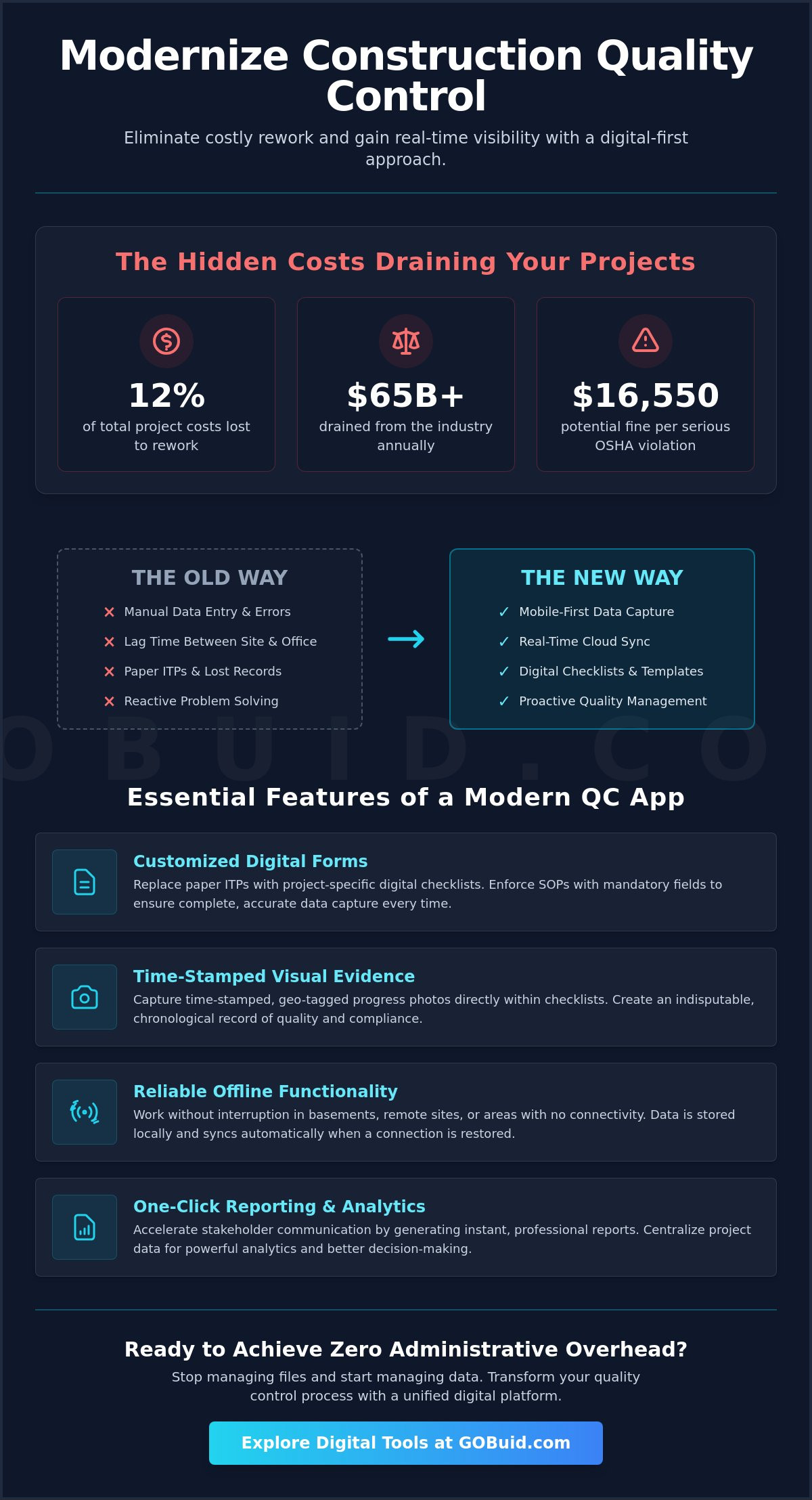
Rework accounts for up to 12% of total project costs, draining over $65 billion from the industry annually. Most of these losses stem from manual data entry errors and the frustrating lag time between site inspections and office reporting. You likely deal with the daily struggle of tracking non-conformance issues on paper while hoping your team catches every violation before an OSHA inspector arrives. With serious OSHA violations now costing up to $16,550 per item in 2026, the margin for error has effectively disappeared.
It's time to stop treating quality control as a paperwork problem and start seeing it as a data problem. By implementing a modern construction quality control checklist app, you can eliminate administrative friction and ensure total project compliance from any location. This article explains how to achieve zero administrative overhead and gain real-time visibility into site safety and quality standards without slowing down your crew.
We'll examine the specific features that drive productivity, from one-click report generation to customized digital forms and manpower tracking. Learn how to transform your field observations into instant, professional stakeholder reports that keep your project on track and your reputation intact.
Key Takeaways
Replace outdated paper ITPs with a mobile-first digital platform to capture site data with precision.
Deploy a construction quality control checklist app to eliminate administrative overhead and achieve real-time visibility into site compliance.
Document visual evidence using time-stamped, geo-tagged progress photos to create an indisputable record of quality.
Identify high-friction points in your current workflow and digitize them using customized forms for seamless field execution.
Accelerate stakeholder communication through one-click report generation and centralized project analytics.
⭐ Learn more about GoBuid's feature - without the heavy enterprise price tag
What is a Construction Quality Control Checklist App?
A construction quality control checklist app is a mobile-first digital platform. It captures and centralizes site data in real time. It replaces traditional paper-based Inspection Test Plans (ITPs) with a unified digital workflow. Field teams record observations directly on their devices. This eliminates the lag between the site and the office. Information syncs instantly to the cloud. This provides the office team with immediate access to site progress. It ensures every stakeholder sees the same data point at the same time. This technology acts as the connective tissue for the entire project.
This shift moves your operations from reactive documentation to proactive quality management. You no longer wait for a weekly report to discover a non-conformance issue. You see it as it happens. You fix it before it scales. This immediacy is the hallmark of a modern, efficient job site.
To better understand how these digital tools improve site standards, watch this helpful overview:
The High Cost of Poor Quality Documentation
Incomplete records are more than an administrative headache. They lead to protracted disputes and unpaid claims. These issues erode your bottom line. Industry research shows that rework accounts for 5% to 12% of total project costs. In the US alone, this represents an annual loss of over $65 billion. Effective quality control (QC) depends on precise, accessible documentation. You must prevent errors before they become permanent fixtures. Without a digital record, proving compliance during an audit becomes nearly impossible. You risk heavy fines and a damaged reputation.
Moving Beyond Simple Digital Forms
Don't confuse a dedicated app with generic PDF or Excel files. A spreadsheet might digitize text, but it fails to provide automated audit trails. Modern regulatory compliance requires more. A specialized construction quality control checklist app integrates customized forms that enforce standard operating procedures. It creates a chronological, tamper-proof record of every inspection. This level of transparency ensures accountability across the team. It provides a professional edge that generic digital documents cannot match. Stop managing files and start managing data.
Essential Features of an Effective Quality Control App
The right construction quality control checklist app does more than record data. It integrates disparate operational streams into a single source of truth. Modern managers recognize the role of construction technology in bridging the gap between site reality and office oversight. High-performance apps prioritize customized forms to build project-specific Inspection Test Plans (ITPs). This ensures your team checks exactly what the contract requires, not just a generic list of tasks.
Visual evidence is non-negotiable. Every entry should support progress photos that are time-stamped and geo-tagged. This creates an indisputable record of work quality at specific milestones. Reliable field tools must also include offline functionality. Site teams often work in basements or remote locations without connectivity. Data capture shouldn't stop because the Wi-Fi did. Your app should store data locally and sync automatically once a connection is restored.
True efficiency comes from integration. Your quality checklists shouldn't exist in a silo. They must link directly to manpower tracking and equipment management. This connection allows you to see which crews or machines are associated with specific non-conformance issues. If you want to streamline these workflows and gain total transparency, you can explore integrated digital tools today.
Standardizing Inspections Across Multiple Sites
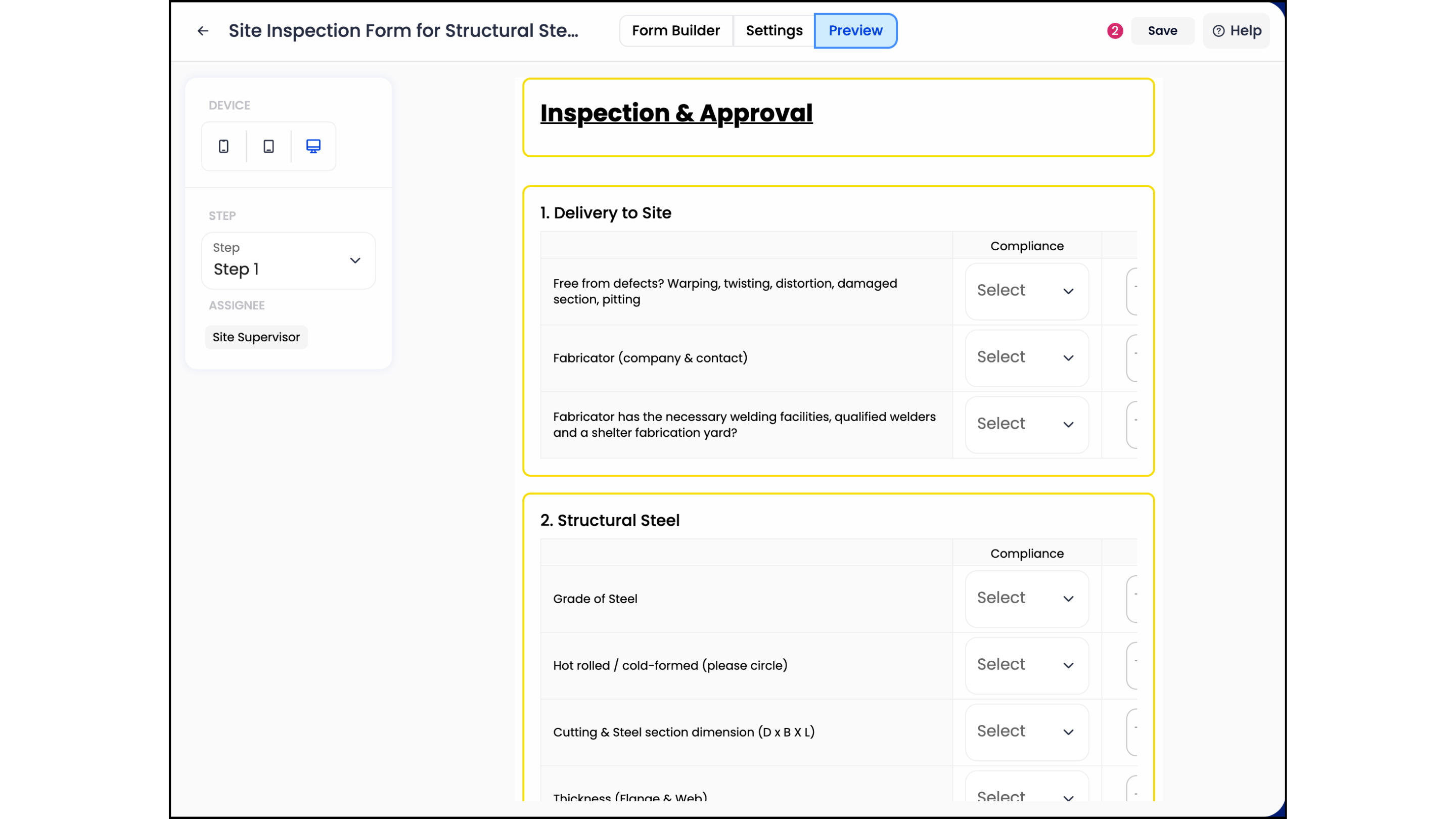
Consistency is the enemy of rework. Centralized template libraries allow you to deploy the same quality standards across ten sites as easily as one. Use mandatory fields to prevent incomplete submissions. If a foreman cannot submit a report without a photo or a signature, your data integrity remains high. This discipline forces a proactive culture on every job site and ensures that no critical step is overlooked during the pressure of a build.
Real-Time Analytics and Dashboards
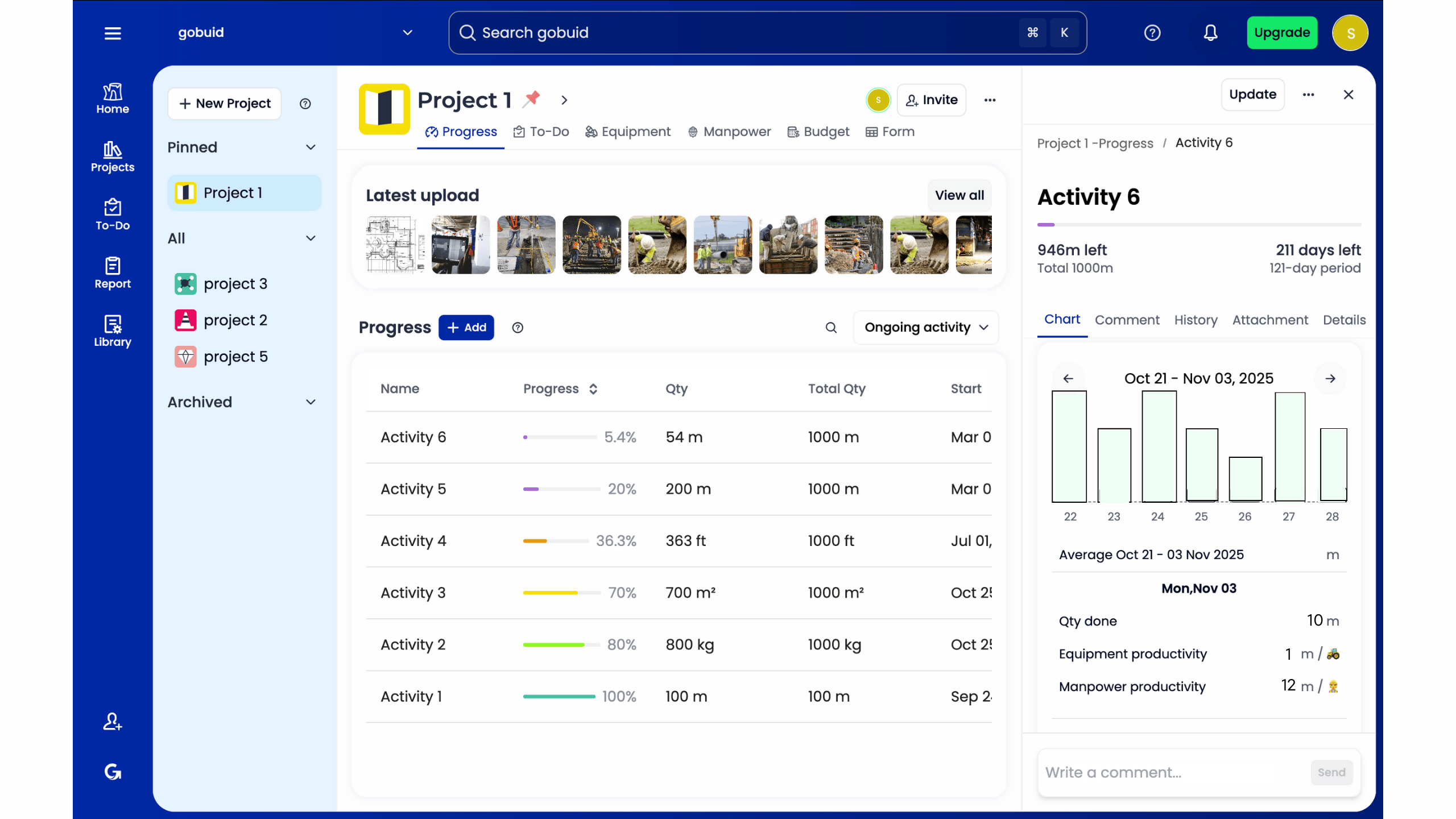
Stop looking at spreadsheets to find problems. A Project Analytics Dashboard visualizes quality trends across your entire portfolio. Utilizing a dedicated construction quality control checklist app transforms raw site data into actionable intelligence. You can identify if a specific subcontractor consistently fails waterproofing tests or if concrete strength issues are recurring. These data-driven insights allow you to intervene before a minor defect becomes a systemic failure, protecting both your schedule and your margins.
How to Implement a Digital Checklist Workflow
Transitioning to a digital system requires a logical, staged approach. You don't need to overhaul your entire operation overnight. Start by auditing your current manual processes to identify high-friction points. Look for where reports get lost or where data entry takes the longest. Once you've identified these gaps, move to the digital environment.
Step 1: Audit and Map. Trace the path of a paper inspection from the field to the filing cabinet. Identify every manual touchpoint that adds delay.
Step 2: Digital Conversion. Build or import your project-specific ITPs into the platform using customized forms. This ensures your digital tools mirror your proven field requirements.
Step 3: Field Deployment. Train your crews with a focus on simplicity. Show them how to attach photos and sign off on tasks in seconds. If the tool is easier than a clipboard, adoption is guaranteed.
Step 4: Automate the Cycle. Configure the system to distribute reports automatically. This keeps stakeholders informed without requiring extra administrative hours from your team.
A construction quality control checklist app only works if the field team uses it. Keep the interface clean and the requirements direct. This approach turns a technical upgrade into a practical site advantage.
Generating Quality Reports in One Click
The manual compilation of site data is a major bottleneck. A modern system uses one-click reporting to aggregate photos, timestamps, and checklist items into a professional PDF instantly. This mechanism removes the lag between site activity and office awareness. Instant reporting serves as your ultimate defense against project delays and disputes. You provide proof of compliance the moment the work is finished, not weeks later during a payment dispute.
Ensuring Long-Term Adoption and Flexibility
Software must scale with your business. Choose a platform that allows you to manage fluctuating project volumes without technical friction. To maintain a complete project record, integrate your quality inspections with a Digital Site Diary. This creates a chronological narrative of the entire build. When quality data sits alongside daily site logs, you achieve total transparency. This unified data point is the foundation of a successful, accountable project team. It ensures you have the documentation needed to protect your margins and your reputation.
Regain Control of Your Operational Workflows
Paper-based inspections are a liability in a high-stakes environment. Shifting to a digital workflow eliminates the industry drain caused by rework and administrative friction. You've seen how centralizing site data and utilizing customized forms can transform field execution from reactive to proactive. By integrating your quality checks with manpower and equipment tracking, you create a unified record that ensures total transparency across every project location.
The transition to a construction quality control checklist app is the fastest way to bridge the gap between site reality and office precision. You don't have to wait days for documentation or struggle with incomplete site submissions. Modern technology exists to streamline these processes and protect your project margins from the first day of implementation.
Don't let manual errors dictate your project outcomes. Start generating professional quality reports in one click with GoBuid. Experience the efficiency of integrated manpower tracking and instant data synchronization. Secure your site compliance and lead your team with the precision of a technical innovator.
Frequently Asked Questions
Can I use a quality control app without an internet connection?
Yes, a professional construction quality control checklist app operates with full offline functionality. Field teams often work in remote areas or reinforced concrete structures where signals are weak. You capture site data, attach progress photos, and sign off on tasks locally on your device. The system automatically syncs this information to the cloud once you return to a connected area. This ensures no data is lost due to environmental connectivity issues.
How do digital checklists improve compliance with safety regulations?
Digital checklists enforce accountability through mandatory fields and automated timestamps. You can't skip critical safety steps if the app requires a photo or signature before submission. With OSHA increasing enforcement in 2026, having immediate access to digital safety logs is essential during inspections. These tools create a tamper-proof audit trail. They prove your team followed specific protocols for heat illness prevention or fall protection in real time.
Can I customize the checklists to match our specific trade requirements?
Yes, you can build project-specific ITPs using customized forms. Generic lists often miss the technical nuances of specialized trades like electrical or structural masonry. A dedicated quality control platform allows you to define exactly what your crew needs to inspect. You control the data points and the required evidence. This flexibility ensures that your documentation meets the precise standards of your contract and trade regulations.
What happens to my data if I decide to switch software providers?
You retain ownership of your project data. Most professional platforms allow you to export your records in standard formats like CSV or PDF. It's best practice to verify the data export capabilities of any software before implementation. This ensures you can maintain a permanent project record for legal and regulatory purposes, regardless of which platform you use in the future. Always prioritize tools that offer easy data portability to protect your historical records.
