Construction Quality Control Checklist Template: The Professional Guide for 2026
by Amilia Grant
|
41% of mid-size general contractors still rely on paper forms and spreadsheets for site compliance. It's a staggering figure when you consider that poor quality and rework typically account for 5 to 15% of total construction costs. You know that managing a manual construction quality control checklist template is a recipe for administrative burnout. It's frustrating to chase subcontractors for inconsistent reports or struggle to match progress photos with specific inspection points; especially as the industry prepares for the ISO 9001:2026 revision this September.
You deserve to regain control over these chaotic workflows. We promise to help you master site inspections with a comprehensive framework that eliminates rework and standardizes your output across every project. This guide details the essential components of a modern checklist and demonstrates how to transition from static documents to automated, one-click reporting that keeps stakeholders informed in real time.
Key Takeaways
Define the essential administrative and technical fields required for a robust construction quality control checklist template to ensure total site accountability.
Identify the hidden operational costs of manual data entry and how digital transitions eliminate administrative overhead.
Learn to trigger real-time notifications for failed inspections to resolve subcontractor issues before they escalate into costly rework.
Connect your inspection data with a Digital Site Diary to maintain a centralized, transparent record of all field activities.
Master the transition to one-click reporting to provide professional project analytics to stakeholders without the manual effort.
⭐ Learn more about GoBuid's feature - without the heavy enterprise price tag
Essential Components of a Construction Quality Control Checklist
A robust construction quality control checklist template serves as the project spine. It transforms subjective site observations into objective, actionable data. Start with the administrative basics. Every entry must include the project ID, date, current weather conditions, and the inspector's credentials. Weather isn't just a detail. It's a critical variable for concrete pours and moisture-sensitive finishes. Proper quality control requires this context to validate why certain results occurred or why a specific delay was necessary.
To better understand how to structure these documents for your building work, watch this helpful video:
Vague checklists create liability. Avoid ambiguous "N/A" options where specific building codes apply. Use strict pass/fail criteria to remove human error. If a reinforcement bar doesn't meet the engineering spec, it's a fail. There's no middle ground in structural integrity. By defining these standards early, you ensure your construction quality control checklist template remains an effective tool for accountability rather than a bureaucratic exercise.
Trade-Specific Quality Points
Separate your workflows by trade to maintain clarity across subcontractors. For structural work, verify reinforcement placement, concrete slump tests, and curing times against the design spec. M&E inspections should focus on pressure levels, circuit continuity, and equipment clearance. For finishes, inspect for surface uniformity, moisture levels, and hardware functionality. This granular approach prevents minor oversights from becoming major rework costs later.
Visual Evidence and Photo Documentation
Documentation is your best defense against litigation. A written note saying "work completed" carries little weight compared to a timestamped image. Mandate that every critical inspection point includes Progress Photos & Documentation. This creates an immutable record of quality. It proves the work was performed correctly before it was covered by the next trade. Total transparency is the only way to protect your margins and your reputation.
Digital Safety Inspection Forms vs. Manual Templates
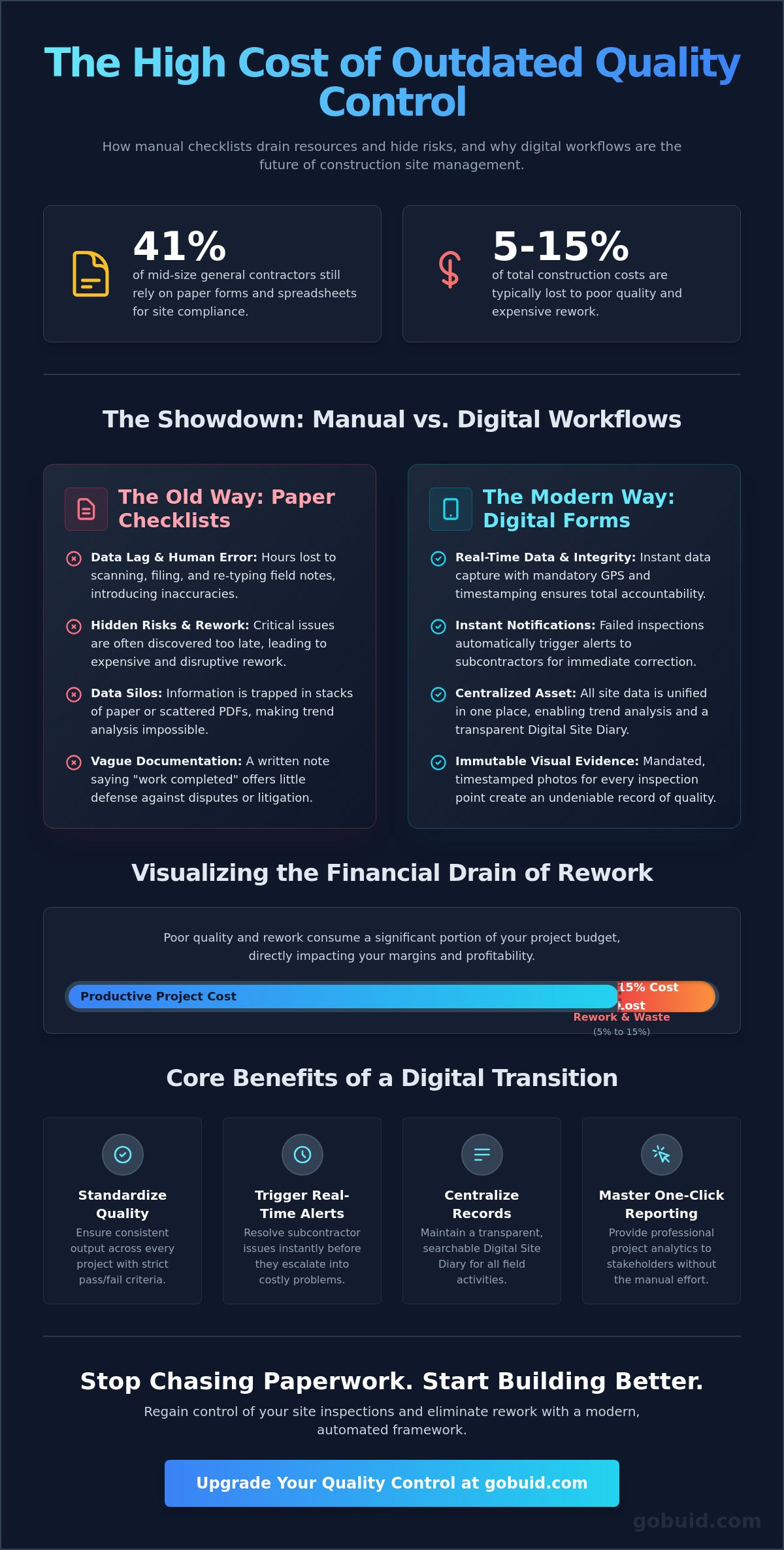
Paper is a liability. While 41% of mid-size general contractors still rely on manual systems, the administrative cost is unsustainable. When you use a traditional construction quality control checklist template, you lose hours to scanning, filing, and re-typing field notes. This manual data entry creates a lag between site reality and office awareness. It's a friction point that slows down project momentum and hides critical risks until it's too late to fix them without expensive rework.
Digital forms solve the "pencil-whipping" problem. By utilizing GPS verification and mandatory timestamping, you ensure that inspections actually happen at the correct location and time. This level of data integrity is essential for compliance with the USACE Construction Quality Management Regulation, which mandates strict accountability for both government and contractor personnel. Digital systems provide the transparency that paper simply cannot offer.
Adoption is the biggest hurdle in the field. Crews resist complex technology, but they embrace tools that make their jobs easier. Mobile-first Customised forms allow teams to complete inspections in seconds. When an inspection fails, the system triggers an immediate notification to the relevant subcontractor. This real-time loop allows for instant correction, significantly reducing the 5 to 15% of total costs typically lost to rework.
The Problem with Static Templates
Static files create data silos. You can't search a stack of paper or a folder of PDFs for safety trends. Manual entry also introduces human error. Some industry professionals report that manual reporting leads to significantly higher error rates compared to digital inputs. These inaccuracies make it impossible to maintain a clear picture of project health across multiple operational locations.
Benefits of Digital Safety Inspection Forms
Centralization transforms your site data into a unified asset. Digital platforms allow you to conduct trend analysis across every site simultaneously. Automated workflows ensure that no inspection point is missed, even during high-pressure project phases. You can increase productivity by replacing manual chasing with automated reminders and instant status updates for all stakeholders.
Streamlining Quality Inspections with One-Click Reporting
Stop merely ticking boxes and start managing project outcomes. A digital system transforms your site data into a strategic asset. Every data point captured in your construction quality control checklist template should feed into a larger ecosystem. This isn't about filling forms; it's about total visibility. By connecting your field data to a Digital Site Diary, you create a live record that updates automatically. You eliminate double-handling and ensure that site reality is reflected in the office instantly.
Stakeholders demand professional documentation, but manual reporting is a productivity killer. Our One-Click Reporting feature solves this. It compiles field data, progress photos, and timestamps into a professional PDF in seconds. You provide transparency without the late-night administrative grind. This speed allows you to maintain a fast-paced rhythm, closing out inspection cycles before the next trade begins work.
True control comes from long-term insights. Use the Project Analytics Dashboard to identify recurring quality issues before they become systemic failures. If a specific trade fails inspections repeatedly across different locations, the data will flag it. Centralized data acts as the connective tissue between your office and the physical site, allowing you to manage by exception rather than chasing every minor detail.
Eliminating Administrative Overhead
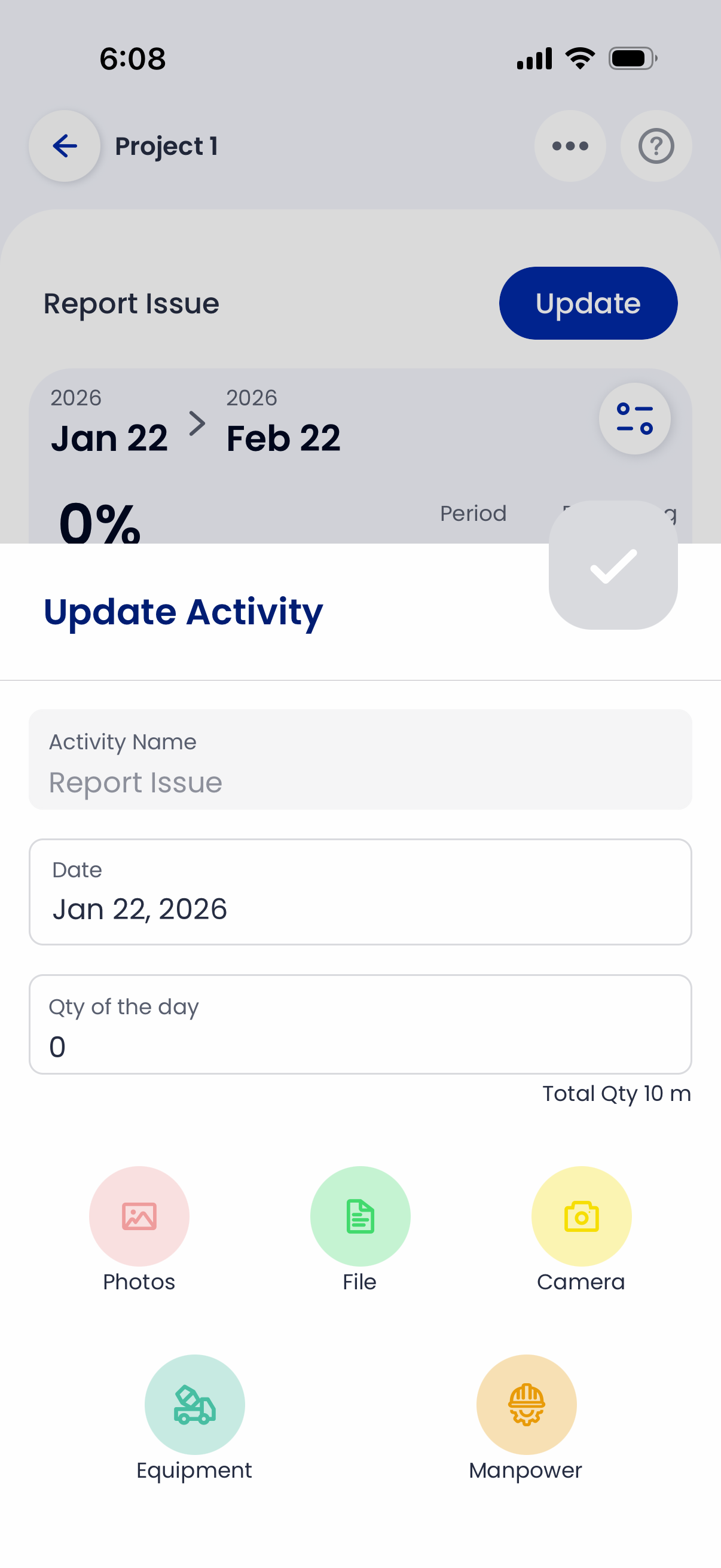
Traditional reporting is a drain on your most valuable resources. Transitioning from manual entries to a digital construction quality control checklist template can slash daily reporting time from two hours to just two minutes. You can Increase Productivity across your entire team by removing these administrative bottlenecks. Let your supervisors focus on site quality instead of paperwork.
Standardizing Subcontractor Performance
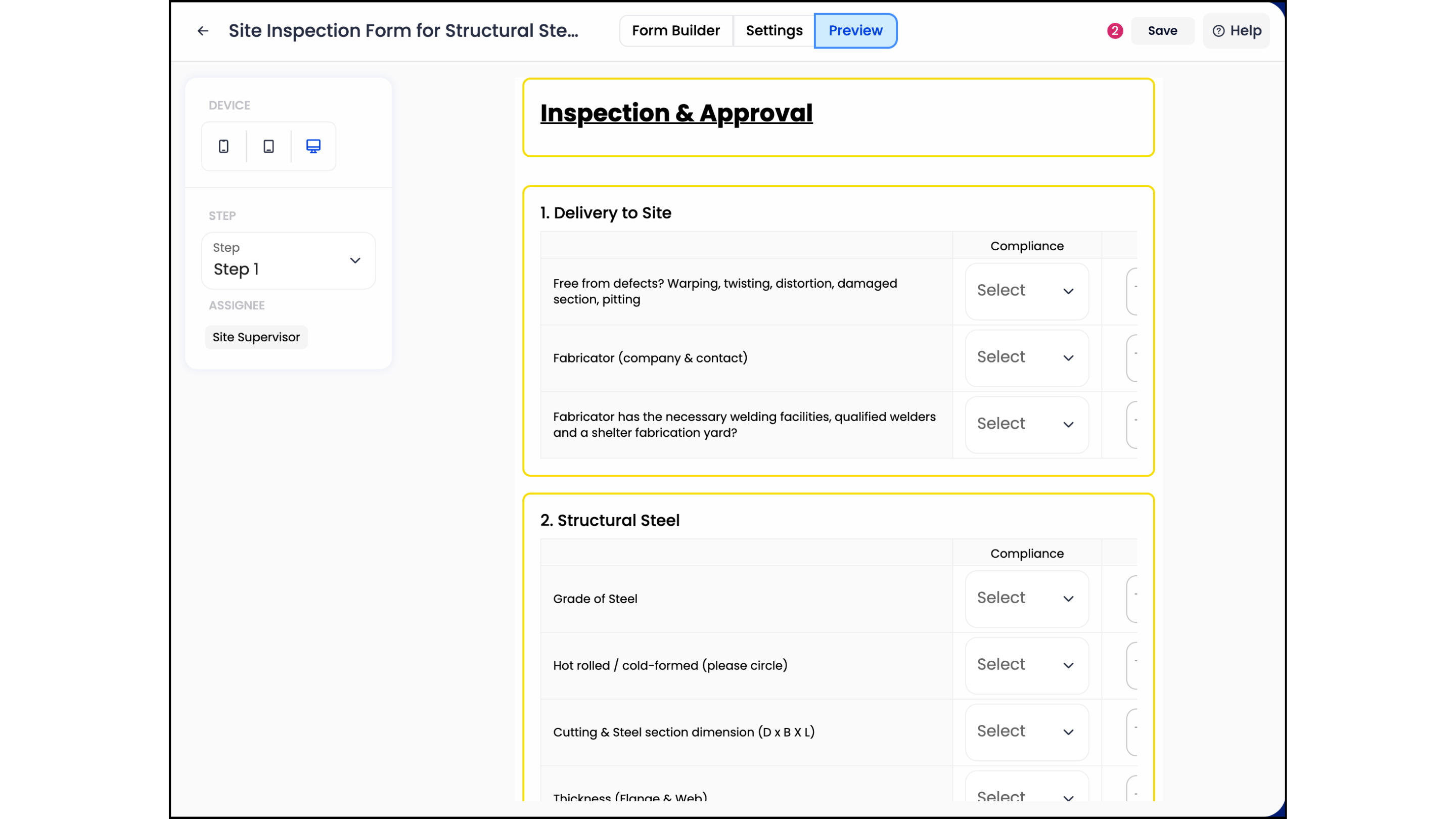
Hold every partner to the same rigorous standard. Use digital forms to enforce consistency across disparate operational locations. When you have historical data on performance, you make better hiring decisions for future projects. Choose partners based on verified quality metrics and pass rates, ensuring that your team is built for high-quality execution every time.
Master Your Site Standards and Eliminate Rework
Site quality is the foundation of your project's profitability. A robust construction quality control checklist template does more than track tasks; it protects your margins by identifying errors before they require expensive remediation. Moving beyond static PDFs allows you to harness real-time data. You gain total transparency through GPS-verified entries and timestamped progress photos. These aren't just records. They are your best defense against litigation and rework.
Efficiency is no longer optional. By centralizing your workflows, you transform site observations into professional project analytics instantly. You can track subcontractor performance and identify systemic issues across every operational location from a single dashboard. It's time to replace manual data entry with a system built for the precision of modern construction.
Take the final step toward zero-rework projects. Utilize customizable forms for any trade and leverage a real-time project analytics dashboard to keep stakeholders informed. Start your free trial of GoBuid and generate quality reports in one click. Build with confidence and lead your team toward high-quality execution.
Frequently Asked Questions
What is the difference between Quality Assurance (QA) and Quality Control (QC) in construction?
Quality Assurance (QA) focuses on the management processes used to prevent defects throughout the project lifecycle. Quality Control (QC) is the specific set of activities, like inspections and tests, used to identify defects in the final product. QA is proactive; QC is reactive. You need both to ensure your site standards remain high. Use a digital construction quality control checklist template to track both processes and maintain total accountability across your professional team.
How do I create a construction quality control checklist that my team will actually use?
Focus on brevity and accessibility. A heavy, paper-based construction quality control checklist template often gets ignored or "pencil-whipped" at the end of the day. Build a mobile-first digital version that uses clear pass/fail criteria and requires minimal typing. When you remove the administrative friction, your field teams are more likely to record data accurately in real time. This shift increases productivity and provides stakeholders with reliable, transparent project data.
Why are progress photos important for quality control inspections?
Progress photos provide immutable visual evidence of work quality before it's covered by subsequent trades. They act as your primary defense against future litigation and insurance claims. By attaching timestamped images to every inspection point, you create a transparent record that a written note cannot match. This visual documentation ensures that every stakeholder can verify site reality without physically being present. It's the connective tissue that links field operations to office management.
Can I customize digital safety inspection forms for different types of construction projects?
You can easily customize digital forms to meet the specific requirements of excavation, structural, or finishing phases. Every project has unique risks and quality standards that a generic template can't cover. Use customized forms to ensure your safety and quality inspections are always relevant to the current site activity. This flexibility allows you to maintain a standardized workflow while adapting to the physical operational realities of different project types. It ensures total site accountability.
