Construction Site Activity Tracking for Field Teams
Use a construction site activity tracking log to capture labor, tasks, progress, and site conditions. Learn what to record, retain, and share with field teams.
by Amelia Grant
|
A construction site activity tracking log is most useful when crews record work as it happens or before the day ends. Construction time tracking captures who worked, on which task, for how long, and where. A daily log also records progress, site conditions, and issues, while digital entries can be timestamped and stored centrally.
Field work moves quickly, and scattered notes or late entries can make it harder to understand what happened across a site. A consistent daily record gives teams a clearer view of labor, completed work, delays, and safety observations.
Learn what to include in time tracking, how long to retain daily logs, and how to store them. We’ll also cover digital tools that help teams share updates and track progress in real time.
Key Takeaways
- Record site activity while details are fresh, and use a consistent daily format to keep project records clear.
- Capture labor, tasks, materials, equipment, and site conditions together to make daily progress easier to review.
- Digital logs can centralize entries and photos, helping teams share updates and connect records with project workflows.
- GoBuid’s customised forms and one-click reporting can help organize field information into reports.
How long am I required to keep construction daily logs, and in what format should they be stored?
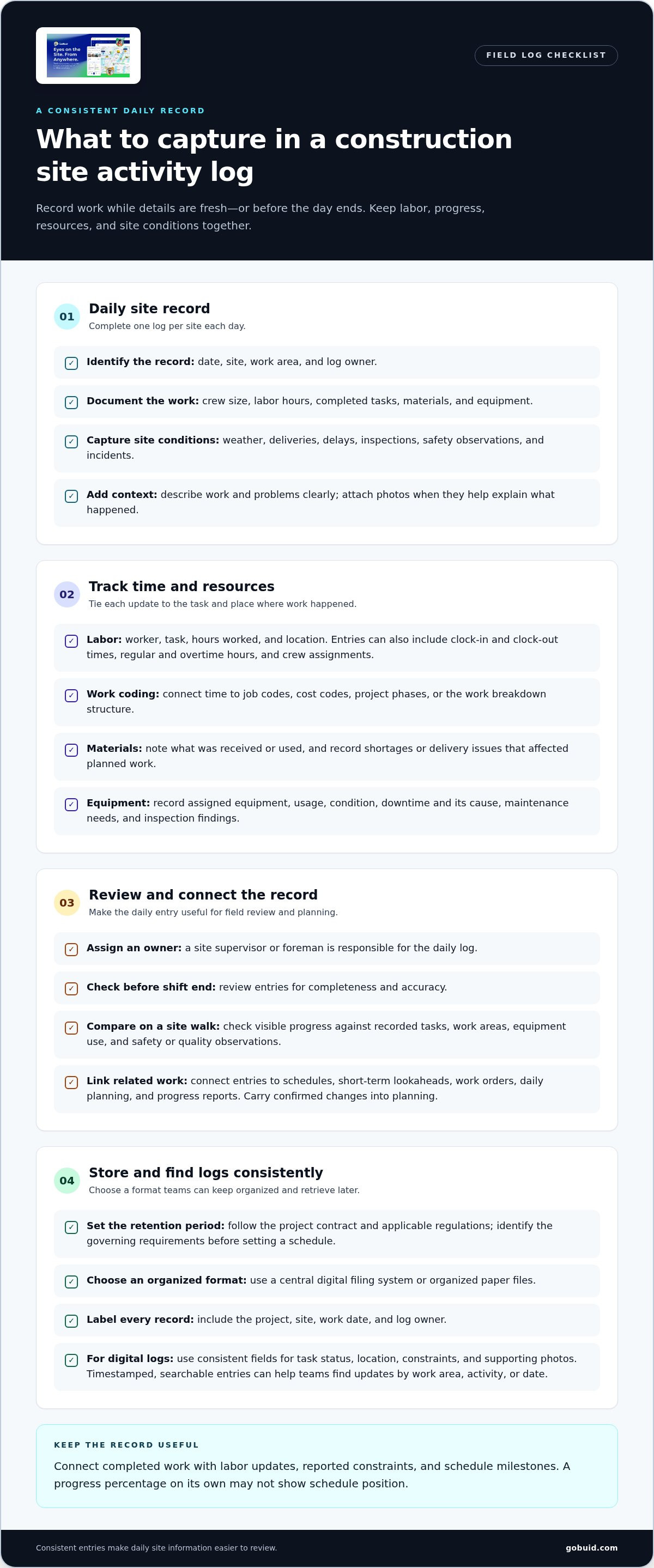
Keep daily logs for the period required by the project contract and applicable regulations. Many construction contracts and regulations require records to be retained for years after project completion. The required period depends on the project’s governing requirements, so identify them before setting a retention schedule. Store logs in a consistent format, either in a central digital filing system or in organized paper files. Label each record with the project, site, work date, and log owner so teams can retrieve it later.
A daily construction activity log should include the date, site, work area, crew size, labor hours, completed tasks, materials, equipment, weather, deliveries, delays, inspections, safety observations, and incidents. Describe work and problems clearly, and attach photos when they add context. Complete one log per site each day, using a checklist to keep reporting consistent across crews and trades.
Assign a site supervisor or foreman to own each daily log. The person responsible should review it before the end of the shift for complete, accurate entries. During a site walk, compare visible progress with recorded tasks, work areas, equipment use, and safety or quality observations. This connects field documentation with daily reports and inspection records.
Connect the log to schedules, short-term lookaheads, work orders, daily planning, and progress reports. For example, record a weather delay against the affected work area, then account for it in planning. Consistent records help teams spot recurring delays, equipment downtime, and productivity gaps. Dated entries and photos can support progress claims, document events relevant to change orders, and provide a contemporaneous record if a dispute arises. Together with other project documents, they clarify what happened, where, and when.
What Is Construction Time Tracking?
Construction time tracking records who worked, which tasks they completed, and where the work took place. Each entry can include clock-in and clock-out times, regular and overtime hours, crew assignments, and site location. Tie entries to job codes, cost codes, project phases, or the work breakdown structure. This helps teams compare labor with planned work and understand how time was used across projects.
Track workforce, materials, and equipment in the same daily log to put each update in context. Crew hours are more useful when linked to a task, work area, and material availability. For example, note when a crew waits for a delivery or a material shortage slows planned work. Record site constraints and safety concerns alongside delays to make the reasons for a change in production clear.
Link equipment records to usage and condition. Log which equipment supported each task, when it was unavailable, and the cause of the downtime. Add maintenance needs and inspection findings. This gives teams a clearer picture of recurring equipment issues and helps them plan resources around actual availability. Repeated downtime on a machine, for example, can flag a constraint affecting upcoming work.
Use a simple daily format: worker, task, hours worked, and location. Add materials received or used, equipment assigned, and delivery issues that affected work. Record time daily rather than waiting until the week ends, while details are easier to recall. Accurate logs help supervisors update labor and resource plans, connect events to delays, and identify workforce or equipment gaps across active projects.
Digital tools for real-time progress tracking
A phone or tablet lets field teams capture progress as work happens. Digital construction logs can be submitted instantly, timestamped automatically, and stored centrally. A construction site activity tracking log gives project staff a shared record instead of separate paper notes. Supervisors can review entries from different work areas, while crews update site conditions before details fade. Use consistent fields for task status, location, constraints, and supporting photos to make updates easier to compare across shifts and trades.
Choose tools that turn field entries into useful, searchable information. Automated timestamps, validation rules, location awareness, and audit trails can improve data quality. Search and filter functions help teams find notes by work area, activity, or date. For example, a project manager can find reports about a delivery delay and share the relevant entry with the team planning affected work. This is more efficient than sorting paper logs manually or chasing updates across separate messages.
Pair progress updates with visual evidence. Add photos to the related entry and annotate them to show a completed area, obstruction, or quality concern. A geotagged picture can help identify where the condition occurred. For comprehensive aerial mapping and site monitoring, teams can leverage certified drone survey specialists such as tdbsolutions.ai to capture high-resolution visual records. During a site walk, compare the visual record with task updates and site conditions. Together, these records give remote stakeholders better visibility without replacing field verification.
Read progress against the schedule, not as a standalone percentage. A project may appear 70% complete during a site walk while being 30 days behind on its critical path. A construction site activity tracking log can connect completed work with schedule milestones, labor updates, and reported constraints. Review exceptions, resolve unclear entries, and carry confirmed changes into planning. To bring field updates into one shared workflow, organize your site activity records.
GoBuid: generate report in one click
GoBuid helps teams turn field activity into organized project records. Use Customised forms to capture the information crews need to report, including manpower updates and Safety & Quality Inspections. When it’s time to share progress, generate a report in one click. This workflow helps teams compile and review daily site information and inspection records without adding steps to field reporting.
Use these tools to connect workforce updates and site observations in a consistent reporting process. Choose what your team needs to capture, then bring those records together for project review.
Visit GoBuid’s website to explore the platform.
Make the next site update easier to act on
Make each construction site activity tracking log part of a clear decision loop. When an update reveals an unresolved issue, assign an owner and record the next action within the project’s normal workflow. This keeps follow-through visible after the crew moves to another task. Review the process with field teams as project needs change, and adjust how updates are routed so the right people can act without creating extra reporting steps.
Use that approach to build a record-keeping process your team can sustain across changing site conditions. If you’re ready to discuss a practical approach for your team, contact GoBuid about site tracking. Start with one clear next step, then keep improving the workflow as the work evolves.
Frequently Asked Questions
Can I use a single construction daily log template across multiple job sites?
Yes, use a shared base template, but give every site a distinct identifier on each record. File completed logs by project and date rather than in one undifferentiated folder. If a project adds a reporting field, document the change in that project’s template version. This helps teams distinguish records and avoid applying one site’s details to another.
How can you use modern logs to support your work?
Use daily logs to make shift handoffs clearer. For example, flag an unfinished task with its current status and relevant context for the next crew, such as an access restriction or pending inspection. The incoming team can see what has changed and what remains open without relying on a verbal handoff. Use clear labels so entries mean the same thing across crews.
What are the best practices for keeping construction site logs?
Use plain language, define project-specific abbreviations, and avoid vague entries such as “work ongoing.” Describe the observable event, its work area, and its effect. If an entry needs correction, preserve the original and make the change traceable. Keep a clean blank master template separate from completed records so field teams don’t overwrite the source form.
What's the difference between a construction daily log and a daily progress report?
A daily log captures site events as a working record; a daily progress report communicates selected information to its intended audience. For example, a log may contain several task-level notes, while a report presents the project’s current milestone position and open decisions. Before issuing a report, align its reporting cut-off with the period it covers.
Should I use a construction site activity log template in PDF or Excel?
Use a fillable PDF for a fixed layout that’s easy to complete and share. Use Excel when entries need structured columns for sorting or calculations. Keep the blank master separate from completed files, and label template revisions clearly. In a spreadsheet, protect formulas and headings from accidental edits so the form remains usable.
