Construction workflows, from planning to site safety
Get your construction workflow explained from preconstruction to safety. Learn how clear handoffs, change tracking, and task visibility keep projects moving.
by Sophia Bennet
|
A project can appear on schedule yet stall when a decision, change, or inspection lacks a clear next step. A construction workflow explained from start to finish shows how each task, request, approval, or issue moves from initiation to closure. A schedule sets when work happens; a workflow clarifies how it gets completed.
Plans, drawings, permits, and site conditions all shape what happens next, so teams need a reliable way to keep decisions visible. This guide explains how preconstruction, design reviews, permits, change requests, and safety inspections connect across a project, including where handoffs happen and what information each step needs. Clear records and assigned next steps help crews, managers, and project partners stay aligned as work moves from plan to site. The focus is practical: understand the workflow, identify where requests or findings enter it, and keep the path to resolution clear.
Key Takeaways
- Separate the project schedule from the workflow: one sets timing, the other clarifies how each task moves to completion.
- Connect preconstruction decisions, design reviews, and permit steps so field teams can work from clear, current project information.
- Route each change request through documented review and approval before it changes site work.
- Use safety inspections to record findings, assign corrective actions, and keep the next step visible to the team.
1. What Are Construction Workflows?
Having the construction workflow explained in plain language helps crews understand how a task, request, inspection, approval, or issue moves from start to closure. The workflow defines the handoffs and information needed to complete work. A schedule shows when tasks happen; a workflow shows how teams complete them. Together, they connect labor, materials, equipment, and decisions with execution, quality, and budget control.
A construction project workflow may move through preconstruction, design review, permitting, procurement, site execution, inspections, and closeout. Each stage produces information for the next. For example, a field question about a drawing is logged, routed for review, and resolved before affected work proceeds. Make each handoff clear so teams know who records updates, secures approvals, and tracks the next action.
Residential workflows often coordinate home design, material choices, and site work within a smaller project team. Commercial workflows typically involve more design and trade coordination. Industrial workflows also need to align specialized equipment, facility requirements, and construction activity. The project’s scope, stakeholders, and technical demands shape its steps.
Scheduling begins with defining the scope, breaking the work into tasks, mapping dependencies, assigning resources, and setting the sequence. Procurement identifies needed materials, reviews specifications and submittals, places orders, and coordinates deliveries with site requirements, often coordinating on-site staging and secure units through suppliers like Atlanta Container & Trailer to keep materials organized and protected.
Closeout tracks remaining work and verifies agreed deliverables. Commissioning tests building systems in operation, while handover organizes project records and operating information for the owner. Clear records connect final approvals and inspection results with the people responsible for ongoing use.
2. Preconstruction, design reviews, and permits
Begin preconstruction by setting project goals, developing the budget, and identifying risks and contingencies. Architects, engineers, contractors, and owners may use Building Information Modeling (BIM) data to coordinate design. A BIM model combines building geometry with materials, construction methods, and performance information. Teams can review the model alongside drawings to resolve clashes before they cause rework on site.
Keep design documents centralized and track revisions through a clear review process. Mark each drawing with its version and review status, then route questions to the responsible designer. For example, if a plan changes a doorway, update related drawings and notify affected trades before installation. This connects decisions and approvals to the documents teams use to execute the work.
Coordinate architects, engineers, contractors, and subcontractors by defining each role against the project scope, design packages, and work sequence. Share current drawings and decisions, then track who owns each review or handoff so trade work stays aligned.
Permit steps and related costs vary by state and local jurisdiction. The project location, scope, applicable review requirements, and site conditions determine the necessary documentation and how approvals fit the schedule. Include these review steps in planning instead of leaving permits to the last minute.
During field execution, progress photos can document site conditions against current plans. Teams using centralized project updates can keep visual records connected to the project information needed for coordination.
3. Change requests and safety inspections
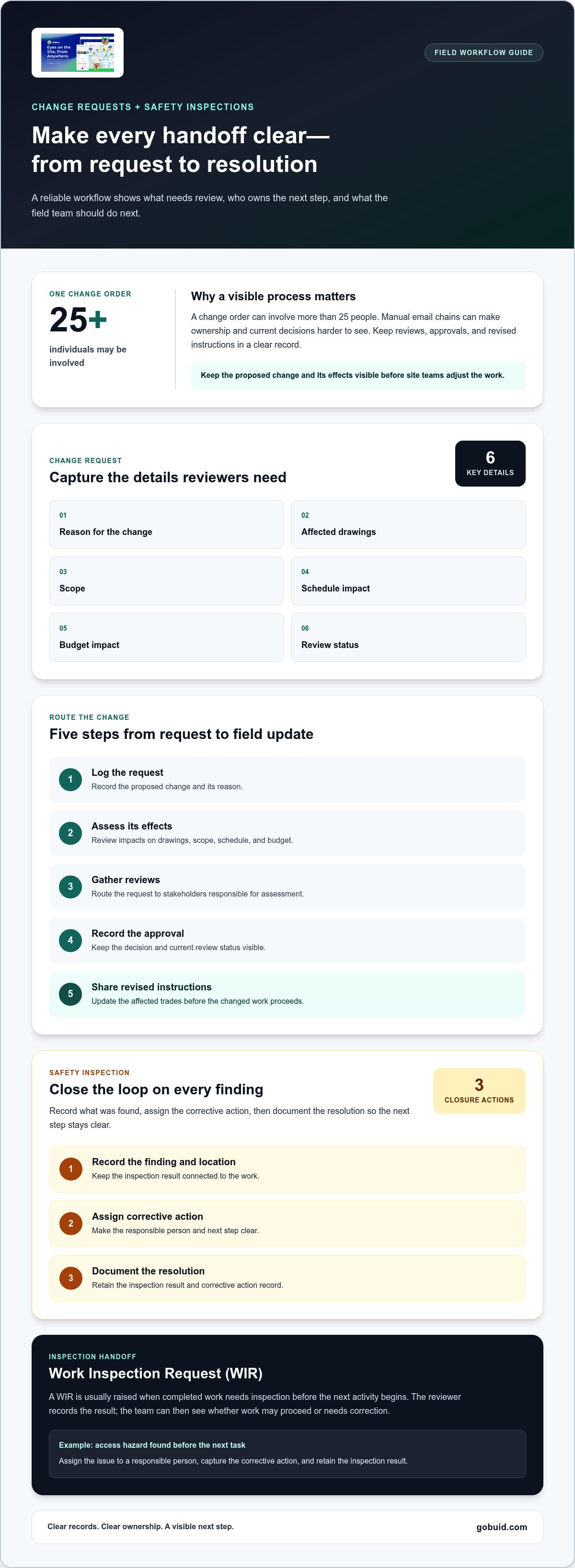
A change request should make the proposed change and its effects visible before site teams adjust the work. Record the reason, affected drawings, scope, schedule impact, budget impact, and review status. Route the request to the stakeholders responsible for assessing and approving it. A single change order may involve more than 25 individuals, so manual email chains can obscure ownership and current decisions.
Follow a defined sequence: log the request, assess its effects, gather reviews, record the approval, then share revised instructions with affected trades. Construction software can centralize documentation and updates, giving stakeholders a clear record to act on. Templates for change orders and requests for information also help teams capture consistent details.
Safety inspections need the same closed-loop process. Record the finding and its location, assign corrective action, and document the resolution. A Work Inspection Request is usually raised when completed work needs inspection before the next activity begins. This creates a clear handoff: the reviewer records the result, and the team knows whether work can proceed or needs correction.
For example, an inspection may reveal an access hazard before crews move to the next task. Assign the issue to a responsible person, capture the corrective action, and retain the inspection result. Keep those records connected to the work with a shared inspection workflow, so field teams can see findings and next steps.
GoBuid: generate report in one click
GoBuid helps teams organize field information and turn routine records into clear project reports. Its one-click report generation brings collected project details into a report, reducing the need to assemble every update manually. Customised forms support consistent information capture, while Manpower Tracking helps teams record workforce information. Safety & Quality Inspections support inspection documentation.
These tools suit teams that need a clearer path from site updates to reviewable records. For example, teams can use a form to capture an inspection, document its result, and include project information in a generated report. The practical benefit is easier-to-follow records and better coordination between the field and project management.
To explore how GoBuid can support your team’s workflow, visit GoBuid’s construction workflow tools.
Make the next workflow easier to run
Clear workflow steps help crews know what to do next and who owns each handoff. Choose a recurring process that still relies on scattered notes or manual follow-up. Define who records the update, who reviews it, and where the decision is stored. Apply the same process to the next task, then adjust it to fit field needs.
GoBuid supports day-to-day project records with a Digital Site Diary, Customised forms, and one-click report generation. These tools organize site information and make it easier to review. Keep the process focused on useful records and clear ownership, not extra administration.
Ready to discuss a workflow for your project? Contact GoBuid about your project. Start with one process, make the next step clear, and build from there.
Frequently Asked Questions
What Are Construction Workflows?
Construction workflows are defined routes for moving project work from a trigger to a recorded outcome. For example, when a crew finds a mismatch between a drawing and installed work, it raises the issue, routes it for review, records the decision, and updates task instructions. This record shows who acted and what the field team should follow.
What are the main phases of a construction project workflow?
Common phases include feasibility and planning, design and preconstruction, permitting and procurement, construction, inspections, commissioning, closeout, and handover. Treat each transition as a checkpoint: confirm the required information is ready, identify the next owner, and record open items. For example, keep a delayed material submittal visible before its installation task begins.
What happens during preconstruction planning and feasibility?
Feasibility examines whether the proposed scope fits site conditions, available resources, design intent, schedule, and budget. Teams test assumptions such as delivery access or space for equipment, then document risks and contingency decisions. If an assumption changes, revisit the plan before committing to related procurement or field tasks. This keeps early decisions traceable.
What inspections, quality controls, and safety checks happen during construction?
Quality checks compare completed work and materials with approved specifications and methods. Safety inspections record hazards and corrective actions. Review material submittals before installation, then inspect completed work at relevant handoffs. If work or materials fail to meet the required standard, document a Non-Conformance Report, assign a correction, and record the follow-up result before closing the issue.
How are construction changes, delays, and cost overruns managed?
Record the cause of a change, affected scope, drawing revision, schedule and budget effects, and decision status. For a delay, identify the blocked task and dependency, then revise the sequence or resource plan and notify affected trades. For example, if weather stops exterior work, managers can assess which indoor tasks can proceed while tracking schedule and budget impacts.
