Digital Safety Inspection Forms: Streamlining Construction Compliance in 2026
Ditch paper checklists & avoid costly OSHA fines. Learn how digital safety inspection forms streamline construction compliance and automate reporting for 2026.
by Michael R. Henderson
|
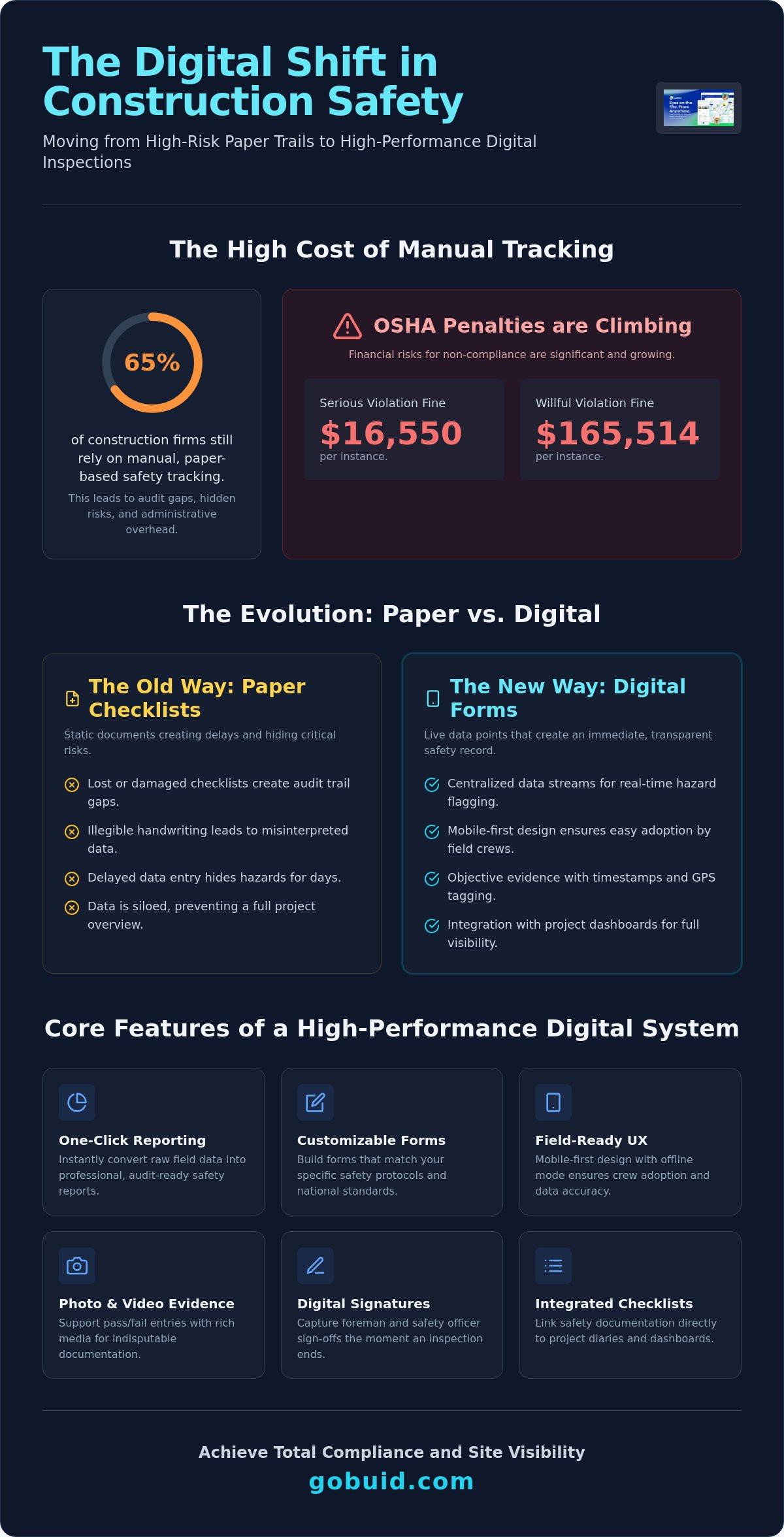
65% of construction businesses still rely on manual tracking, even as OSHA penalties for serious violations climb to $16,550 per instance in 2026. Transitioning to digital safety inspection forms is no longer a luxury. It's a strategic move to eliminate the audit trail gaps that trigger willful violation fines of up to $165,514. You know the frustration of chasing lost checklists or deciphering messy handwriting. These delays don't just create administrative overhead; they hide critical risks that lead to higher DART rates and unwanted regulatory scrutiny.
You can regain total control of your workflow by moving from fragmented paper to a centralized digital system. This article teaches you how to transition to digital safety inspection forms that automate your reporting and protect your job site. We'll explore how to achieve real-time visibility into site operations and generate professional safety reports with a single click to ensure full compliance with national safety standards.
Key Takeaways
- Replace fragmented paper checklists with centralized data streams to flag and resolve safety hazards in real-time.
- Deploy digital safety inspection forms with mobile-first designs to ensure field crews document risks without workflow friction.
- Utilize one-click reporting to convert raw field data into professional, audit-ready safety reports instantly.
- Customize inspection templates to match specific site risks and national regulatory standards for total compliance.
- Integrate safety documentation with project dashboards to bridge the gap between field operations and management oversight.
The Evolution of Digital Safety Inspection Forms in Construction
Transitioning to digital safety inspection forms is more than a clerical upgrade. It is a fundamental shift in how site operations are managed and monitored. Paper checklists are static documents that often sit in a truck for days, hiding risks until it's too late. Modern systems transform these inspections into live data points. Centralized data ensures that when a hazard is flagged in the field, it is visible to the office immediately. This connectivity creates a transparent audit trail, which is essential for meeting rigorous national safety inspections. By removing the need for manual data entry and physical filing, industry professionals report a significant reduction in administrative overhead.
To better understand how these tools function in the field, watch this helpful video:
Why 'Digital' Isn't Enough: The Need for Integration
Stand-alone digital forms often fail because they exist in isolation. These data silos prevent a comprehensive view of project health. To gain true visibility, you must connect safety data to your Digital Site Diary. This integration provides a complete project narrative, linking safety checks directly to daily progress. When the office knows exactly what the field discovered five minutes ago, they can allocate resources to fix issues before they stall production. It's about moving from reactive fixes to proactive management.
Maintaining Compliance with National Safety Standards
Adhering to Construction site safety standards requires verifiable proof of due diligence. Digital timestamps and GPS location tagging provide objective evidence that inspections actually occurred at the right time and place. This creates a "zero-gap" audit trail that is critical during OSHA inspections. Automated reminders ensure no recurring safety check is missed, while standardized templates maintain consistency across multiple project locations. You don't have to worry about missing signatures or illegible notes when every entry is validated by the system. Using digital safety inspection forms ensures that your compliance remains unbroken and your team stays protected.
Core Features of High-Performance Digital Safety Inspection Forms
High-performance digital safety inspection forms prioritize field utility over administrative convenience. If a form is difficult to navigate, the data quality suffers. Successful implementation relies on tools that mirror the rugged reality of the job site while maintaining the precision of OSHA recordkeeping forms. This ensures every entry contributes to a defensible safety record rather than a cluttered database. Cloud-based syncing then allows for immediate access to this data across the entire organization, bridging the gap between disparate job sites and the head office.
Customized Forms vs. Rigid Templates
One size doesn't fit all in construction. You must build forms that match your specific safety protocols with Customised forms. Incorporate logic-based fields that only expand when a hazard is identified. This keeps forms lean and focused, ensuring crews aren't bogged down by irrelevant questions. Digital signature blocks for instant foreman and safety officer sign-off ensure accountability is captured the moment the inspection ends. This level of customization ensures that every unique risk on your site is addressed and documented properly.
Field-Ready UX: Reducing Crew Resistance
Field adoption is where most digital initiatives fail. Your digital safety inspection forms must be mobile-first to succeed. Short, punchy questions prevent "checklist fatigue" and improve data accuracy. Offline mode is essential for underground work or remote sites with limited connectivity. This allows data to be captured in real-time regardless of the environment. One-click photo and video evidence support "Pass/Fail" entries, providing indisputable documentation that a simple checkmark cannot offer. Integrating these features creates a rich data set for your Project Analytics Dashboard, allowing you to spot trends before they become accidents.
Optimizing Site Operations with One-Click Safety Reporting
Data collection is only half the battle. If inspection results remain trapped in a database, they can't protect your crew or your bottom line. The real value of digital safety inspection forms lies in their ability to translate raw field data into actionable insights for stakeholders. Integrated systems connect these safety checks to equipment status and manpower tracking, providing a unified view of site health. This visibility allows management to move from simply monitoring compliance to actively optimizing site operations. It ensures that safety is treated as a core operational metric rather than an administrative burden.
How to Generate a Professional Safety Report in One Click
Speed is essential in a fast-paced construction environment. You don't have time to manually compile data for weekly meetings or regulatory audits. Within the platform, you simply select your date range and inspection type. Use one-click reporting to instantly compile this data into a branded, professional PDF document. These reports are ready for immediate distribution to owners or regulators directly from the Project Analytics Dashboard. This automation eliminates the administrative lag that often plagues project documentation.
Driving Long-Term Safety with Data Insights
True safety leadership requires looking beyond the individual checklist. Analytics dashboards allow you to identify recurring hazards by analyzing inspection trends over time across all projects. If a specific hazard keeps appearing, you can link those safety failures to specific equipment or crews. This precision allows you to target training efforts where they're needed most. Over time, these data-driven insights help lower insurance premiums and improve your site’s reputation with clients. You aren't just checking boxes; you're building a culture of accountability. Using digital safety inspection forms turns every field check into a strategic asset for your business.
Future-Proof Your Site Safety and Compliance
Adopting digital safety inspection forms is the most effective way to keep pace with 2026's strict regulations and escalating OSHA penalties. You now understand how integrated data removes operational silos and how mobile-first tools boost field adoption. These systems do more than record data. They provide the total transparency required to protect your crew and your company’s reputation. Centralized documentation ensures every inspection is verified and every hazard is resolved before it becomes a liability.
Don't let manual entry and lost paperwork compromise your project’s success. Streamline your site safety with GoBuid's customized forms today. You'll gain immediate access to a real-time project analytics dashboard and the power to generate professional reports in one click. Regain control of your workflows and focus on high-quality execution. Build a safer, more profitable job site starting now.
Frequently Asked Questions
What are digital safety inspection forms?
Digital safety inspection forms are cloud-based tools that replace traditional paper checklists with dynamic data entry points. They allow field crews to capture site safety data, attach photos, and record GPS locations on mobile devices. This creates a unified data point for the entire project team. These forms ensure that safety documentation is immediate, legible, and easily accessible from any location.
How do digital safety forms improve OSHA compliance?
These forms create an unbroken "zero-gap" audit trail with automatic timestamps and location tagging. In 2026, OSHA penalties for serious violations reach $16,550 per instance. Using digital safety inspection forms ensures you meet electronic submission deadlines, such as the March 2 requirement for high-hazard industries. They provide the objective evidence needed to defend your safety record during a site audit.
Can my crew use digital forms without an internet connection?
Yes, high-performance systems include an offline mode specifically for underground work or remote sites. Crews can complete full inspections and attach evidence while disconnected from the network. The data syncs automatically to the central dashboard once a connection is re-established. This functionality ensures that safety documentation remains continuous regardless of the signal strength at your operational location.
How long does it take to generate a safety report from digital forms?
Generating a professional safety report takes seconds through one-click automation. You simply select your desired date range and inspection type within the platform. The system instantly compiles raw data into a branded PDF document ready for stakeholders or regulators. This speed eliminates the administrative lag common with paper logs, allowing you to focus on high-quality execution instead of manual data entry.
Are digital signatures on safety forms legally binding?
Digital signatures are legally recognized and provide a superior record of accountability compared to paper. They capture the exact identity and time of the sign-off, creating a secure link between the inspector and the report. This level of transparency is critical for demonstrating due diligence to national safety authorities. It ensures that every safety officer and foreman remains accountable for the site conditions they verify.
Can I customize digital safety forms for different project types?
Customization allows you to tailor digital safety inspection forms to the specific risks of any project. You can build logic-based fields that only appear when certain hazards are identified, keeping forms lean for the field crew. Whether you are managing high-rise developments or civil infrastructure, standardized templates maintain consistency across all project locations. This flexibility ensures your safety protocols adapt to the unique regulatory requirements of every job site.
