Evidence Capture for Construction Claims: What Can Prove a Claim
Master evidence capture for construction claims. Learn how field photos, reports, and logs protect your team and prove disputes with clear documentation.
by Amelia Grant
|
A claim finding is only as useful as the record behind it. Evidence capture for construction claims should connect each finding to its source document, with enough context to show what it records and when. AI extraction can help surface relevant details, but original photos, reports, and correspondence remain essential.
Construction teams know that clear records can make a disputed issue easier to explain. The challenge is organizing evidence across changing site conditions, inspections, maintenance, and safety reviews. This article outlines which records can support a claim and how to keep each one connected to its source.
Dated photos and videos, inspection reports, maintenance records, and safety audits can build a more complete project history. Timely capture, clear context, and organized files make it easier to trace a finding back to its source.
Key Takeaways
- Keep contemporaneous records organized so each claim finding can be traced to its source document.
- Capture photos and videos promptly, with clear context about the site condition, equipment, or incident shown.
- Use inspection reports, maintenance records, and safety audits to add supporting detail to the project record.
- Bring field documentation together in reports that make key findings easier to review.
Lesson 11: What Evidence Proves a Construction Claim?
Strong claim evidence connects a project event to reliable records. Photos, written notices, schedules, and cost documents help explain what happened and why it matters.
For an overview of construction claim types and responses, watch this video:
Contemporaneous Records and Reliability
Contemporaneous records are created as events unfold, rather than reconstructed later. Daily logs, meeting minutes, RFIs, schedules, and written correspondence help connect an issue to its timing, impact, and response. For a delay claim, compare schedule updates with daily reports to show which work was affected and any critical-path effects. Support claimed damages with cost records, such as labor and equipment expenses tied to the event.
Documenting Defects, Changes, and Weather
Document faulty materials, design changes, and site conditions with dated records and images. A weather-delay file, for example, should include dated photos of the conditions and daily reports describing the work affected. Keep scope and cost correspondence with related change orders. Linking records this way clarifies what each one shows and makes the claim easier to assess.
Contract Documentation and Claim Notices
Contract requirements set the form, content, recipients, and timing for notices. U.S. contracts do not share a single notice deadline, so identify the applicable clause, triggering event, required method, and specified time period. Send formal notice as required, then retain a dated copy and proof of receipt. Missing notice records or disorganized correspondence can weaken a dispute.
Foreman Photo Documentation
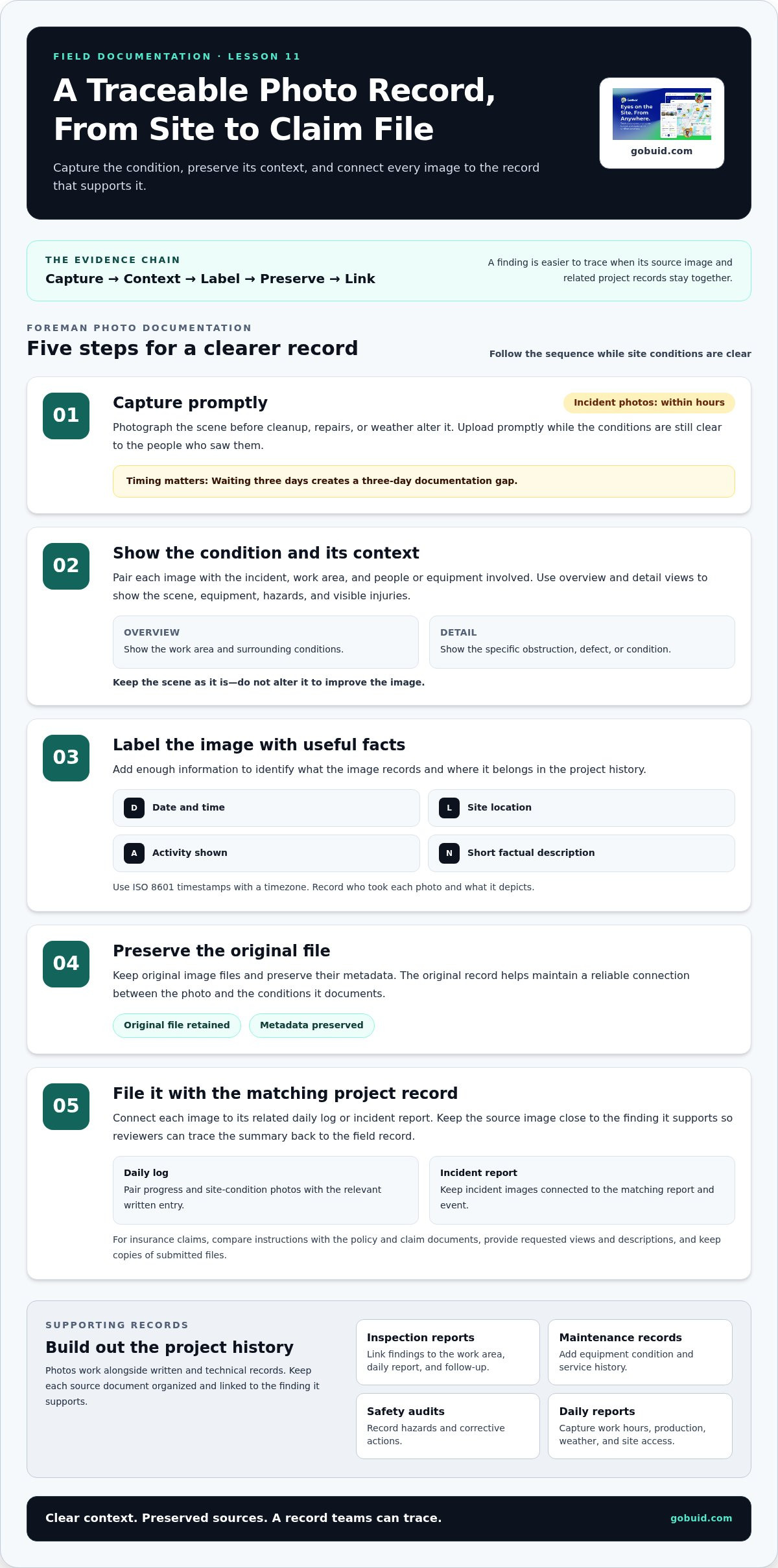
A practical checklist is: capture the condition, include context, record the date and location, and file the image with its related log. Use ISO 8601 timestamps with a timezone, and preserve the original file. Upload promptly; waiting three days creates a three-day documentation gap. Capture incident photos within hours, before cleanup, repairs, or weather alter the scene. These steps make evidence capture for construction claims clearer and more traceable.
Photographs and videos of the accident scene, equipment, hazards, and injuries
Photos and videos add visual context to written records. Pair each image with the incident, work area, and people or equipment involved.
Photos for Logs and Progress
Photos supplement daily construction logs by showing the conditions behind a written entry. For example, a log noting a blocked access route gains context from a wide view of the work area and a close-up of the obstruction. Teams often deploy site camera towers from Jobcam to maintain continuous, broad visual records across work areas. To document subcontractor progress, capture completed work, active work, and visible deficiencies in the relevant zone. These images help show what was present when the crew recorded its observations.
After an incident, document the scene, equipment, hazards, and visible injuries from useful angles. Include overview and detail views without altering the scene to improve the image. Record who took each photo and what it depicts. Preserve the original files and connect them to the matching daily log or incident report. Organized image records can help explain the event during an insurance review or litigation.
Real-Time Photo Workflows
A real-time workflow captures, labels, and stores images while the site conditions are still clear to those who saw them. Add the date, location, activity, and a short factual description, then file each image with its related log or report. Keep the original files and preserve their metadata. This makes it easier to trace a finding from a summary back to the source image.
For insurance claims, compare the insurer’s instructions with the policy and claim documents. Provide requested views and descriptions, and keep copies of submitted files. Don’t assume one photo set fits every claim. A consistent progress photo record can also help teams keep site images organized as work moves across locations.
Inspection reports, maintenance records, and safety audits
Inspection reports, maintenance records, and safety audits add technical detail to a claim file. A third-party inspection can document a defect, while maintenance entries show equipment condition and previous work. Safety audits can record hazards and corrective actions. OSHA reports may help identify safety violations when a subcontractor may have failed to follow industry safety standards. Keep the original documents and note their dates, authors, and project locations.
Build a chronological record of site conditions and activities by linking each inspection finding to the relevant daily report, work area, and follow-up. For example, an inspection noting a damaged component gains context from maintenance records showing its service history. Record work hours, production, weather, and site access in daily reports. These details help explain changes in progress and clarify each party’s position.
Third-party weather reports and statistical records can provide useful context, but may not reflect conditions at a specific work area or explain the actual project impact. Compare them with dated site observations, access records, and production notes. For an injury claim, medical bills, prescriptions, and treatment plans document care and related financial impact. Keep these records linked to the incident and claim materials.
Use a consistent inspection workflow to keep findings, corrective actions, and supporting documents together. Organize inspection findings and project reports so the formal record is easier for involved parties to review.
GoBuid: generate report in one click
GoBuid helps construction teams create clearer project documentation from routine field records. Use Customised forms to capture inspection details consistently and Safety & Quality Inspections to record site findings. Manpower Tracking adds workforce records that can support the project timeline.
When it is time to present documented findings, GoBuid lets teams generate a report in one click. Keep source records organized so reviewers can see how each reported item relates to the field documentation. This is useful when photos, inspection notes, and workforce information are spread across project activities.
Explore how GoBuid can support your documentation workflow at gobuid.com.
Make the Next Project Record Easier to Use
Effective evidence capture for construction claims relies on habits teams can maintain during active work, not a last-minute document search. Establish a clear process for recording site events, filing supporting materials, and reviewing open issues. This gives project teams a consistent starting point when a concern needs attention.
GoBuid’s Digital Site Diary and Customised forms support structured field records, and teams can generate a report in one click. Use these tools to gather and present routine documentation more easily. They support project records, while the underlying evidence still depends on accurate field observations and source documents.
Ready to improve how your team manages project documentation? Contact GoBuid about your documentation workflow. Build a clearer record, one field entry at a time.
Frequently Asked Questions
Are AI-extracted claims findings traceable back to the source documents?
Yes, provided each extracted finding retains a clear reference to its original record. A reviewer should be able to open the daily report, email, or photo behind a summary and compare it with the source. Treat AI output as an index to evidence, not a replacement for it. For disputed or formal proceedings, preserve original files and their audit history.
What can AI extract from daily work reports for a construction claim?
AI can help identify information in daily reports, including work activities, labor and equipment entries, site conditions, access issues, and reported delays. For example, it might surface repeated notes about a crew waiting for an area to open. Before relying on an extracted item, staff should compare it with the source report and related schedule or cost records.
What makes a construction photo “defensible”?
A useful photo has reliable date and location context, an identifiable subject, and an unaltered original file. Include a wide view to establish the work area, followed by detail shots showing the specific condition. Record who captured the image and connect it to the relevant project entry. These practices support reliability, but the image alone does not establish responsibility.
What evidence is needed to support a construction claim?
Build a connected record of the event, its effect, and the basis for the requested remedy. For a defective installation, this might include the inspection finding, applicable drawing or specification, corrective-work record, and related labor or material documentation. Add contract correspondence and schedule records where relevant. The evidence should address both the technical facts and the requirements governing its use.
How should contractors document delays, disruptions, and extra work?
For each event, record what changed, when it happened, who directed or reported it, and which work was affected. Link daily entries to schedule updates, labor and equipment records, access constraints, and written instructions or change orders. Tie cost records to the extra work, and submit notices according to the contract’s stated process and timing.
