Mobile Field Reporting: Buying Guide for Contractors
Discover the best mobile field reporting for contractors. Streamline site notes, progress photos, and daily logs with our practical software buyer's guide.
by Michael R. Henderson
|
A field report can be accurate and still arrive too late to help. When notes stay on paper, photos sit in phone galleries, and updates travel through separate channels, mobile field reporting for contractors can mean collecting the same information twice: once on site, then again at the office. Crews need a practical way to record progress as work happens, while managers need a consistent view of daily activity.
The right system connects field updates, supporting records, and reporting without adding unnecessary steps. This guide compares reporting workflows and software capabilities, from digital site diaries and customised forms to progress photos and one-click report generation. Use it to identify what your team needs to record, how managers will review and share it, and which setup fits the way your projects run.
Key Takeaways
- Bring notes, photos, and site updates into a reporting workflow that keeps project records connected.
- Choose mobile field reporting for contractors by mapping reporting tasks, required records, field usability, and report outputs.
- Compare how digital forms, photo documentation, review visibility, and report generation fit your team’s daily work.
- GoBuid combines customised forms, progress photos, and daily reports for small-to-mid-size contractor teams.
What mobile field reporting for contractors needs to capture
Handwritten notes may stay in a pocket, photos in a phone gallery, and updates in a message thread. When records are disconnected, it takes extra effort to work out what happened on site and assemble a clear daily account. Mobile field reporting for contractors brings job-site information into a workflow for capturing, organizing, reviewing, and sharing records.
A daily report documents site activity and progress. Time tracking records labor hours, while scheduling coordinates upcoming work. Broader project-management tools may cover tasks across a project. These functions can support each other, but they answer different questions. Field reporting focuses on what the team observed and completed on site. It sits within the wider concept of field service management (FSM), which concerns managing resources working at client properties.
For a quick visual example of a construction reporting workflow, watch this video:
Which site records should a mobile reporting workflow support?
Start with the information a supervisor needs to understand the day: work completed, progress against planned activities, manpower updates, supporting photos, and safety or quality observations. Add enough context to make each record useful later, such as the work area or activity shown, the date, and any follow-up needed. A useful field report is timely, structured, and traceable.
Digital forms can standardize recurring QA/QC, RFI, and safety records, so crews use a consistent format instead of rebuilding each update from scratch. Choose forms that reflect real site tasks, then make sure completed records and progress photos can be brought together in the daily reporting process. See how customised digital forms support structured field documentation.
How to compare mobile field reporting software for contractor teams
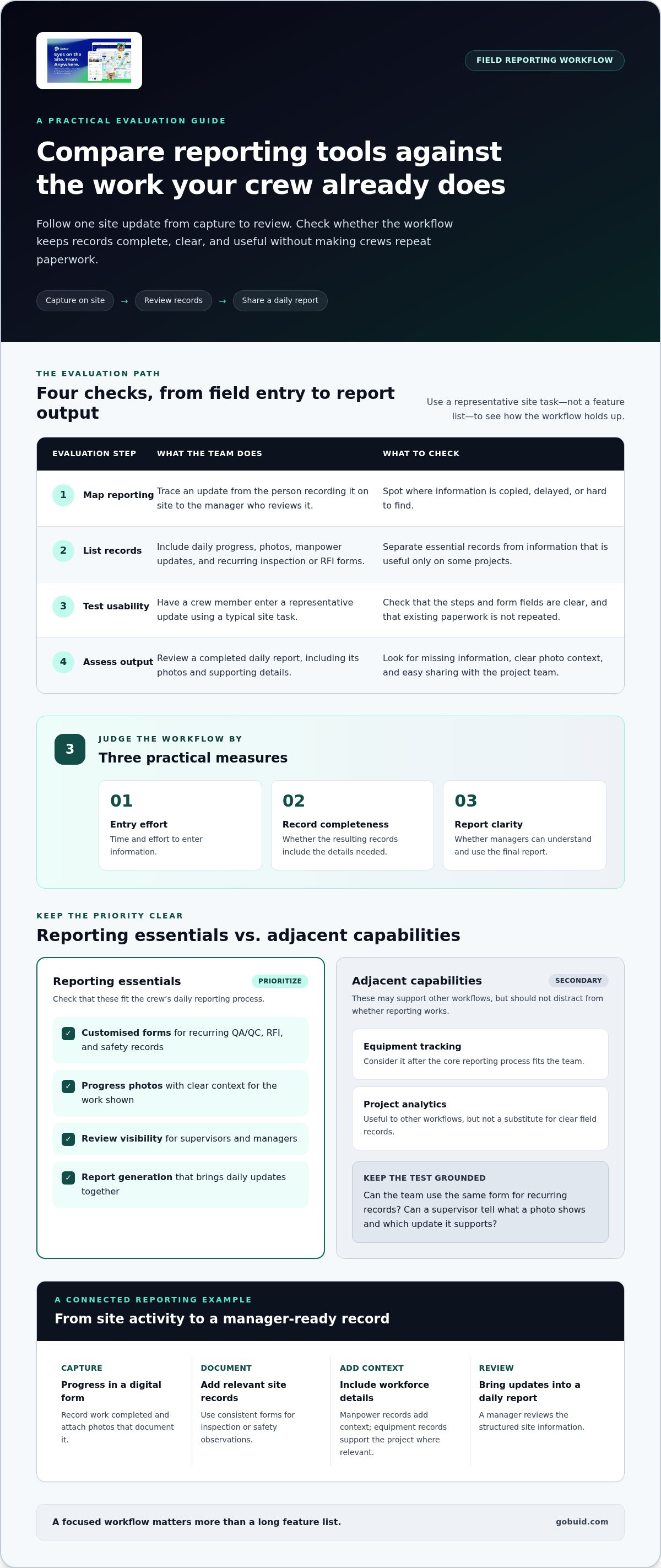
Compare tools against the work your crew already does, not a feature list alone. Use these four steps to evaluate mobile field reporting for contractors:
- Map current reporting. Follow an update from the person recording it on site to the manager who reviews it. Note where information is copied, delayed, or hard to find.
- List required records. Include daily progress, photos, manpower updates, and recurring inspection or RFI forms. Separate essential records from information that is useful only on some projects.
- Test field usability. Have a crew member enter a representative update using a typical site task. Check whether the steps and form fields are clear.
- Assess report outputs. Review a completed daily report for missing details, clear photo context, and ease of sharing with the project team.
Then compare how each system handles customised forms, photo documentation, review visibility, and report generation. Can a supervisor tell what a photo shows and which work update it supports? Can the team use the same form for recurring records? Prioritise these reporting essentials before considering adjacent capabilities such as equipment tracking or project analytics. Those can support other workflows, but they should not distract from whether the reporting process works.
For a closer look at connecting site updates with progress records, explore GoBuid’s progress monitoring features.
How can contractors tell whether a reporting tool fits field conditions?
Test a representative workday, from a crew member entering an update to a manager reviewing the report. Use real tasks, such as recording progress, attaching a photo, and documenting an observation. Check whether the process makes crews repeat paperwork they already complete. Judge the workflow by three practical measures: time and effort to enter information, completeness of the resulting records, and clarity of the final report.
A focused workflow matters more than a long feature list. GoBuid’s construction site-management software brings digital forms, progress photos, and daily reporting together.
Turn field updates into consistent contractor reports with GoBuid
GoBuid connects site documentation with daily reporting. Crews can record updates using digital forms, add progress photos, and capture recurring information such as QA/QC, RFI, and safety records. These entries support a structured site record, and one-click report generation brings daily updates into a report for review and sharing.
For small-to-mid-size contractors, the practical question is whether the workflow matches the team’s reporting needs. GoBuid is designed for contractors with 10-50 persons and includes site reporting alongside workforce, equipment, safety, and quality capabilities. It supports a focused reporting process without needing to replace every system a contractor uses. Compare its reporting workflow with the criteria from your evaluation: required records, field usability, review visibility, and clear report outputs.
What does a connected field-reporting workflow look like in practice?
A crew member records the day’s progress in a digital form and attaches photos that document the work. If an inspection or safety observation is part of the update, a relevant form captures it in a consistent format. Manpower records can add workforce context, while equipment management supports equipment records where they matter to the project. The site information then feeds into a daily report for a manager to review.
That’s the value of mobile field reporting for contractors: field updates and supporting documentation stay connected to a usable project record. Include report generation, forms, photos, and any related site records in your software evaluation, then explore GoBuid.
Build a reporting workflow your crew can use
Effective mobile field reporting for contractors starts with the records your team needs and a workflow that works on site. Compare systems by how easily crews can capture updates, how clearly managers can review them, and whether the finished reports are useful as project records.
GoBuid brings digital forms for QA/QC, RFI, safety, and related documentation together with progress photos and daily site reports. Teams can generate daily reports in one click, keeping field information organized for review and sharing.
Ready to improve how your team records site activity? Explore GoBuid’s construction field reporting tools and see how digital forms, progress photos, and one-click reports can connect field updates with daily records.
Frequently Asked Questions
What is mobile field reporting for contractors?
Mobile field reporting for contractors is the process of capturing, organizing, reviewing, and sharing job-site information through a mobile workflow. Crews can record daily progress, add photos, and submit structured forms for site observations. Managers use those records to review activity and maintain a consistent project record, rather than piecing updates together from separate notes, messages, and photo folders.
What should contractors look for in mobile field reporting software?
Look for tools that match the records your team needs and the way crews work on site. Check whether forms support recurring tasks, photos can be connected to updates, managers can review submitted information, and reports present it clearly. Test a representative workflow from field entry to manager review. Assess the effort required to enter information, whether records are complete, and how easy the report is to understand.
Can mobile field reporting software generate daily construction reports?
Yes. Construction site-management software can bring site updates into daily reports. GoBuid supports daily site reports with one-click report generation. Crews can use digital forms for QA/QC, RFI, safety, and related documentation, alongside progress photos. The reporting process brings field records together for review, while the team’s chosen reporting routine determines what information to capture each day.
How does mobile field reporting differ from workforce tracking?
Mobile field reporting documents broader site activity, including progress, photos, inspections, and other project updates. Workforce tracking focuses on manpower records, such as who is assigned or present. The functions can complement each other, but they answer different questions: reporting describes what is happening on site, while workforce tools provide information about the people doing the work.
