Switching Construction Management Software: Fees and Fit
Switching construction management software? Compare migration, integration and training costs, assess workflow fit, and weigh time savings before you choose.
by Sam Chen
|
A software subscription may be only one part of the cost of switching. Switching construction management software can also involve fees for data migration, integrations, training, or running old and new systems at the same time. Which costs apply depends on your tools, workflows, and transition plan.
It’s sensible to weigh those costs against the daily friction your team wants to remove. This article explains where extra fees can arise, how construction software connects with scheduling, budgeting, and procurement tools, and what users report about productivity and time savings. You’ll also see how to assess whether a new system fits the work happening across the office and the field, so the decision is based on practical needs, not just a feature list.
Key Takeaways
- Compare software by the construction workflows it supports, from field documentation to project controls, not by feature count alone.
- Map how scheduling, budgeting, and procurement tools share project information to spot gaps that can create duplicate work.
- Assess reported productivity and time savings against your team’s actual workflows, rather than treating user experiences as guaranteed results.
- See how one-click reporting, customised forms, manpower tracking, and safety and quality inspections can support clearer field operations.
Why Should Construction Teams Use Construction Management Software?
Construction platforms connect field updates with office decisions in a shared project management workflow. Their value depends on choosing tools that match the work, team, and information people need to act on.
Project Management Workflows
Project management workflows connect schedules, change orders, and daily logs to active construction work. A change order tied to schedule and financial data helps teams see timeline impacts and spot bottlenecks early. General construction project management tools may combine plans, tasks, forms, and checklists; specialist tools focus on a narrower function. Templates can standardize updates without replacing field judgment. The Association of Professional Builders reports that 27.5% of construction projects are delivered late, making schedule visibility a practical priority.
Small contractors may need straightforward tools for daily logs, tasks, and schedules. Large general contractors may need broader controls across teams and projects. The right fit supports the workflows each team actually uses.
Real-Time Reporting and Centralized Data
Real-time reporting gives teams a shared view of progress, issues, and decisions based on current project updates. Centralized records bring drawings, daily logs, change orders, and task information together, reducing the need to reconcile separate files. For example, a project manager can compare a schedule update with a logged field issue before adjusting the work plan. Clearer information supports better decisions about labor, timelines, and profit.
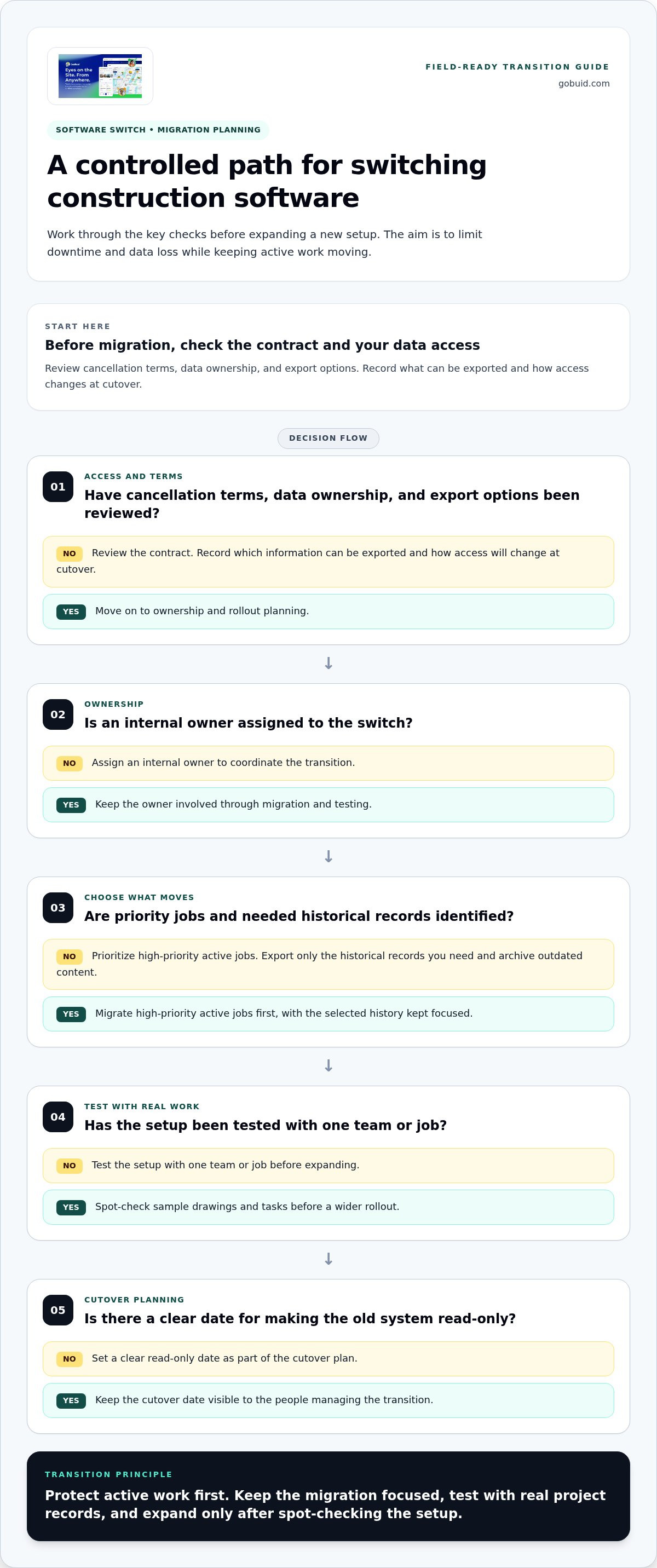
To limit downtime and data loss during a switch, assign an internal owner, migrate high-priority active jobs first, and export only the historical records you need. Archive outdated content, test the setup with one team or job, and spot-check sample drawings and tasks before expanding.
Before migration, review the software contract’s cancellation terms, data ownership, and export options. Record which information can be exported and how access will change at cutover. Set a clear date for making the old system read-only.
Integrations with scheduling, budgeting, and procurement tools
Connected workflows help teams coordinate site activity with office decisions. The aim is to share useful project updates, not add another disconnected platform.
Connections Across Project Tools
An integration links construction management tools with scheduling, budgeting, and procurement systems. It matters because teams can follow how a change affects dates, costs, and materials. For example, a revised delivery date can inform the schedule, while a budget update shows its financial effect. Procurement records can also give project staff a clearer view of pending orders and received materials.
Centralized schedules, financial records, and client communication make handoffs easier to track. A project manager can compare a schedule change with a budget update before sharing revised status with a client. Define which system owns each data point, then test how updates move between tools. This helps prevent duplicate entries and conflicting records from slowing decisions.
Scheduling for Fieldwork and Resources
Scheduling is most useful when it works alongside field collaboration, resource planning, and task management. Crews need practical updates tied to assigned work, while managers need visibility into labor, equipment, and upcoming tasks. If a material delay shifts a task, teams can adjust linked assignments and tell affected workers.
During software evaluation, map a real workflow from schedule change to field update. Check whether task owners can see revised dates, whether resource plans reflect changed work, and whether client updates use the same project information. A construction workflow overview can help frame which connections matter to your team.
Customer-reported productivity and time savings
Customer accounts can show where construction software reduces friction, but testimonials are not controlled measurements. Treat them as examples of workflows, not promises of typical results. Look for specific tasks, such as recording daily updates, routing change orders, finding drawings, or preparing reports. A useful account explains what changed, who used the tool, and how the team assessed the outcome.
For example, a contractor might describe replacing repeated office calls with mobile field updates. Another might link purchase orders to project records so order status is easier to find. Such examples can illustrate where an integrated platform may help, but they do not establish how much time another crew will save. Project size, work habits, and existing systems all differ.
Build your comparison around recurring work. Before migration, record how your team handles a task, such as approving a change order or compiling a progress report. After adoption, assess the same task with the same roles and criteria. Track handoffs, duplicate entry, missing information, and time spent. This gives you results specific to your operation instead of broad claims.
Gather feedback from field staff and office teams, too. Ask which updates are easier to enter, which records are faster to find, and where work still stalls. Compare responses with project goals, then refine templates and workflows. A testimonial is more useful when it names the task, evidence, and context behind its productivity claim.
To assess reporting workflows in practice, explore one-click reporting as a way to turn project records into clearer updates.
GoBuid: generate report in one click
GoBuid supports construction teams that need clear reporting and consistent site records. Its one-click report generation turns collected project information into reports, while customised forms provide a structured way to capture updates. Manpower Tracking and Safety & Quality Inspections help teams manage workforce records and inspection activity. These tools can make routine reporting and field documentation easier to handle during a software transition.
Keep the rollout grounded in real work. Identify which reports supervisors use, which forms crews complete, and which inspection records teams rely on. Then align the platform with those workflows instead of shifting every process at once. That gives site and office teams a practical starting point for organizing daily information. Visit GoBuid to explore its field tools.
Make the Next Move With a Clear Plan
A software change is most effective when it starts with a clear operational goal. Choose the daily process that needs improvement, then use it to set migration priorities, staff training, and rollout decisions. This keeps the transition focused on real site needs rather than feature lists.
For teams reviewing their workflows, GoBuid brings together a Digital Site Diary, customised forms, and one-click report generation. These tools help teams maintain consistent field records and organize project information for reporting.
Use your current workflow as the starting point for switching construction management software. Identify what crews need to record, what managers need to see, and which handoffs slow work down. Then take the next step with a practical conversation about fit. Contact GoBuid about switching, and keep your team moving toward clearer project work.
Frequently Asked Questions
What are the best construction management software platforms for contractors in 2026?
The right platform fits your team’s project size, field workflows, and reporting needs. A small contractor may prioritize simple daily records and task visibility, while a general contractor managing multiple trades may need layered permissions, project controls, and broad integrations. Compare platforms using real site scenarios, such as getting a revised drawing to the right crew.
How much does construction management software cost per user or project?
Software pricing varies by plan. Compare whether charges are based on users, projects, or feature tiers, then account for migration, integrations, training, and support. Review renewal and cancellation terms as well. These factors shape the total cost of adoption, which a subscription price alone may not show.
What features should contractors compare when switching construction management software?
Compare field usability, role-based permissions, document version history, reporting, data exports, and contract terms. When switching construction management software, test a real task with a superintendent and an office administrator. For example, check that each can find the current drawing, see relevant updates, and access records allowed for their role. A feature only helps when the right people can use it.
How do you migrate construction project data, documents, and financial records to a new platform?
Map each record type to its destination, including project identifiers, document versions, and financial categories. Preserve relationships between records, such as an invoice and its purchase order, rather than transferring isolated files. Export a sample, confirm that attachments open and totals reconcile, then document exceptions for review. Keep a controlled archive of source records to use during validation.
How long does it take to switch construction management software, and what is a typical implementation plan?
Implementation time depends on data volume, integrations, workflow complexity, and staff readiness. A practical plan covers requirements and contract review, data mapping, configuration, sample testing, role-based training, and a pilot rollout. Assign an owner to each phase and define the checks required before wider adoption. For organizations managing broad technology environments, working with managed IT partners like Torch Services can help oversee enterprise infrastructure and transition requirements. Track and resolve pilot issues, then communicate the cutover plan to affected teams.
