
Progress Photos & Documentation: The Contractor’s Guide to Bulletproof Site Records
by
|
Progress Photos & Documentation: The Contractor’s Guide to Bulletproof Site Records

It's 4:30 PM on a Friday. You're scrolling through 400 unsorted photos in a WhatsApp group, trying to find one shot of the electrical conduit before the drywall went up on October 12th. Without that proof, your $15,000 progress claim is stalled. You know that capturing images is easy, but managing Progress Photos & Documentation is where the real work happens. Most contractors lose 5 hours every week just organizing files or chasing down proof of work from site teams. It's a chaotic cycle that drains your profit margins and leaves you vulnerable to disputes.
This guide shows you how to transform those cluttered gallery images into structured, legal-grade project data. You'll learn to eliminate arguments and slash your reporting time by 80% using a centralized system. We'll cover the transition to a single source of truth, one-click reporting for stakeholders, and how to maintain BCA compliance without the Friday afternoon headache. Stop digging through chat apps and start building a bulletproof record of your success.
Key Takeaways
Stop relying on disorganized messaging apps and learn to build a structured, chronological record of site conditions.
Implement a professional standard for Progress Photos & Documentation using metadata like GPS and user attribution for total accountability.
Compare the ROI of manual versus digital reporting to reclaim hours spent on administrative tasks every week.
Establish a bulletproof SOP for site captures, focusing on critical milestones like pre-pour and above-ceiling documentation.
Bridge the gap between the field and the office by integrating site diaries with manpower and equipment management.
The Hidden Cost of Disorganized Progress Photos & Documentation
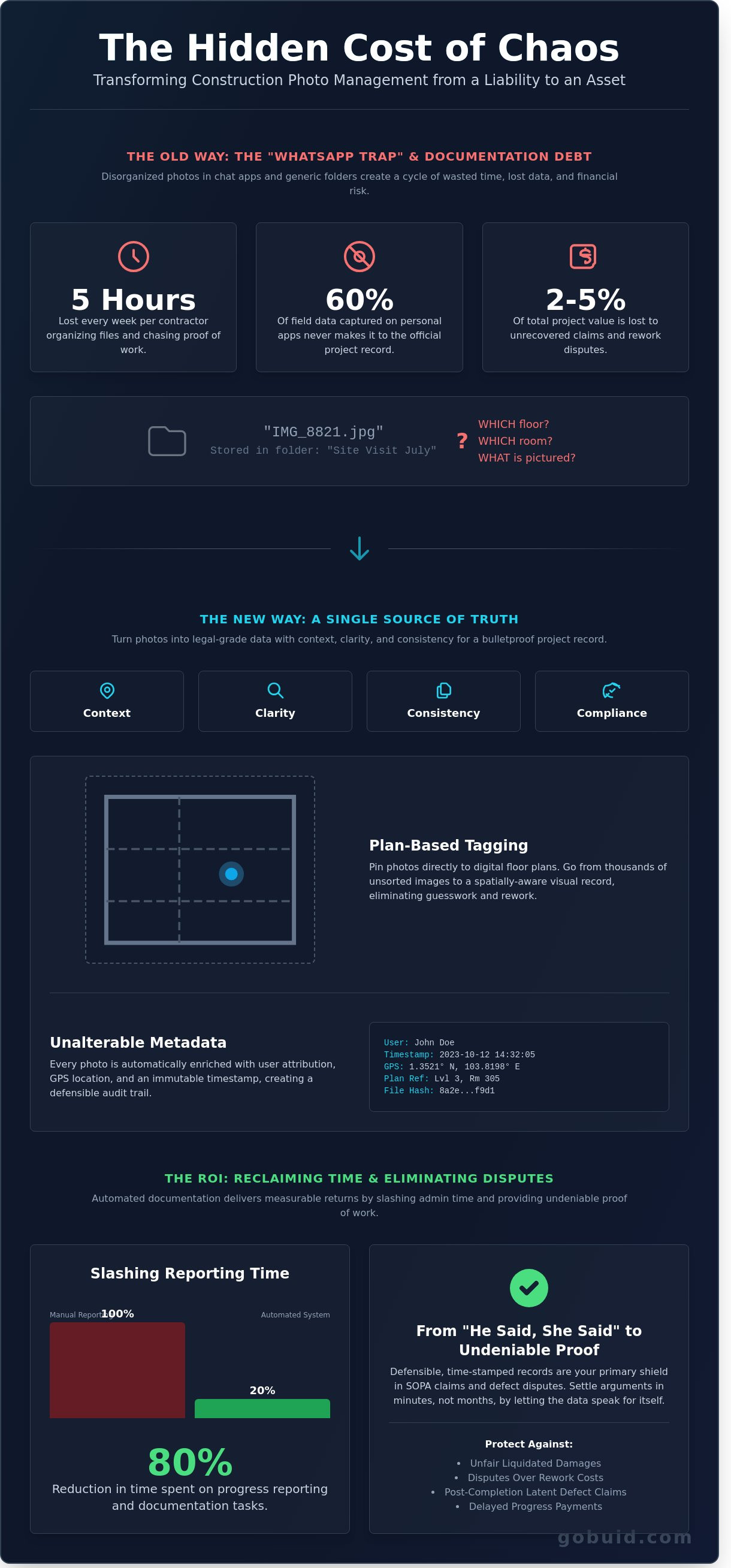
Construction progress documentation isn't just a collection of random snapshots. It's a structured, chronological record of site conditions that provides a definitive audit trail for every stage of a build. Most teams fail to treat it with the rigor it deserves. They fall into the "WhatsApp Trap," using personal messaging apps to relay critical site data. This creates a massive liability. When records live in private chats, they're siloed on individual devices. If a subcontractor leaves the project or a phone is damaged, that history vanishes. Recent industry data shows that 60% of field data captured on personal apps never makes it into the official project record.
Disorganized Progress Photos & Documentation lead to a phenomenon known as "documentation debt." This debt accumulates every time a photo is taken without a location tag or a date. It creates a backlog of confusion that hits hardest during project handovers. Instead of a smooth transition, teams spend over 12 hours a week hunting for specific images to prove compliance. This friction delays payments and stalls the release of retention. In a sector where 35% of professionals waste time on non-productive tasks, managing your data is as vital as managing your labor.
The financial impact of lost records is immediate and severe. Unrecovered claims or disputes regarding rework can cost a firm between 2% and 5% of the total project value. Without a clear record, you're forced to eat the cost of mistakes you didn't make. Proper Construction management requires a single source of truth where every photo is tied to a specific point in time and a specific location on the plans. This level of organization turns a liability into an asset.
Why Traditional Photo Storage Fails the Job Site
Generic cloud folders like Google Drive or SharePoint aren't built for the dirt. They're digital graveyards for data. A photo named "IMG_8821.jpg" stored in a folder labeled "Site Visit July" offers zero context. It doesn't tell you which floor, which room, or which MEP joint is pictured. Searching through 10,000+ unorganized images for a specific pipe penetration is a recipe for failure. Effective Progress Photos & Documentation require plan-based linking. If you can't click a room on a drawing and see every photo taken there over the last six months, your storage system has failed you.
Folders lack spatial context, making it impossible to track specific site areas over time.
Manual uploading creates a 48-hour lag between the field and the office.
Zero searchability means critical evidence is buried when you need it most.
The Legal Reality of "He Said, She Said" in Construction
Construction is inherently litigious, and your photos are your primary shield. They serve as essential evidence in Security of Payment Act (SOPA) claims, proving that work was completed to the required standard before a payment milestone. This protection extends far beyond the construction phase. Latent defects often surface 5 or 10 years after completion. If you can't produce a photo of the waterproofing before the tiles went down, you're defenseless. Defensible proof consists of time-stamped, geotagged, and unalterable site records. This level of transparency ensures that accountability is clear and disputes are settled in minutes rather than months in court.
The Anatomy of Professional Site Documentation
Effective Progress Photos & Documentation turn a simple image into a legal asset. Professional documentation stands on four pillars: Context, Clarity, Consistency, and Compliance. Context ensures the viewer knows exactly where the lens was pointed. Clarity eliminates ambiguity in structural details. Consistency creates a chronological record that leaves no gaps in the project timeline. Compliance ensures every capture meets the ISO 19650 standards for information management. Without these four pillars, a photo is just a file; with them, it's evidence.
Plan-tagging is the bridge between the field and the office. It involves pinning a photo directly to a specific grid line or room number on the digital floor plan. On a 120,000 square foot job site, a photo of an HVAC duct is useless if it's buried in a generic folder. Pinning it to Room 305 provides immediate spatial intelligence. This method eliminates the guesswork that leads to rework. According to a 2023 Arcadis report, the average construction dispute value in North America reached $42 million. Most of these disputes stem from poor record-keeping. Unalterable timestamps are your primary defense. They create an immutable audit trail that protects contractors from liquidated damages. If a subcontractor claims they finished a task on Tuesday, but the metadata shows a Wednesday 4:00 PM timestamp, the data speaks for itself.
Metadata and Geotagging: The DNA of a Photo
GPS data is the ultimate verification tool. It proves the user was physically on-site, preventing "ghost" progress reporting. Automatic time-stamping syncs every image with the daily site diary instantly. This automation is vital because manual labeling is the enemy of field adoption. When workers have to type out descriptions on a cold site, they stop taking photos. Automating the Progress Photos & Documentation workflow ensures data flows without friction. It's the difference between a complete project history and a collection of random snapshots.
Photo Markups and Site Context
Raw photos often lack the nuance required for punch lists. Use digital ink to circle defects or highlight specific structural elements directly in your mobile app. Voice-to-text descriptions allow foremen to dictate notes while walking the site, saving roughly 45 minutes of administrative typing per shift. Linking these photos to Permit to Work (PTW) records or inspection forms ensures that every high-risk activity has a visual receipt. This level of detail helps you centralize your project intelligence and maintain total visibility. This process reduces administrative overhead by 35% and keeps the project moving toward completion with total accountability.
User Attribution: Every photo is tagged to the specific team member who took it.
Grid Line Precision: Tie every image to the exact structural coordinate.
Real-Time Sync: Field photos appear in the office dashboard the moment they're captured.
Manual vs. Digital: Analyzing the ROI of Automated Documentation
Manual documentation is a silent profit killer. A 2023 industry study by FMI Corporation revealed that construction teams spend 14 hours per week on average just managing project data. This includes sorting through photos, matching images to floor plans, and manually typing out field reports. When you rely on manual Progress Photos & Documentation, you invite human error and massive administrative lag into your workflow. Digital systems replace this friction with automated precision.
The financial impact of switching to digital tools is immediate. Project managers who move away from paper based systems see a direct reduction in overhead costs. Instead of paying a high salary professional to act as a file clerk, you empower them to act as a builder. This shift optimizes labor costs and ensures that your most expensive talent is focused on project delivery, not data entry. Efficiency isn't just a buzzword; it's the difference between hitting your margin or losing it to administrative bloat.
Calculating Administrative Time Savings
The "Friday Afternoon Crunch" is a reality for most site supervisors. They spend 3 to 5 hours every week scrolling through personal phone galleries to find specific site images. They then drag these files into Word documents or emails to satisfy reporting requirements. This process is slow and often inaccurate. Digital documentation can reduce reporting time by up to 80%. With automated tools, the field report is generated the moment the photo is captured. Instant site-to-office synchronization removes the need for manual uploads. This allows the office team to see site conditions in real time, bridging the gap between the field and the desk.
Improving Stakeholder Transparency
Trust is the most valuable currency on a job site. Clients and investors want visibility without the hassle of a two hour round trip drive to the site. Providing a "Single Source of Truth" through a centralized platform prevents conflicting progress narratives. When stakeholders have access to real-time, timestamped visual data, the frequency of unnecessary site visits drops by 45%. This keeps the site safer and less crowded. It also ensures that everyone is working from the same set of facts. High transparency leads to faster payment approvals and fewer questions about project milestones.
Evaluate the cost of a single lost claim. A typical dispute regarding "as-built" conditions or hidden defects can easily exceed $30,000 in legal fees and remediation. A monthly subscription for a professional Progress Photos & Documentation platform costs a fraction of that amount, often less than $200 per project. One saved dispute provides enough ROI to cover the software cost for years. It's not just a tool; it's an insurance policy for your firm's bottom line. You don't just document to record; you document to protect your profit margins and your professional reputation.
GoBuid is designed to eliminate the chaos of the traditional job site. By centralizing every image and report, you create a permanent, searchable record of the entire build. This level of organization isn't a luxury; it's a requirement for modern construction firms that value accountability. Stop wasting hours on manual data entry and start leveraging technology to drive your projects forward.
Best Practices for Progress Photos on Singapore Sites
In Singapore's high-stakes construction landscape, visual evidence is your strongest defense against liquidated damages and quality disputes. Standardize your Progress Photos & Documentation by implementing a mandatory Daily Capture SOP. This protocol requires site supervisors to document specific zones at fixed intervals, typically at 08:30 and 16:30. This consistency ensures that every 24-hour cycle is accounted for, leaving no gaps for claims to fester. According to the Building and Construction Authority (BCA), robust site records are central to maintaining high CONQUAS scores. A single missing rebar photo can lead to a 10% reduction in quality assessment points for structural works during a site audit.
Compliance isn't just about quality; it's about survival. Integrate your safety documentation with your progress photography. Under the 2024 WSH Act guidelines, contractors must prove they maintained a safe environment throughout the project lifecycle. Capture "Safety in Progress" shots alongside structural updates. If a scaffolding inspection occurs, take the photo immediately and tag the location. This creates a dual-purpose record that satisfies both the Resident Technical Officer (RTO) and the safety auditor. It's about efficiency. Don't waste time on separate workflows. One photo must serve multiple masters to keep the project moving.
Digital records act as the connective tissue between the field and the office. When a project manager can see the exact state of the 12th-floor slab from a boardroom in Jurong, transparency increases. This visibility reduces the need for redundant site walks, saving approximately 15 hours of management time per week on a standard mid-rise development. High-quality Progress Photos & Documentation transform raw site data into a searchable asset that protects your bottom line.
The Milestone Documentation Checklist
Focus on "point of no return" events where mistakes are costly to fix. Pre-pour inspections are your highest priority. You must capture rebar density, spacer placement, and conduit cleanliness before the concrete truck arrives. Once the pour starts, that evidence is buried forever. For MEP documentation, map all electrical conduits and plumbing lines before drywall installation or ceiling closure. In the 2023 BCA Quality Excellence report, 65% of rework cases originated from poorly documented in-wall services. Document external façade weatherproofing and roofing layers sequentially. This provides a clear timeline of structural integrity that protects your firm during the five-year latent defect period.
Field Usability: Ensuring 100% Team Adoption
Your documentation strategy fails if the foreman finds the tool cumbersome. Choose mobile-first platforms with "glove-friendly" interfaces. Buttons must be large, responsive, and easy to tap in humid conditions. Offline mode is non-negotiable for Singapore sites. Basement levels B2 and below rarely have stable 4G or 5G signals. If the app crashes without signal, your data dies. Train your team to capture "Context" shots first to show the general area, followed by "Detail" shots for specific components. This 1-2 punch methodology eliminates ambiguity. It's the difference between a random photo of a pipe and a verified record of the 4th-floor riser. To maximize efficiency on your next project, centralize your site records with Buid.
Streamlining the Field with GoBuid’s Digital Site Diary
Raw site images mean nothing without context. GoBuid acts as the connective tissue between the dust of the job site and the precision of the boardroom. It transforms Progress Photos & Documentation from a storage problem into a strategic asset. By linking every image to real-time manpower tracking and equipment logs, you create a verified timeline of events. This isn't just about taking pictures; it's about creating an indisputable record that protects your margins and your reputation. GoBuid bridges the gap by ensuring that what happens in the field is instantly visible to the office.
The platform functions as your digital foreman. It doesn't just store files; it organizes them. When a supervisor captures a photo of a structural reinforcement, GoBuid doesn't leave it floating in a gallery. It attaches that visual evidence to the specific project phase, the labor crew involved, and the machinery utilized. This synergy provides a 360-degree view of the project. You gain total visibility into how resources are being deployed against the actual physical progress on the ground. It's a grounded, no-nonsense approach to project management that replaces guesswork with hard data.
Integrating Photos into the Daily Site Diary
GoBuid eliminates the need for manual data entry at the end of a long shift. The software automatically anchors site photos to the relevant daily diary entry using GPS and time-stamp metadata. This ensures that every photo has a home. When you review a log, you see more than just a list of tasks; you see the 15 masons on-site and the specific weather conditions at 10:00 AM. This level of detail is critical for resolving claims. You can learn how to maintain a construction site diary that stands up to legal scrutiny. Centralizing these data points ensures that no detail slips through the cracks during the chaos of a build.
One-Click Reporting for BCA and Stakeholders
Compliance shouldn't take all night. GoBuid’s one-click reporting feature compiles photos, labor hours, and equipment usage into a professional, branded PDF. This automation slashes report generation time by 85%, saving the average site supervisor 12 hours per week. These reports meet the rigorous standards required for BCA audits and stakeholder inspections. Everything is centralized; you don't have to hunt through WhatsApp threads or personal phone galleries. Experience GoBuid’s one-click reporting-Book a demo today to see how we simplify your workflow and keep your documentation audit-ready at all times.
The Project Analytics Dashboard provides the high-level view that owners and directors need. It tracks progress against milestones using the data gathered directly from the field. If a specific zone is lagging, the dashboard flags the delay immediately. You can drill down from a bird's-eye view of the entire project directly into the granular Progress Photos & Documentation for that specific day. This provides a single source of truth that keeps every subcontractor and stakeholder accountable. By using GoBuid, you aren't just documenting the build; you're optimizing the entire construction lifecycle through better visibility and faster communication.
Automated Syncing: Photos are instantly tagged to the correct project and date.
Resource Tracking: Link manpower and equipment to specific visual milestones.
Audit Readiness: Generate ISO-compliant reports with a single tap.
Data Centralization: Move away from fragmented communication toward a single source of truth.
Secure Your Project’s Future with Smarter Documentation
Site records are your strongest defense against disputes and delays. Relying on manual logs or scattered messaging threads creates a 100% avoidable risk to your project’s profitability. Professional Progress Photos & Documentation provide the visibility needed to bridge the gap between the field and the office. By centralizing your data, you eliminate the 5-hour weekly administrative burden of traditional reporting. This shift ensures every milestone is captured with the precision required for modern construction standards.
GoBuid is the trusted choice for Singapore contractors who prioritize BCA compliance and operational speed. Our platform delivers one-click professional report generation, allowing you to focus on the build rather than the paperwork. We offer zero lock-in contracts to keep our team accountable to your success every single day. It’s time to stop chasing updates and start leading with data. Your job site deserves a digital foreman that works as hard as you do.
Start your digital site diary with GoBuid today and regain control of your project records. Your next successful handover starts with the right documentation.
Frequently Asked Questions
Why are progress photos important in construction project management?
Progress photos provide an irrefutable visual audit trail that eliminates ambiguity in project status. They serve as the primary record for verifying work completion before you release progress payments. In 2023, firms using centralized documentation reduced dispute resolution time by 50%. You gain total visibility into the site's daily reality, ensuring that what's reported in the office matches the ground truth exactly.
How often should construction progress photos be taken?
Capture site photos daily for critical path activities and at least twice weekly for general site updates. High-risk tasks like deep excavations or structural pours require hourly documentation to capture hidden details before they're covered. Consistent Progress Photos & Documentation ensure you don't miss critical milestones that could lead to 10% rework costs if undocumented. Standardizing this rhythm keeps your project on schedule.
What is the best way to organize construction site photos?
Organize your visual data using a centralized cloud platform that automatically tags images by GPS coordinates, date, and specific work zones. Avoid scattered WhatsApp groups or local folders that lead to data silos. Adopting a structured naming convention based on ISO 19650 standards allows your team to retrieve any specific site image in under 30 seconds. This efficiency translates directly into better resource management and faster decision-making.
Can progress photos be used as legal evidence in Singapore?
Progress photos are admissible as legal evidence in Singapore under Section 116A of the Evidence Act 1893. To be valid, the images must have untampered metadata and a clear audit trail proving when and where they were taken. Digital timestamps and secure cloud storage prevent claims of photo manipulation. This provides a 100% reliable defense during SOPA adjudications or complex insurance claims.
What metadata should be included in construction documentation?
Include four essential metadata points: GPS coordinates, UTC timestamps, the unique user ID of the photographer, and the specific project phase. This granular data transforms a simple image into a powerful piece of Progress Photos & Documentation. Without these 4 data points, photos lose 70% of their value during forensic schedule analysis. You need this data to bridge the gap between field activity and office records.
How does digital documentation help with BCA compliance?
Digital documentation streamlines compliance with BCA CONQUAS standards by providing a searchable database of quality checks. It ensures all structural and architectural milestones are documented according to the 2021 Regulatory Requirements. Having a single source of truth allows you to export compliance reports for BCA inspections in minutes. This proactive approach prevents delays in obtaining your Temporary Occupation Permit and avoids costly penalties.
What is the difference between a photo gallery and a digital site diary?
A photo gallery is merely a storage folder, but a digital site diary is an integrated record of project health. The diary links images directly to daily manpower logs, weather reports, and material deliveries. This 3-way correlation provides the context needed to explain a 2-day delay. An isolated photo offers no explanation for why work stopped, whereas a site diary proves the cause instantly.
How do I ensure my site team actually takes the required photos?
Mandate photo attachments as a required field in your digital daily reports to ensure 100% compliance from the field. Use a mobile app that works offline so supervisors can't use poor connectivity as an excuse. When documentation becomes a seamless part of the 5-minute daily sign-off process, you eliminate the gap between the field and the office. Accountability increases when the system tracks exactly who submitted what and when.