Construction Software vs. Spreadsheets: Why Your Site Needs a Single Source of Truth in 2026
Is your spreadsheet a liability? In the construction software vs spreadsheets debate, discover how a single source of truth prevents delays and boosts site p...
by Michael R. Henderson
|
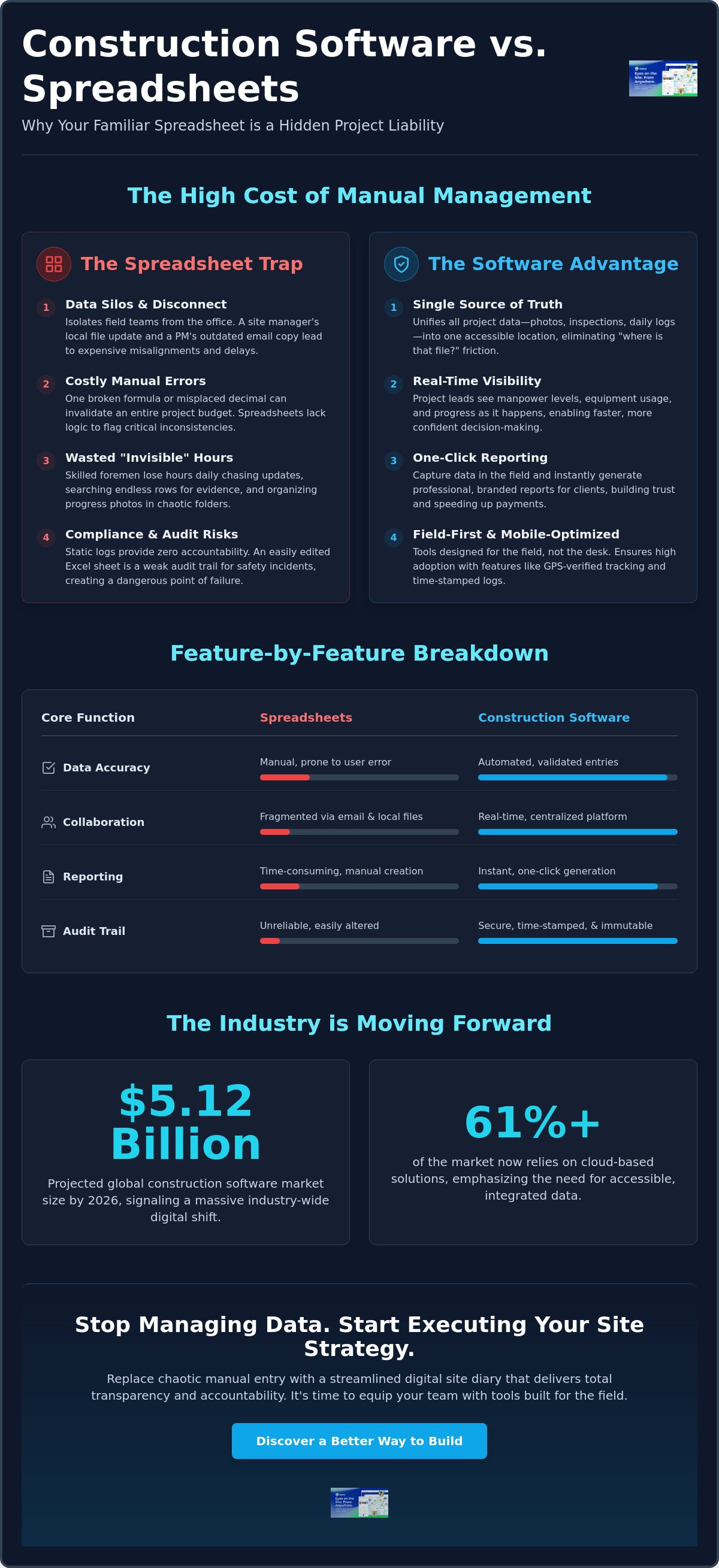
Your spreadsheet isn't just a document; it's a liability waiting to trigger a project delay. While Excel feels like a cost-effective choice for site tracking, the debate of construction software vs spreadsheets is no longer about price. It's about operational performance. You likely rely on manual sheets because they're familiar. However, you're also fighting constant data entry errors, buried email threads, and site reports that arrive three days too late. With the global construction software market projected to reach $5.12 billion in 2026, the industry is moving toward a level of precision that static cells simply cannot match.
This article reveals why manual data management is draining your project timelines and how moving to a single source of truth stabilizes your workflow. You'll learn how purpose-built tools automate manpower tracking and equipment management to keep your site moving. We'll explore the 2026 shift toward cloud-based integration, which now accounts for over 61% of the market. It's time to replace chaotic manual entry with a streamlined digital site diary that delivers transparency and total accountability. Stop managing data and start executing your site strategy with tools built for the field.
Key Takeaways
- Identify how data silos and broken formulas create significant financial leaks in manual workflows.
- Evaluate the core differences in construction software vs spreadsheets to improve real-time site-to-office collaboration.
- Centralize progress photos, safety inspections, and site reports into a single, accessible digital environment.
- Leverage automated manpower and equipment tracking to drive accurate project analytics and faster decision-making.
- Audit your existing Excel processes and standardize templates to ensure a seamless transition to digital site management.
- ⭐ Learn more about GoBuid's feature - without the heavy enterprise price tag
Table of Contents
-
The Hidden Costs of Managing Construction Projects via Spreadsheets
-
Why Purpose-Built Construction Software Outperforms Generic Tools
-
Transitioning from Excel to Digital Site Management: A Practical Framework
The Hidden Costs of Managing Construction Projects via Spreadsheets
Spreadsheets create data silos that isolate the field from the office. When comparing construction software vs spreadsheets, the primary cost isn't the software subscription; it's the fragmentation of your information. A site manager updates a local file while the project lead views an outdated version in an email thread. This disconnect leads to expensive site delays and misaligned procurement schedules.
Manual entry is inherently flawed. One broken formula or a misplaced decimal can invalidate an entire project budget. Unlike specialized construction estimating software, generic spreadsheets lack the logic to flag inconsistencies. You're building your project on a foundation of unverified data that requires constant manual checking.
Compare how these two methods handle the complexities of modern site management in this video:
The "Invisible" Hours Spent on Manual Data Collation
Site foremen spend hours at the end of every shift chasing sub-contractors for site diary updates. This manual process creates several bottlenecks that drain your productivity:
-
Difficulty searching through months of Excel rows for specific progress evidence.
-
Hours wasted uploading progress photos into unorganized server folders.
-
Constant rework caused by teams using outdated versions of the master schedule.
The debate over construction software vs spreadsheets often ignores the high price of this lost time. These administrative tasks pull your most skilled workers away from the build, slowing down project momentum and reducing your overall margin.
Compliance Risks and Documentation Gaps
Static logs provide zero accountability. In a safety incident, an Excel sheet doesn't prove who verified a hazard or when they did it. It's too easy to edit after the fact. This makes it a weak audit trail for quality inspections. Relying on a single person to maintain a "master sheet" creates a dangerous point of failure. If that employee leaves or is off-site, your project data is effectively lost, leaving you vulnerable during regulatory audits.
Why Purpose-Built Construction Software Outperforms Generic Tools
Purpose-built software isn't just a place to store data; it's an engine for site execution. In the construction software vs spreadsheets comparison, software wins by unifying disparate data points into a single source of truth. Every site photo, safety inspection, and daily log lives in one accessible location. This centralization eliminates the "where is that file?" friction that kills office productivity and site momentum.
Real-time visibility changes how you manage operational risk. Digital site diaries allow project leads to see manpower levels and equipment usage as they happen. By using customised forms, you ensure every team member follows the same reporting logic. This standardization eliminates the "creative" data entry often found in Excel. It provides a consistent stream of clean data for your project analytics dashboard, allowing for faster, more confident decision-making.
From Data Collection to One-Click Reporting
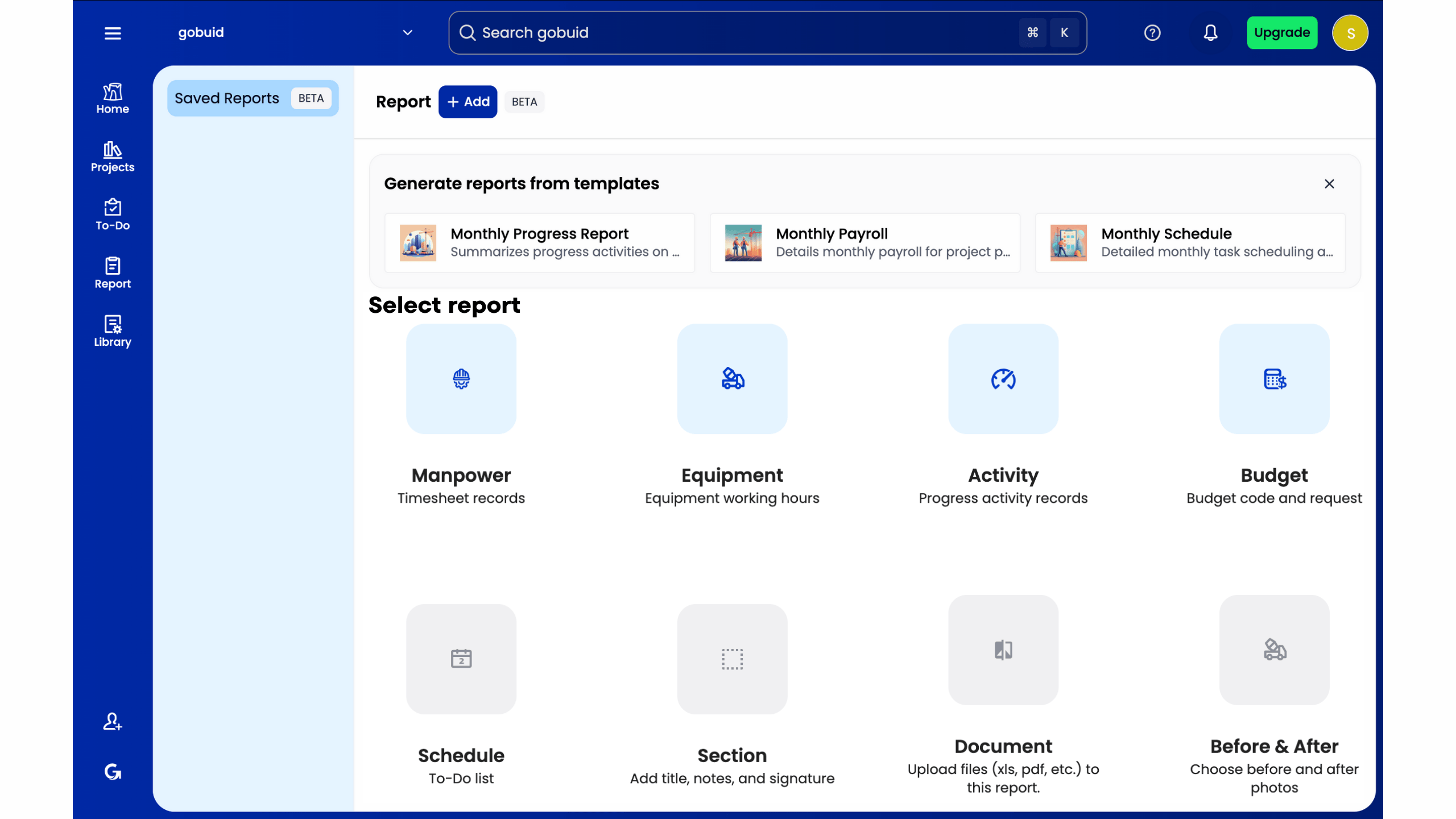
Most contractors struggle with the "reporting lag"—the days spent turning messy site notes into client-ready documents. Purpose-built software bridges this gap. Capturing data directly in the field enables one-click report generation. You send professional, branded updates to stakeholders instantly. This speed builds client trust and keeps payment cycles moving without the typical administrative friction. Explore how a Digital Site Diary can reclaim your team's time.
Field-First Design vs. Desktop-Bound Sheets
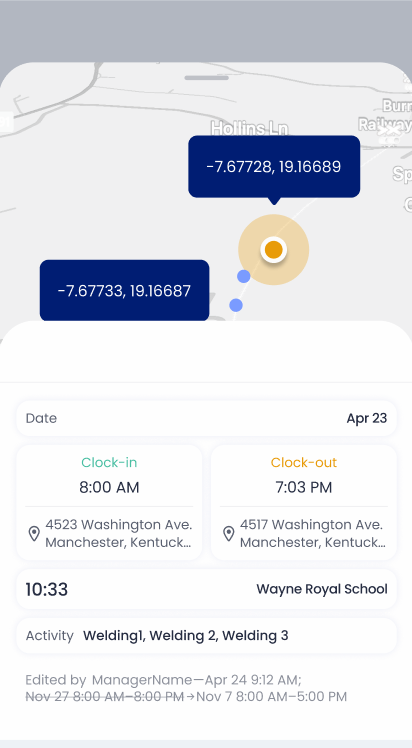
Spreadsheets are built for desks; construction happens in the field. Mobile-optimized tools ensure high adoption rates because they're easier to use than a paper notebook or a complex mobile spreadsheet. Features like GPS-verified manpower tracking and time-stamped equipment management provide a level of accountability spreadsheets can't match. This data isn't just collected; it's verified at the source, giving you an undisputed record of site activity.
Transitioning from Excel to Digital Site Management: A Practical Framework
Moving from manual sheets to a centralized system requires strategy, not just a software purchase. The construction software vs spreadsheets transition succeeds when you focus on workflow first. Start by auditing your current Excel files. Identify which sheets take the longest to update and where data most frequently breaks. This audit reveals your biggest time-wasters and defines your digital requirements.
Standardize your reporting logic before you digitize. If three different site managers use three different formats for a site diary, your data remains fragmented. Create uniform reporting templates. Once your team agrees on the format, the move to a purpose-built platform becomes a matter of execution rather than an overhaul of your business logic. Roll out the solution on a single pilot project first. This approach builds team confidence and allows you to refine your processes without risking the stability of multiple job sites simultaneously.
Setting Up Your Digital Site Diary
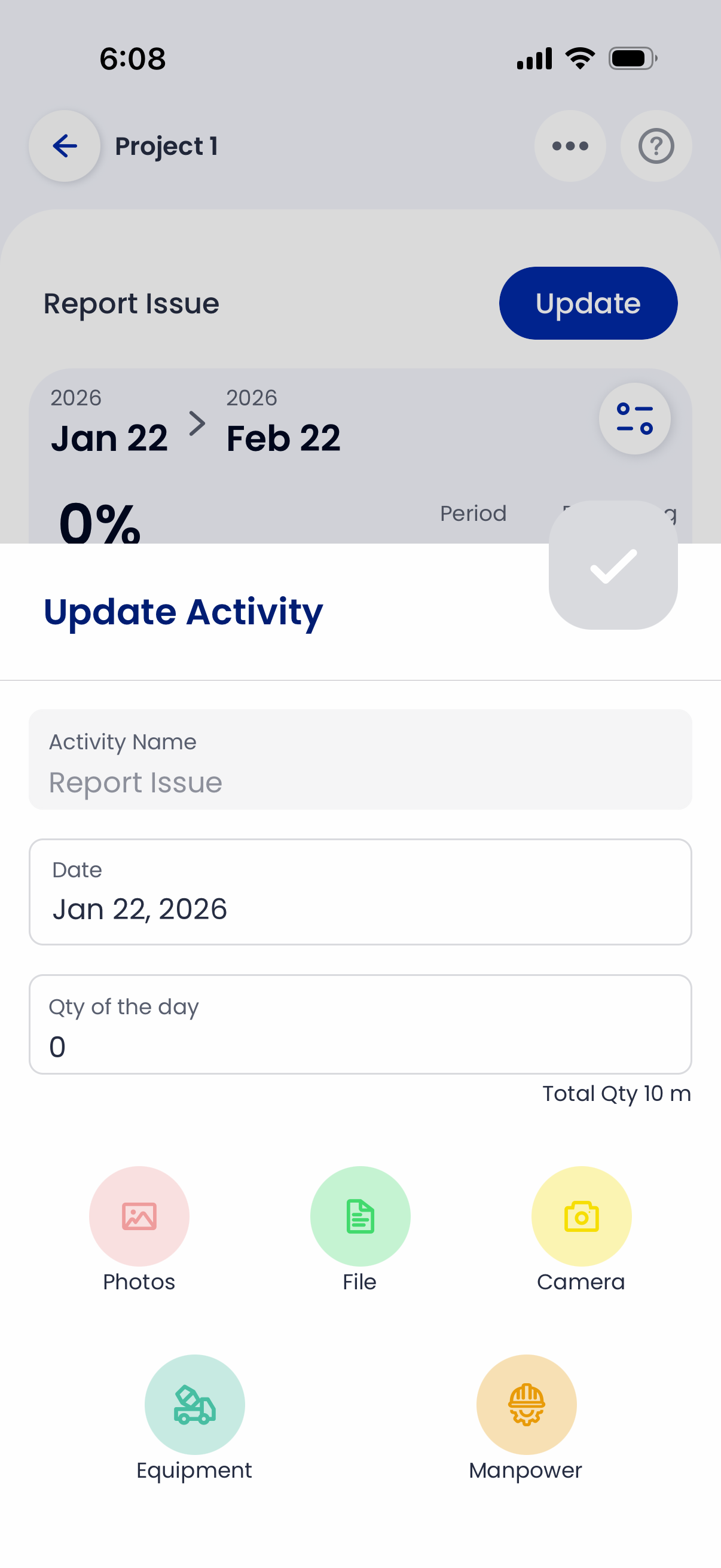
Transitioning away from paper logs or static cells begins with your field team. Move your manual entry into a digital site diary to capture data at the source. This shift ensures that progress photos and safety inspections are logged immediately, not at the end of the week. Training is essential. Show your foremen how mobile documentation saves them from late-night admin. When the field team sees the immediate benefit of less paperwork, adoption rates soar.
Leveraging Project Analytics for Growth
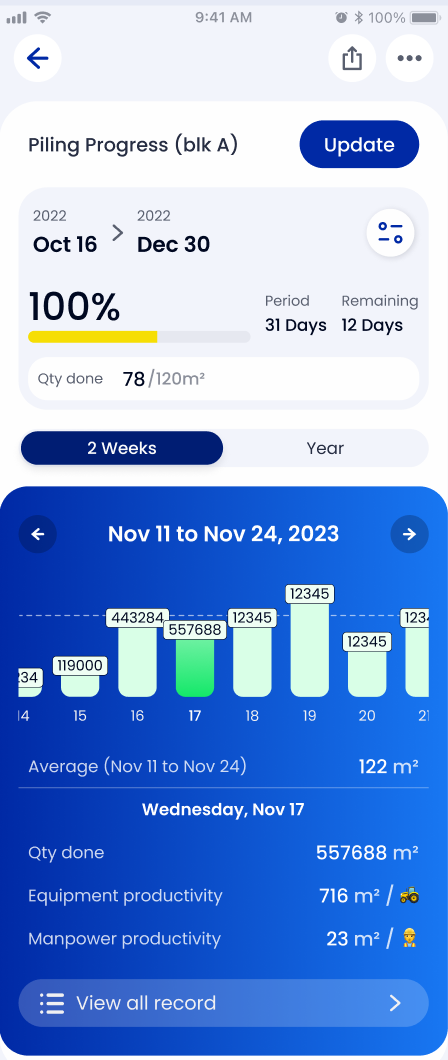
The real value of ditching spreadsheets lies in the data you can finally see. Use a project analytics dashboard to spot trends that are invisible in a standard spreadsheet. High-level dashboards aggregate manpower levels and equipment usage across all active sites. This visibility turns raw site data into actionable insights. You'll gain a competitive edge in future bidding by using historical performance data to refine your cost estimates and equipment management strategies. Stop looking back at what happened and start predicting what your next project needs.
Take Control of Your Site Operations
The construction industry is evolving rapidly beyond the limitations of static cells and fragmented email threads. The construction software vs spreadsheets debate ends when you prioritize real-time site execution over manual data entry. You've identified the hidden costs of data silos and seen the practical framework for a digital transition. Now, it's time to move toward a unified source of truth that connects your field teams to the office with precision.
Centralizing your documentation isn't just a technical upgrade; it's a strategic requirement for staying competitive in 2026. You need a real-time project analytics dashboard to drive growth and professional reports that generate in one click to keep stakeholders informed without the administrative lag. Eliminating the friction of manual reporting allows your most skilled workers to focus on what they do best: building high-quality projects on time and under budget.
Don't let outdated tools hold your productivity back. Stop wasting hours on manual reports—get started with GoBuid today. Use digital site diaries and automated manpower tracking to transform your site documentation into a high-performance asset. Regain control of your workflows and start building with total transparency and accountability.
Frequently Asked Questions
Is construction software harder to learn than Excel?
No, purpose-built construction software is designed for intuitive use by site teams, unlike the complex formulas required by Excel. While spreadsheets demand a high level of technical proficiency to build and maintain, digital site diaries use straightforward inputs. Mobile-first interfaces ensure that foremen can log data in seconds. This reduces the learning curve and eliminates the risk of accidental formula breakage that often plagues manual sheets.
How much time can my team save by switching from spreadsheets to a digital site diary?
Site managers typically reclaim several hours each week by automating their documentation processes. Switching from manual spreadsheets to a digital site diary removes the need for double-handling data. Instead of re-keying site notes and manually collating photos at the end of the day, reports are generated instantly. This efficiency directly increases productivity by allowing your leadership team to focus on project execution rather than administrative backlog.
Can I still export my data from construction software if I need it in a spreadsheet format?
Yes, you retain full ownership and flexibility of your data through easy export options. Most platforms allow you to download information in CSV or Excel formats for external reporting or legacy record-keeping. When evaluating construction software vs spreadsheets, it's important to know that choosing software doesn't mean losing the familiarity of a grid view. You get the power of a centralized database with the convenience of traditional file formats when needed.
Do I need a constant internet connection to use construction management software on-site?
No, you don't need a constant signal to maintain accurate site records. Most industry-leading software includes offline functionality specifically for remote sites or underground work. Site teams can record safety inspections and capture progress photos without a connection. The system caches the data and syncs it to the cloud automatically once the device reconnects. This ensures your single source of truth remains updated without interruption.
