How to Choose Construction Project Software: A Practical Guide for 2026
Learn how to choose construction project software your team will actually use. Our 2026 guide focuses on field adoption and real-time data to boost efficiency.
by Sheldon Huang
|
What if the most expensive software you buy is the one your field crew never actually opens? In 2026, the success of your project depends on data integrity, not just a long list of features. Learning how to choose construction project software requires a shift in perspective. You need a tool that works as hard as your team does on-site.
It's frustrating to deal with manual data entry errors or delayed reporting that leaves the office in the dark. You want real-time visibility into site progress and accountability for every piece of equipment. We understand that complex systems often lead to abandonment in the field. This guide offers a clear framework for selecting software that bridges the gap between field reality and office reporting. You'll discover how to prioritize user adoption to ensure you get professional reports in seconds and maintain total transparency across every job site.
Key Takeaways
- Audit your operational bottlenecks to reveal how manual documentation and reporting lags are impacting your bottom line.
- Master how to choose construction project software by prioritizing field adoption and mobile-first interfaces over complex, unused features.
- Bridge the gap between site reality and office reporting with a Digital Site Diary that captures data in real-time.
- Eliminate hours of administrative work by utilizing tools designed to generate professional reports in one click.
- Evaluate implementation speed to ensure your team moves from chaotic workflows to centralized data and total transparency within hours.
Identifying Your Construction Operational Bottlenecks
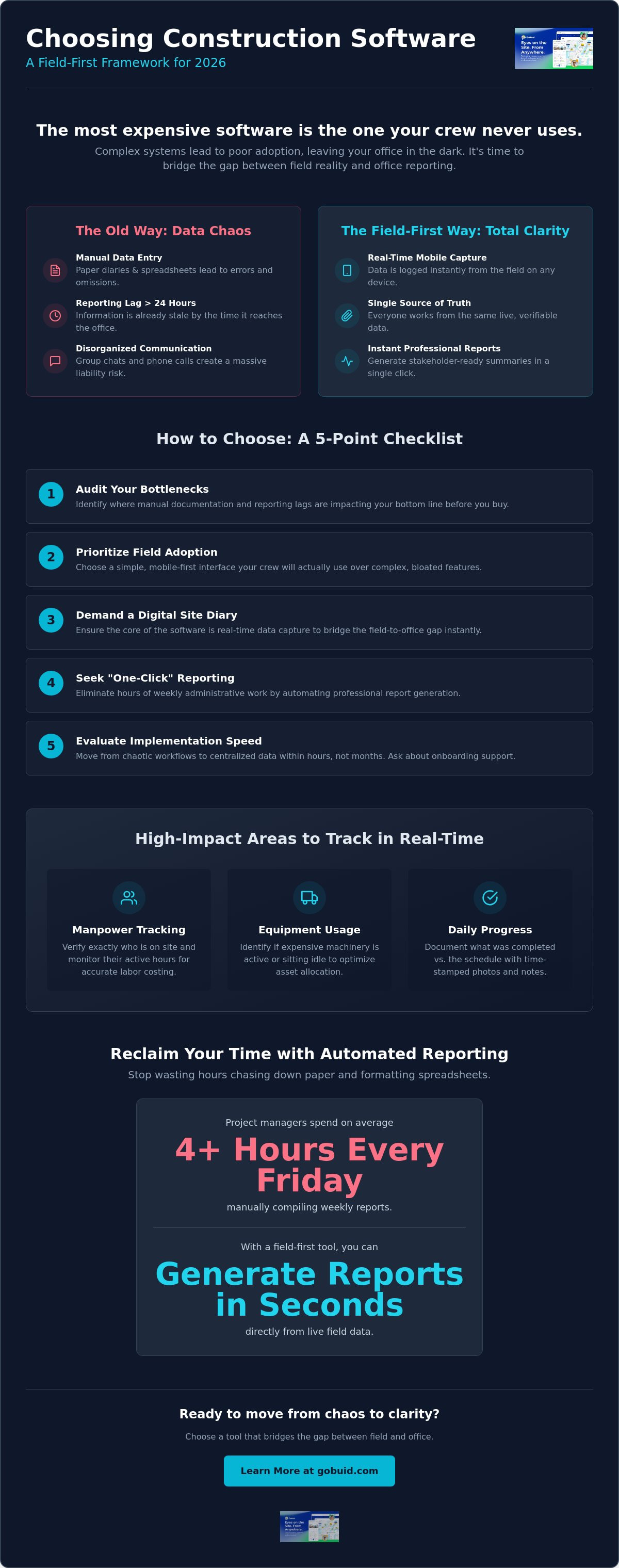
Stop guessing where your project margins are leaking. Effective Construction management requires precise data, not rough estimates. Learning how to choose construction project software starts with a brutal audit of your current daily workflows. Are you still relying on paper diaries or disorganized group chats to track progress? These manual methods create a reporting lag that leaves the office flying blind.
Calculate the time that passes between a site incident and a professional report landing on a stakeholder's desk. If that gap exceeds 24 hours, your information is already stale. You can't manage what you don't see in real-time. To better understand how to identify these operational gaps, watch this helpful video:
As you refine your search for how to choose construction project software, assess your field crew's tech-readiness. Don't waste capital on over-engineered tools that your team will ignore. Define your essential data points early to ensure the solution matches your site reality. Focus on these high-impact areas:
- Manpower Tracking: Verify exactly who is on site and their active hours.
- Equipment Usage: Identify if expensive machinery is active or sitting idle.
- Daily Progress: Document what was actually completed today versus the schedule.
The Field-to-Office Communication Gap
Missing progress photos aren't just an administrative headache; they're a massive liability. Without clear visual evidence, winning disputes over delays or rework becomes nearly impossible. Manual data entry also introduces errors that ripple through your Project Analytics Dashboard. You need a unified data point that connects the field to the office instantly, ensuring everyone works from a single version of the truth.
Safety and Compliance Requirements
Compliance shouldn't be a separate, manual chore. In 2026, OSHA enforcement is heavily focused on digital documentation for safety plans and training records. You need a system that allows for instant Safety & Quality Inspections directly from a mobile device. Verify if you can customize forms to meet these strict federal standards. Static templates won't protect your business when site conditions and regulations change fast.
Core Features for Field-First Construction Management
Efficiency on a job site isn't about complex gantt charts. It's about what happens on the ground. When evaluating how to choose construction project software, prioritize a Digital Site Diary. This tool must allow for real-time updates from any mobile device. If your site manager has to wait until they're back at a trailer to log progress, you've already lost the battle for accuracy.
High-quality software integrates equipment management and manpower tracking into the daily workflow. You need to see who is on site and what machines are active without making a single phone call. This level of oversight aligns with Construction Planning Fundamentals, which emphasize the coordination of labor and resources to maintain a project schedule.
Don't overlook the importance of progress photos. A field-first platform lets you capture and tag images directly on the site. These photos become a visual record that protects your business from future claims. When you can see the site without being there, you regain control over the project's trajectory.
The Power of Automated Reporting
Manual report compilation is a profit-killer. Project managers shouldn't spend four hours every Friday chasing down paper site diaries and formatting spreadsheets. Look for "One-Click" capabilities that let you generate reports instantly from live field data. Automated summaries improve stakeholder transparency. They build trust because the data is fresh, verifiable, and professional.
Customization vs. Out-of-the-Box
Every project has unique requirements. You need customised forms that mirror your existing workflows rather than forcing you into a rigid box. The right software balances standard templates with site-specific flexibility. This ensures your safety checklists and quality inspections are relevant to the specific hazards of each build. If you're ready to see how these features work in a live environment, you can explore our field-first solutions today.
Evaluating Implementation, Support, and Total Cost of Ownership
Software is an operational partner, not just a digital file cabinet. When you evaluate how to choose construction project software, look beyond the sales demo. Prioritize flexibility in your contract. Many enterprise providers thrive on multi-year commitments that trap you with stagnant tools. Seek out "No Lock-in" options that force the software to earn its place on your job site every month. This keeps the provider accountable for performance and updates.
Speed of implementation defines your return on investment. Verify the onboarding process before you sign. Can your team be up and running in hours, or will it take weeks of specialized training? Your business moves fast; your software should keep pace. Test the mobile interface in actual field conditions. Apply the three-tap rule: if it takes more than three taps to log a site entry, the system is too complex for a busy crew. High adoption rates depend on this simplicity.
Avoiding the "Shelfware" Trap
Shelfware is expensive software that nobody uses. It happens when the user interface is cluttered with features the field crew doesn't need. Ensure 100% crew adoption by selecting a platform with a clean, distraction-free design. Site workers are there to build, not to navigate complex menus. A simple tool ensures that progress photos and daily logs are submitted consistently, providing the data you need for accurate reporting.
Scaling Your Software with Your Business
Your needs will change as you win more contracts. Your software must handle multiple projects without increasing your administrative overhead. Use a Project Analytics Dashboard to turn those daily site logs into long-term growth insights. This transition from raw data to strategic intelligence is what separates a basic tool from a growth engine. Check the availability of help documentation and responsive customer support to ensure you're never left stalling on a deadline. For more details on aligning costs with value, visit our pricing page.
Take Control of Your Site Operations
Operational excellence isn't achieved through complex paperwork; it's built on clear, immediate data. You now have the framework to bridge the gap between field reality and office reporting. Focus on tools that your crew will actually use. Prioritize mobile-first interfaces that eliminate the reporting lag and ensure every site event is captured as it happens. Understanding how to choose construction project software is the first step toward reclaiming your project margins and team accountability.
Stop settling for delayed insights and manual errors. You need a partner that values transparency and results above all else. Demand a real-time site analytics dashboard that turns raw data into actionable intelligence. Look for solutions that offer "no lock-in" contracts, ensuring the platform proves its value every single day on the job site. It's time to transition from chaotic workflows to a unified data point that connects every location.
Start streamlining your site documentation with GoBuid to generate professional reports in one click and gain total visibility into your projects. Build with confidence and lead your team with precision.
Frequently Asked Questions
What is the most important feature in construction project software?
The most important feature is field usability. High-level analytics are worthless without accurate data from the site. A mobile-first design ensures your crew logs progress as it happens. When evaluating how to choose construction project software, prioritize tools that allow for real-time updates and photo documentation. This creates a unified data point that connects every operational location without adding to the administrative burden.
How much does construction management software typically cost?
Software pricing typically follows a subscription-based model. Most platforms offer per-user, flat-rate, or revenue-based plans tailored to your company's size and annual construction volume. While costs vary based on the depth of features like manpower tracking and equipment management, your focus should remain on value rather than the lowest price. Look for transparent structures that allow you to scale as your business grows without unexpected administrative overhead.
Can construction software help with safety compliance?
Yes, software streamlines safety compliance by digitizing inspections and training records. You can use customized forms to meet specific site or regulatory standards like the updated 2026 building codes. Digital logs ensure that safety data is captured instantly and stored securely for audit readiness. This eliminates the risk of missing paperwork and improves overall site accountability through a centralized, transparent document management system.
How do I get my field crew to use a new digital site diary?
Secure crew adoption by choosing a tool with a clean, distraction-free interface. If it takes more than three taps to log a site entry, your team will likely ignore it. Demonstrate how a digital site diary reduces their manual paperwork and eliminates the need for repetitive end-of-day reporting. When you show that the software makes their job easier rather than harder, you ensure 100% adoption from day one.
