Switching to Construction Site Management Software: A 2026 Data Migration Strategy
by Sam Chen
|
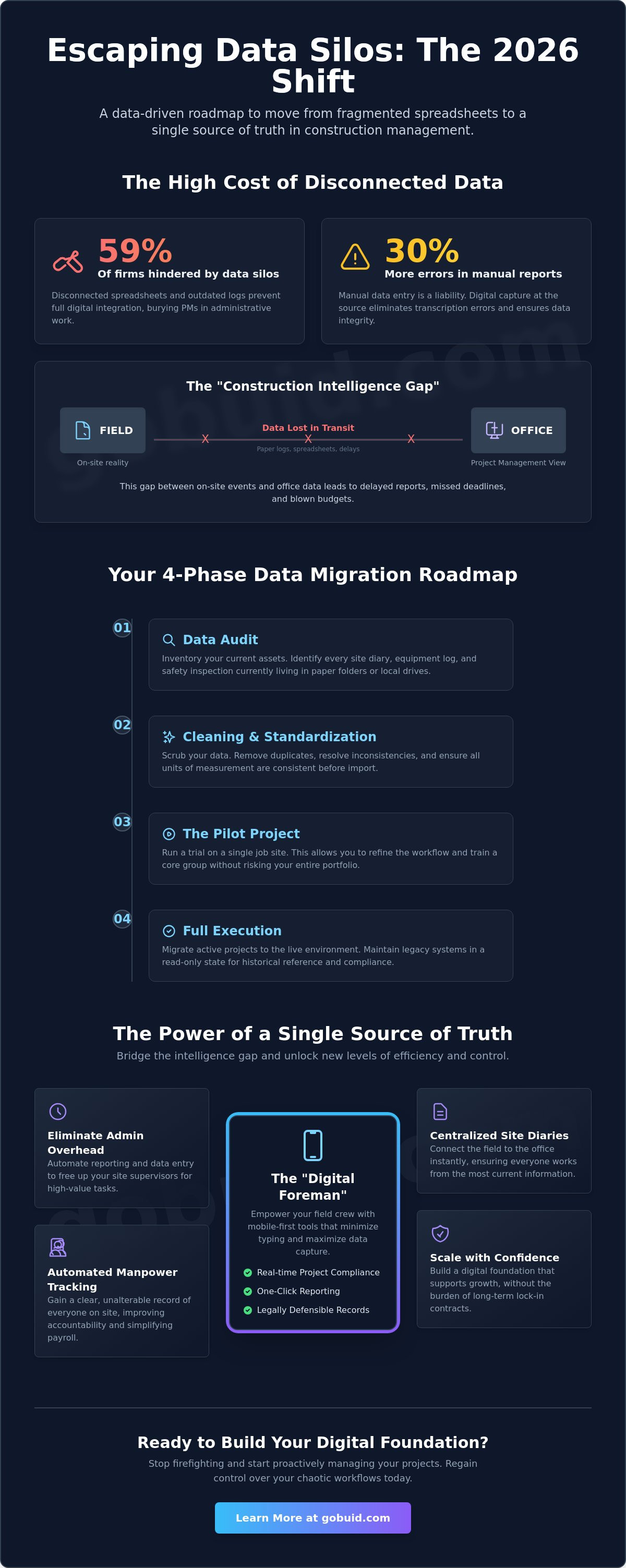
Data silos currently hinder 59% of construction firms from achieving full digital integration, leaving project managers buried in disconnected spreadsheets and outdated logs. You know the frustration of high administrative overhead and the constant search for a single source of truth across fragmented field reports. While the fear of a complex implementation is real, switching to construction site management software is the only way to regain control over your chaotic workflows in 2026.
You shouldn't have to choose between modernizing your tech and keeping your projects on schedule. This guide provides a data-driven roadmap to master the transition without losing a single day of progress. We cover the essential steps to centralize your site documentation, automate manpower tracking, and move toward the speed of one-click reporting. From auditing legacy files to onboarding the field crew, you'll learn how to build a digital foundation that ensures total visibility across every square foot of the job site.
Key Takeaways
Bridge the construction intelligence gap by moving from fragmented spreadsheets to a centralized system that ensures real-time project compliance.
Execute a clean data transfer when switching to construction site management software by following a structured audit and standardization process for legacy site diaries.
Drive field adoption by prioritizing mobile-first tools that minimize typing and empower your team with a "Digital Foreman" approach to documentation.
Eliminate administrative overhead and improve accountability through automated manpower tracking and one-click reporting for safety and quality inspections.
Scale your operations with confidence by leveraging a single source of truth that connects the field to the office without the burden of long-term lock-in contracts.
⭐ Learn more about GoBuid's feature - without the heavy enterprise price tag
Why GoBuid is the Logical Destination for Your Site Data
switching to construction site management software should result in immediate relief, not more paperwork. GoBuid delivers this through one-click reporting. Instead of spending hours compiling safety and quality inspections, you generate professional PDFs instantly. This functionality bridges the gap between field grit and executive oversight. You get real-time visibility into every project, ensuring the office knows exactly what the field is doing at any given second. It's about turning daily chaos into a structured, searchable record that protects your business and your margins.
From Data Migration to Project Analytics
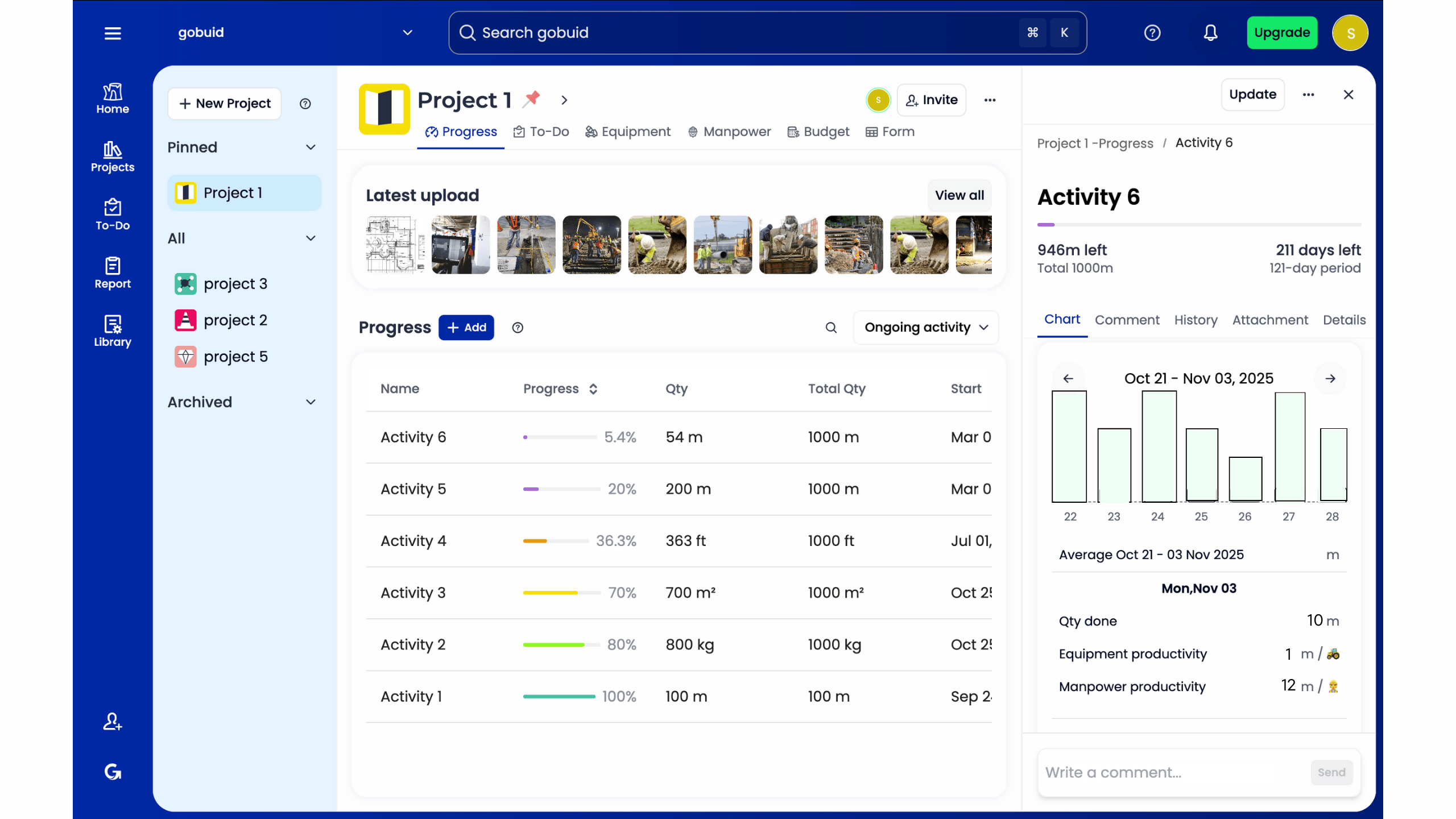
Your migrated historical data isn't just a record; it's fuel for future growth. When you import your legacy site diaries, the GoBuid Project Analytics Dashboard turns those entries into actionable trends. You can track productivity across multiple sites nationally from a single screen. This high-level view allows you to spot bottlenecks before they stall a project. You move from simply storing data to leveraging it for better resource allocation. By analyzing manpower and equipment trends over time, you build more accurate bids and tighter schedules.
Securing Your Future with Flexible Software
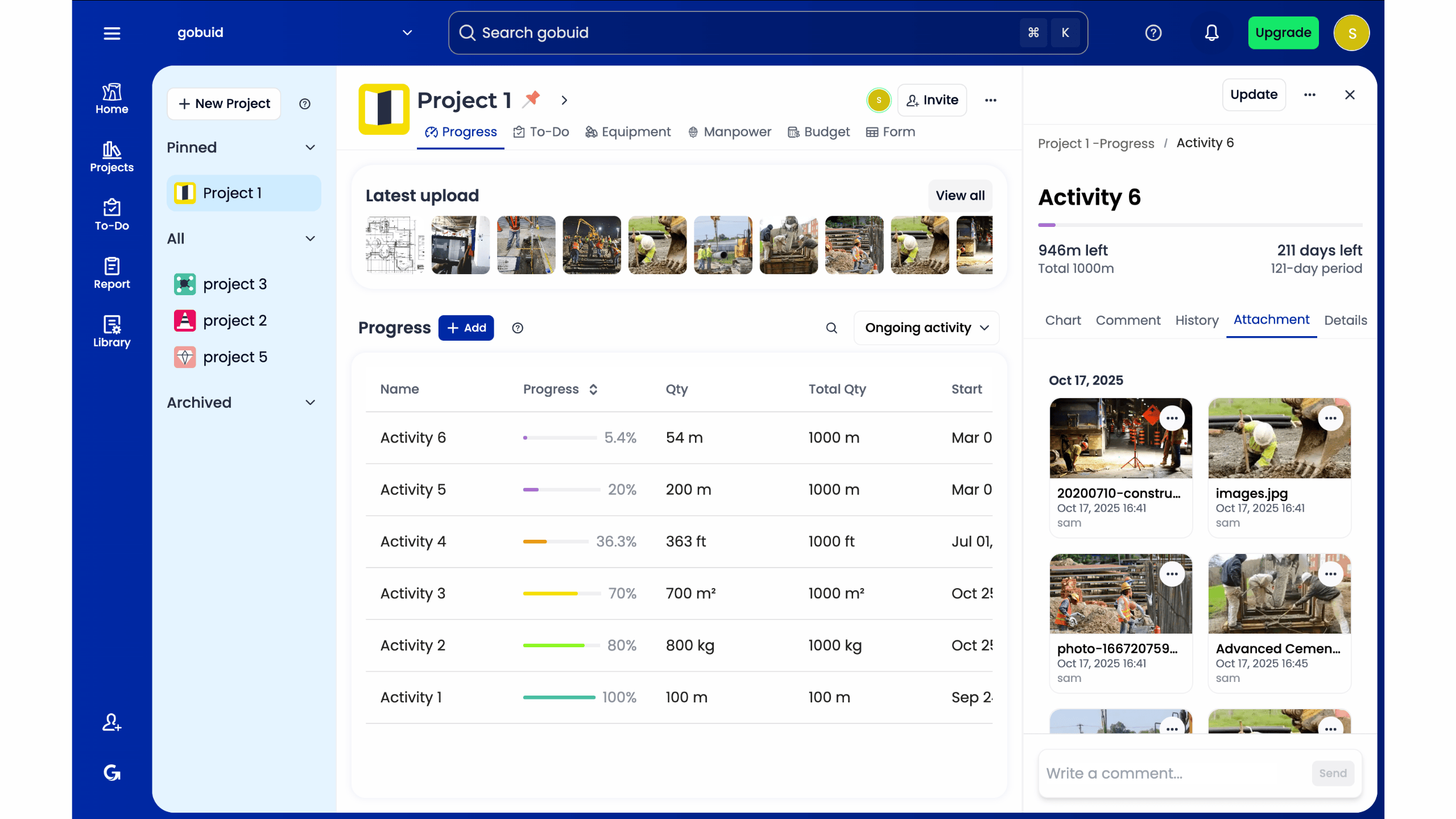
The 2026 economic landscape rewards agility. Many competitors trap firms in complex tiers that don't account for the cyclical nature of construction. GoBuid supports your growth through transparent pricing, providing a software partner that respects your bottom line. You can scale your operations as your project portfolio expands, ensuring you have a stable platform for long-term digital transformation. It's time to stop fighting your tools and start building with precision. Don't let your project data stay buried in old spreadsheets. Contact GoBuid to start your migration strategy and take full control of your site documentation today.
The 2026 Shift: Why Construction Firms Are Migrating Now
Construction projects are faster and more complex than ever. Relying on paper logs and static spreadsheets creates what we call the "Construction Intelligence Gap." This gap is the distance between what happens on the slab and what the project manager sees in the office. In 2026, real-time visibility is the standard for project compliance. You need to know exactly who is on-site and what progress occurred before the sun goes down. Many contractors are realizing that switching to construction site management software is no longer a luxury. It is a survival strategy. Modern construction management software bridges this gap by turning field observations into actionable data instantly.
To better understand how the right tech choices impact your project, watch this helpful video:
Administrative overhead is the hidden tax on your profit margins. Site supervisors spend hours every week chasing down submittals or manually compiling field reports. This manual labor adds zero value to the physical build. By establishing a single source of truth for site diaries and manpower tracking, you eliminate the confusion of site disputes. You gain a clear, unalterable record of everything that happens on the job site.
The Death of the Legacy Spreadsheet
Manual data entry is a liability. Industry data suggests that manual entries lead to 30% more errors in field reports compared to digital captures. When data lives in a siloed spreadsheet on one laptop, the back office stays blind. This lack of transparency leads to missed deadlines and blown budgets. Digital systems ensure that information flows freely between the field and the office without the risk of transcription errors.
Identifying the Trigger for a Software Switch
Your current system is failing if you struggle with delayed reports, lost progress photos, or frequent billing disputes. These aren't just inconveniences; they are signs of a system that can't scale. If you're comparing options, review the best construction project management software 2025 to see how the market has evolved. Switching to construction site management software allows you to capture data at the source and move from reactive firefighting to proactive management.
Developing a Robust Construction Data Migration Strategy
Successful migration requires more than just exporting a few CSV files. It demands a tactical approach that treats data as your most valuable project asset. If you are switching to construction site management software, you must prioritize data integrity over speed. This shift aligns with current construction tech adoption trends, where leading firms are investing in structured digital transitions to avoid the pitfalls of legacy systems. Moving legacy data into a modern environment is often the most complex stage of the process, but a structured roadmap makes it manageable.
The process follows four critical phases:
Phase 1: Data Audit. Inventory your current assets. Identify every site diary, equipment log, and safety inspection currently living in paper folders or local drives.
Phase 2: Cleaning and Standardisation. Scrub your lists. Remove duplicate entries and ensure all units of measurement are consistent before the import.
Phase 3: The Pilot Project. Run a trial on a single job site. This allows you to refine the workflow without risking the data of your entire portfolio.
Phase 4: Full Execution. Migrate active projects to the live environment. Maintain your legacy systems in a read-only state for historical reference and legal compliance.
Mapping Your Field Data Fields
Your digital site diary is only as good as the data feeding it. Align your custom fields with the new software structure to ensure a seamless flow. Pay close attention to progress photos. Ensure they retain their metadata, such as timestamps and GPS coordinates, so your documentation remains legally defensible. You can explore how to centralize your project documentation to see this structure in action.
Minimising Downtime During the Switch
Never cut over on a Monday morning without a safety net. Use the "Parallel Running" method. Maintain both your old and new systems for one week to verify accuracy. To accelerate this phase, leverage GoBuid customized forms. These tools allow for rapid data mapping, ensuring your field team spends less time configuring and more time building.
Overcoming the Implementation Gap: Training and Adoption
The best software in the world is useless if your crew won't touch it. The "Digital Foreman" mindset is about empowering workers, not burdening them with extra clicks. When switching to construction site management software, you'll likely face the "too busy to learn" excuse. Smash this objection by choosing tools that prioritize field speed. If an app requires heavy typing or complex navigation, it stays in the pocket. Effective adoption happens when the software feels like a tool, not a chore.
Strategy for field adoption starts with mobile-first interfaces. Standardized templates for safety and quality inspections reduce the cognitive load for subcontractors. They don't need to guess what data to record; they simply follow the prompts. You can also gamify progress reporting by showing live manpower and equipment counts on a central dashboard. This creates a sense of momentum and accountability that paper logs can't match. It turns daily reporting into a visible win for the entire team.
Bridging the Field-to-Office Communication Gap
Real-time visibility stops the shouting matches between the site and the office. When the back office sees exactly how many excavators are active, disputes with fleet owners vanish. Utilizing GoBuid equipment features allows site managers to demonstrate immediate value to the crew. They save time on phone calls and manual inventory logs, proving the system works for them, not just for the auditors. This immediate utility is the key to long-term buy-in.
Micro-Training Sessions for Busy Teams
Forget the four-hour boardroom seminar. No one remembers it, and it pulls your best people away from the build. Replace it with five-minute "Toolbox Talk" software demos. Show one specific feature, like how to snap a progress photo or log a site diary entry, then let the team get back to work. For everything else, point your crew to GoBuid features-help for self-paced learning. This approach respects their time and builds digital confidence through small, daily wins. Start building a more efficient job site today by exploring our site management tools.
Take Control of Your Project Data
The transition from legacy spreadsheets to a centralized platform is a strategic necessity. You've seen how a structured migration roadmap protects your historical data while empowering your field crew. Success in 2026 depends on your ability to bridge the gap between the office and the job site with real-time visibility. By switching to construction site management software, you eliminate the administrative burden that drains your profitability and focus on building with precision.
GoBuid provides the tools you need to maintain national compliance through a professional digital site diary. You gain the power to track manpower and equipment in real-time and generate complex safety reports with a single click. This is about establishing a single source of truth for your entire portfolio. Don't let legacy systems hold your firm back from its full potential. Every minute saved in the field translates directly to your bottom line.
Start your digital transformation with GoBuid and regain control of your site. Our platform is built for the rugged reality of the site and the precision of modern software. It's time to stop chasing data and start using it to drive your business forward. Let's get to work.
Frequently Asked Questions
How long does a construction data migration strategy typically take to execute?
Most firms execute a full migration in 2 to 4 weeks. This timeline covers the initial data audit through the pilot project phase. If your digital records are clean, the technical import takes only a few days. However, complex portfolios with decades of paper logs require more time for digitization. Focus on a staged rollout to maintain momentum without disrupting active job sites or missing deadlines.
Will I lose my historical project photos when switching construction software?
No, you won't lose your visual history if you use a structured migration path. Modern platforms allow you bulk upload progress photos while preserving critical metadata like timestamps and GPS coordinates. This ensures your documentation remains legally defensible and organized. Always verify that your new system supports the specific file formats used in your legacy archives before you start the transfer process.
Can I migrate my existing Excel-based site diaries into GoBuid?
Yes, you can import your Excel-based site diaries into GoBuid using our customized form structures. We map your existing spreadsheet columns to our digital site diary fields for a seamless transition. This process turns static rows of data into searchable, actionable insights. switching to construction site management software shouldn't mean leaving your project history behind in a dead file or a disconnected drive.
What is the most common mistake firms make when switching to construction management software?
The most common mistake is failing to clean data before the migration. Importing "dirty" data with duplicates or inconsistent units creates immediate friction in the new system. Another major error is ignoring field buy-in. When switching to construction site management software, if the crew finds the interface too complex, they'll revert to paper logs. Prioritize mobile-first tools that require minimal typing to ensure high adoption rates.
Is it better to switch software mid-project or wait for a new project start?
Waiting for a new project start is ideal, but switching mid-project is often necessary for long-term compliance. If you switch mid-stream, use the "Parallel Running" method for at least one week. Maintain your legacy system alongside the new software to verify data accuracy. This safety net prevents information gaps while your team adjusts to the new digital workflow and reporting requirements.
