Choosing the Best Construction Timesheet and Payroll App in 2026
by Guillermo Sánchez
|
Chasing subcontractors for crumpled paper timesheets isn't just a weekly headache; it's a 4.2% leak in your annual profit margin. You already know that manual data entry is a relic of the past that breeds payroll disputes and inaccurate labor costs. It's time to stop guessing and start tracking. Choosing the right construction timesheet and payroll app is the only way to secure a single source of truth for your job site. This is how you bridge the gap between rugged field reality and sleek office precision.
You've likely felt the frustration of reconciling mismatched hours at 6:00 PM on a Friday. We'll show you how to eliminate those manual errors and automate your payroll reporting for good. This article breaks down the essential digital tools for 2026 that ensure your documentation is audit-ready and compliant with federal and state labor regulations, and your labor cost visibility is instantaneous. From field reports to centralized submittals, you'll learn how to select a platform that acts as your digital foreman. Discover the exact features you need to regain control over your workflows and drive project profitability without the fluff.
Key Takeaways
Eliminate labor leaks and administrative overhead by replacing outdated manual tracking with high-precision digital tools.
Ensure total site accountability using GPS geofencing and offline functionality to track manpower in every corner of the job site.
Evaluate integration capabilities and total cost of ownership when selecting a construction timesheet and payroll app for your firm.
Bridge the gap between the field and the office by automating the workflow from site entry to one-click payroll processing.
Centralize your project data into a single source of truth that combines manpower tracking with site diaries and safety reports.
⭐️ Learn more about GoBuid's feature - without the heavy enterprise price tag
Why GoBuid is the Strategic Choice for Construction Firms
GoBuid acts as your digital foreman. It understands the dirt, sweat, and complexity of your job site. Most software fails because it's built by people who have never stepped onto a scaffold. We built GoBuid to bridge the gap between field reality and office precision. It's a comprehensive solution. You get site diaries, manpower tracking, and safety documentation in one unified construction timesheet and payroll app. This ensures that every hour worked is an hour accounted for.
Local compliance is a major hurdle for Singapore firms. GoBuid addresses this directly. The platform is designed to meet the specific reporting standards required for Singapore projects. This includes everything from BCA manpower reporting to MOM safety compliance. By using a tool built for your specific market, you avoid the headaches of generic software. You gain a partner that values transparency and accountability. Data-driven insights allow you to spot labor cost overruns before they impact your bottom line. Contractors using our platform see a 40% reduction in manual data entry within the first 90 days.
A Single Source of Truth for Your Projects
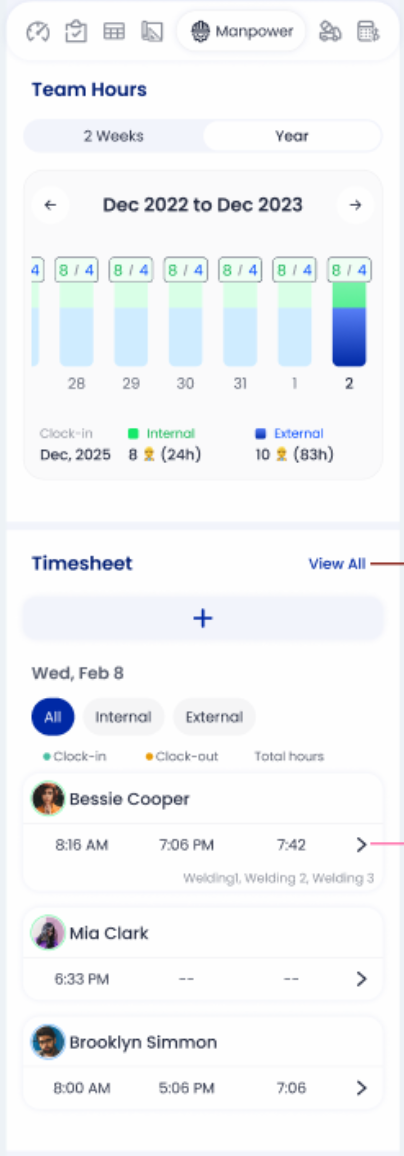
Disputes over hours and progress stall projects and ruin reputations. GoBuid eliminates the "he-said-she-said" dynamic. Every entry is timestamped and geo-tagged. You centralize every field report and safety check to maintain a professional project history that stands up to any audit. Teams can leverage customised forms to capture specific data points unique to their site requirements. This level of transparency builds trust with clients and ensures your records are bulletproof. You aren't just tracking time; you're protecting your profit margins.
Get Started with the Modern Era of Build
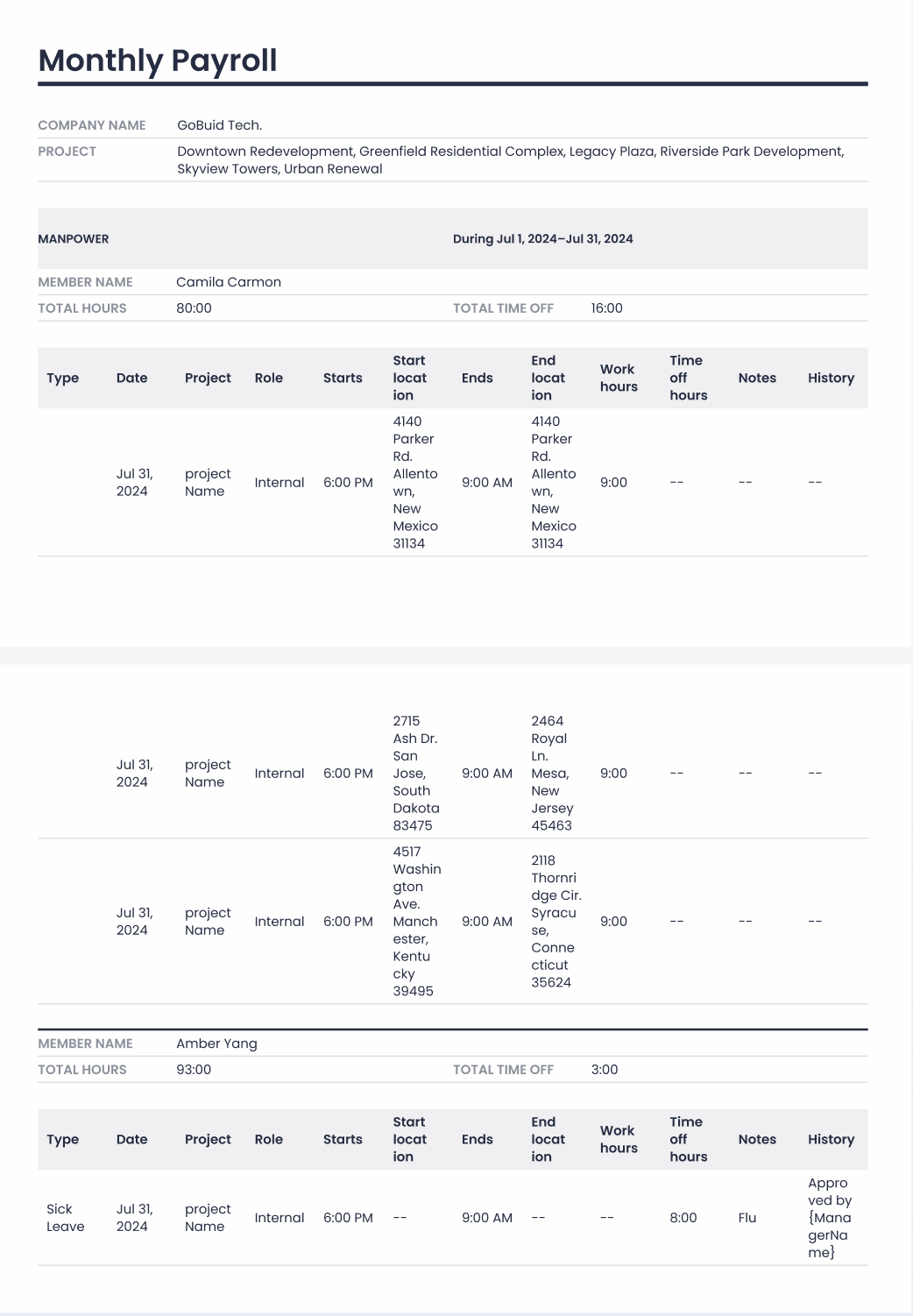
The transition to digital doesn't have to be slow or expensive. GoBuid offers transparent pricing and rapid deployment that fits any project size. You can move from paper-based chaos to a streamlined construction timesheet and payroll app in less than a week. Join the growing network of contractors who have already cut their administrative workload by 40%. Stop chasing paper and start leading projects with confidence. It's time to regain control over your workflows. Book a demo and see the GoBuid difference today.
The Evolution of the Construction Timesheet and Payroll App
Construction is changing. The days of scribbling hours on a coffee-stained notepad are over because accuracy is the new currency of the job site. A modern construction timesheet and payroll app isn't just a digital stop-watch; it's a high-performance data engine. It captures labor hours, specific cost codes, and GPS-verified locations in a single click. This technology transforms timesheets from passive records into active project management tools.
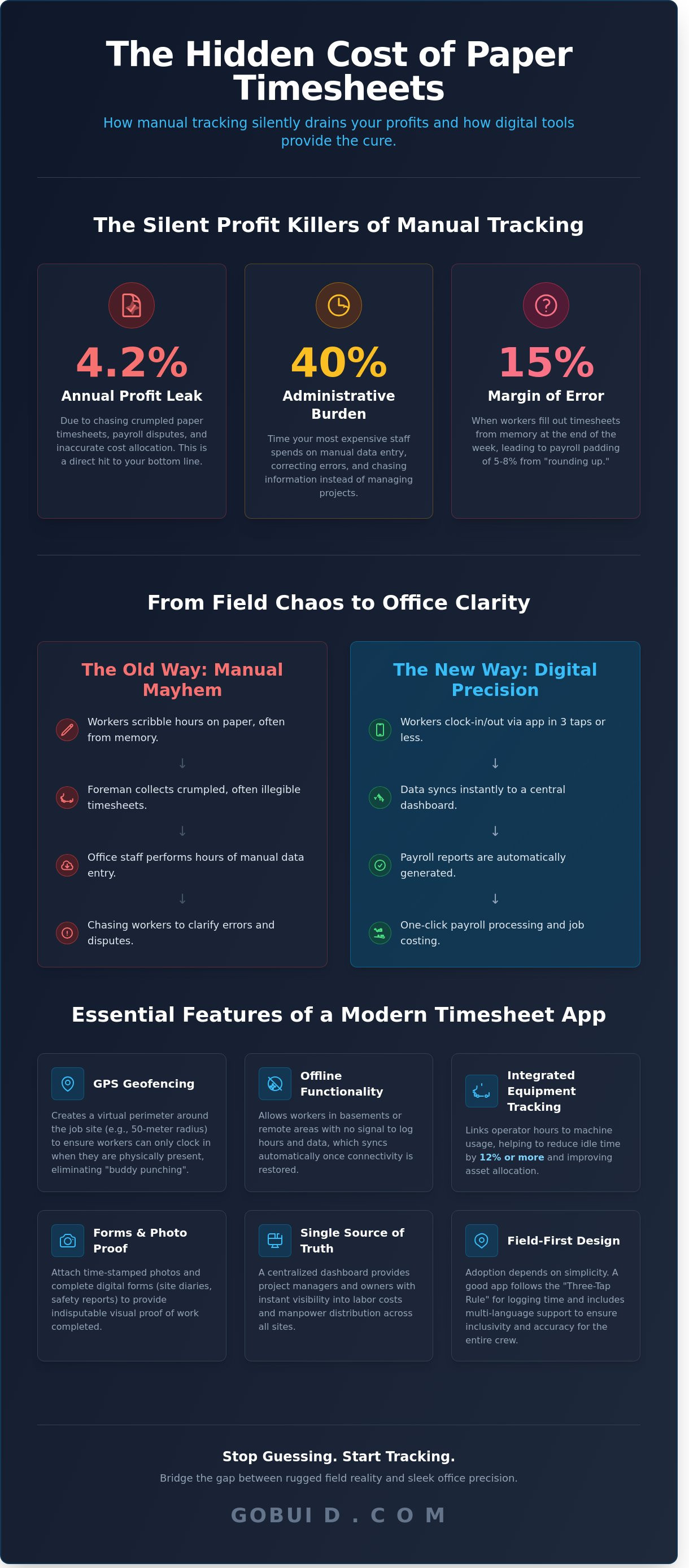
Manual tracking is a silent profit killer. Contractors lose thousands of dollars every year to labor leaks and rounded numbers. Industry studies show that manual data entry and correction account for a 40% administrative burden on project teams. You're paying your most expensive staff to chase paper instead of building. By 2026, paper site documentation will be an obsolete liability. The industry is moving toward a mandatory digital standard where every minute must be accounted for and verified. Bridging the gap between field operations and office accounting systems is no longer a luxury. It's a survival strategy.
From Paper to Digital: Why the Shift is Mandatory
End-of-week guesses don't work. When workers fill out paper logs on a Friday afternoon, they rely on memory, leading to a 15% margin of error in reported hours. Digital footprints eliminate this gap. A robust construction timesheet and payroll app provides real-time data that reflects the actual work performed. This shift delivers three immediate results:
Elimination of Labor Leaks: Precise timestamps stop the "rounding up" habit that pads payroll costs by 5% to 8% annually.
Reduced Admin Load: Automating the flow of data from the site to the office cuts the 40% administrative burden identified in industry research.
Verifiable Accountability: Digital signatures and GPS tags create a transparent record that protects both the employer and the employee.
Core Benefits for Project Managers and Owners
Visibility drives profitability. Owners now demand instant data on manpower distribution across multiple sites. You can't manage what you can't see. With a centralized dashboard, you gain a single source of truth for every project. This system automates the calculation of billable hours based on custom cost codes, ensuring that every labor hour is assigned to the correct budget line. This level of detail is essential for maintaining healthy margins.
Compliance is the other side of the coin. Digital records strengthen your legal standing during BCA audits or safety investigations. You gain a timestamped, tamper-proof history of site activity that paper simply can't provide. It's about more than just payroll; it's about building a professional, compliant, and data-driven operation that's ready for the demands of 2026 and beyond.
Essential Features for Modern Manpower Tracking
Manual tracking is a liability. A robust eliminates the 5% to 8% margin of error common in paper-based systems. GPS geofencing sets a hard boundary for accountability. It creates a virtual perimeter around the job site, ensuring workers only clock in when they're physically within the designated 50-meter radius. This simple automation stops "buddy punching" and ensures you only pay for time spent on-site.
Connectivity isn't guaranteed. High-rise basements and remote infrastructure projects often lack 5G or Wi-Fi. Offline functionality is a non-negotiable requirement. It allows workers to log hours and site data in dead zones, syncing everything to the cloud the moment a signal returns. This prevents data gaps that lead to payroll disputes and project delays.
Modern tracking goes beyond the individual. Integrated equipment management links operator hours directly to machine usage. By tracking these metrics together, firms often reduce idle machine time by 12% or more. Custom forms for safety, quality inspections, and daily site diaries turn a standard clock-in into a rich data point for project health. Photo documentation adds the final layer of proof. Attaching time-stamped images to entries provides a visual record of work completed, protecting the contractor against future claims.
Field-First Design and Ease of Use
Adoption depends on simplicity. The "three-tap" rule is the gold standard for field software. If a worker can't log their time in three taps or less, they'll stop using the tool. Biometric or RFID options provide secure, fast site access for large crews. Multi-language support is also critical. Providing interfaces in the native languages of your workforce ensures accuracy and inclusivity across the entire project team. It's about removing friction so the data remains clean and consistent.
Beyond the Clock: Integrated Site Management
Time tracking shouldn't exist in a silo. Linking manpower data to a digital site diary provides the "why" behind the "when." It helps project managers understand if a delay was due to weather, material shortages, or labor inefficiency. Automating equipment logs prevents fuel waste and identifies underutilized assets that are burning through your budget.
Capturing progress photos validates timesheet claims with visual evidence. This creates a transparent environment where the office knows exactly what happened in the field without making a phone call. To see how these tools work together to protect your margins, you can view our full feature suite. This integrated approach ensures every hour billed is an hour worked.
Buying Guide: How to Evaluate Construction Payroll Software
Choosing a construction timesheet and payroll app requires more than a quick feature scan. You need a tool that survives the job site and satisfies the back office. Start by calculating the total cost of ownership. Per-user fees often penalize growth; subscription models provide predictable overhead. 2024 industry benchmarks show that hidden implementation fees can inflate initial costs by 18% if not negotiated upfront. Demand transparency from your vendor.
Security is non-negotiable. Your system holds Social Security numbers, bank details, and sensitive project margins. Ensure the provider utilizes AES-256 encryption and maintains SOC 2 Type II compliance. Field teams also require immediate support. Software is useless if your crew stalls at the gate. Look for providers offering 24-hour technical assistance to keep projects moving. Reliability in the field translates to accuracy in the office.
The Compatibility Checklist
Siloed data creates manual entry errors. Your software must act as the connective tissue between field logs and your financial stack. 82% of contractors report that poor integration is their primary source of payroll delays. Verify these technical requirements before committing:
ERP Integration: Does the app sync directly with Sage 300, QuickBooks, or Procore without manual CSV imports?
Labor Law Automation: Can it handle complex overtime, shift differentials, and Davis-Bacon Act prevailing wage rules automatically?
Open API: Is there an API available for custom data exports to your internal business intelligence tools?
Scalability and Flexibility
Construction is seasonal. You might jump from 20 to 100 workers during peak summer months. Avoid long-term commitments that lock you into high seat counts during the winter. Opting for no lock-in contracts allows you to scale costs based on active project volume. This flexibility protects your margins during the off-season when cash flow tightens.
Run a field test before signing. Hand the mobile app to your most skeptical foreman. If they cannot log hours or submit a field report in under 45 seconds, the software will fail. High adoption is the only metric that matters for a construction timesheet and payroll app. If the field team rejects the tool, the office will continue to chase paper. Test the mobile experience on actual job sites to ensure it handles low-connectivity environments and rugged conditions.
Streamlining the Workflow: From Site Entry to One-Click Payroll
Efficiency in construction isn't about working harder; it's about eliminating the friction between the field and the office. A robust construction timesheet and payroll app transforms a chaotic paper trail into a linear, four-step process. It starts with setting up projects and assigning precise cost codes. This structure ensures every labor hour is categorized correctly from the moment a worker clocks in. You aren't just tracking time; you're tracking profitability against specific budget line items.
Field execution moves from guesswork to real-time data. Foremen log manpower directly on-site, capturing attendance and activity as it happens. This immediate entry eliminates the 15% data loss often associated with end-of-week manual entries. Once the day concludes, managers review site diaries and provide digital approvals. This creates a verified record that bridges the gap between site activity and financial processing. The final step is generating professional payroll reports in one click, moving data from the field to your accounting system in seconds.
Automating the Approval Process
Manual follow-ups waste valuable management hours. Buid automates this by triggering alerts for missing entries or budget overruns before they become financial liabilities. Foremen and subcontractors provide digital signatures directly within the app to finalize hours. This creates an ironclad audit trail that protects the business. All this field data flows into a centralized project analytics dashboard. It gives you a single source of truth where you can spot labor trends and productivity gaps across multiple job sites simultaneously.
The Power of One-Click Reporting
Spreadsheet consolidation is a relic of the past. Using a modern construction timesheet and payroll app removes the need to manually transcribe hours from coffee-stained notebooks. You can generate customized reports for client billing and internal audits in under 60 seconds. This speed allows for faster invoicing and improved cash flow. Beyond payroll, these reports provide the data-driven insights needed for future project bidding. When you know exactly how many man-hours a specific slab pour took on your last three jobs, your next estimate will be significantly more accurate.
Ready to reclaim your Friday afternoons? Explore the full feature suite to see how Buid handles your toughest workflows.
Future-Proof Your Site Operations for 2026
The construction landscape demands more than just basic tracking. By 2026, firms must bridge the gap between field data and office execution to remain competitive. You need a robust construction timesheet and payroll app that eliminates manual entry and provides a single source of truth for every project. GoBuid delivers this through one-click professional reporting and automated workflows that reduce administrative overhead by 85% on average. Trusted by over 150 Singaporean contractors, our platform ensures your manpower data stays accurate from the moment a worker enters the site. We don't believe in trapping you with restrictive terms. Our service features no lock-in contracts to keep us accountable to your project success every single day. Transitioning to a digital foreman approach isn't just about software; it's about reclaiming your time and ensuring every project remains profitable. Take control of your site operations today and see the difference that real-time visibility makes for your bottom line. You've got the tools to build better; now use them to lead the industry.
Start your journey to zero manual paperwork with GoBuid
Frequently Asked Questions
How does a construction timesheet app improve payroll accuracy?
A construction timesheet and payroll app eliminates manual entry errors and the double-handling of data. By capturing work hours directly from the field, you remove the 12% error rate common in paper-based systems. Real-time data sync ensures the office processes exact hours without waiting for Friday's paper delivery. This creates a single source of truth for every labor hour spent on your site.
Is GPS tracking necessary for a construction timesheet app?
GPS tracking is essential for verifying worker locations and preventing buddy punching. It ensures that 100% of clock-in events occur within the designated geofence of your project site. Without this verification, firms often lose up to 5% of their annual payroll to time theft or accidental inaccuracies. Geofencing provides the accountability needed to maintain thin margins in competitive bidding environments.
Can my workers use the app if there is no internet on the site?
Workers can log hours and complete field reports offline using local device storage. The app automatically syncs all data to the cloud the moment a 4G or Wi-Fi connection is restored. This prevents data loss on basement levels or remote infrastructure projects where connectivity is often below 20%. Your team keeps moving while the software handles the background synchronization once they're back in range.
How much time can I save by using a digital site diary and payroll app?
Most project managers save 6 hours per week using a digital site diary and construction timesheet and payroll app. Instead of spending 2 hours every Monday morning deciphering handwritten logs, you generate reports in under 60 seconds. This 80% reduction in administrative overhead allows your leadership team to focus on site safety and production schedules. You're not just saving time; you're reclaiming your project's profitability.
What is the difference between manpower tracking and simple time tracking?
Manpower tracking links hours to specific cost codes and trades, whereas simple time tracking only records start and end times. With GoBuid, you see exactly how many hours go into concrete pouring versus steel reinforcement. This granular data allows you to compare actual labor costs against your initial 2024 budget estimates. It transforms a simple clock-in into a powerful tool for project cost control and future bidding.
How do I ensure my subcontractors actually use the timesheet app?
You ensure adoption by making app usage a prerequisite for progress payments and invoice approvals. When subcontractors realize that digital submission speeds up their payment cycle by 14 days, compliance rates typically hit 95% within the first month. The interface is designed for the field, requiring only 3 taps to log a daily entry. Simplicity drives the consistency your project needs to maintain visibility.
Is GoBuid compliant with BCA reporting standards in Singapore?
GoBuid is fully compliant with BCA manpower reporting standards and EPSS requirements in Singapore as of 2024. The platform generates the specific CSV and PDF formats required for regulatory submissions with 100% accuracy. You'll avoid the $5,000 fines associated with improper record-keeping by maintaining a digital audit trail. It meets the rigorous transparency demands of the Singapore construction industry, ensuring your project stays on the right side of the law.
Can I export my data to Excel or my existing accounting software?
You can export all labor and site data to Excel, CSV, or directly into accounting software via our API. This seamless integration removes the need for manual data entry, which typically cuts processing time by 4 hours per payroll cycle. Your finance team gets the raw data they need in a structured format immediately. It bridges the gap between field operations and back-office financial management without any friction.
