Best Digital Construction Diary Software: A Buyer’s Guide for 2026
by Sam Chen
|
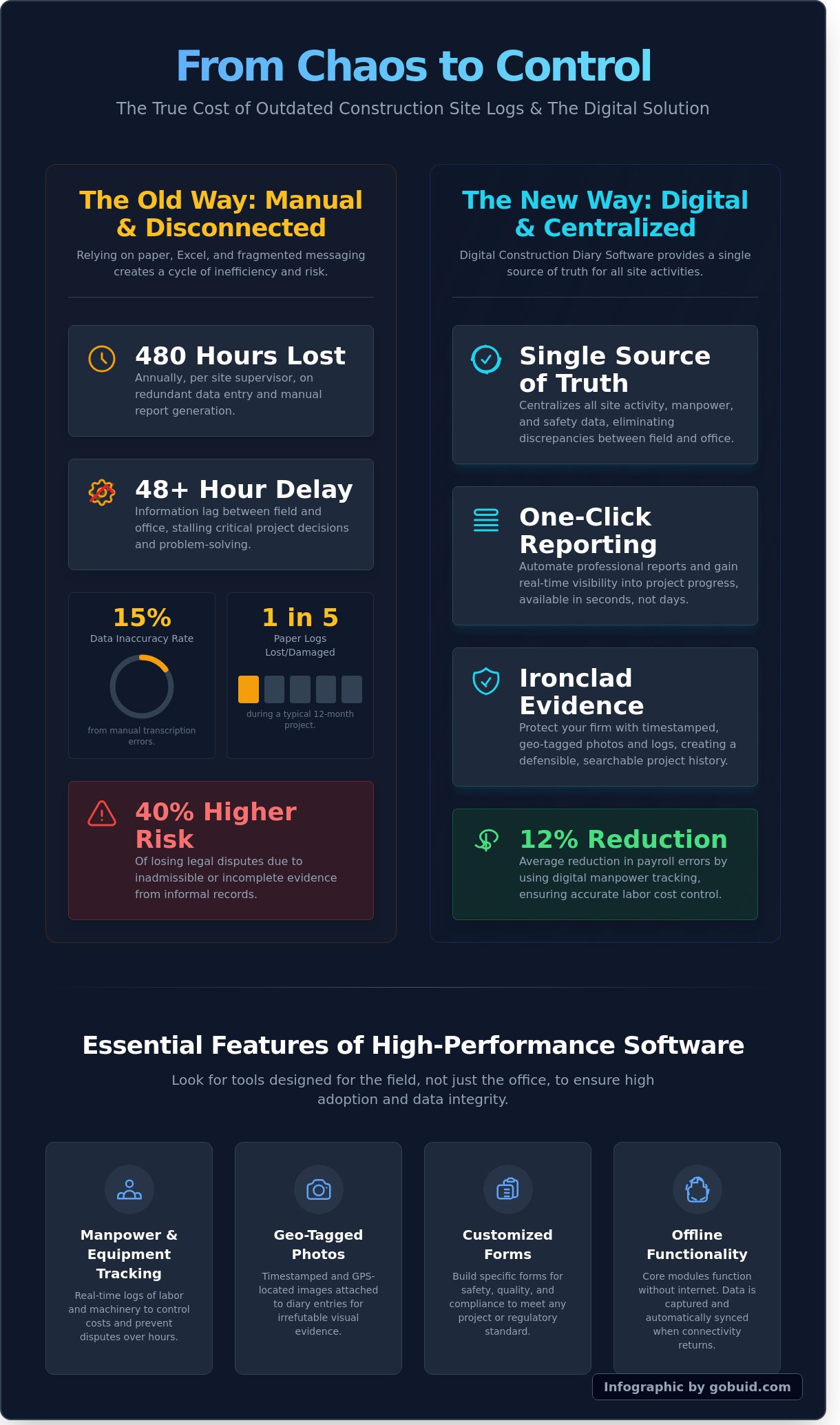
Site managers currently lose 14 hours every week to manual data entry and redundant reporting. You know the routine. It's 5:00 PM and you're stuck in the site office, squinting at coffee-stained notes to move data from paper into a spreadsheet. This double-handling doesn't just waste time; it creates a blind spot where manpower and equipment costs spiral out of sight. Implementing the right digital construction diary software is the only way to stop this leak and regain control over your site documentation.
You deserve a system that provides a single source of truth without the administrative headache. We'll show you how to achieve one-click professional reports and better dispute protection through timestamped photos. This guide evaluates the top-rated solutions for 2026, helping you choose a tool that bridges the gap between the rugged field and the sleek precision of the office. It's time to trade the chaos of manual logs for real-time visibility and professional accountability.
Key Takeaways
Bridge the gap between rugged site reality and office precision by centralizing all field activities and safety data into a single source of truth.
Select the right digital construction diary software by prioritizing field-first usability that eliminates software fatigue and ensures high adoption among site crews.
Quantify your ROI by shifting from manual data capture to automated site analytics that generate professional, one-click reports.
Apply a lean selection framework to cut through marketing fluff and identify the essential modules required for national-scale project management.
⭐ Learn more about GoBuid's feature- without the heavy enterprise price tag
The Evolution of Site Documentation: Why Digital Construction Diaries are Mandatory
A digital construction diary software serves as the centralized hub for every field activity, manpower log, and safety data point on a project. Construction sites are inherently rugged, characterized by dust, heavy machinery, and shifting variables. However, project stakeholders in 2026 demand a level of precision that mirrors high-tech manufacturing. This software bridges that gap, transforming the daily log from a passive record into active project intelligence. It's no longer about just recording what happened; it's about leveraging data to drive the next move.
Relying on fragmented communication like WhatsApp threads or physical notebooks is a liability. These methods offer zero searchability and even less legal protection. Industry data from 2024 shows that 40% of construction disputes stem from poor documentation. A centralized digital system provides a bulletproof audit trail that protects your margins and your reputation. It's the difference between guessing and knowing exactly where your resources are at any given second.
The High Cost of Paper and Manual Logs
Manual logs are productivity killers that drain resources. Site managers often lose 6 hours per week transcribing handwritten notes and manually sorting through smartphone photo galleries. This creates an information lag that prevents timely decision-making, often delaying critical interventions by 48 hours or more. When data is trapped on paper, it's invisible to the people who need it most. Administrative overhead in construction is the silent killer of project margins, often consuming up to 14% of total project costs through hidden inefficiencies and redundant data entry. Transitioning to a digital construction diary software eliminates this waste by capturing data at the source.
Real-Time Visibility: Bridging the Field-to-Office Gap
Instant synchronization allows office teams to monitor progress without stepping foot on the site. This real-time visibility ensures that project managers catch errors before they escalate into expensive rework. By maintaining a single source of truth, every team member stays aligned on the latest project status, weather impacts, and delivery schedules. Implementing Digital Site Diaries maintains project momentum by removing the friction of manual reporting. It replaces "I'll check on that tomorrow" with "I can see the update now." This connectivity is the essential tissue that holds a modern, profitable project together.
Essential Features of High-Performance Construction Daily Log Apps
Professional grade digital construction diary software isn't a digital notepad; it's the project's central nervous system. For national-scale projects, the software must survive the field. If a foreman can't log data with gloves on, the tool fails. High-performance apps prioritize high-contrast interfaces and large touch targets to ensure data entry happens in real-time, not back at the trailer. Reliability also means operating without a signal. Projects in tunnels or remote regions rely on robust offline synchronization. When the device reconnects, data flows instantly to the office. This connectivity prevents data silos. Integrated modules ensure safety reports, quality checks, and progress logs talk to each other, providing a single source of truth for the entire team.
Manpower and Equipment Tracking
Subcontractor disputes often stem from vague hours. Real-time Manpower Tracking eliminates this friction. Foremen log exact start and stop times, creating a verifiable record that can reduce labor claim processing time by 22%. Equipment logs are equally vital. Tracking fuel consumption and utilization rates ensures machines don't sit idle. It moves maintenance from reactive to proactive, preventing costly mid-project breakdowns on heavy civil sites where every hour of downtime costs thousands.
Progress Photos and Geo-Tagged Documentation
Photos provide the ultimate defense in litigation. A timestamped, geo-tagged image proves exactly what happened at a specific coordinate on any given date. High-quality Progress Photos & Documentation allow users to attach images directly to diary entries or specific tasks. This context is critical. Instead of searching through a chaotic gallery, managers see visual proof linked to the daily log. It creates a bulletproof audit trail that protects the bottom line during final handovers.
Customized Forms for Safety and Quality
Generic forms ignore the nuances of specialized builds. A bridge project has different safety requirements than a high-rise. Using Customised forms ensures teams meet specific regulatory standards without unnecessary bloat. Digital signatures add the final layer of accountability. When a supervisor signs off on a safety check, the record is permanent and unalterable. This level of precision is why top-tier contractors use digital construction diary software to maintain 100% compliance. You can standardize your field reporting to achieve this same level of control across your entire project portfolio.
The ROI of One-Click Reporting and Site Analytics
Data capture is only half the battle. If your logs sit in a silo, they're useless. Modern digital construction diary software shifts the focus from simple recording to active utilization. You aren't just filing reports; you're building a database of project intelligence. This transition ensures that every entry made by a foreman in the field contributes to a larger picture of project health and profitability.
Eliminating the 'Friday Afternoon' Reporting Crunch
Traditional reporting involves a frantic scramble every Friday. Site managers spend hours chasing sub-contractors and squinting at handwritten notes to compile weekly summaries. This manual process is prone to error and drains morale. One-click reporting ends this cycle. When data is entered daily, the software compiles it instantly. Automated reporting can reduce administrative time by up to 40% based on recent field studies. This gives your team hours back every week to focus on actual site progress rather than paperwork. It turns a grueling end-of-week chore into a five-second task.
Leveraging the Project Analytics Dashboard
Raw data becomes a roadmap when viewed through a Project Analytics Dashboard. High-level management needs to see more than just "work completed." They need to identify trends. You can spot labor spikes before they blow the budget. You can track recurring safety incidents to implement targeted training. This visibility makes your next bid more accurate because you're using real historical performance, not just guesswork. Data-driven insights allow you to justify extension requests with hard evidence, protecting your margins from liquidated damages.
The professional impact of this technology extends to your client relationships. Sending a high-quality, branded PDF report directly from the field builds immediate trust. It proves your site is organized and transparent. These reports include:
Time-stamped photos that provide visual proof of progress.
Weather data pulled automatically to explain site delays.
Labor breakdowns to show exactly who was on-site and for how long.
Using digital construction diary software ensures that your records are professional, consistent, and instantly accessible. You stop being a reactive manager and start being a proactive leader. High-quality reporting isn't just about compliance; it's about demonstrating your firm's technical edge and commitment to excellence.
Selection Criteria: How to Choose the Right Site Diary App
Stop buying software based on a glossy PDF or a polished sales demo. Most field teams suffer from software fatigue because platforms are built for the boardroom, not the mud. Your digital construction diary software must solve problems, not create extra admin work. Every feature should serve the field first. If the crew won't use it, the data won't exist. This leads to gaps in your records that cost thousands during a dispute.
Scalability is about more than adding users. It's the ability to move from a single $2M renovation to a national $500M infrastructure fleet without retraining your staff. Analyze the Total Cost of Ownership (TCO). A 12% lower subscription fee is irrelevant if the implementation takes six months and requires a dedicated consultant. Look for a system that delivers a single source of truth from day one.
Ease of Use vs. Feature Depth
Feature bloat kills productivity. A 2025 industry survey found that 74% of site managers ignore features they find too complex. You need a "Digital Foreman" approach. This means the UI mirrors actual site workflows. Prioritize mobile-first design over mobile-responsive web apps. A true mobile-first app works offline and uses native camera functions for rapid photo uploads. It feels like a rugged tool, not a fragile spreadsheet.
The Importance of No Lock-In Contracts
Avoid the SaaS trap. Long-term contracts often lock you into stagnant tech that doesn't evolve with the industry. Flexible, project-based scaling allows you to pilot digital construction diary software on one site before committing the whole company. This reduces the financial risk of digital transformation by 35%. It forces the vendor to earn your business every month through performance and updates. High-performing teams demand flexibility to scale up during peak construction and down during site handovers.
Offline Capability: Ensure the app functions in basements or remote areas with zero connectivity.
Automated Weather: Eliminate manual entries by using software that pulls 100% accurate local weather data.
Instant Exports: Reports must be ready for distribution in under 60 seconds to maintain office-to-field visibility.
Ready to see how a field-first tool improves your bottom line? Start your pilot project with GoBuid.
GoBuid: The Professional Choice for Digital Site Management
GoBuid serves as the lean, efficient alternative to the bloated enterprise software that often paralyzes modern construction sites. Most platforms prioritize office-based administrators, but GoBuid operates with a Digital Foreman personality. It's no-nonsense, hardworking, and focuses on what actually happens in the dirt. We provide a No Lock-In promise as a direct sign of confidence in our product. If the software doesn't deliver immediate value, you aren't trapped in a multi-year agreement; our results keep you here, not a legal contract.
The core differentiator is our One-Click reporting. While other digital construction diary software options require manual data collation and hours of formatting, GoBuid automates the entire process. It transforms raw field data into professional, client-ready reports in seconds. This eliminates the 4:00 PM rush to finish paperwork, allowing your team to focus on the build itself rather than the spreadsheet.
Why GoBuid Wins in the Field
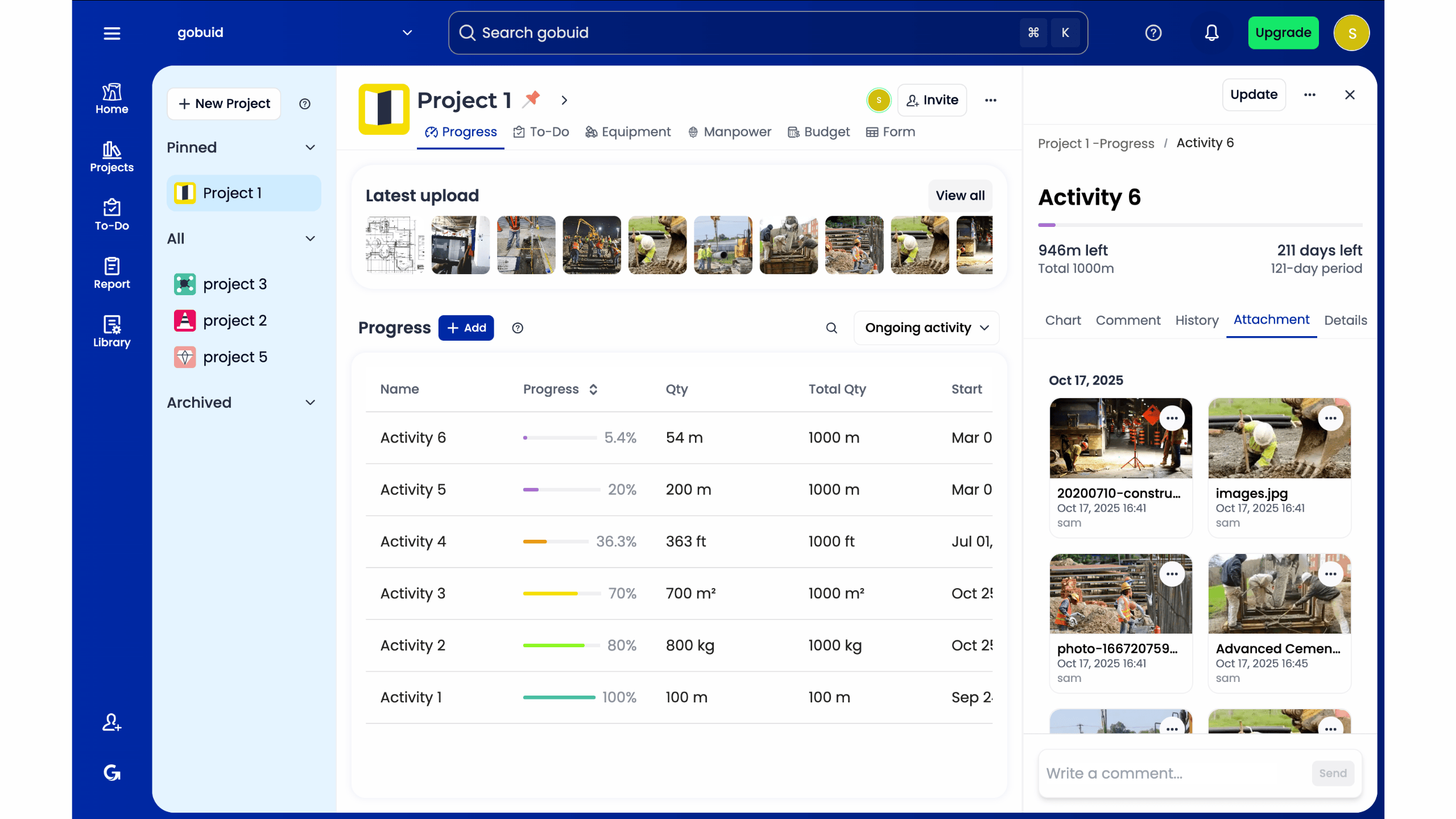
Speed of entry is the primary reason field teams adopt GoBuid over traditional methods. The Digital Site Diary is designed for thumbs, not keyboards. Entries are completed in under 60 seconds, ensuring that high-quality data actually makes it into the system instead of being forgotten. There is a seamless integration between daily diaries and Safety & Quality Inspections, which prevents dangerous data silos. This centralized approach provides a single source of truth, giving stakeholders 100% visibility into project progress and potential risks at any given moment.
Zero-minute learning curve for site crews and subcontractors.
Automated weather and site condition tracking linked to specific timestamps.
Real-time photo uploads with GPS coordinates to verify site activity.
Direct link between site logs and compliance checklists for easier auditing.
Getting Started with One-Click Reporting
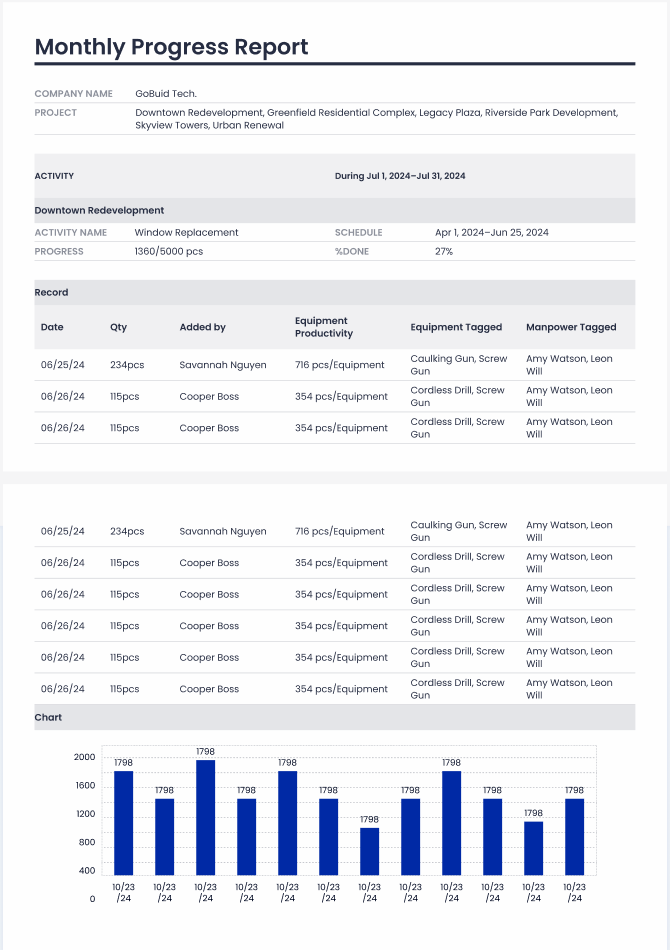
Onboarding is built for speed. New projects are live in less than 15 minutes, allowing you to bypass the typical 3-month implementation phase of legacy systems. This digital construction diary software is built to scale with your project, whether you're managing a $2 million fit-out or a $500 million infrastructure job. Experience the efficiency of a project that documents itself. Contact our team to schedule a 30-minute demo and see how GoBuid can reclaim 5.5 hours of your project manager's week through automated reporting and streamlined data entry.
Own Your Site Data and Eliminate Reporting Lag
The transition into 2026 demands a shift from passive observation to active site intelligence. Manual logs are a liability that costs project managers an average of 5 hours per week in redundant data entry. High-performance digital construction diary software solves this by centralizing field data into a single source of truth. By implementing real-time manpower and equipment tracking, you gain immediate visibility into project health and 100% accountability across your sub-trades. Professional site documentation isn't just about compliance; it's about protecting your margins through data-backed decision-making. Choosing the right platform means prioritizing 0% downtime and instant accessibility for every foreman on the ground.
GoBuid streamlines this process with one-click professional PDF reports that replace hours of administrative work. You don't need to worry about long-term commitments because we offer no lock-in contracts. It's time to bridge the gap between the field and the office with a tool built for the dirt. Stop chasing updates and start leading your team with total transparency and 24/7 visibility. Your site data should work as hard as your crew does.
Start your digital transformation with GoBuid's one-click reporting- 30 days free trial
Your next project deserves the precision of modern site management.
Frequently Asked Questions
What is digital construction diary software exactly?
Digital construction diary software is a centralized cloud platform that replaces paper logs with real-time field data capture. It allows site managers to record labor hours, equipment usage, and weather conditions directly from a mobile device. This technology ensures 100% data visibility between the field and the office. By 2026, 85% of Tier 1 contractors will use these tools to maintain a single source of truth for every project milestone.
Can this software work offline on remote construction sites?
Yes, professional software includes an offline mode that saves data locally on your device when a connection is unavailable. The system automatically syncs all entries to the cloud the moment you return to a 4G or Wi-Fi zone. This prevents data loss on 100% of remote sites. It ensures that field reports remain accurate even in basement levels or rural locations where connectivity drops to zero during the workday.
How does a digital site diary help with legal disputes?
A digital site diary provides an immutable, time-stamped audit trail that serves as primary evidence in litigation. It captures high-resolution photos and GPS coordinates for every entry, proving exactly what happened and when. Statistics from 2024 show that firms using digital logs reduce dispute resolution time by 40%. You gain a permanent record that protects your profit margins against unsubstantiated claims and late-payment excuses from clients.
Is it difficult to train foremen and subcontractors on a new app?
No, modern interfaces are designed for the field and require less than 30 minutes of initial onboarding. The UI mirrors traditional paper forms to ensure a 95% adoption rate among crews within the first 7 days. We focus on punchy, intuitive workflows that minimize cognitive load. This allows your team to spend more time building and less time navigating complex menus or troubleshooting software errors on the job site.
Does the software support customized inspection forms?
Yes, you can build bespoke inspection forms that match your specific safety protocols and quality standards. Users can drag and drop fields to create checklists for OSHA compliance or concrete pours in under 5 minutes. This flexibility allows 100% alignment with your existing company SOPs. It turns the digital construction diary software into a tailored tool that fits your unique project requirements and specific regional regulations.
How long does it take to generate a daily site report?
Generating a daily site report takes less than 60 seconds once the field data is entered. The software aggregates labor, material, and progress notes into a professional PDF layout automatically. This saves site managers an average of 12 hours per week compared to manual data entry. You get instant distribution to stakeholders, ensuring everyone stays informed without the typical end-of-day administrative bottleneck that often delays project communication.
What is the typical cost structure for site diary software?
Most providers use a per-user or per-project monthly subscription model starting around $45 per month. Some enterprise plans offer unlimited users for a flat annual fee to simplify scaling across 15 or more active job sites. This predictable pricing structure helps you calculate software ROI with 100% accuracy. You avoid hidden costs while gaining full access to automated reporting and centralized data storage for all your field staff.
Can I export my data if I decide to stop using the service?
Yes, you maintain 100% ownership of your data and can export it in CSV or PDF formats at any time. Most platforms provide a bulk export feature that packages all photos, logs, and attachments into a single ZIP file for local archiving. This ensures you comply with 7-year record-keeping requirements even if you cancel your subscription. Your project history remains accessible and portable, protecting your long-term interests and legal standing.