Automated Construction Reporting: The Contractor’s Guide to One-Click Documentation
by Sam Chen
|

Research shows that 35% of a construction professional's time is wasted on non-productive tasks like hunting for project data and manual entry. You know the drill. You spend all day managing the site only to spend your evening wrestling with spreadsheets and blurry site photos. It's a bottleneck that creates a 24-hour lag between the field and the office. You agree that your time is better spent building than typing. That's why automated construction reporting isn't just a luxury anymore; it's the standard for teams that want to scale without the administrative burnout.
This guide shows you how to turn 10 hours of weekly paperwork into a single click. We'll explore how to bridge the gap between site operations and office management using real-time data. You'll learn to generate professional reports instantly, maintain 100% compliance for audits, and gain total visibility into your project's progress. We're breaking down the transition from chaotic logs to a single source of truth that keeps your projects on track and your overhead low.
Key Takeaways
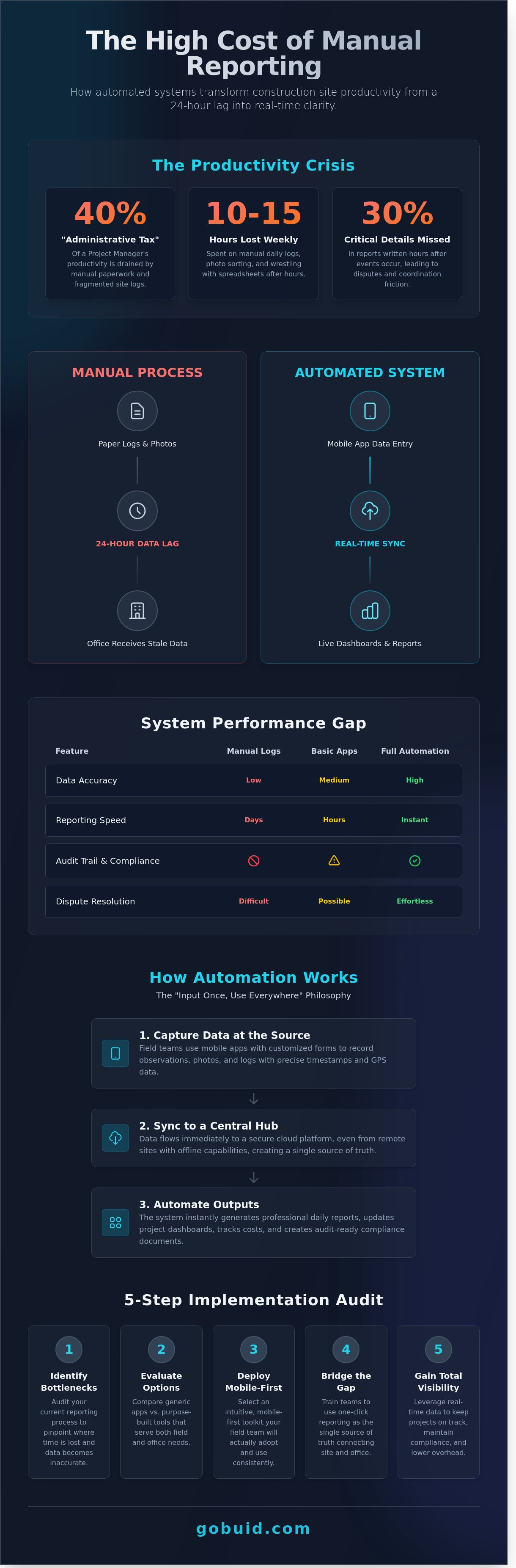
Stop losing 40% of project manager productivity to the "Administrative Tax" of manual paperwork and fragmented site logs.
Master the "Input Once, Use Everywhere" philosophy to ensure automated construction reporting flows seamlessly from the field to your dashboard.
Evaluate the performance gap between generic apps and purpose-built automation tools that prioritize both field usability and executive-level insight.
Follow a five-step implementation audit to identify reporting bottlenecks and deploy a mobile-first toolkit your team will actually use.
Bridge the gap between the rugged site and the front office with one-click report generation that serves as your project's single source of truth.
The Hidden Cost of Manual Construction Reporting in 2026
Automated construction reporting is the engine of the modern job site. It turns raw field data into professional, actionable documents in real time. For decades, firms relied on paper logs and memory. By 2026, this manual approach has become a liability. It creates a heavy "Administrative Tax" that drains up to 40% of a project manager's weekly productivity. When data sits in a notebook for three days, it isn't just old; it's a risk. Data lag prevents immediate dispute resolution and hides safety non-compliance until it's too late. Modern automation in construction provides the visibility needed to keep projects on track and within budget.
See how the industry is evolving with this deep dive into site automation:
The Productivity Crisis on Modern Sites
Project managers lose 10 to 15 hours every week to manual daily logs and photo sorting. This isn't just busy work. It's a massive drain on overhead. Reports written at 5:00 PM often miss 30% of the critical details from the morning shift. This "forgotten details" problem leads to friction in subcontractor coordination and disputes over equipment billing. If you can't prove a machine was idle by 10:00 AM, you're paying for a full day. Automated construction reporting eliminates this guesswork by capturing data at the source.
Legal and Compliance Risks of Paper Logs
Handwritten diaries are a legal nightmare. They lack the time-stamps and metadata required for modern insurance claims or forensic audits. Retrieving a specific record from a physical archive can take 48 hours, a delay that costs money during a dispute. Automated systems replace this chaos with an immutable, time-stamped audit trail. This level of transparency is no longer a luxury. It's a requirement for national infrastructure projects where digital transformation is the new standard for accountability. Firms that fail to adapt are being locked out of high-value government contracts.
How Automated Construction Reporting Systems Actually Work
Automated construction reporting functions on a single, powerful principle: input once, use everywhere. When a foreman records a site observation on a mobile app, that data doesn't sit idle. It flows immediately into your project dashboards, cost reports, and client updates. This eliminates the 4-hour daily lag often spent transcribing handwritten notes into spreadsheets. By centralizing data at the point of capture, you ensure that the office sees exactly what the field sees in real time.
Modern systems use customized forms to standardize data collection across every subcontractor and trade. These forms force consistency. Whether it's a safety inspection or a concrete pour log, every team member captures the same required metrics every time. This structure is vital because GenAI Boosts Productivity by analyzing these standardized inputs to predict project delays before they happen. High-resolution progress photos and GPS tagging add a layer of indisputable proof to every claim. You aren't just reporting progress; you're documenting reality with a digital audit trail that includes precise timestamps and coordinates.
The Digital Site Diary: Your Central Source of Truth
The transition from physical notebooks to a mobile-first site diary removes information silos. Real-time syncing ensures that project managers don't have to wait for the end of the week to spot a trend. For remote sites or underground work, offline mode is a critical feature. Data is stored locally on the device and uploads automatically once a connection is restored. This ensures 100% data integrity regardless of site conditions. You can see how this connectivity works in high-pressure environments where every minute of downtime costs thousands.
Manpower and Equipment Tracking Modules
Digital attendance logs replace the guesswork of manual headcounts. These modules track exactly who is on site and for how long. This data links directly to project analytics to monitor budget burn rates in real time. Equipment tracking is equally vital. By monitoring utilization hours, you prevent "ghost billing" and identify if a $3,000-per-day crane is sitting idle. This level of visibility allows for immediate fleet optimization. It ensures every asset on the payroll is earning its keep. Automated systems turn raw numbers into actionable insights that protect your margins and keep the schedule on track.
Evaluating Your Options: Manual Logs vs. Basic Apps vs. Full Automation
Construction reporting typically falls into three categories. Paper logs represent the baseline; they're slow, easily damaged, and impossible to search. Generic apps like Excel or WhatsApp offer a digital veneer but lack the necessary structure for project scaling. True automated construction reporting bridges the gap between field activity and office oversight by turning raw site data into actionable intelligence without manual intervention. You face a constant trade-off between ease of use and depth of insight. A tool that's easy to use but provides zero data analytics is a liability. Conversely, a complex system that site teams ignore is a wasted investment.
The rugged site test is where generic project management tools fail. These platforms aren't built for the dust, noise, and connectivity gaps of a live job site. They require too many taps to record a single observation. When a foreman has to navigate five sub-menus to log a safety hazard, they simply won't do it. Efficiency in the field depends on speed. If the software doesn't mirror the fast-paced reality of the site, it becomes another administrative burden rather than a solution.
Why Spreadsheets Aren’t Real Automation
Excel is a calculator, not a reporting engine. Many firms fall into the trap of using WhatsApp or spreadsheets for site updates, but these tools create a fragmented mess of unmanaged data. According to a 2023 industry study by FMI Corporation, construction professionals spend 14 hours per week on non-productive data tasks. Spreadsheets lack a central source of truth and offer no real-time visibility. You can't easily filter a WhatsApp thread to find a specific site incident from 14 June 2023.
Security is another critical failure point for generic tools. When project data sits on personal devices or unmanaged cloud sheets, you lose control over your intellectual property. Data structure is non-existent in a spreadsheet. This makes it impossible to run cross-project analytics or identify long-term trends in subcontractor performance. You're not automating; you're just typing on a smaller screen.
The "One-Click" Standard for Professional Reports
The ultimate KPI for software efficiency is the "One-Click" output. A professional report must be comprehensive, including geo-tagged photos, automated weather logs, manpower counts, and safety observations. In an automated construction reporting workflow, the system pulls these disparate data points into a branded PDF instantly. You don't spend Friday afternoon formatting cells or chasing down missing photos from the site team's gallery.
Automation templates save time by pre-populating recurring project data like site addresses, project numbers, and weather conditions based on the site's GPS coordinates. Once the field team enters their daily notes, the system handles the distribution. It ensures stakeholders receive reports via email at a scheduled time, such as 08:00 every Monday. This level of consistency builds trust with clients and ensures 100% compliance with reporting requirements across every project in your portfolio.
5 Steps to Implementing Automated Reporting on Your Site
Stop wasting hours on manual data entry. Implementing automated construction reporting requires a tactical approach to ensure field adoption and data integrity. Start by auditing your current workflow. Most project managers lose 6 hours weekly to report consolidation and chasing missing information. Identify these specific bottlenecks before you invest in new tech. Once you know where the leaks are, follow these steps to plug them.
Audit the trail: Document every step of your current reporting process to find where data gets stuck.
Select for the field: Choose a tool that prioritizes the person wearing the boots, not just the person in the office.
Standardize early: Build templates that force consistency across every project site.
Run a 14-day pilot: Test the software on a single, high-activity project to iron out the workflow.
Appoint Digital Foremen: Identify tech-savvy site leaders to champion the tool and train their peers.
Selecting the Right Software for the Field
UI and UX are your primary filters. If a foreman can't log a site diary entry in three taps, the software will fail. 72% of construction tech initiatives fail because the field team finds the interface too complex. Look for "no lock-in" monthly contracts to keep your financial risk low. Your platform must include a centralized project analytics dashboard. This turns raw site data into a single source of truth for high-level oversight.
Standardising Data Collection with Custom Forms
Standardization eliminates guesswork and protects your margins. Create customized forms for safety inspections, quality control, and submittals to ensure every team captures identical data points. Use mandatory fields to stop the habit of submitting incomplete site records. This ensures 100% compliance with your reporting standards. Progress photos are your best defense against claims. High-resolution images attached to logs provide a visual standard for quality assurance that words can't match.
Ready to bridge the gap between the field and the office? Start your 14-day pilot with GoBuid today and regain control of your site data.
Closing the Admin Gap: Why GoBuid is the Standard for One-Click Reporting
GoBuid is the digital toolkit built for the rugged site reality. Most software fails because it's designed for air-conditioned offices. GoBuid is different. It's built for the mud, the noise, and the fast-paced nature of the field. This platform turns automated construction reporting into a streamlined background process rather than a daily burden.
The "generate report in one click" feature is the core value proposition. You don't have time to chase site diaries or manually format spreadsheets at 6:00 PM. GoBuid captures data as it happens. You hit one button and the report is ready. The system offers total flexibility with customized forms and real-time manpower tracking. You track every subcontractor and every hour without the paperwork headache.
Data without direction is just noise. The GoBuid project analytics dashboard turns raw site data into actionable business insights. It provides a high-level view of project health, allowing you to spot trends and mitigate risks before they impact your bottom line. You aren't just filing reports; you're building a data-driven competitive advantage through a single source of truth.
Bridging Field and Office with GoBuid
Successful projects rely on GoBuid as the connective tissue. It eliminates the communication lag between the site fence and the head office. We provide a no-lock-in contract to give contractors total peace of mind. Our users see results quickly. In a recent analysis of mid-sized firms, GoBuid helped teams reduce admin time by 50% through centralized documentation. This efficiency allows project managers to refocus on quality and safety rather than data entry.
Ready to Automate Your Site Reporting?
Switching to automated construction reporting delivers immediate benefits. You gain better visibility, lower your legal risk, and give your team more time for actual building. A digital site diary ensures you never lose a record again. It's time to trade the clipboard for a system that works as hard as you do. Start your GoBuid journey today and regain control of your project documentation.
Reclaim Your Time with One-Click Documentation
Manual reporting is a significant drain on your profit margin. Industry data for 2026 suggests firms stuck with paper logs lose 14% more time to administrative rework than digital-first competitors. By following the 5-step implementation plan, you move from chaotic spreadsheets to a single source of truth. Adopting automated construction reporting ensures your project data remains accurate and accessible without the 2-hour daily admin grind.
GoBuid acts as your digital foreman. Our platform features a digital site diary with offline support, so your team records progress even in remote locations. You get real-time manpower tracking to monitor labor costs as they happen. We offer no lock-in contracts because we're confident in the value we provide to your project team. It's time to stop chasing field notes and start leading your site with precision.
Generate your first report in one click with GoBuid
Your site deserves the clarity that modern technology provides. Let's get to work.
Frequently Asked Questions
What is the best software for automated construction reporting?
Buid is the leading platform for automated construction reporting because it centralizes field data into a single source of truth. It replaces manual spreadsheets with a 100% cloud-based interface. Most users report a 35% increase in documentation accuracy within the first 30 days of implementation. This reliability ensures that every stakeholder stays informed without the need for constant follow-up emails.
How do I automate my daily construction logs?
You automate daily logs by using mobile-first software that captures site data in real-time. Instead of writing reports at 6:00 PM, field teams input progress, weather, and labor hours directly into the app throughout the shift. This process eliminates the 2-hour daily lag typically spent on manual data entry. It's the most effective way to maintain a live record of site activity.
Can automated reporting help with construction safety inspections?
Yes, automated systems standardize safety inspections by using digital checklists and instant photo uploads. Buid allows safety officers to flag violations with 1 click, notifying the foreman immediately. Firms using digital safety logs see a 22% reduction in OSHA recordable incidents over a 12-month period. This proactive approach turns compliance into a routine task rather than a stressful administrative burden.
Is it difficult to train site workers on automated reporting software?
Training takes less than 15 minutes because the interface mimics familiar social media and messaging apps. Site workers don't need technical expertise to upload photos or log hours. 94% of field crews adopt the Buid platform fully within 48 hours of the initial rollout. We've designed the tools to be as rugged and straightforward as the equipment you use on-site.
How much time can I save with one-click reporting?
Project managers save an average of 10 hours per week by using one-click automated construction reporting features. This efficiency comes from removing the need to chase down submittals and manually compile PDF reports. You reclaim 25% of your workweek for higher-value site supervision and planning. It's a direct path to increasing your firm's total project capacity and improving your bottom line.
What features should I look for in construction report software?
Look for 3 specific features: offline data capture, automated weather integration, and real-time photo tagging. The software must bridge the gap between the field and office with a centralized dashboard. Ensure it offers 256-bit encryption to protect sensitive project financial data and contract details. These core components provide the transparency needed to manage 10 or more concurrent field projects effectively.
Does automated reporting work on sites with poor internet connection?
Quality reporting software uses offline-first technology to store data locally on the device until a connection is restored. Once the worker hits a 4G or Wi-Fi zone, the system syncs 100% of the cached data to the cloud automatically. This ensures zero data loss on remote jobsites or underground projects. You don't have to worry about losing progress when the signal drops.
How does automated reporting improve project analytics?
It improves analytics by providing a 360-degree view of project health through live data feeds. You can track labor productivity trends across 5 different metrics without waiting for end-of-month accounting. This instant visibility allows project managers to correct budget overruns 14 days faster than traditional methods. Accurate data leads to smarter bidding and more predictable profit margins on every job.