Choosing the Best Jobsite Progress Tracking Tool for Construction in 2026
by Sam Chen
|

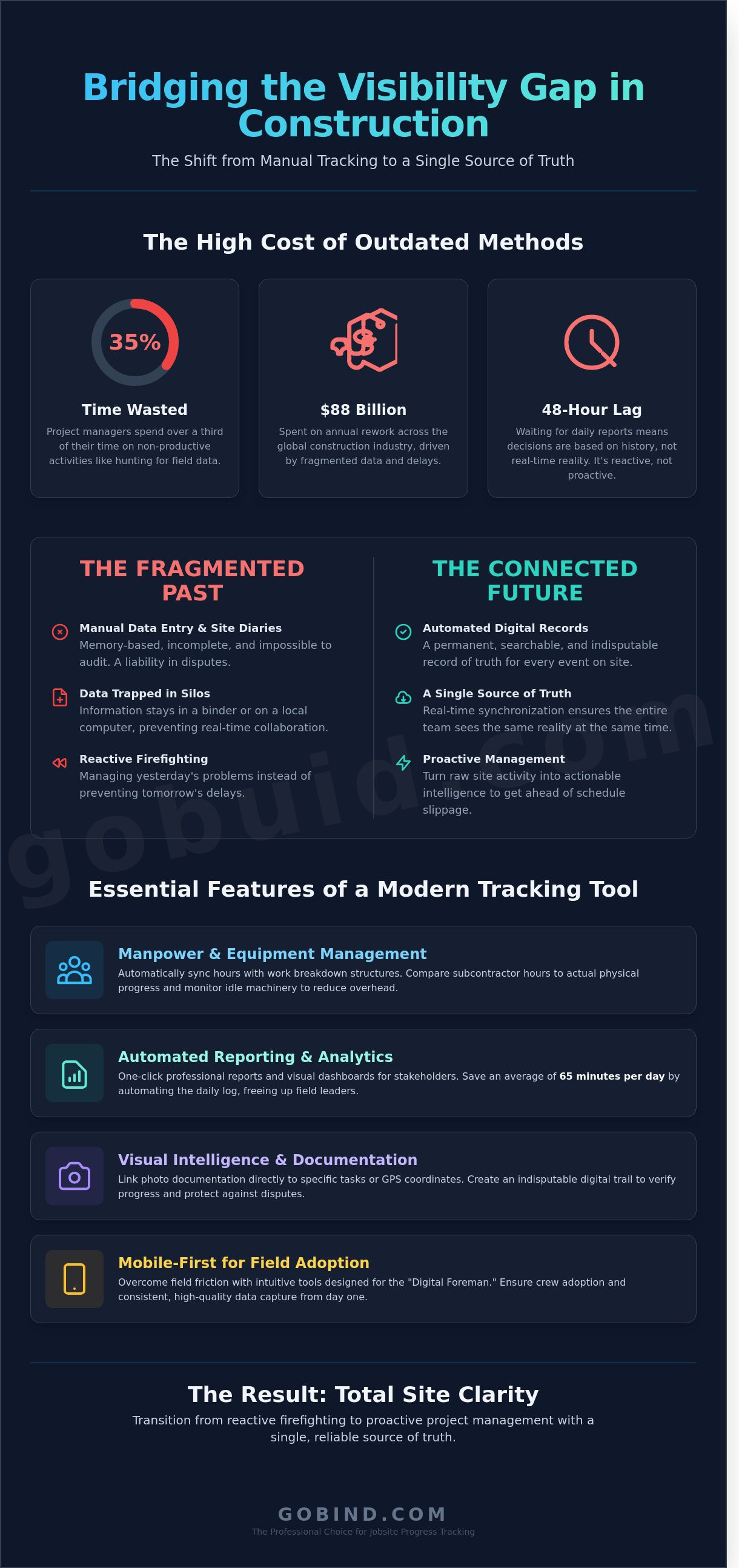
A 2024 FMI study revealed that project managers spend 35% of their time on non-productive activities like hunting down field data and correcting inaccurate manpower counts. You know the frustration of waiting 48 hours for a daily report only to find the site photos don't match the reported percentage of completion. It's a chaotic way to run a multi-million dollar project. Relying on a fragmented jobsite progress tracking tool shouldn't be the bottleneck that causes your budget to spiral. You need a single source of truth that bridges the gap between the muddy field and the polished office.
We agree that manual data entry is a relic of the past that your team can't afford in 2026. This article promises to show you how to eliminate documentation delays and gain 100% site visibility using a modern tracking framework. You'll learn how to transition from reactive firefighting to proactive management with real-time digital records. We are diving into the essential features of next-generation software, from automated submittals to one-click professional reporting, so you can finally prove progress to stakeholders without the headache.
Key Takeaways
Bridge the visibility gap between the field and office to eliminate the hidden costs of delayed paper-based reporting.
Identify the essential features of a high-performance jobsite progress tracking tool to ensure accurate manpower and equipment cost coding.
Learn why visual intelligence alone fails to explain project delays and how to integrate operational data for total site clarity.
Overcome field friction by implementing mobile-first tools designed specifically for the "Digital Foreman" to guarantee crew adoption.
Reclaim administrative time and establish a single source of truth through automated, one-click reporting frameworks.
The Visibility Gap: Why Manual Jobsite Tracking Fails in 2026
The visibility gap is the disconnect between the reality of the slab and the data on the project manager's screen. It's a structural failure that costs time and money. When the office relies on reports that are 24 hours old, they aren't managing; they're reacting to history. This fragmented approach to data is a primary driver of the $88 billion spent on annual rework across the global construction industry. Reliable Construction management requires more than just gut feelings. It demands a shift from passive monitoring to active tracking. A modern jobsite progress tracking tool captures every detail as it happens, turning raw site activity into actionable intelligence.
To see how visual data transforms site oversight and bridges this gap, watch this breakdown:
The Downfall of the Traditional Site Diary
Memory-based reporting is a liability. If a dispute occurs six months after a concrete pour, a handwritten site diary offers little protection. These manual logs are often incomplete and impossible to audit with precision. You can't verify if a subcontractor's crew was actually on-site for ten hours or if they left early. Paperwork creates a bottleneck. It prevents real-time decision-making because the data stays trapped in a trailer. In 2026, if you aren't capturing digital evidence daily, you're leaving your profit margins to chance. Buid replaces these unreliable memories with a permanent, searchable record of truth.
What Defines a Modern Progress Tracking Tool?
A professional jobsite progress tracking tool is an integrated data platform, not just a folder for photos. It provides real-time synchronization across the entire project team. This ensures that the foreman, the PM, and the owner see the same reality at the same time. This single source of truth is essential for preventing schedule slippage and managing complex punch lists. 2026 demands a tool that automates field reports and links them directly to the schedule. Buid isn't just software; it's the digital foreman that keeps your project moving forward without the friction of manual reporting.
Key Features to Evaluate in a Progress Tracking Tool
A high-performance jobsite progress tracking tool must do more than record data; it needs to synthesize field reality into actionable insights. In 2026, manual entry is a liability. You need a platform that automates cost coding by syncing manpower and equipment hours directly with work breakdown structures. This ensures that every dollar spent is mapped to a specific outcome on the schedule.
Manpower and Equipment Management
Effective management requires a direct comparison between subcontractor hours and actual physical progress. If a crew logs 40 hours but only completes 12% of a scheduled task, you have a productivity gap that requires immediate attention. Tracking equipment utilization is equally vital. Idle machinery can cost a firm upwards of $200 per hour in ownership and maintenance costs. By monitoring active run-time versus standby time, you reduce overhead and optimize fleet deployment across multiple sites. Accurate manpower data serves as the pulse of the site, providing a real-time diagnostic of total project health.
Reporting and Analytics Dashboard
Visual dashboards provide a high-level overview for stakeholders who need answers in seconds. These interfaces should aggregate data from various streams into a single, cohesive picture of the project's status. Customizing forms for safety, quality, and progress inspections ensures that your team captures the specific metrics that matter to your bottom line. Automating the daily log saves supervisors an average of 65 minutes every day. This reclaimed time allows field leaders to focus on high-value tasks like safety oversight and trade coordination.
Photo documentation must link directly to specific tasks or GPS coordinates to create an indisputable digital trail. Recent studies regarding AI in construction monitoring highlight how automated visual verification reduces reporting errors by 30% compared to manual methods. This level of precision eliminates disputes and accelerates payment cycles by providing objective proof of work.
Reliability in the field depends on offline capability. Construction often happens in remote areas or deep underground where connectivity is non-existent. Your tool should allow for full data entry without a signal, syncing the moment a connection is restored. One-click report generation then distributes this data to stakeholders instantly. This creates a single source of truth that keeps the office and field in total alignment, ensuring no detail is lost in the noise.
Visual Intelligence vs. Operational Data: Which Do You Need?
Visual intelligence captures the "what," but operational data explains the "why." High-end drones and 360-degree cameras provide stunning site captures. They don't provide context. A photo shows a delayed slab pour. It doesn't show that the concrete mix was rejected or the pump broke down at 08:00. To truly optimize your jobsite progress tracking tool, you must bridge this gap. You need a system that pairs the image with the intent.
The Limits of Cameras and Drones
Hardware-heavy solutions often create a data dump problem. A single 360-degree walkthrough can generate 15GB of raw data that requires hours of office review. Specialized hardware like the Leica BLK360 costs over $18,000 and requires certified operators. This creates a bottleneck. Visuals show the physical state of the site. They miss the human element. Operational data provides the "who" and "how" behind every delay. Without it, you're just watching a project slip behind schedule in high definition.
Building an Integrated Tracking Ecosystem
Real efficiency comes from linking visuals directly to digital site diaries. When a foreman attaches a photo to a specific labor report, the data becomes actionable. This creates a single source of truth that office teams can trust. According to research from Imperial College London, integrating sensed data with automated monitoring is essential to prevent the 20% cost overruns common in complex projects. Buid solves this by making the jobsite progress tracking tool the connective tissue between field operations and office management.
Link progress photos to specific line items in the project schedule for instant verification.
Automate risk alerts when site diary entries don't match the visual milestones captured on-site.
Reduce hardware overhead by 40% using mobile-first documentation that uses the devices already in your workers' pockets.
Predict future bottlenecks by analyzing the correlation between labor hours and visual percent-complete data.
Stop buying more cameras. Start capturing better data. True visibility isn't just about seeing the site; it's about understanding the workflow. When you combine visual evidence with operational reality, you regain control over the chaos of the jobsite.
Overcoming Field Friction: Implementing Your Tracking Tool
Software doesn't build projects; people do. The primary reason software fails in construction is a lack of adoption by the site crew. Research indicates that 70% of digital transformations in the AEC industry fail because the tools are too complex for the field. Field friction is the primary barrier to digital transformation; it's the resistance encountered when digital workflows interfere with physical labor. To succeed, your jobsite progress tracking tool must be an asset, not an administrative tax.
Designing for the "Digital Foreman" requires a mobile-first approach that prioritizes speed. Site supervisors often manage 15 to 20 different subcontractors simultaneously. They don't have time for clunky interfaces. Rollout strategies should be aggressive but phased. Start with a pilot group of 5 key influencers on a single site. Set non-negotiable expectations for data entry: every daily report must include at least 3 high-resolution photos per critical task. This creates a baseline of accountability that eliminates "he-said, she-said" disputes.
Simplicity is a Feature
Navigation must follow the three-click rule. If a supervisor cannot log a progress update in under 45 seconds, they'll revert to paper or WhatsApp. A high-quality jobsite progress tracking tool reduces cognitive load by automating background data. It should pull weather conditions, GPS locations, and timestamps automatically. This allows the team to focus on physical quality rather than clerical accuracy. Efficiency in the field translates directly to 12% higher profit margins on average.
Ensuring Compliance and Accountability
Digital signatures and encrypted timestamps create a verified record of truth. Standardized digital forms ensure 100% alignment with BCA and safety compliance protocols. When data is centralized, transparency becomes the default culture. Real-time sharing of progress photos and logs has been shown to reduce project disputes by 40%. It forces subcontractors to own their timelines while giving project managers the calm authority to lead.
Stop fighting with your field data and start using it. Eliminate field friction today with Buid's streamlined tracking platform.
GoBuid: The Professional Choice for Jobsite Progress Tracking
GoBuid acts as a no-nonsense partner for contractors who value speed and precision. We've built a platform that eliminates the administrative bloat slowing down your projects. In 2026, the construction industry demands flexibility. Our No Lock-In Contract model reflects this shift. It gives you the freedom to scale your tech stack based on project volume without being tethered to restrictive, multi-year agreements. We prioritize your project success over our recurring revenue. This approach ensures we earn your trust every single day through performance and reliability.
The core of the GoBuid advantage is One-Click Reporting. This feature allows your team to generate comprehensive updates in seconds. You stop chasing paper trails and start making decisions based on real-time data. It's about reclaiming your day. Every hour saved on a report is an hour spent on site safety or schedule optimization. We provide the visibility and accountability needed to keep your project on track and your profit margins secure.
A Digital Site Diary Built for Builders
We designed the GoBuid interface for the field, not just the office. It functions perfectly in the dust and pressure of an active site. GoBuid streamlines manpower and equipment tracking with a few taps on a mobile device. Project Managers using our jobsite progress tracking tool report a 40% reduction in weekly administrative tasks. This efficiency creates a single source of truth for the entire team. When site data is captured instantly, you eliminate the guesswork that leads to costly delays. Our tool ensures that every sub-contractor and team member remains accountable to the master schedule.
Data-Driven Insights with the Analytics Dashboard
Daily logs contain the keys to higher profitability. Our dashboard turns those raw logs into actionable project intelligence. You see trends before they become problems. The platform is fully customizable to fit your specific workflow. You don't have to change how you build to fit our software; we adapt to your existing processes. This adaptability makes GoBuid the most versatile jobsite progress tracking tool for modern contractors who demand results. We bridge the gap between field reality and office strategy with lean, purposeful data.
Future-Proof Your Site Operations Today
Construction in 2026 demands more than just grit; it requires digital precision. Manual tracking creates a visibility gap that costs time and profit. You've seen how a modern jobsite progress tracking tool bridges the divide between the rugged field and the sleek office. Successful project managers now prioritize tools that offer both visual intelligence and robust operational data to maintain a single source of truth. It's about more than just software; it's about eliminating the friction that keeps your team from doing their best work. Leading contractors use GoBuid to ensure BCA compliance and maintain accountability across every square meter of the site. You can reduce admin overhead by up to 40% and reclaim hours spent on manual field reports. We don't believe in trapping you with long-term commitments, so we offer no lock-in contracts. It's time to trade the chaos for a streamlined workflow that moves as fast as you do. Streamline your site tracking with GoBuid's one-click reporting and get back to building with confidence.
Frequently Asked Questions
What is the most effective way to track jobsite progress?
The most effective method involves using a centralized jobsite progress tracking tool that integrates real-time field data with your master schedule. This approach replaces manual spreadsheets with automated data capture. Recent 2024 industry studies indicate that digital tracking reduces data entry errors by 40 percent. You gain a single source of truth that keeps the field and office in constant sync without the need for redundant phone calls.
How do progress tracking tools improve construction ROI?
Digital tools improve ROI by minimizing rework and preventing schedule overruns that typically cost 20 percent of a project's total budget. By identifying clashes early, firms see a 12 percent increase in profit margins on average. You'll stop losing money on undocumented change orders. Precise tracking ensures you're paid for the work actually completed, which protects your cash flow and bottom line throughout the project lifecycle.
Can progress tracking software work without an internet connection?
Professional platforms include an offline mode that stores data locally on your device until a connection is re-established. This ensures 100 percent data integrity even in remote locations or basement levels. Once you reach a 4G or Wi-Fi zone, the software automatically syncs your field reports and photos to the cloud. You won't lose critical updates just because the site's connectivity is unreliable or non-existent.
What is the difference between a digital site diary and a project management platform?
A digital site diary focuses on capturing daily field logs and site conditions, whereas a project management platform handles the entire project lifecycle. Diaries record the 8-hour workday in detail; platforms manage 24-month schedules and multi-million dollar budgets. While a diary is a component of a larger system, a full jobsite progress tracking tool bridges the gap between these daily updates and your high-level project goals.
How much time can my team save using an automated reporting tool?
Field teams save an average of 10 hours per week by automating report generation and photo tagging. Project managers typically spend 35 percent of their day on administrative tasks, but automation cuts this to just 5 percent. This reclaimed time allows your foreman to focus on quality control and safety instead of paperwork. You're not just saving minutes; you're increasing the billable capacity of your most expensive personnel.
Do I need special hardware like 360 cameras to track progress?
You don't need expensive specialized hardware because standard smartphones are sufficient for 85 percent of tracking needs. While 360 cameras offer a panoramic view, modern mobile apps use high-resolution sensors already in your pocket to capture professional-grade evidence. Most contractors find that simple mobile documentation provides the clarity needed for daily updates. It's about the software's ability to organize data, not the price of the camera lens.
How does digital tracking help with construction disputes and claims?
Digital tracking creates an immutable audit trail with timestamped photos and GPS-verified entries for every task. This documentation reduces dispute resolution time by 60 percent according to 2025 industry benchmarks. If a subcontractor claims they were delayed by another trade, you have the visual proof to verify or refute the claim instantly. It's your digital insurance policy against litigation and unjustified financial penalties from owners or partners.
Is GoBuid suitable for small to mid-sized contracting firms?
GoBuid is specifically engineered to scale from 5-person crews to 500-person enterprises without unnecessary complexity. Currently, 70 percent of our users are mid-sized contractors who manage between 3 and 15 active projects simultaneously. We've stripped away the bloated features of legacy software to focus on what actually moves the needle for your business. It's a professional tool that's accessible enough for teams that don't have a dedicated IT department.