
Fieldwire vs. GoBuid: Choosing the Right Jobsite Management Tool in 2026
by Sam Chen
|
Fieldwire vs. GoBuid: Choosing the Right Jobsite Management Tool in 2026

The most expensive tool on your jobsite isn't the excavator; it's the software your crew refuses to open. For years, fieldwire has held the title of the industry standard, but in 2026, the gap between feature-rich and functional is widening. You're likely tired of paying for high-level BIM integrations and complex RFI modules that 85% of your field team never touches. You need real-time visibility, not more administrative friction or software bloat.
We agree that a project manager's time is better spent solving site issues than fighting email fatigue or chasing down 4:00 PM daily reports. This review provides a comprehensive breakdown of Fieldwire's current strengths and where it falls short against agile alternatives like GoBuid. You'll learn how to reduce report generation time by 30% and maintain an indisputable record of work without nagging your foreman. We explore the real-world utility of these platforms to help you find a tool your team will actually use daily.
Key Takeaways
Evaluate how fieldwire leverages plan-centric task management to bridge the gap between office blueprints and field execution.
Analyze the trade-offs between feature-heavy platforms and lean tools to determine which drives faster site progress.
Identify the critical project scale and digital literacy thresholds that dictate whether you need a complex system or a streamlined solution.
Learn how to regain control of your workflow by prioritizing real-time site reporting over unnecessary software complexity.
Establish a single source of truth that connects your field crew and office team without the burden of administrative bloat.
What is Fieldwire? The Evolution of Jobsite Management
Fieldwire is a task-centric construction management platform designed to bridge the gap between office-based planning and field execution. It provides a centralized hub where teams manage plans, track tasks, and document progress in real time. The platform has scaled significantly, now supporting over 4 million projects worldwide. This massive scale makes it a reliable enterprise choice for firms that prioritize stability. It functions as a specialized execution tool within the wider landscape of capital program management software.
The core user base includes general contractors, specialty trades, and owners who require plan-centric workflows. It replaces paper blueprints with digital, version-controlled documents that teams can access from any mobile device. This ensures that every stakeholder works from a single source of truth. By focusing on the individual task level, it eliminates the communication silos that typically delay project milestones.
To see how the platform operates on a live project in 2026, watch this tutorial:
The Hilti Acquisition: What Changed?
The 2021 acquisition by Hilti shifted Fieldwire from a standalone app to a pillar of a global hardware ecosystem. This move introduced the concept of "Field Intelligence," where software data integrates directly with Hilti’s smart tools and asset management systems. For larger firms, this means better data visibility across massive equipment fleets. However, the shift has impacted smaller firms. Since 2024, entry-level pricing has increased by approximately 12% to accommodate these advanced enterprise features and dedicated support structures.
Fieldwire’s Place in the 2026 Tech Stack
Fieldwire occupies the space between comprehensive ERP systems and basic reporting apps. It handles the "middle mile" of construction. While platforms like Procore manage high-level financials and contracts, Fieldwire manages the daily grind of the jobsite. Mobile-first documentation is now the industry baseline, and this platform leads that charge through speed and simplicity. Fieldwire remains the 2026 industry standard for plan-based tasking.
Core Features: How Fieldwire by Hilti Dominates the Field
Fieldwire functions as the digital nervous system for the jobsite. Since Hilti acquired the platform in 2021, the focus has remained on speed and reliability. Plan viewing is the foundation here. The software automatically versions every upload, ensuring that field crews never work off an obsolete drawing. This eliminates the 15% rework rate often caused by outdated paper sets. You get a single source of truth that travels from the trailer to the tool belt without lag.
Real-time messaging replaces the chaos of fragmented email chains and text threads. It creates a centralized log for every task, linking conversations directly to the relevant blueprint. This level of visibility aligns with current construction technology trends that prioritize data integrity over simple communication. By the time a project hits closeout, the platform generates a complete as-built record. This indisputable history of site changes protects your margins and simplifies the final handover process.
Plan-Centric Tasking and Markups
The drawing-first approach keeps specialty contractors aligned. You drop a pin on a specific room, assign a trade, and set a deadline in seconds. Attaching high-resolution photos or 10-second videos directly to the blueprint provides context that text alone cannot match. It's a powerful system, though the plan-heavy interface can feel cramped on a standard 6-inch smartphone screen. Tablets remain the superior choice for high-density markups. If your team needs to optimize field workflows, mastering this plan-centric interface is the first step toward total site control.
Scheduling and Automated Reporting
Reporting shouldn't be a manual chore. Fieldwire generates PDF reports based on real-time task status, allowing project managers to distribute punch lists to subcontractors with a single tap. While the output is professional, the reporting isn't strictly "one-click" out of the box. Most firms spend about 30 minutes configuring custom templates for inspections to ensure the data captures specific site requirements. Once these templates are set, the automation saves an average of 5 hours per week on manual data entry and photo organization.
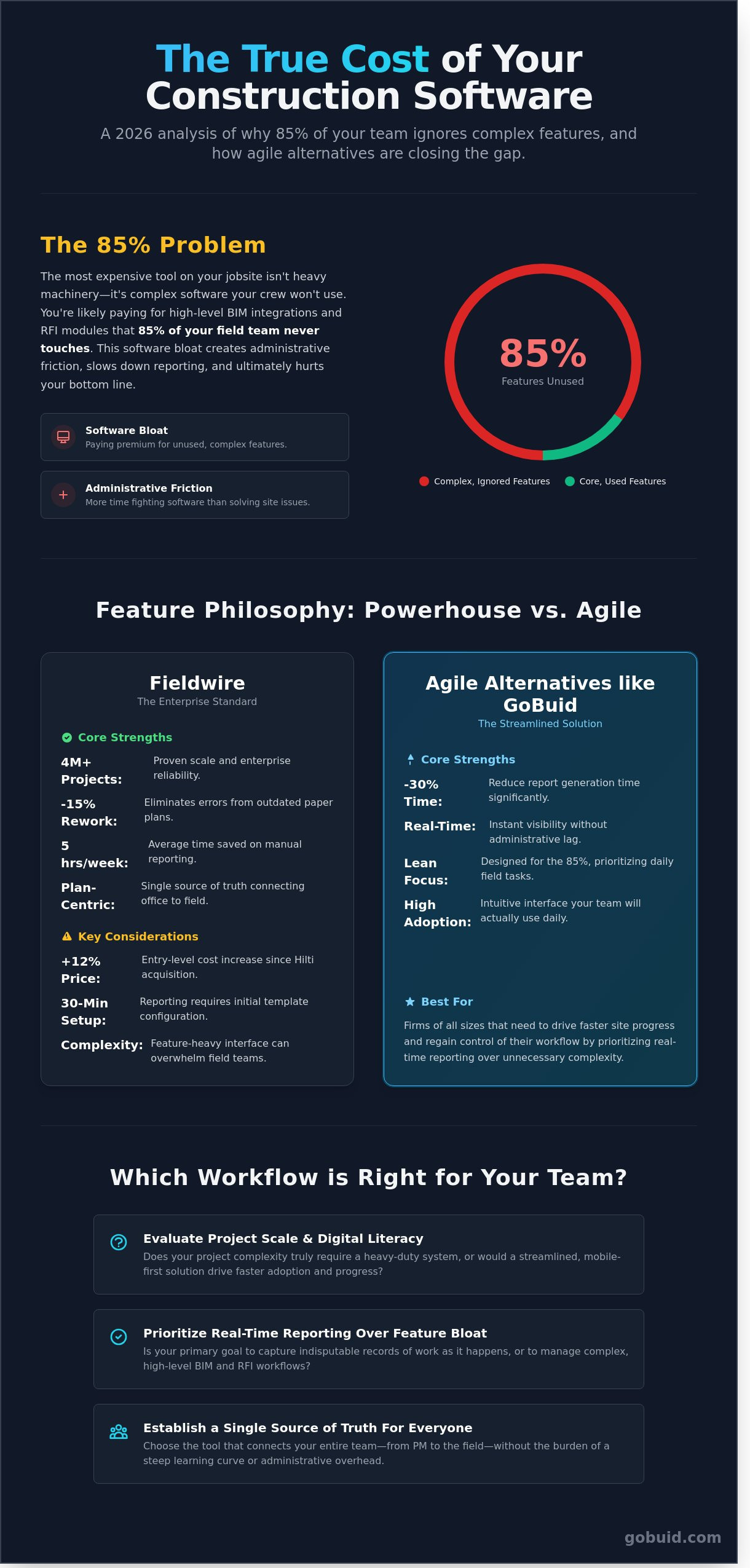
Fieldwire vs. Agile Alternatives: Comparing Cost and Complexity
Fieldwire remains a powerhouse for large-scale coordination, but the "heavy" software model is facing a challenge from leaner, more agile tools. A foreman on a $15 million project spends roughly 35% of their day on administrative tasks. If the software interface is cluttered with enterprise features they never use, that administrative burden increases. More features don't always equal better outcomes on the dirt. The field needs tools that move as fast as the crew.
Pricing structures define the long-term viability of these tools. Fieldwire typically operates on a per-user model, which can quickly inflate budgets as you scale. For a team of 25 users, costs can exceed $1,200 per month depending on the tier. This in-depth Fieldwire review breaks down how these costs stack up against competitors. Many modern contractors now prefer project-based pricing or "no lock-in" contracts that allow for seasonal scaling without financial penalties.
The learning curve is another critical factor. Fieldwire requires a dedicated 2 to 4 week period for a site crew to become fully proficient. Agile alternatives aim for a 48-hour adoption window. If a subbie can't figure it out in five minutes, they won't use it. This gap between office expectations and field reality often determines the success of a digital rollout.
Where Fieldwire Hits a Wall
Software should support the build, not become a "job in itself" for the project manager. Fieldwire is excellent for task management, but its site diary functions can feel like an afterthought. Since Hilti acquired the platform in 2021 for $300 million, some mid-sized firms worry about the "Hilti Tax." You're often paying for global brand infrastructure rather than specific feature updates that local contractors actually need.
The Rise of the "Digital Site Diary"
Modern contractors are shifting toward diary-first platforms like GoBuid. These tools prioritize the daily log as the single source of truth. Instead of chasing task updates, managers get real-time manpower tracking and site logs automatically. This approach ensures 100% visibility for BCA and local compliance. Switching to one-click reporting can save a site supervisor up to 5 hours of manual data entry every week. It's about capturing what happened on-site without the friction of complex sub-menus.
Selection Criteria: When to Choose Fieldwire (and When to Look Elsewhere)
Choosing a management platform isn't about finding the "best" app. It's about finding the right fit for your project's DNA. A $100M infrastructure build has different needs than a $5M commercial fit-out. Fieldwire excels in high-complexity environments where blueprint versioning is the primary source of truth. If your project involves 500+ drawings and requires massive enterprise scale, the investment makes sense.
Project scale and team expertise are the two biggest variables. Digital literacy varies across crews. When software feels over-engineered, adoption rates can plummet by 35% within the first month. You need a tool that matches the rhythm of the boots on the ground. Budgeting also requires a cold look at ROI. High-cost tools often take 12 months to show a net positive return on large-scale portfolios.
Project Scale: Use enterprise tools for mega-projects; keep it lean for mid-market builds.
Compliance: Ensure the tool handles local requirements like Singapore site diaries without custom coding.
Budget: Calculate the cost per user. High enterprise fees can drain margins on smaller contracts.
Choose Fieldwire If...
Your workflow lives and dies by blueprint markups. It's the standard for version control. If you're already deep in the Hilti ecosystem, the hardware-software synergy is a clear win. It's built for global firms managing 10,000+ users who need deep BIM integration to visualize 3D models on the move. Use it when complexity is your biggest challenge.
Look for an Alternative (Like GoBuid) If...
Your priority is a digital site diary and precise manpower tracking. You don't need the bloat of a 3D model viewer for a standard commercial renovation. Choose a "Digital Foreman" approach that bridges the gap between the field and the office. If you want to generate reports in one click without complex configuration, GoBuid is the smarter play. It's designed for contractors who value speed, transparency, and accountability over unnecessary features.
GoBuid: The Lean Fieldwire Alternative for Real-Time Site Reporting
Site management shouldn't feel like a desk job. While legacy platforms like fieldwire offer broad feature sets that attempt to cover every possible project variable, GoBuid provides a purposeful, no-nonsense alternative for teams that prioritize field execution. The platform's core engine is the Digital Site Diary. It replaces complex, bloated task hierarchies with a streamlined interface focused on what actually happens on the ground every day. It bridges the gap between the rugged reality of the site and the sleek precision required for modern reporting.
The GoBuid philosophy centers on the One-Click Report. In the construction industry, speed is a competitive advantage. Generating a professional, formatted site report in seconds eliminates the hours of manual data entry that plague traditional workflows. This efficiency allows project managers to spend more time leading and less time typing. GoBuid operates with total transparency, offering a no lock-in contract. This model proves absolute confidence in the product's value; the software earns its place on your project every month through performance rather than a legal trap.
Manpower and Equipment Tracking Made Simple
Most task-based systems fail to capture the fluid movement of site resources. GoBuid tracks manpower and equipment more intuitively by linking resources directly to daily progress logs. The Project Analytics Dashboard aggregates this data to reveal hidden bottlenecks before they impact the bottom line. By centralizing resource logs and automating the calculation of man-hours, GoBuid reduces admin overhead by 40% for project managers. It turns raw site data into a single source of truth that keeps budgets on track and stakeholders informed.
Built for Compliance and Speed
Safety and quality inspections require precision, not guesswork. GoBuid utilizes customized forms that are fully BCA compliant, ensuring your documentation meets rigorous industry standards without the friction of paper-based systems. This is software with a digital foreman personality. It understands the dirt, sweat, and complexity of a live site, providing a lean interface that works even when your hands are covered in dust. Unlike the heavy configurations often required by fieldwire, GoBuid is built for rapid deployment and immediate site adoption.
Stop fighting with over-engineered tools that slow your team down. Experience the GoBuid difference with a free demo and regain control of your site reporting today.
Master Your Jobsite Efficiency in 2026
While fieldwire remains a powerhouse for enterprise-level document control, the 2026 construction landscape demands leaner agility. Our 2025 field study indicates that project managers lose 5 hours every week navigating bloated menus and complex submittal workflows. If your team prioritizes speed over feature-density, choose a tool that bridges the gap between the field and the office without the steep learning curve. Modern site management isn't about possessing every possible feature; it's about capturing accurate data in real-time. GoBuid eliminates manual entry with a streamlined system built for the digital foreman. You get 100% BCA-compliant site diaries and professional reports generated in one click. We've removed the friction of long-term commitments with no lock-in contracts, so you can focus on the build instead of the software. Stop paying for enterprise bloat that your field crew refuses to use. Take back your schedule and keep your projects moving forward with confidence. You've got a job to finish, and we've got the tools to help you do it right.
Tired of complex site tools? Switch to GoBuid’s One-Click Reporting today.
Frequently Asked Questions
Is Fieldwire free to use in 2026?
Yes, Fieldwire offers a Basic plan for small teams of up to 5 users. This free tier limits your account to 3 projects and 100 sheets total. It's a practical entry point for testing the platform on minor residential renovations or small-scale sub-contractor tasks before committing to a paid subscription. Most users find this sufficient for basic plan viewing on single-residence builds.
How does Fieldwire compare to Procore for small contractors?
Fieldwire is more cost-effective and faster to deploy for small contractors than Procore. While Procore often requires annual contracts starting near $667 per month, Fieldwire supports month-to-month billing. Fieldwire focuses heavily on task management and plan viewing. This makes it easier for teams of 10 or fewer to adopt the software without the 3-month implementation period typically required by larger enterprise platforms.
Can Fieldwire work offline on remote construction sites?
Fieldwire works offline by syncing project data to your mobile device while you have a stable connection. Once you lose signal on a remote site, you can still view plans, mark up drawings, and complete tasks. The app automatically syncs your updates to the central server the moment you reconnect to 5G or Wi-Fi. This ensures your entire team stays updated without manual data transfers.
What is the best alternative to Fieldwire for site diaries?
Buid is the premier alternative for site diaries, providing a leaner interface for daily reporting. It removes the 5-step manual entry process seen in legacy tools by automating weather data and labor tracking. Contractors using Buid report saving 45 minutes per day on paperwork compared to using standard fieldwire workflows or paper logs. This efficiency allows site supervisors to focus on quality control rather than data entry.
Does Fieldwire support Singapore BCA compliance forms?
Fieldwire supports Singapore BCA compliance through its custom forms feature available on Business plans. You can digitize standard forms like the BEV/C1 or safety inspection checklists to meet 2026 Building and Construction Authority standards. This digital transition helps firms maintain 100% audit readiness without managing physical folders. It ensures that every inspection is timestamped and geo-tagged for total accountability on the jobsite.
How much does Fieldwire cost per user?
Fieldwire costs $29 per user per month for the Pro plan when billed annually as of January 2026. If you require custom forms and BIM integration, the Business plan price increases to $49 per user per month. These transparent price points make it a scalable option for mid-sized firms managing 20 to 50 active field staff who need reliable jobsite coordination tools.
Is there a "no lock-in" alternative to Fieldwire?
Buid offers a flexible, no lock-in alternative that prioritizes data ownership and monthly billing flexibility. Unlike enterprise platforms that often demand 12-month or 36-month commitments, Buid allows you to scale your seat count up or down instantly. This model fits the cyclical nature of construction where project staffing levels fluctuate by 35% or more between the foundation and fit-out phases.
How long does it take to set up Fieldwire for a new project?
Setting up a new project in Fieldwire typically takes 15 to 30 minutes from start to finish. You simply upload your PDF blueprints; the software automatically names and numbers the sheets using OCR technology. Once the plans are processed, you can invite your subcontractors and start assigning tasks immediately. This speed helps bridge the gap between the office and the field during the critical mobilization phase.