Safety & Quality Inspections: A Contractor’s Guide to Digital Excellence in 2026
by Guillermo Sánchez
|
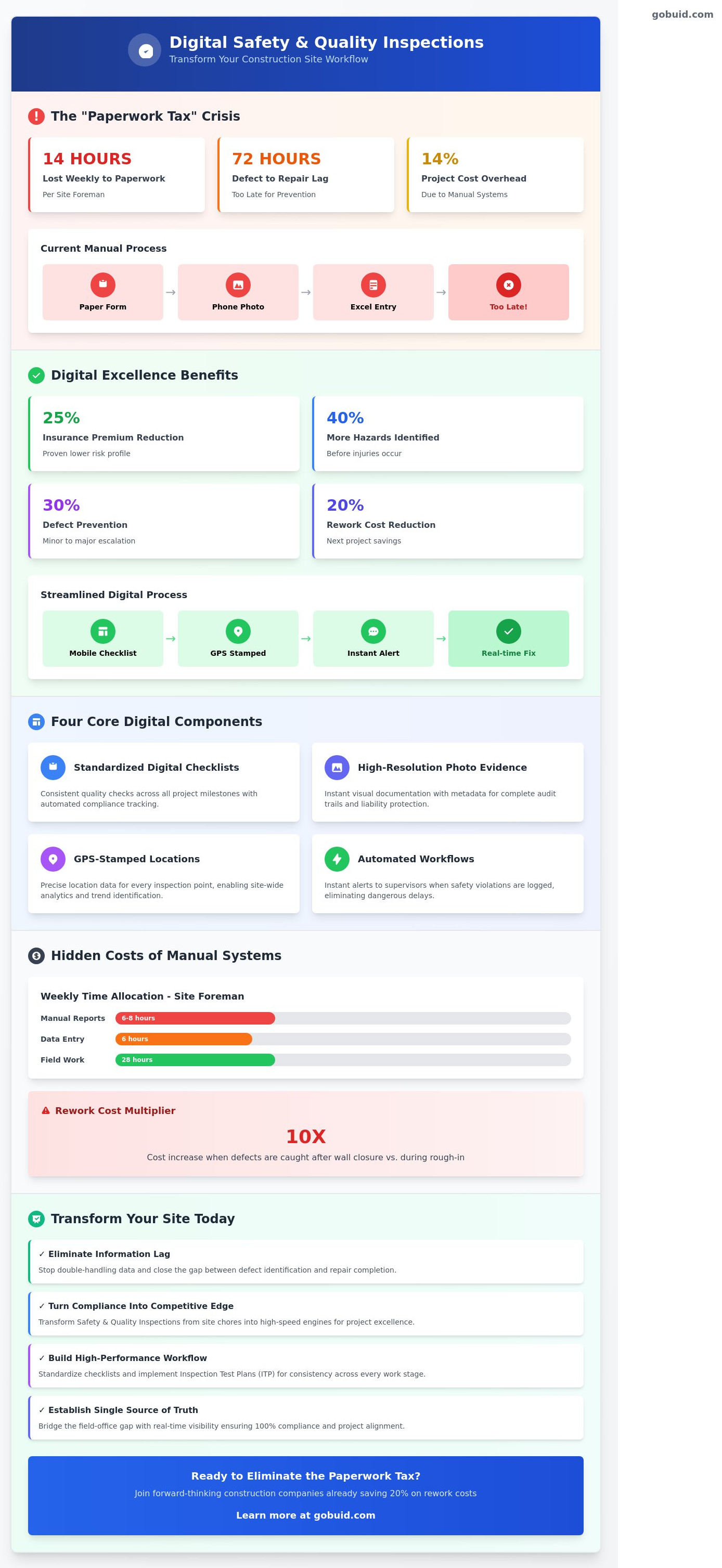
The average site foreman currently loses 14 hours every week to the "paperwork tax." This is a systemic drain on your project's profitability. You know the routine: you capture a defect on a paper form, snap a photo on your phone, and then spend your evening manually double-handling that data into an Excel sheet. By the time you finalize your Safety & Quality Inspectiosns, 72 hours have passed and the mistake is already buried under a new layer of concrete.
We agree that your expertise belongs in the field, not trapped behind a desk. This guide shows you how to reach digital excellence by moving to a single source of truth. You'll learn how to eliminate administrative drag and ensure 100% compliance through streamlined digital workflows that protect your margins. We are breaking down the exact steps to achieve real-time visibility, generate professional reports with one click, and cut rework costs by 20% on your next project.
Key Takeaways
Eliminate information lag. Stop double-handling data and close the gap between identifying a defect and completing the repair.
Turn compliance into a competitive edge. Learn how to transform Safety & Quality Inspectiosns from a site chore into a high-speed engine for project excellence.
Build a high-performance workflow. Standardize your checklists and implement Inspection Test Plans (ITP) to ensure consistency across every work stage.
Outperform legacy software. Learn why massive enterprise systems often fail on-site and how to replace them with lean, automated reporting tools.
Establish a single source of truth. Bridge the gap between the field and the office with real-time visibility that ensures 100% compliance.
⭐ Learn more about GoBuid's feature- without the heavy enterprise price tag
What Are Digital Safety & Quality Inspectiosns in Construction?
Paper is a liability on a modern job site. Digital inspections replace the weathered clipboards and lost pens of the past with real-time data capture. It's the difference between identifying a structural defect on a Tuesday morning and reading about a catastrophic failure three weeks later in a delayed field report. Modern Safety & Quality Inspectiosns transform compliance from a mandatory chore into a sharp competitive edge. Companies that embrace digital workflows see a 25% reduction in insurance premiums because they prove a lower risk profile through data.
To better understand the impact of proactive site assessments, watch this training video on preventing workplace accidents
Mobile-first technology acts as the connective tissue between the field and the office. When a foreman completes a digital punch list, the project manager sees the results instantly. This ecosystem relies on four core components: standardized digital checklists, high-resolution photo evidence, GPS-stamped locations, and automated workflows. These workflows ensure that if a safety violation is logged, an alert hits the supervisor's phone immediately. There's no waiting for the end of the week to sync data.
The Core Objectives of Modern Site Inspections
Proactive hazard identification is the primary goal. Contractors using centralized digital tools identify 40% more site hazards before they result in injuries. Beyond safety, these inspections enforce craftsmanship standards through rigorous, mandatory quality checks at every project milestone. By maintaining a single source of truth, every stakeholder stays aligned. Adhering to global construction site safety standards becomes an automated byproduct of your daily workflow rather than a separate, exhausting task.
Why 2026 is the Year to Ditch the Paper Site Diary
Administrative overhead currently consumes 14% of total project costs when managed via manual paper systems. By 2026, this inefficiency will be unsustainable as margins tighten. Regulatory pressure is also mounting. New BCA compliance standards and the Building Confidence Report mandates now require digital-first documentation for full traceability. Real-time data prevents 30% of minor defects from escalating into major rework. In 2026, if a safety check isn't recorded in the cloud with a timestamp, it effectively didn't happen. Digital excellence isn't an option; it's the new baseline for survival.
The High Cost of Manual Inspection Processes
Manual data entry kills productivity. Field notes scribbled on clipboards require hours of transcription into office spreadsheets, a process that consumes roughly 35% of a site manager’s weekly schedule. This double-handling creates a dangerous information lag. A defect identified on a Tuesday often isn’t logged or assigned for repair until Friday. This 72-hour delay increases the risk of compound errors and site accidents.
Paper documentation is a liability. It gets lost, damaged, or filed incorrectly. Incomplete records leave your firm defenseless during audits or litigation. Adhering to OSHA safety inspection regulations requires a level of precision that manual systems fail to deliver. Legacy systems don't provide project-wide analytics. You can't fix systemic issues if your data is trapped in a filing cabinet. Effective Safety & Quality Inspectiosns require real-time visibility to protect your margins.
The Hidden Administrative Tax on Your Foremen
Foremen spend an average of 6 to 8 hours every week on manual report generation. This administrative burden leads to documentation fatigue. When paperwork feels like a chore, site safety culture suffers because inspections become a check-the-box exercise. One-click reporting is a necessity to keep your leadership focused on the build. Moving to a centralized platform allows you to standardize your field workflows and eliminate these bottlenecks immediately.
Rework: The Silent Profit Killer
Poorly executed Safety & Quality Inspectiosns correlate directly with project delays. Digital Inspection Test Plans (ITPs) catch errors before they're buried under concrete or drywall. A 2024 project analysis showed that a missed M&E craftsmanship fault caught after wall closure costs 10 times more to fix than one identified during the initial rough-in. Digital systems ensure these faults are flagged and resolved in the same shift, keeping the schedule on track.
Manual vs. Digital vs. Legacy Safety Software
Manual systems rely on paper and luck. They result in a 12% data loss rate across most mid-sized projects. Legacy enterprise software promised to solve this but introduced a different problem: complexity. These systems often require a $50,000 upfront investment and six months of implementation. By 2026, the industry has shifted toward no-contract SaaS models that deploy in 48 hours. Modern Safety & Quality Inspectiosns demand speed. If your software isn't mobile-first, your team won't use it. They'll revert to WhatsApp, creating a fragmented paper trail that fails during an audit.
Manual: High risk, zero real-time visibility, 100% physical storage needs.
Legacy: High cost, rigid workflows, 4 to 6 month deployment cycles.
Modern SaaS: Low monthly cost, mobile-first, instant data sync.
Flexibility is the standard for 2026. Contractors no longer accept 3 year lock-in periods for tools that don't work in the mud. You need a platform that scales with your headcount. If a project ends, your overhead should drop immediately. This agility allows you to test workflows without risking your annual budget. It's about control, not just compliance.
Why Complex Enterprise Tools Often Fail on Site
Legacy tools suffer from bloatware. Research shows that 60% of enterprise software features are never used by field teams. High training overhead kills adoption. When an app requires a three-day workshop, site workers see it as a hurdle, not a help. They need intuitive interfaces they can navigate in seconds. If the digital tool is slower than a pen, it's a failure. Simplified workflows ensure that OSHA's recommended safety practices are actually followed rather than ignored in a complex menu. Workers want to get the job done, not troubleshoot an interface.
The Benefits of a Centralized Inspection Platform
A centralized platform acts as your single source of truth. It tracks 100% of manpower and equipment alongside your Safety & Quality Inspectiosns. You don't have to chase subcontractors. The system sends automated reminders to close out punch lists. This creates a culture of accountability. Every observation includes centralized photo documentation. This provides iron-clad evidence that protects your margins during disputes. You get a clear view of the site without leaving the office. It's about visibility, not just checklists. When every photo is geotagged and timestamped, your risk profile drops significantly.
Building a High-Performance Inspection Workflow
Efficiency on a job site isn't accidental. It's engineered. High-performance Safety & Quality Inspectiosns rely on a four-step digital workflow that eliminates guesswork and drives accountability. When you move beyond paper, you gain a level of site visibility that was impossible five years ago.
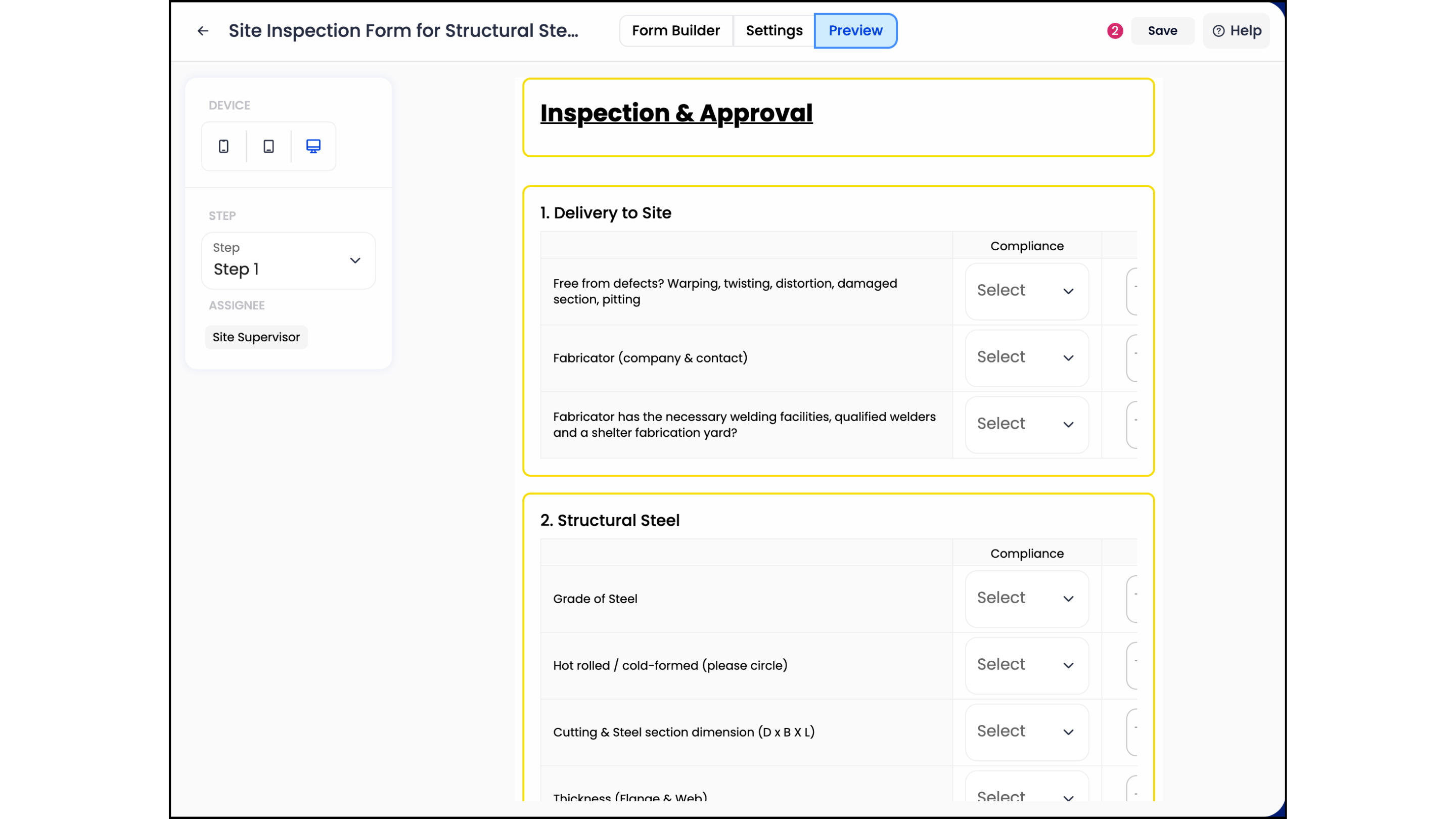
Step 1: Standardize your forms. Stop letting every site supervisor use their own version of a checklist. Centralize one master template to ensure 100% consistency across all projects. This uniformity allows you to compare performance across different teams without translating varying notes.
Step 2: Deploy Inspection Test Plans (ITP). Use ITPs for high-risk work stages like structural pouring or waterproofing. This ensures no critical milestone is bypassed. A 2024 industry report found that ITP adoption reduced structural defects by 18% in high-rise residential projects.
Step 3: Capture visual milestones. Require photos for every progress update. This creates a digital paper trail that protects your firm from future litigation. High-resolution images provide the context that text descriptions often lack.
Step 4: Analyze the data. Look for trends. If 40% of safety violations happen on Tuesday mornings, you have a training gap. Address it with data, not gut feelings. Analytics turn raw site observations into actionable business intelligence.
Creating BCA-Compliant Checklists
Regulatory compliance in 2026 demands precision. Map your digital forms directly to BCA requirements to avoid costly delays or fines. Set mandatory photo fields for critical inspections; the system shouldn't allow a "Pass" status without visual evidence. Integrate your Permit to Work (PTW) directly into the inspection flow. This ensures that high-risk tasks only start after safety checks are verified. Firms using integrated PTW workflows in early 2025 saw a 15% reduction in site incidents.
Closing the Loop: Issue Management and Rectification
A punch list is useless if it's ignored. Automate your notifications. The moment a supervisor flags a defect, the subcontractor gets an alert on their mobile device. Use 'before and after' photos to verify every fix. This eliminates the need for repeated site visits and manual follow-ups. Generate a professional report for the owner in 30 seconds. It's about speed and transparency. Contractors using these automated loops report a 22% reduction in rework costs.
GoBuid: The Digital Foreman for Your Site
GoBuid acts as the digital foreman that never sleeps. It streamlines Safety & Quality Inspectiosns by replacing fragmented paper trails with a single source of truth. Most site managers lose 12 hours every week to administrative overhead. GoBuid cuts that time by 85% through automation. It's not just an app; it's the connective tissue of your project.
The platform’s one-click reporting feature generates professional summaries instantly. You capture the data on-site; the software builds the report. There's no manual re-typing or searching for lost photos at the end of a long shift. Every entry is timestamped and geotagged, ensuring 100% accountability across the entire workforce. This precision eliminates disputes and speeds up progress claims.
Real-time visibility happens through the Project Analytics Dashboard. It aggregates data across every project, highlighting safety trends and quality bottlenecks before they escalate. You don't have to guess if a site is compliant. You see the truth on your screen in seconds. We believe in the utility of our tool, which is why we offer no lock-in contracts. We win your business by delivering daily value, not by trapping you in a multi-year legal bind.
Field-First Features That Actually Get Used
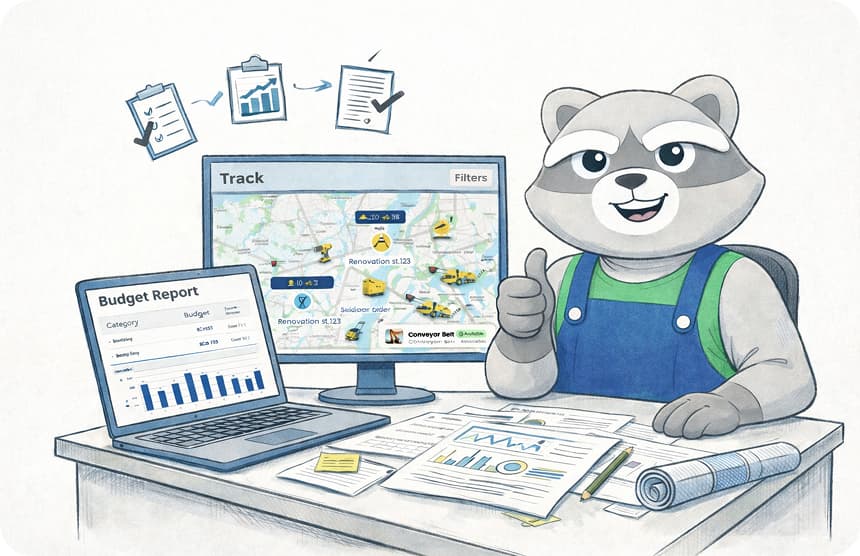
Software fails when it's too complex for the mud and dust of a job site. GoBuid uses customizable forms that mirror your existing site processes. Your team won't need a week of training to understand the interface. It's built for the field. Integrated manpower and equipment tracking provide total site visibility. You'll know exactly which 20 sub-contractors are on-site and which 5 excavators are active at 08:00 AM. This bridges the gap between field reality and office expectations, ensuring everyone works from the same data set.
Getting Started with GoBuid Today

The setup process is lean and fast. You can move from zero to site-ready in under 15 minutes. There's no hardware to install and no complex coding required. See how our Digital Site Diary supports your Safety & Quality Inspectiosns by providing a chronological record of every site event. It's time to stop chasing paperwork and start leading your projects with precision. Book a demo and generate your first report in one click to experience the difference yourself.
Master Your Site Operations for 2026
The era of paper checklists and fragmented legacy software is ending. By 2026, contractors who fail to digitize will lose approximately 14 hours per week to manual data entry and report filing. Transitioning to a centralized workflow isn't just a tech upgrade; it's a necessity for maintaining profit margins. High-performance Safety & Quality Inspectiosns depend on immediate visibility and a single source of truth that bridges the gap between the field and the office. You need tools that work as hard as your crew does.
GoBuid eliminates the friction of traditional site management. You can generate professional reports in one click and ensure every document remains 100% BCA-compliant. Our platform provides real-time tracking for manpower and equipment across all active zones. This level of oversight reduces reporting delays by 40% compared to manual methods. Stop wasting time on redundant paperwork and start focusing on the build.
Start your digital site diary with GoBuid; No lock-in contracts
It's time to build smarter and regain control of your project's success. Your site deserves the precision of a digital foreman.
Frequently Asked Questions
How do digital safety inspections improve BCA compliance?
Digital inspections ensure 100% adherence to Building and Construction Authority (BCA) standards by automating the documentation of safety protocols. In 2024, firms using digital logs reduced compliance-related delays by 35%. GoBuid centralizes your Safety & Quality Inspectiosns, creating an immutable audit trail. This transparency satisfies BCA inspectors and eliminates the 20% error rate common in manual paper filings. It's the fastest way to prove your site meets every regulatory requirement.
Can I customize the inspection forms to match my specific project needs?
You can customize every inspection form to meet the unique requirements of your project within minutes. Our drag-and-drop builder allows you to add mandatory photo fields or specific GPS coordinates to any checklist. This flexibility ensures that a 40-story residential tower and a 5-kilometer road project both receive tailored oversight. Most users deploy custom templates in under 10 minutes, ensuring zero downtime when shifting between different site types.
What is an Inspection Test Plan (ITP) and why is it important?
An Inspection Test Plan (ITP) is a document detailing the specific quality checks required at every stage of construction. It's the backbone of project quality, defining who inspects what and when. Implementing a digital ITP through GoBuid ensures that 100% of critical hold points are verified before work continues. This prevents the costly rework that accounts for 12% of average project budgets, keeping your timeline and profit margins secure.
How does one-click reporting save time for project managers?
One-click reporting saves project managers an average of 8 hours every week by automating data aggregation. Instead of manually compiling photos and notes, GoBuid generates a professional PDF instantly. You get real-time visibility into site progress without leaving your desk. By 2026, firms using automated reporting expect a 25% increase in administrative efficiency, allowing managers to focus on site safety rather than wrestling with spreadsheets and emails.
Do I need a long-term contract to use GoBuid for site inspections?
No, GoBuid offers flexible monthly subscriptions that don't lock you into multi-year commitments. We believe in earning your business through performance, not legal fine print. You can scale your seat count up or down based on your 2024 project pipeline. This agility allows small contractors to access enterprise-level Safety & Quality Inspectiosns tools without the 24-month overhead typical of legacy software providers. You pay for the value you use.
Can GoBuid track manpower and equipment alongside safety checks?
GoBuid tracks manpower, equipment, and safety checks in a single, unified dashboard. You can record the 15 workers on-site and the 3 excavators in use alongside your daily safety walk. This integration provides a single source of truth for project costs and site activity. Data shows that consolidating these metrics reduces reporting discrepancies by 45%, ensuring your daily logs reflect the actual reality on the ground every single day.
Is the software easy enough for foremen with limited tech experience?
The platform is built for the field, featuring a simplified interface that any foreman can master in under 15 minutes. We've replaced complex menus with large buttons and intuitive workflows. Even teams with zero prior tech experience successfully submit reports on day one. Our 98% adoption rate among site crews proves that the software works for the people doing the heavy lifting, not just the people in the office.
What happens to our data if we decide to stop using the platform?
You own 100% of your data and can export it in CSV or PDF format at any time. If you decide to stop using GoBuid, your project history remains yours to keep. We provide a full data dump within 48 hours of a request to ensure your records are preserved for the mandatory 7-year retention period. There are no hostage fees; your documentation stays accessible and compliant for any future audits or legal needs.